printables
report
MS_Word_report_in_Creatio
FreedomUI
Studio_Creatio
8.0

Hi,
I would like to know whether there is a way to both download a printable report and attach it to a record simultaneously in Creatio Freedom UI.

Currently, I am aware of two separate approaches:

  1. Using the default functionality to generate and download the printable report.
  2. Using a business process to generate the report and attach it to the record's Attachments section.

However, my requirement is to perform both actions at the same time—when the user generates the report, it should be automatically attached to the record while also being downloaded to the user's machine.

Has anyone implemented a similar solution or can suggest an approach to achieve this?

Any guidance would be greatly appreciated.

Thank you,

Like 0

Like

2 comments

Hi Satyam,

Yes, this can be achieved, but you need to handle both actions in one custom flow.

The recommended approach would be:

  1. Generate the printable report using a business process or custom backend service.
  2. Save/attach the generated report to the record’s attachment object, for example ContactFile, AccountFile, or the relevant {Object}File schema.
  3. After the file is created and you have the generated file record Id, trigger the browser download using FileService/Download/{EntityFileSchemaName}/{fileId}.

For uploading/attaching a file manually, Creatio provides POST /FileApiService/UploadFile, where you need to pass parameters such as entitySchemaName, parentColumnName, and parentColumnValue.

So the key point is: do not only call the download service directly. First generate/save the report as a file attachment, then use the generated file Id to download it for the user.

If this needs to happen from a Freedom UI button, the button can call a custom service or process, wait for the generated attachment file Id, and then open the download URL in the browser.

smit suthar,

Hi,

Thank you for the detailed explanation.

I understand the overall approach, but I'm still a bit unclear on some of the implementation details in Creatio.

Would it be possible for you to elaborate on the following points:

  1. In the case of a Freedom UI button, what would be the recommended way to wait for the file creation and then trigger the download automatically?
  2. If possible, could you provide a simple end-to-end example (Business Process or Freedom UI implementation) demonstrating the complete flow?

A more detailed example would help me understand how these pieces fit together in practice.

Thank you for your help.

Show all comments
Freedom_UI
FreedomUI
printables
reports
Report_data
Report_Tables
Report_List
Report_Form
details
Sales_Creatio
8.0


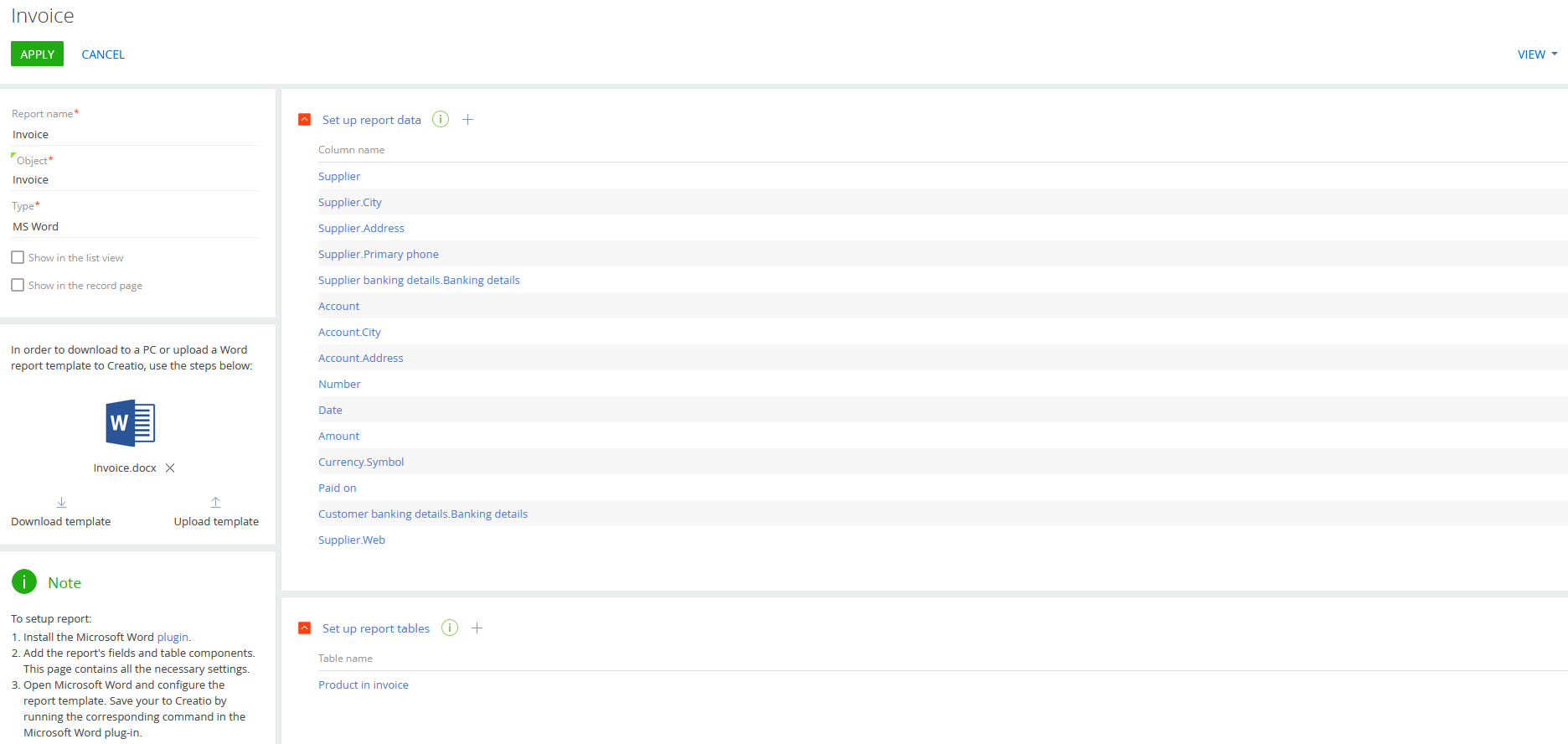
How can we recreate the printable pages configuration in Freedom UI (/0/ClientApp/#/Printables), including the report data setup (retrieving entity columns) and the report table detail configuration?

Like 0

Like

1 comments

Good afternoon,

Thank you for your question.

At the moment, it is not possible to configure a Reports page in Freedom UI using out-of-the-box tools. To recreate this functionality in Freedom UI, custom development would be required.

We have already submitted an idea to the R&D team to consider moving the Reports page to Freedom UI in future releases.

We recommend keeping an eye on the Release Notes and Changelogs in Creatio Academy for any updates.

Thank you for your understanding.

Show all comments

Hi,

In Freedom UI, in the Print Report action, the list of available reports does not appear to be ordered alphabetically. The order seems random.

Is there a way to control or configure the sorting of the report list?
Can it be set to sort by name or another specific field?

Thank you!

Like 0

Like

1 comments

Hello!

At this time, there is no standard option or configuration in Creatio Freedom UI to control or customize the sorting of the report list in the "Print Report" action. The order of reports is not affected by name or any specific field according to current platform functionality.
Thank you for sharing your feedback. We will forward this request to our R&D team to evaluate the feasibility of implementing it in a future release.

Show all comments
FreedomUI
printables
MSwordReport
Sales_Creatio_enterprise_edition
8.0

Hello Community,

Is there any way Conditionally show or hide printables in FreedomUI, based on a certain Lookup Value. We are basically trying to achieve this https://customerfx.com/article/showing-or-hiding-printables-based-on-a-value-for-the-selected-record-in-creatio/ but in FreedomUI

Sasor

Like 0

Like

1 comments

Hello,

In Freedom UI you can’t hide individual reports inside the Print report menu, but you can control the buttons.
Add a Print report button to your page, then create a business rule on your lookup field: if it equals a certain value, show the button; otherwise hide it.

If you need different reports per scenario, add multiple Print buttons (e.g. “Print Customer Pack”, “Print Partner Pack”) and use rules so only the right one shows.

For full control (skipping the menu), add a custom button with a click handler that picks and runs the right report based on the lookup.

That’s the Freedom UI equivalent of conditionally showing/hiding printables.

Show all comments

Hello creatio team, 


I have successfully set up the printables show/hide feature based on the value from field(Currency). But it only works when record is opened from section page or navigated from other page. It doesn't work if I refresh the record page. (I don't have any section printable so only focusing on edit page printables. )


 I have tried adding the preparePrintFormsMenuCollection() on the edit page and apply the filter there so it could work on refresh. But the value of the currency field coming as undefined so I can apply static filter and that worked on refresh but if I want to add condition based on currency to show and hide I can't do it.


My code on Edit page: 


initCardPrintForms: function() {

this.callParent(arguments);

var printMenuItems = this.get(this.moduleCardPrintFormsCollectionName);

if (Ext.isEmpty(printMenuItems)) return;


printMenuItems.each(function(item) {

                               item.set("Visible", {bindTo: "getPrintMenuItemVisible"}); 

}, this);

},


getPrintMenuItemVisible: function(reportId) {

var currentCurrency = this.get("UsrCurrency") || { displayValue: "" };

var        printMenuItems = this.get(this.moduleCardPrintFormsCollectionName),

item = printMenuItems.find(reportId);


if (Ext.isEmpty(item)) {

return false; // Ensure a boolean return

}        

                                 var caption = item.get("Caption") || "";


var isUsCurrency = currentCurrency.displayValue === "US";


var containsUs = caption.includes("-US");


return isUsCurrency === containsUs;


}, 


My code on section page: 


initQueryColumns: function(esq) {

this.callParent(arguments);


if (!esq.columns.contains("UsrCurrency")) {

esq.addColumn("UsrCurrency");

}

},

initCardPrintForms: function() {

this.callParent(arguments);


var printMenuItems = this.get(this.moduleCardPrintFormsCollectionName);

if (Ext.isEmpty(printMenuItems)) return;


printMenuItems.each(function(item) {

item.set("Visible", {bindTo: "getPrintMenuItemVisible"});

}, this);

},

getPrintMenuItemVisible: function(reportId) {

if (Ext.isEmpty(this.get("ActiveRow"))) return true;


var currentCurrency = this.get("GridData").get(this.get("ActiveRow")).get("UsrCurrency") || { displayValue: "" };

var        printMenuItems = this.get(this.moduleCardPrintFormsCollectionName);

var        item = printMenuItems.find(reportId);


if (Ext.isEmpty(item)) return;

var caption = item.get("Caption") || "";


var isUsCurrency = currentCurrency.displayValue === "US";


var containsUs = caption.includes("-US");


return isUsCurrency === containsUs;

},


I have tried adding in the  preparePrintFormsMenuCollection()


preparePrintFormsMenuCollection: function(printForms) {

printForms.eachKey(function (key, item) {

if (!item.get("Caption")) {

item.set("Caption", item.get("NonLocalizedCaption"));

}

item.set("Tag", key);

if (item.get("TypeColumnValue")) {

item.set("Visible", { bindTo: "getPrintMenuItemVisible" });

}


var currentCurrency = this.get("UsrCurrency");

console.log("## currentCurrency", currentCurrency);


    var caption = item.get("Caption") || "";

If(currentCurrency.displayValue === "US"){

item.set("Visible", caption.includes("-US"));

}

}, this);

}

Like 0

Like

6 comments

The reason why this happens is when you open a page from the section you are in combined mode and the logic for the print menu comes from the Section schema. When you refresh, the edit page only opens in edit mode, in this case the logic is coming from the Page schema (when you refresh, note that the tab on the left to popout the section list to navigate is no longer there). Basically, your logic needs to be implemented on both the section schema and also on the page schema to handle both cases. There are a few community posts on this that show both sides, perhaps this or this might help to piece together the details.

Ryan

Ryan Farley,

Hello Ryan, highly appreciate your response. As I have attached above, I have included the code on edit page as well. Seems like edit page code doesn't work. I have exactly similar code as your article but edit page code doesn't apply the filter. I see couple of person commented on below the article and they are facing the same issue. Did we find the work around yet?


Hello Creatio support do we have solution for this?

The problem here is that on Edit page initCardPrintForms method is called before onEntityInitialized so the field value is undefined because it hasn't been initialized yet. It's the known issue and we have already registered a request to our R&D team to address that.

Iryna Oriyenko,

Thank you for the response but isn't really there a way to reload or refresh the print records after the entity has been initialized? 

Tony Stark,

So for workaround, Can we create the new dropdown next to 'PRINT' button dropdown? 


Since we can't have dependent on value of field, I can have predefined filter for those dropdown it will only show them. The reason is we have long list of printables and we want to organize them. Thank you!

Show all comments
printables
#Printable

Hello creatio experts, 


I want to show/ hide printables based on currency field. If the currency is us then show the printable which names contains '-US' in them. I have tried follow this article but the field value is getting undefined as the time this function run entity might not be initialized. I mainly want to do this for edit page.  


My code: 


initCardPrintForms: function() {

this.callParent(arguments);

var printMenuItems = this.get(this.moduleCardPrintFormsCollectionName);

if (Ext.isEmpty(printMenuItems)) return;


printMenuItems.each(function(item) {

                               item.set("Visible", {bindTo: "getPrintMenuItemVisible"}); 

}, this);

},


getPrintMenuItemVisible: function(reportId) {

var type = this.get("UsrCurrency") || { displayValue: "" },

console.log("## UsrCurrency", UsrCurrency);

var printMenuItems = this.get(this.moduleCardPrintFormsCollectionName),

item = printMenuItems.find(reportId);

if (Ext.isEmpty(item)) {

return false; // Ensure a boolean return

}                                

                                 var caption = item.get("Caption") || "";


return type.displayValue === "US Dollar" ? caption.includes("-US") : true;

},


Alternatively, I have tried this but printforms and currency come undefined


        preparePrintFormsMenuCollection: function(printForms) {

           printForms.eachKey(function (key, item) {

               if (!item.get("Caption")) {

                   item.set("Caption", item.get("NonLocalizedCaption"));

               }

               item.set("Tag", key);

               if (item.get("TypeColumnValue")) {

                   item.set("Visible", { bindTo: "getPrintMenuItemVisible" });

               }

               var currentCurrency = this.get("UsrCurrency");

               console.log("## currentCurrency1", currentCurrency);

               var isCurrencyEmpty = Ext.isEmpty(currentCurrency);

               var currentCurrencyDisplayValue = isCurrencyEmpty ? "" : currentCurrency.displayValue || "";

               if (!isCurrencyEmpty && currentCurrencyDisplayValue=="US Dollar" && item.get("Caption").includes("-US")){

               item.set("Visible", true);

               }

               else {

               item.set("Visible", false);

               }


           }, this);

       },


We already have getModulePrintFormsESQ() on the edit page and if add filter there for currency it would hide the remaining printable in list but this function only responsible for creating query so this doesn't refresh the list of printables as value of currency is undefined at the first call.

Like 0

Like

3 comments

Hello Tony,


The logic of forming the list of reports that are displayed in the "Print" button added to the page is hardcoded in the _generateMenuItems method in the core Angular files of the app. It doesn't contain the "visible" property and selects printables for the current entity only once when the page is refreshed or the entity is opened and then forms an array of printables using filter.map chain and return this array for the button. And we cannot override the logic of the _generateMenuItems method.


So in order to hide printables you have to add the filters like that:


initCardPrintFormsEsqFilters: function(esq) {
	esq.filters.addItem(Terrasoft.createColumnFilterWithParameter(Terrasoft.ComparisonType.CONTAIN,
	"Caption",
	"testStringValue"));
}


The problem here is that initCardPrintFormsEsqFilters method is called before onEntityInitialized so the record fields are not initialized yet so their values are undefined.


Meanwhile we will create a request for our R&D team to implement the possibility of filtration button options using custom handlers and also possibility of filtration of printables list also using a custom handler.


Thank you for reporting this idea to us and helping us in making the app better!

Iryna Oriyenko,

Relying same text here for future refrences: 


Thank you for the response but isn't really there a way to reload or refresh the print records after the entity has been initialized? 

Currently the printables are selected only once when the page is refreshed or the entity is opened. Other changes that are made to printables later in the page life cycle (e.g. adding filters) will not have the effect and the printables list will remain the same as it was created during the initialization.

Show all comments
printables
Studio_Creatio_free_edition

How to setup template and print functionality using 8.2.0.4183 version?

Like 0

Like

2 comments

Thanks Kumar, could you please also help with the template creation which then should be printed?


Show all comments

Hi


I want to change the text in printable based on the two values of printable. Please let me know if there is any way we can do that.


Regards

Rakshith Dheer

Like 0

Like

1 comments

To accomplish this, what I typically do is add the macro to the record Id, then in the macro use an ESQ to get the needed values and return the result. You can get the UserConnection in the macro using something like this: 

namespace Terrasoft.Configuration 
{
  using System;
  using Terrasoft.Common;
  using Terrasoft.Core;
  using Terrasoft.Core.DB;
  using Terrasoft.Core.Entities;
  using Terrasoft.Core.Packages;
  using Terrasoft.Core.Factories;
  using System.Globalization;

  [ExpressionConverterAttribute("MyMacro")]
  public class UsrMyMacro: IExpressionConverter 
  {
    public string Evaluate(object value, string arguments = "") 
    {
        
      // value passed in is an Id of some record

      var result = "";

      if (value != null) 
      {
        UserConnection userConnection = null;
        try
        {
          userConnection = (UserConnection) System.Web.HttpContext.Current.Session["UserConnection"];
        }
        catch {}
        if (userConnection == null) return result;

        var esq = new EntitySchemaQuery(userConnection.EntitySchemaManager, "UsrSomeEntity");
        esq.AddColumn("UsrSomeField1");
        esq.AddColumn("UsrSomeField2");

        var entity = esq.GetEntity(userConnection, Guid.Parse(value.ToString()));
        if (entity != null) 
        {
          var val1 = entity.GetTypedColumnValue<string>("UsrSomeField1");
          var val2 = entity.GetTypedColumnValue<string>("UsrSomeField2");

          result = val1 + " " + val2;
        }
      }
      return result;
    }
  }
}

One thing to note that is an issue if running the printable from a process with a timer, you'll be unable to get the UserConnection because in those cases the Session will be null.

Ryan

Show all comments
printables
MSwordReport
report designer
printable forms

Hello Community,

We are looking to implement functionality that allows printing of only the selected records from a detail list on a list page. All the selected records should be consolidated into a single document, rather than generating multiple documents for each selected record.


Any guidance or best practices on how to achieve this would be greatly appreciated.


Thank you!

Like 0

Like

1 comments
Best reply

Hello,
 

Unfortunately, the functionality you mentioned with the button is not being implemented. 

Printed forms work so that they print the information contained in a single record of a section. One section record equals one report. If the task is to include information about multiple records in one report, it is better to create a separate section for this purpose, where you can add fields and details that will reference specific records via reverse relationships. This way, you can include data from multiple records in the report.
 

Printable forms are generated as one document per section record. If you want to implement your own logic for working with printed forms using development tools, you can look into the client schema "PrintReportUtilities," which interacts with "ReportService" on the server side.
 

It would be best if you implemented something similar to ReportService.

Hello,
 

Unfortunately, the functionality you mentioned with the button is not being implemented. 

Printed forms work so that they print the information contained in a single record of a section. One section record equals one report. If the task is to include information about multiple records in one report, it is better to create a separate section for this purpose, where you can add fields and details that will reference specific records via reverse relationships. This way, you can include data from multiple records in the report.
 

Printable forms are generated as one document per section record. If you want to implement your own logic for working with printed forms using development tools, you can look into the client schema "PrintReportUtilities," which interacts with "ReportService" on the server side.
 

It would be best if you implemented something similar to ReportService.

Show all comments
printables
MSwordReport
Notes
Sales_Creatio
8.0

Hi Community,

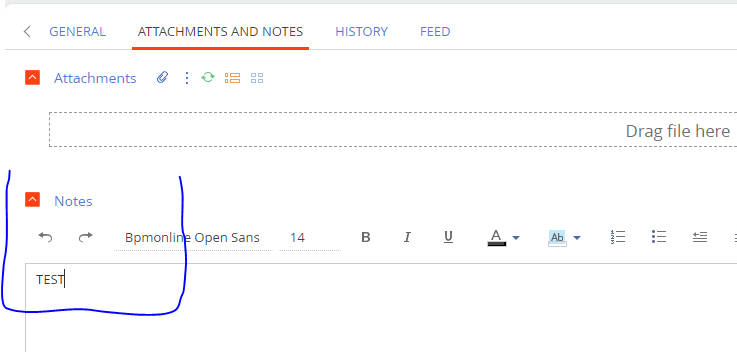
Im trying to download the Notes of a Classic Ui Section, to a Word printable.

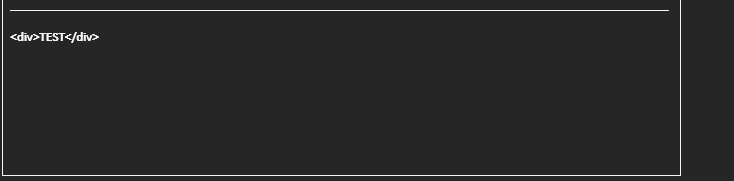
The end result in the Word printable is together with the Html Tags. How can we fix this?

Sasori

Like 0

Like

1 comments

Dear Sasori,


As of now, it's not possible to correctly display the field with HTML formatting in the printable.  


We registered a query for our R&D team and await a fix in the upcoming versions. 


As a workaround suggestion, you can replace the Notes field with a simple text field. I understand that it's missing the format settings and cannot be applied to tables, but it should work for a sentence or two simple comments. 


Thank you for making Creatio better!

Show all comments