Quetion

How do I update page fields by developer means after updating records in the database (via ESQ)?

Answer

You can use the this.set(‘ColumnName’, ‘NewValue’) method to update a field value by developer means. We recommend updating fields in the callback function with preliminaty checking of the database updates.

Example of a code:

someMethod: function(){
    var value = this.get('UsrRequired');
    var updateQuery = Ext.create("Terrasoft.UpdateQuery", {
        rootSchemaName: "UsrRuleTest"});
    var filters = updateQuery.filters;
    filters.addItem(this.Terrasoft.createColumnFilterWithParameter(
        this.Terrasoft.ComparisonType.EQUAL, "Id", 'IdValue’)); updateQuery.setParameterValue("UsrSomething", value, this.Terrasoft.DataValueType.TEXT); updateQuery.execute(function(result){ if(result.success) this.set('UsrTest0', value); }, this); }


Like 0

Like

Share

0 comments
Show all comments

Symptoms

An error occurred during synchronization % 0D% 0A% 0D% 0ATtype: Terrasoft.ServerException% 0D% 0AMessage: A request to the server returned an error% 0D% 0AAdditional information:% 0D% 0A% 09 {"requestUri": "https://tatpharm.bpmonline.com/ 0 / ServiceModel / EntityDataService.svc / ProductLineCollection / $ count /? $ Filter = ((CreatedOn ge datetime'2015-06-22T17% 3A38% 3A02% 2B06% 3A00 'or ModifiedOn ge datetime'2015-06-22T17% 3A38% 3A02% 2B06% 3A00 ')) "," statusCode ": 404," statusText ":" Not Found "," headers ": []," body ":" \ r \ n \ r \ n \ r \ n The resource cannot be found.

Cause

The object referred to is already deleted or moved.

Solution

1. Synchronize, make sure that the settings include the correct date and time of the last synchronization.

2. Clear the mobile application cache (by clicking the corresponding “Clear Cache” button. If there is no such button, you first need to perform a demo login - the corresponding button is below the authorization data, after which the cache is cleared).

3. Re-synchronize.

Like 0

Like

Share

0 comments
Show all comments

Symptoms

While accessing the section:

Type: Terrasoft.SourceCodeException 

Message: Uncaught TypeError: Cannot read property 'getComponent' of undefined 

AdditionalInfo: Script: file:///storage/emulated/0/BPMonline700/AppStructure/rev_0/src/MobileSocialMessageGridPageController.js?hash=c73dfb1d-eca1-40b3-8d5c-c6de590f5a6c%0D%0A%09Line: 160 

Stack trace: 

    at Ext.define.showException (file:///android_asset/www/appV2/Common/Terrasoft.Mobile.Combined.js:39893:41

    at Ext.define.showUncaughtException (file:///android_asset/www/appV2/Common/Terrasoft.Mobile.Combined.js:3461:25

    at Ext.define.onWindowError (file:///android_asset/www/appV2/Common/Terrasoft.Mobile.Combined.js:2987:18

Cause

Manifest lacks components.

Solution

Connect the schemas that are responsible for the "Feed" section in the "Support" workplace in the mobile application manifest.

-  MobileSocialMessageActionsSettingsSupport;

-  MobileSocialMessageGridPageSettingsSupport.

Additionally, remove the schemas that relate to the main workplace, and not to "Support".

-   MobileSocialMessageGridPageSettingsDefaultWorkplace;

-   MobileSocialMessageRecordPageSettingsDefaultWorkplace.

Like 0

Like

Share

0 comments
Show all comments
SDK
support
cases

Add new DataView in Contact Section (only contacts with B2B type)

define("ContactSectionV2", ["GlbClientConstants"], function(clientConstants) {
    return {
        entitySchemaName: "Contact",
        details: /**SCHEMA_DETAILS*/{}/**SCHEMA_DETAILS*/,
        attributes: {},
        methods: {
            getDefaultDataViews: function() {
                var baseDataViews = this.callParent(arguments);
                baseDataViews.GridDataViewB2B = {
                    name: "GridDataViewB2B",
                    caption: this.get("Resources.Strings.B2BButtonCaption"), // Section header
                    hint: this.get("Resources.Strings.B2BButtonCaption"), // Hint for button
                    icon: this.get("Resources.Images.B2BDataViewIcon") // Image for button
                };
                return baseDataViews;
            },
            loadActiveViewData: function() {
                var activeViewName = this.getActiveViewName();
                if (activeViewName === "GridDataViewB2B") {
                    this.loadGridData();
                }
                this.callParent(arguments);
            },
            loadGridDataView: function(loadData) {
                var gridData = this.getGridData();
                if (gridData && loadData) {
                    gridData.clear();
                }
                this.setViewFilter(this.get("ActiveViewName"));
                this.reloadGridColumnsConfig(false);
                this.reloadSummaryModule();
                this.callParent(arguments);
            },
            loadGridDataViewB2B: function(loadData) { // "load" + DataView.name
                this.loadGridDataView(loadData);
            },
            setActiveView: function(activeViewName) {
                this.callParent(arguments);
                if (activeViewName === "GridDataViewB2B") {
                    this.set("IsGridDataViewVisible", true);
                }
            },
            setViewFilter: function(activeViewName) { // Add filter for your "DataView"
                var sectionFilters = this.get("SectionFilters");
                if (activeViewName === "GridDataViewB2B") {
                    sectionFilters.add("FilterB2BType", this.Terrasoft.createColumnFilterWithParameter(
                        this.Terrasoft.ComparisonType.EQUAL, "Type", clientConstants.ContactTypes.B2B));
                } else {
                    sectionFilters.removeByKey("FilterB2BType");
                }
            }
        }
    };
});

Like 2

Like

Share

2 comments

How to create GridDataViewB2B? Is it a schema of the section view model?

Thank you

You don't need to create a schema. The GridDataViewB2B is created in the getDefaultDataViews function via native js (https://prnt.sc/pl1tvo).

Show all comments
knowledge base
SDK
Q&A
support

Symptoms

When creating a detail via the detail wizard, the following error message pops up at the moment of registering the page: message: Uncaught Terrasoft.ArgumentNullOrEmptyException: Nonexisting or empty argument with the argumentName: query name

Cause

Too long names of objects used for creating details:

"Opportunity Documents in the Product", "History of Document changes"

Solution

Change the name for a shorter one (up to 30 characters) and publish the object.

Like 0

Like

Share

0 comments
Show all comments

Symptoms

Terrasoft.Exception% 0D% 0A Message: A timeout occurred while determining the current coordinates%

There was a problem with determining the location when the error has occurred.

When determining the current location, a time-out message is displayed if the system could not determine the coordinates using any available services.

Depending on the device, your location can be determined by the following services:

  • A built-in GPS device
  • Google services using Wi-Fi
  • Using A-GPS technology in case the device supports it.

The most reliable way is to determine the location using a Wi-Fi network.

The most common method is to determine the coordinates is using GPS, however GPS in itself is not failproof, for example:

- GPS is turned off

- No satellite signal at the time of the request

- Signal from the satellite is weak

- Radio interference

About the influence of external factors on the signal quality: 

The level of signal reception from satellites is lower if there is dense foliage of trees in its way or due to very large clouds. Also, the normal reception of GPS signals can be prevented by interference from radio sources. However, the main factor affecting the decrease in GPS accuracy is the incomplete visibility of the sky - this occurs when a GPS receiver is located in a dense urban environment in which a significant part of the sky is hidden by nearby buildings, sheds, and other obstacles.

It is important to note that a message about a location failure is not an application error and does not affect its performance. The mobile app simply alerts the user that it wasn't able to determine the location for an activity, for example. 

Solution

Wait for the GPS signal to recover and re-synchronize. If you are using Android, try restarting your mobile device (this error may occur due to nuances of certain mobile OS versions). If you still see an error, check the following:

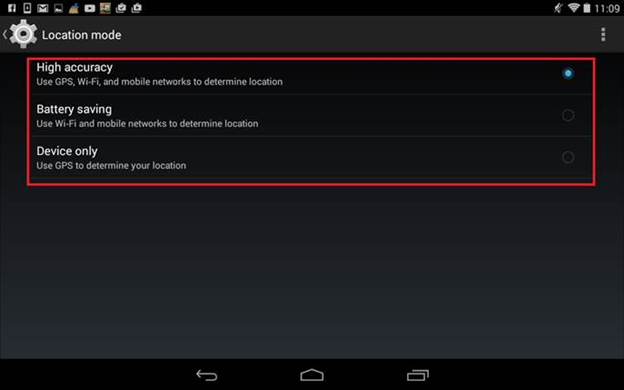
1.  What options are included in the geolocation settings on the device (Fig. 1-3):

Fig.1 
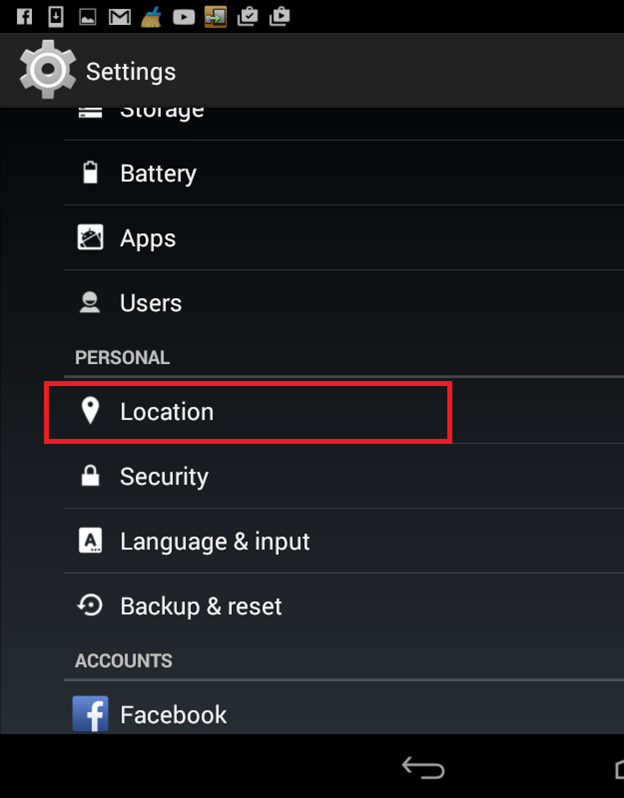
Fig.2
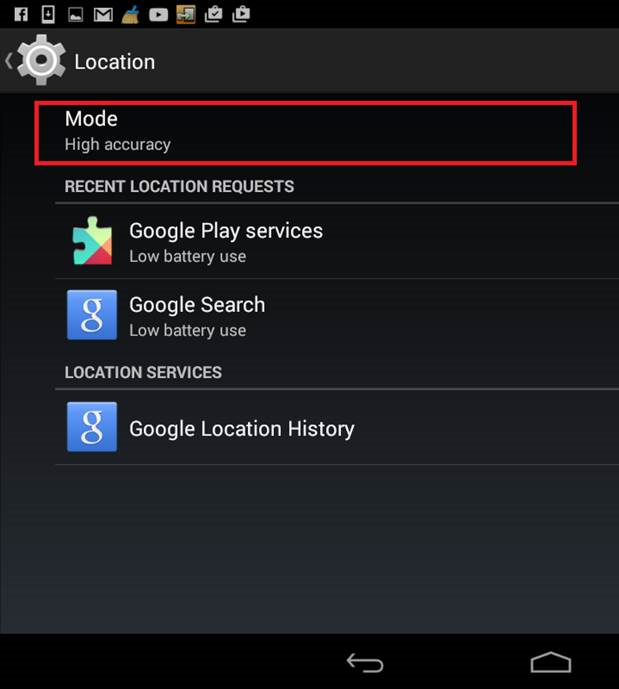
Fig. 3
2. Were you indoors or outdoors when the error has occurred?

3. Did the error still occur when you tried to create a visit once more?

If your device is normally connected to WiFi, but the settings indicate “Use GPS only”, then this error may occur as well.



Like 0

Like

Share

0 comments
Show all comments

Symptoms

Type: Terrasoft.SyncException%0D%0AMessage: There was a synchronization error%0D%0A%0D%0AType: Terrasoft.FileException%0D%0AMessage: An error occured while opening the file%0D%0AAdditional information: %0D%0A%09Name: BPMonline700/AppStructure/rev_29/src/MobileContactAnniversaryEditPage.js%0D%0A%0D%0AType: Terrasoft.FileSystemException%0D%0AMessage: Object not found%0D%0AAdditional information: %0D%0A%09Code: 1%0D%0A%0D%0A

Solution

In the mobile application, perform the following actions:

  1. Clear cache.
  2. Re-synchronize.
Like 0

Like

Share

0 comments
Show all comments

Question

Regarding the error when working with the mobile version of the application:

HTTP Error 405.0 - Method Not Allowed. The page you are looking for cannot be displayed because an invalid method is used (HTTP command).

Full bug report:

Type: Terrasoft.ServerException

Message: Request for server returned error

 Most likely reasons:  \ n 
    \ t
  • The request sent to the web server used the HTTP command that was not allowed by the module configured to process the request.
  • \ t < li> A request was sent to the server containing an invalid HTTP command. \ t
  • This request for static content contains an HTTP command other than GET and HEAD.
  • \ t
  • The request was sent to the virtual directory using the HTTP POST command; meanwhile, the default document is a static file that is not compatible with HTTP commands other than the GET and HEAD.
\ n \ n \ n \ n What can be done: \ n
    \ t
  • Check the list of commands activated for the module handler with this request and ensure that this command can easily reach the website.
  • \ t
  • View the IIS log file and determine which command cannot be used in the request.
  • \ t
  • Create a trace rule to track failed requests for this HTTP status code. For more information about creating a trace rule for failed requests, click Most likely causes: The request sent to the web server used the HTTP command that was not allowed by the module configured to process the request. A request was sent to the server containing an invalid HTTP command. This static content request contains an HTTP command other than GET and HEAD. A request was sent to the virtual directory using an HTTP POST command; meanwhile, the default document is a static file that is not compatible with HTTP commands other than the GET and HEAD. Possible solutions: Check the list of commands activated for the module handler where this request was sent, and make sure that this command can reach the website. Review the IIS log file and determine which command cannot be used in the request. Create a trace rule to track back requests for this HTTP status code. For more information on creating a trace rule for failed requests, click here.

Solution

This error may occur due to incorrect IIS settings on the server.

To fix this, add the following code to the web.config file:


Like 0

Like

Share

0 comments
Show all comments
knowledge base
SDK
Q&A
support

Symptoms

When I export big data volumes, in 30 seconds I get an error.

Cause

The cause of the timeout error, when exporting big volumes of data or big number of nested queries, is the Ext.Ajax component, whose standard timeout is 30 seconds.

The server request waits for this exact time, and if the file is not generated, the client declines waiting.

Solution

The possible solution might be extending the timeout period in the bpm'online "core" (...\Terrasoft.WebApp\Resources\ui\Terrasoft\core\). The ajax-provider.js file in the "request: function(config) { …" function, add the following code strings:

Ext.Ajax.timeout = 90000;
Ext.override(Ext.data.proxy.Server, { timeout: Ext.Ajax.timeout });
Ext.override(Ext.data.Connection, { timeout: Ext.Ajax.timeout });

If a permission error occurs, increase the number of list records in the web config:


Like 0

Like

Share

0 comments
Show all comments
SDK
support
cases
  1. Add your *.dll file to configuration on "External assemblies" tab (for example barcode.dll):

  2. Get Namespace of your *.dll file.

    a) You can find it in documentation to library;

    b) If you don't have documentation you can use ildasm.exe (IL Disassembler). This tool is automatically installed with Visual Studio. To run the tool, use the Developer Command Prompt (or the Visual Studio Command Prompt in Windows 7). For more information, see Command Prompts.


  3. Add using to your schema

    a) For source code:


    b) For Business process:


  4. Now you can use methods from library in your code. 


    Example for barcode.dll

    string temp = BarcodeConverter128.StringToBarcode("Test string");


Like 0

Like

Share

6 comments

Hi,

I tried to do so with a library I uploaded and I'm getting the following compilation errors on the script


The type or namespace name 'PdfApi' could not be found (are you missing a using directive or an assembly reference?)


Thanks,

Raz

Raz Guille Rosman,

Hello,


Please share the process schema and with the library you've uploaded.


Thank you in advance!


Best regards,

Oscar

Oscar Dylan,

Hi Oscar,


I attached  a screen shot of the process and a link to the libraryhttps://www.dropbox.com/s/2lplgni2wsi5piy/Aspose.PDF.dll?dl=0


This is the code inside the script task:

PdfApi api = new PdfApi("11d276990520041f6cda09531e25aabb", "9568f0a0-cf77-4836-97d2-fd1389338080");

return true;

Raz Guille Rosman,


Hello Raz,


Thank you for providing the dll file!


The namespace of the file is no Aspose.PDF, but Aspose.Pdf:

And even after applying a correct namespace name this error comes up:

And indeed I couldn't locate the type or namespace with such a name in the dll. Please contact the developer of this library and ask him\her how to correctly call the method you need.


Best regards.

Oscar

Thank you, I'll check it out.

It's a library I downloaded from Aspose website

Show all comments