knowledge base
SDK
Q&A
support

Question

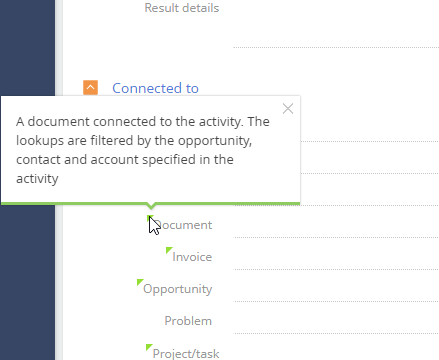
How can I implement tips on the [Connected to] detail?

Answer

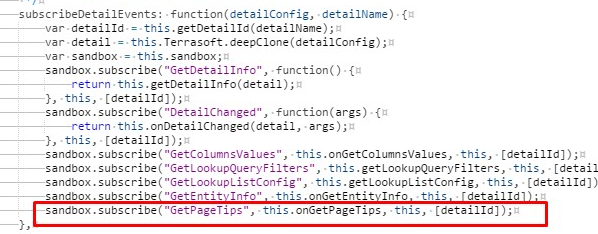
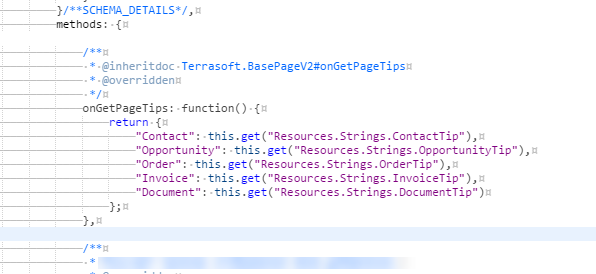
The tips for the [Connected to] detail are formed based on the onGetPageTips() method that must be called in the BasePageV2 schema:

To add a custom tip in the [Activities] section, you need to:

  1. replace АctivityPageV2
  2. add localizable string
  3. override the onGetPageTips() method

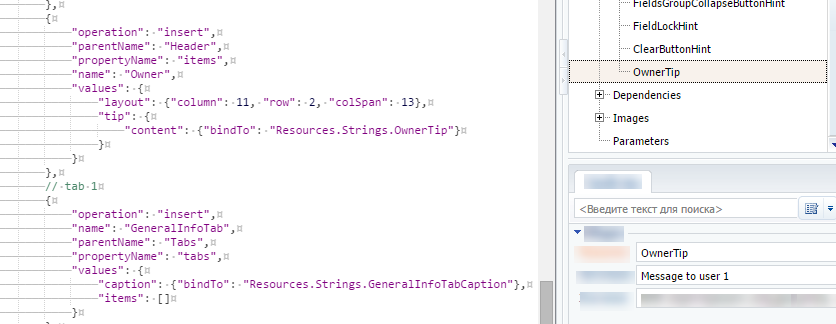
In the base configuration you can see an example of code in the ContactPageV2 (UIv2) schema:

{
    "operation": "insert",
    "parentName": "Header",
    "propertyName": "items",
    "name": "Owner",
    "values": {
        "layout": {"column": 11, "row": 2, "colSpan": 13},
        "tip": {
            "content": {"bindTo": "Resources.Strings.OwnerTip"}
        }
    }
},


Like 0

Like

Share

0 comments
Show all comments
knowledge base
SDK
Q&A
support

Question

Where can I find information on implementing messages between details via sandbox? 

Answer

Examples of implementing massage exchange between details via sandbox:

1) AccountBillingInfoDetailV2:

define("AccountBillingInfoDetailV2", [], function() {
	return {
		entitySchemaName: "AccountBillingInfo",
		details: /**SCHEMA_DETAILS*/{
		}/**SCHEMA_DETAILS*/,
		diff: /**SCHEMA_DIFF*/[
			{
				"operation": "merge",
				"name": "DataGrid",
				"values": {
					"selectRow": {
						"bindTo": "rowSelected"
					}
				}
			}
		]/**SCHEMA_DIFF*/,
		methods: {
			rowSelected: function() {
				this.sandbox.publish("RowSelectedInFirstDetail", { test: "param anything" }, [this.sandbox.id]);
				console.log("rowSelected in first detail...");
			}
		},
		messages: {
			"RowSelectedInFirstDetail": {
				mode: Terrasoft.MessageMode.PTP,
				direction: Terrasoft.MessageDirectionType.PUBLISH
			}
		}
	};
});

2) AccountAddressDetailV2:

define("AccountAddressDetailV2", [], function() {
	return {
		entitySchemaName: "AccountAddress",
		details: /**SCHEMA_DETAILS*/{
		}/**SCHEMA_DETAILS*/,
		diff: /**SCHEMA_DIFF*/[]/**SCHEMA_DIFF*/,
		methods: {
			init: function() {
				this.sandbox.subscribe("RowSelectedInFirstDetail", function(arg) {
					console.log("test " + arg.test);
				}, this, [this.getSenderSandboxId()]);
			},
			getSenderSandboxId: function() {
				return this.sandbox.id.replace("_AccountAddress", "_AccountBillingInfo");
			}
		},
		messages: {
			"RowSelectedInFirstDetail": {
				mode: Terrasoft.MessageMode.PTP,
				direction: Terrasoft.MessageDirectionType.SUBSCRIBE
			}
		}
	};
});


Like 0

Like

Share

2 comments

I have an error coming from the arg value:

Unhandled Promise rejection: arg is not defined ; Zone: <root> ; Task: Promise.then ; Value: ReferenceError: arg is not defined


Where is that coming from? Why do I get it?

Hello Maria,


Could you please provide us the full code that you have implemented? Also, as long as I understand this error is being shown in the console. Does it point exactly to this line 

console.log("test " + arg.test); 

?

And what are the steps that you follow to reproduce this problem and receive this error?


Best regards,

Dariy

Show all comments
knowledge base
Q&A
support
SDK

Case

An arbitrary object, say, an account, has parameter 1, parameter 2 and parameter 3. The object has a detail displaying records of this object type, e.g., accounts that meet the condition "parameter 1 + parameter 2 match the primary record", "parameter 2 + parameter 3 match the primary record", "parameter 1 + parameter 3 match the primary record". The detail enables filtering by several columns. How can I enable UNION, i.e., "summarize" several independent sets of such filters?

Solution

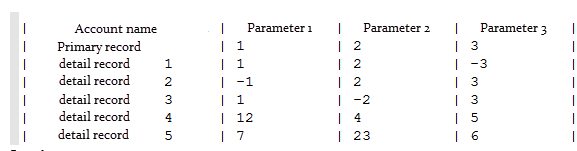
Let's assume we have the following population of the account table:

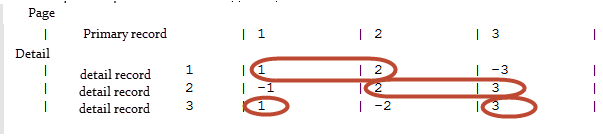
As per the above description, the page and detail will be populated as follows:

1) The first variant of detial population:

2) The secon variant of detail population. Maybe combining values was meant, in this case the detail and page will be as follows:

"The detail enables filtering by several columns. How can I enable UNION, i.e., "summarize" several independent sets of such filters?"

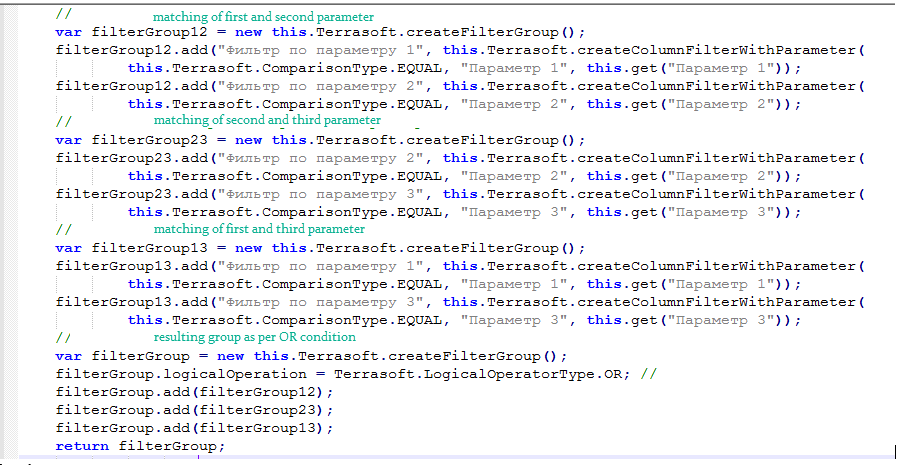
If the first variant of detail population was meant, then filterGroup in the filtering method on the page will look as follows:

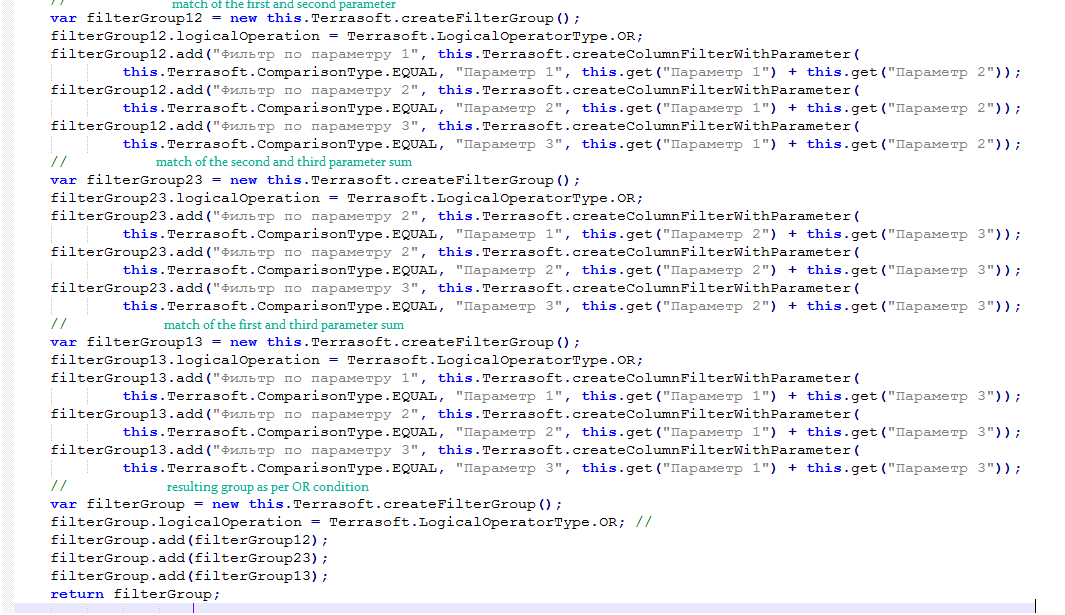
If the second variant of detail population was meant, then filterGroup in the filtering method on the page will look as follows:

Note the mistake in adding groups - the keys are not specified. The correct adding of groups is displayed below:

filterGroup.add(“1”, filterGroup1);
filterGroup.add(“2”, filterGroup2);
filterGroup.add(“3”, filterGroup3);


Like 0

Like

Share

0 comments
Show all comments
knowledge base
SDK
Q&A
support

Question

How can I create my own control element?

Answer

To create a custom control element:

1. Create a module - class of the control element:

Ext.ns("Terrasoft");
/** * @class Terrasoft.controls.UsrMyControl * Control element class for display */
Ext.define("Terrasoft.controls.UsrMyControl", {
	extend: "Terrasoft.Component",
	alternateClassName: "Terrasoft.UsrMyControl",
	mixins: {
	},
	myParam: "",
	/** * @inheritdoc Terrasoft.Component#tpl * @protected * @overridden */
	tpl: [
		/*jshint white:false */
		"",
		"{myParam} test-test-test",
		""
		/*jshint white:true */
	],
	getTplData: function() {
		var tplData = this.callParent(arguments);
		tplData.myParam = this.myParam;
		this.updateSelectors(tplData);
		return tplData;
	},
	/** * @inheritDoc Terrasoft.Component#init * @protected * @overridden */
	init: function() {
		this.callParent(arguments);
		this.addEvents(
			"myMethod"
		);
	},
	/** * @inheritDoc Terrasoft.Component#constructor * @overridden */
	constructor: function() {
		this.callParent(arguments);
	},
 
	updateSelectors: function(tplData) {
		var id = tplData.id;
		var baseIdSuffix = "-usr-my-control";
		var selectors = this.selectors = {};
		selectors.wrapEl = "#" + id + baseIdSuffix;
		return selectors;
	},
	/** * Subscription to element events of the control element */
	initDomEvents: function() {
		this.callParent(arguments);
		var wrapEl = this.getWrapEl();
		if (wrapEl) {
			wrapEl.on("click", this.onClick, this);
		}
	},
	/** * "click" event handler on the ptimary element * @param event */
	onClick: function(event) {
		event.stopEvent();
		this.fireEvent("myMethod", this);
	},
	/** * Returns configuration of connection to the model. Implements the mixin interface {@link Terrasoft.Bindable}. * @overridden */
	getBindConfig: function() {
		var parentBindConfig = this.callParent(arguments);
		var bindConfig = {
			myParam: {
				changeMethod: "setMyParam"
			}
		};
		Ext.apply(bindConfig, parentBindConfig);
		return bindConfig;
	},
 
	setMyParam: function(val) {
		this.myParam = val || this.myParam;
		if (this.allowRerender()) {
			this.reRender();
		}
	},
	/** * @overridden * @inheritdoc Terrasoft.Component#destroy */
	onDestroy: function() {
		var wrapEl = this.getWrapEl();
		if (wrapEl) {
			wrapEl.un("myMethod", this.onClick, this);
		}
		this.callParent(arguments);
	},
	/** * Sets the flag value to "read only" * @param {Boolean} readonly The flag value "read only". If true - the control element is set to *  "read only" mode, if false - the operating mode of the control element */
	setReadonly: function(readonly) {
		if (this.readonly === readonly) {
			return;
		}
		this.readonly = readonly;
		if (this.allowRerender()) {
			this.reRender();
		}
	}
});

2. Create a generator module of the control element:

define("UsrMyControlGenerator", ["UsrMyControlGeneratorResources", "terrasoft", "ext-base", "UsrMyControl"],
		function(resources) {
	var UsrMyControlGenerator = Ext.define("Terrasoft.configuration.UsrMyControlGenerator", {
		extend: "Terrasoft.ViewGenerator",
		alternateClassName: "Terrasoft.UsrMyControlGenerator",
		generateUsrMyControl: function(config) {
			var usrMyControl = {
				className: "Terrasoft.UsrMyControl",
				id: config.name + "UsrMyControl",
				selectors: {wrapEl: "#" + config.name + "UsrMyControl"},
				myParam: {bindTo: config.getMyParam},
				myMethod: {bindTo: config.myMethod}
			};
			if (!Ext.isEmpty(config.wrapClassName)) {
				usrMyControl.classes = {
					wrapClassName: config.wrapClassName
				};
			}
			return usrMyControl;
		}
	});
	return Ext.create(UsrMyControlGenerator);
});

3. Add the custom control element to the diff property of the schema:

define("CasePage", ["CasePageResources", "terrasoft", "UsrMyControlGenerator", "UsrMyControl"],
	function(resources, Terrasoft) {
	return {
		entitySchemaName: "Case",
		details: /**SCHEMA_DETAILS*/{}/**SCHEMA_DETAILS*/,
		attributes: {
			"Test": {
				"dataValueType": Terrasoft.DataValueType.TEXT,
				"type": Terrasoft.ViewModelColumnType.VIRTUAL_COLUMN,
				"value": "123"
			}
		},
		diff: /**SCHEMA_DIFF*/[
			{
				"operation": "insert",
				"parentName": "SolutionTab_gridLayout",
				"name": "UsrTest",
				"propertyName": "items",
				"values": {
					"className": "Terrasoft.UsrMyControl",
					"layout": { "colSpan": 24, "rowSpan": 1, "column": 0, "row": 4 },
					"generator": "UsrMyControlGenerator.generateUsrMyControl",
					"visible": true,
					"getMyParam": "getMyParam",
					"myMethod": "myMethod"
				}
			}
		]/**SCHEMA_DIFF*/,
		methods: {
			onEntityInitialized: function() {
				this.callParent(arguments);
				// just for debug:
				document.scope = this;
			},
			getMyParam: function() {
				return this.get("Test");
			},
			myMethod: function() {
				var oldTest = this.get("Test");
				this.set("Test", oldTest + "!");
			}
		},
		rules: {}
	};
});

Soecify UsrMyControl and UsrMyControlGenerator modules in schema dependancies.

Like 0

Like

Share

0 comments
Show all comments
knowledge base
SDK
Q&A
support

Case

I created a UsrCustomHelper module where I placed my code. When I connect this module to the  replacing schema of the contract section (ContractPageV2 ). When I try to call it, bpm'online displays an error that the module is not found.

Solution

To ensure correct operation, connect the module by the name it has in the system. You use CustomHelper in your code, while you need to use UsrCustomHelper, which is the real name of your module.

Thus, in the define section of your module, make the following changes:

define("UsrCustomHelper", [], function() {

In the define section of the schema, where you want to use the module, make the following changes:

define("ContractPageV2", ["ContractPageV2Resources", "BusinessRuleModule", "GeneralDetails", "Terrasoft", "UsrCustomHelper"],
    function(resources, BusinessRuleModule, GeneralDetails, Terrasoft, CustomHelper) {

Leave CustomHelper as the name of the incoming parameter if you wish, in this case the call of module methods will remian unchanged:

this.set("Number", CustomHelper.toTranslit(ownerAbb).toUpperCase()+response);


Like 0

Like

Share

0 comments
Show all comments
knowledge base
SDK
support
Q&A

Case

An arbitrary object, say, an account, has parameter 1, parameter 2 and parameter 3. The object has a detail displaying records of this object type, e.g., accounts that meet the condition "parameter 1 + parameter 2 match the primary record", "parameter 2 + parameter 3 match the primary record", "parameter 1 + parameter 3 match the primary record". The detail enables filtering by several columns. How can I enable UNION, i.e., "summarize" several independent sets of such filters?

Solution

Use the filterGroup class for advanced filtering (you can implement filtering of any complexity).

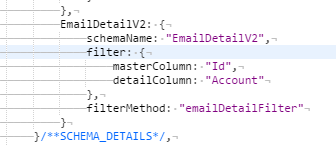
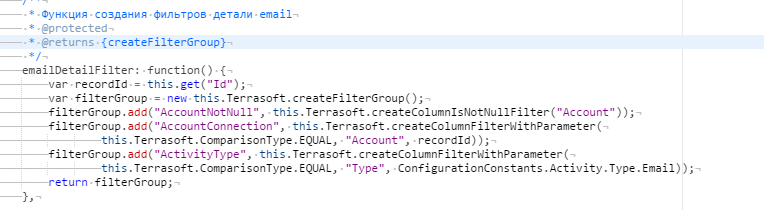
You can see the case implementation in the AccountPageV2 schema (the UIv2 package) - the emailDetailFilter  filter.

Implement a custom method that contains "filterGroup" (e.g. "emailDetailFilter") and add this method to the entity.

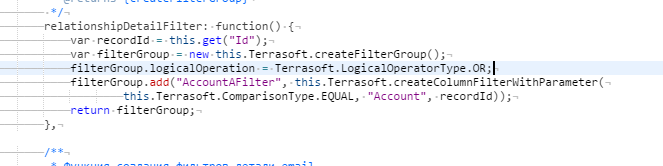
filterGroup has "AND" condition by default. If you need to use "OR" condition, add the following property:

filterGroup.logicalOperation = Terrasoft.LogicalOperatorType.OR

You can find an example below:

Like 1

Like

Share

0 comments
Show all comments
knowledge base
SDK
Q&A
support

Question

How can I add a web-type field (as the one in the [Communication options] detail) that would open in a new tab when I click it?

Answer

To turm a usual text field into a web link, develop the diff  property of this field with the following code:

{
    "operation": "insert",
    "name": "AdditionalExpenses",
    "values": {
 
        // -->
        "showValueAsLink": true,
        "controlConfig": {
            "enabled": true,
            "href": {
                "bindTo": "getAdditionalExpensesLink"
            },
            "linkclick": {
                "bindTo": "onExternalLinkClick"
            }
        },
        // <--
 
        "layout": {
            "colSpan": 12,
            "rowSpan": 1,
            "column": 0,
            "row": 3,
            "layoutName": "Tab07720f4eTabLabelGridLayout691629ea"
        },
        "labelConfig": {},
        "enabled": true,
        "bindTo": "AdditionalExpenses"
    },
    "parentName": "Tab07720f4eTabLabelGridLayout691629ea",
    "propertyName": "items",
    "index": 5
},

Add the following code to the methods property:

methods: {
 
    getAdditionalExpensesLink: function() {
        return this.getLink(this.get("AdditionalExpenses"));
    },
    onExternalLinkClick: function() {
        return;
    },
    getLink: function(value) {
        if (Terrasoft.isUrl(value)) {
            return {
                url: value,
                caption: value
            };
        }
    }
},

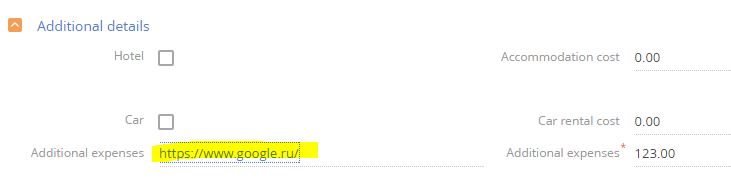
After this, the field becomes a link if it is specified in the correct web format or copied from browser. If you click the "Open in a new tab" option from the context menu, it will be opened in a new tab, if you left-click it - it will open in the current tab:

To open the link in a new window, develop the onExternalLinkClick() method:

onExternalLinkClick: function() {
    var value = this.get("AdditionalExpenses");
    if (!Ext.isEmpty(value)) {
        window.open(value, "_blank");
    }
    return false;
},


Like 1

Like

Share

0 comments
Show all comments

Question

The getEntity method of the EntitySchemaQuery class works asynchronously. Can we make the getEntity method work synchronously?

Answer

The getEntity method of a customer EntitySchemaQuery is designed for asynchronous use only. Nevertheless, you can imitate synchronous behavior via Terrasoft.chain - see below:

getMyEntity: function(callback) {
    var esq = this.Ext.create("Terrasoft.EntitySchemaQuery", {
        rootSchemaName: schemaName
    });
    ...
    esq.getEntity(recordId, function(response) {
        ...
        if (callback) {
            callback.call(this);
        }
    }, this)
},
globalMethod: function() {
    Terrasoft.chain(
        function(next) {
            this.getMyEntity(function() {
                next();
            });
        },
        function() {
            this.doAfterGettingEntity();
        },
        this
    );
}

The next parameter of the last method stores link to the following method in the array. Upon implementation, it will be called after the client receives server response.

Terrasoft.chain can contain as many arguments as needed. Do not forget to specify the next argument so that the array does not stop in advance. The last argument transfers the execution context.

Like 5

Like

Share

0 comments
Show all comments
knowledge base
SDK
support
Q&A

Question

Where do the SysPageSchemaUId and MiniPageSchemaUId fields refer to (the SysModuleEdit table)? Where does the SysEntitySchemaUId field from the SysModuleEntity table refer to?

Answer

The SysModuleEdit table:

The table describes the connection of configuration objects with their edit pages. 

For example, the [Activity] object can have one or several edit pages described in the table. Basically, the "Object"-"The page schema, displaying the object content" connection is set here.

Primary table columns:

SysModuleEntityId - link to the SysModuleEntity table, described below. Basically, the link to the "Activity" object schema is described in it. All the schemas are contained in the SysSchema table.


TypeColumnValue  - if the column is empty, it means that this object has a single edit page. If the TypeColumnValue field is populated, it is the identifier of type that differentiates between the edit pages. For example, the Activity edit pages can be differentiated by the ActivityType column and the Id of this specific table (ActivityType) is recorded in TypeColumnValue. The differentiation can be by any reference column of an object, but only by one at a time. It is usually the "Type" column.

CardSchemaUId - the link to the UId field of the SysSchema table, namely to the edit page schema. For example, the link to UId of the ActivityPageV2 schema, but the string must necessarily be as follows:

SELECT * FROM SysSchema WHERE Name = 'Activity' AND ExtendParent = 0

In other words, it should be the base, parent page schema. The same refers to all SysSchema-related links. They always refer to a parent schema (ExtendParent = 0), so that inheritance could work.

The rest of text columns are text views of pages and tasks.


SysPageSchemaUId  - the link to the old aspx pages (SysSchema), not used now.


MiniPageSchemaUId  - used for creating mini pages, read more at https://academy.bpmonline.com/documents/technic-sdk/7-12/creating-pop-s…

The SysModuleEntity table:

The connection table for SysModuleEdit, the final connection is as follows:

SysSchema (object schema) – SysModuleEntity – SysModuleEdit – SysSchema (page schema(s))

Primary table columns:

SysEntitySchemaUId - the link to the SysSchema table, namely to the object schema. For example, to the UId field of the following record:

SELECT * FROM SysSchema WHERE Name = 'Activity' AND ExtendParent = 0

TypeColumnUId - is populated for cases, when there are many edit pages for a single object. The UId of the column is specified here from the metadata of the differentiating object, ideologically it is tightly connected with the TypeColumnValue  column of the SysModuleEdit table.

Like 5

Like

Share

0 comments
Show all comments
knowledge base
SDK
support
Q&A

Question

I need to perform calculations based on invoices in the [Forecast] section

Answer

1. Modify the ForecastBuilder schema. Replace the following code in the openForecastPage() method:

var valuePairs = [
 {
  name: "EntitySchemaUId",
  value: "ae46fb87-c02c-4ae8-ad31-a923cdd994cf"
 },
 {
  name: "EntitySchemaName",
  value: "Opportunity"
 }
];

for:

var valuePairs = [
 {
  name: "EntitySchemaUId",
  value: "bfb313dd-bb55-4e1b-8e42-3d346e0da7c5"
 },
 {
  name: "EntitySchemaName",
  value: "Invoice"
 }
];

2. Apply changes to the stored tsp_RecalculateForecastFact procedure.

Replace the opportunity table for the invoice table, change the stage and data conditions. The source code of the stored procedure:

SET ANSI_NULLS ON
GO
SET QUOTED_IDENTIFIER ON
GO
ALTER PROCEDURE [dbo].[tsp_RecalculateForecastFact]
@ForecastId UNIQUEIDENTIFIER = NULL,
@CurrentUserContactId UNIQUEIDENTIFIER = NULL
AS
IF @ForecastId IS NULL
BEGIN
	RETURN;
END
DECLARE @PlanIndicatorId UNIQUEIDENTIFIER
DECLARE @FactIndicatorId UNIQUEIDENTIFIER
DECLARE @FactPercentIndicatorId UNIQUEIDENTIFIER
DECLARE @PotentialIndicatorId UNIQUEIDENTIFIER
DECLARE @CompletedId UNIQUEIDENTIFIER
DECLARE @ForecastItemId UNIQUEIDENTIFIER
DECLARE @DimensionId UNIQUEIDENTIFIER
DECLARE @DimensionValueId UNIQUEIDENTIFIER
DECLARE @PeriodId UNIQUEIDENTIFIER
DECLARE @StartDate DATE
DECLARE @DueDate DATE
DECLARE @MaxDueDate DATE
DECLARE @ColumnName NVARCHAR(100)
DECLARE @SQLText NVARCHAR(MAX)
DECLARE @PlanAmount DECIMAL(18,2)
DECLARE @FactAmount DECIMAL(18,2)
DECLARE @PotentialAmount DECIMAL(18,2)
DECLARE @FactPotentialAmountTable TABLE (PlanAmount DECIMAL(18,2), FactAmount DECIMAL(18,2), PotentialAmount DECIMAL(18,2))
SET @PlanIndicatorId = '{CBD311C7-6E1B-4324-BF21-192681349DDF}'
SET @FactIndicatorId = '{52CAE26F-84F6-42A0-AAEF-97790AF3B8D9}'
SET @FactPercentIndicatorId = '{E0D66FFB-A3E3-4DA9-BCB7-95D27033286E}'
SET @PotentialIndicatorId = '{A004FC7A-D63D-4E3C-9356-0AD77B2600F3}'
--SET @CompletedId = '{60D5310C-5BE6-DF11-971B-001D60E938C6}'
SET @CompletedId = '{698D39FD-52E6-DF11-971B-001D60E938C6}' --Paid PaymentStatusId from InvoicePaymentStatus
DELETE FROM ForecastItemValue 
WHERE ForecastIndicatorId IN (@FactIndicatorId, @FactPercentIndicatorId, @PotentialIndicatorId)
AND EXISTS (SELECT 1 
			FROM ForecastItem fi 
			WHERE ForecastItemValue.ForecastItemId = fi.Id
				AND fi.ForecastId = @ForecastId 
			) 
SET @MaxDueDate = (SELECT Convert(Date, MAX(StartDate), 104) FROM Invoice o WHERE o.PaymentStatusId = @CompletedId)
DECLARE Cur CURSOR STATIC LOCAL FOR
SELECT
fi.Id ForecastItemId,
d.Id DimensionId, 
fi.DimensionValueId DimensionValueId,
p.Id PeriodId,
p.StartDate StartDate,
p.DueDate DueDate,
d.[Path] + 'Id'
FROM ForecastItem fi
INNER JOIN Forecast f ON f.Id = fi.ForecastId
INNER JOIN ForecastDimension fd ON fd.Id = fi.ForecastDimensionId
INNER JOIN Dimension d ON d.Id = fd.DimensionId
INNER JOIN Period p ON p.PeriodTypeId = f.PeriodTypeId
WHERE f.Id = @ForecastId
AND ISNULL(d.[Path],'') <> ''
AND p.StartDate <= @MaxDueDate
 
SET NOCOUNT ON;
 
OPEN Cur
FETCH NEXT FROM Cur INTO @ForecastItemId, @DimensionId, @DimensionValueId, @PeriodId, @StartDate, @DueDate, @ColumnName
WHILE @@FETCH_STATUS = 0
BEGIN
	SET @DueDate = DATEADD(DAY, 1, @DueDate)
	DELETE FROM @FactPotentialAmountTable
	SET @SQLText = N' SELECT (SELECT SUM(ISNULL(fiv.[Value], 0)) FROM [ForecastItemValue] fiv WHERE fiv.[ForecastItemId] = @P5 AND fiv.[PeriodId] = @P6 AND fiv.[ForecastIndicatorId] = @P7 ) PlanAmount, (SELECT SUM(ISNULL(o.[Amount], 0)) FROM [Invoice] o WHERE o.[PaymentStatusId] = @P1 AND o.[StartDate] >= @P2 AND o.[StartDate] < @P3 AND o.' + @ColumnName + N' = @P4 ) FactAmount, (SELECT SUM(ISNULL(o.[Amount], 0)) FROM [Invoice] o INNER JOIN [InvoicePaymentStatus] os ON os.[Id] = o.[PaymentStatusId] WHERE os.[FinalStatus] = 0 AND o.[StartDate] >= @P2 AND o.[StartDate] < @P3 AND o.' + @ColumnName + N' = @P4 ) PotentialAmount'
	INSERT INTO @FactPotentialAmountTable exec sp_executesql @SQLText,
	N'@P1 UNIQUEIDENTIFIER, @P2 DATE, @P3 DATE, @P4 UNIQUEIDENTIFIER, @P5 UNIQUEIDENTIFIER, @P6 UNIQUEIDENTIFIER, @P7 UNIQUEIDENTIFIER',
	@P1 = @CompletedId, @P2 = @StartDate, @P3 = @DueDate, @P4 = @DimensionValueId, @P5 = @ForecastItemId,
	@P6 = @PeriodId, @P7 =  @PlanIndicatorId
	SELECT @PlanAmount = PlanAmount, @FactAmount = FactAmount, @PotentialAmount = PotentialAmount 
	FROM @FactPotentialAmountTable
	IF (@FactAmount <> 0)
	BEGIN
		INSERT INTO ForecastItemValue
		(
			Id,
			CreatedOn,
			CreatedById,
			ModifiedOn,
			ModifiedById,
			ProcessListeners,
			ForecastIndicatorId,
			[Value],
			PeriodId,
			ForecastItemId
		)
		VALUES
		(
			NEWID(),
			GETUTCDATE(),
			@CurrentUserContactId,
			GETUTCDATE(),
			@CurrentUserContactId,
			0,
			@FactIndicatorId,
			@FactAmount,
			@PeriodId,
			@ForecastItemId
		)
		IF (@PlanAmount <> 0)
		BEGIN
			INSERT INTO ForecastItemValue
			(
				Id,
				CreatedOn,
				CreatedById,
				ModifiedOn,
				ModifiedById,
				ProcessListeners,
				ForecastIndicatorId,
				[Value],
				PeriodId,
				ForecastItemId
			)
			VALUES
			(
				NEWID(),
				GETUTCDATE(),
				@CurrentUserContactId,
				GETUTCDATE(),
				@CurrentUserContactId,
				0,
				@FactPercentIndicatorId,
				CAST((@FactAmount * 100 / @PlanAmount) AS DECIMAL(18, 2)),
				@PeriodId,
				@ForecastItemId
			)
		END
	END
 
	IF (@PotentialAmount <> 0)
	BEGIN
		INSERT  INTO ForecastItemValue
		(
			Id,
			CreatedOn,
			CreatedById,
			ModifiedOn,
			ModifiedById,
			ProcessListeners,
			ForecastIndicatorId,
			[Value],
			PeriodId,
			ForecastItemId
		)
		VALUES
		(
			NEWID(),
			GETUTCDATE(),
			@CurrentUserContactId,
			GETUTCDATE(),
			@CurrentUserContactId,
			0,
			@PotentialIndicatorId,
			@PotentialAmount ,
			@PeriodId,
			@ForecastItemId
		)
	END
FETCH NEXT FROM Cur INTO @ForecastItemId, @DimensionId, @DimensionValueId, @PeriodId, @StartDate, @DueDate, @ColumnName
END
CLOSE Cur
DEALLOCATE Cur

 You can set the condition columns that create separate tabs in the following table:

SELECT * FROM Dimension

They have Account, ResponsibleDepartment, Owner and LeadType specified by default.

Like 0

Like

0 comments
Show all comments