FreedomUI
recordpermission
Object Permissions
permissions
organizational roles
Studio_Creatio
8.0

Access rights need to be assigned at the object level based on roles. 

Our requirement is two-fold:

  1. Assign permissions to specific roles, and
  2. Assign permissions to specific users within a role, based on certain filter conditions.

For example:

  • The X role has role-based permissions, but these permissions must be overridden for certain users within the same role based on filters.
  • For other roles like Y, all users in that role should have access to the records without any additional filtering.

We already have a business process that manages this logic, but the challenge is the large volume of records. Whenever we add a new role to the permission set, we must update the object-level permissions again. This unintentionally exposes all existing records to all users in the X role.

To correct this, we must re-run our business processes on all existing records to ensure that only the intended X users retain access, not everyone in the role. This becomes a very manual and time-consuming activity each time any permission change is required.

Would like guidance on how to achieve this more efficiently, ideally through customization, given the volume of records involved.

Like 0

Like

1 comments

Hello,

In this scenario, the most effective approach is to separate permission management by role type. For roles like Y, where all users should have access to records without additional conditions, standard object-level record permissions can be used without any changes.

For role X, where access must be limited to specific users within the same role based on certain conditions, permissions should be managed exclusively through a business process. The process can be triggered on record creation (and, if required, on record update) and grant access only to the users who meet the defined criteria.

To avoid unintended access, the X role should not be included in the object-level record permissions. This is important because object-level permissions are recalculated whenever role settings change, which is what currently causes all existing records to become visible to all users in role X. When access is granted through a business process, it is not revoked during permission recalculation, and users retain only the access explicitly assigned by the process.

With this approach, adding or modifying roles no longer requires re-running processes for all existing records. Access remains controlled and consistent, and only the intended users within role X will have permissions to the relevant records.

Show all comments
reports
permissions
Sales_Creatio
8.0

Very often CRM customers would like to set permissions on MS-Word Reports, to allow each users role to generate "only their reports".

The Report setup interface doesn't allow to set the roles allowed to select the report, and the SysModuleReport entity doesn't have the Record Permissions enabled.

How is it possible to setup permissions in MS-Word Report in Creatio?

Thanks

Regards 

Like 0

Like

1 comments

Hello,

Currently, Creatio does not provide an out-of-the-box option to configure user- or role-based access permissions specifically for MS Word reports.

It is also not possible to enable record permissions selectively "only for some reports." The SysModuleReport table contains definitions for all report types, and enabling record-level permissions on this entity would affect the entire reporting subsystem. This may lead to unpredictable behavior, including incorrect report visibility or access issues for other users and report types. For this reason, modifying its permission model is not recommended and is not supported as a partial or isolated configuration change.

If the project requires strict access control to specific reports, this can only be achieved through a custom development approach (e.g., custom UI logic, custom section replacing standard report generation buttons, or intermediary permission checks).

Show all comments
record
permissions
Business Process

Hello

How can I read the access permissions of a record in a business process? I need to read the permissions of one record and assign the same permissions to another record.

Like 0

Like

2 comments
Best reply

Hello.

There is a table in the database, where all rights for the object are stored.

The table is called Sys+Object+Right (SysOpportunityRight, SysActivityRight, SysCaseRight etc).

More information can be found here:
https://community.creatio.com/articles/what-database-tables-should-i-ta…

Unfortunately, you can't read this object by the 'read data' element in the business process.

But your business task could be achieved by the script-task. 

Best regards,
Antonii.
 

Hello.

There is a table in the database, where all rights for the object are stored.

The table is called Sys+Object+Right (SysOpportunityRight, SysActivityRight, SysCaseRight etc).

More information can be found here:
https://community.creatio.com/articles/what-database-tables-should-i-ta…

Unfortunately, you can't read this object by the 'read data' element in the business process.

But your business task could be achieved by the script-task. 

Best regards,
Antonii.
 

Antonii Viazovskyi writes:

Hello.

There is a table in the database, where all rights for the object are stored.

The table is called Sys+Object+Right (SysOpportunityRight, SysActivityRight, SysCaseRight etc).

More information can be found here:
https://community.creatio.com/articles/what-database-tables-should-i-ta…

Unfortunately, you can't read this object by the 'read data' element in the business process.

But your business task could be achieved by the script-task. 

Best regards,
Antonii.
 

Thanks!

Show all comments
organizational roles
functional roles
Access Rights
permissions
Sales_Creatio_enterprise_edition
8.0

Hello Community,

We want to achieve the following but cant find the right way to do it.

We have two Organizational Roles 

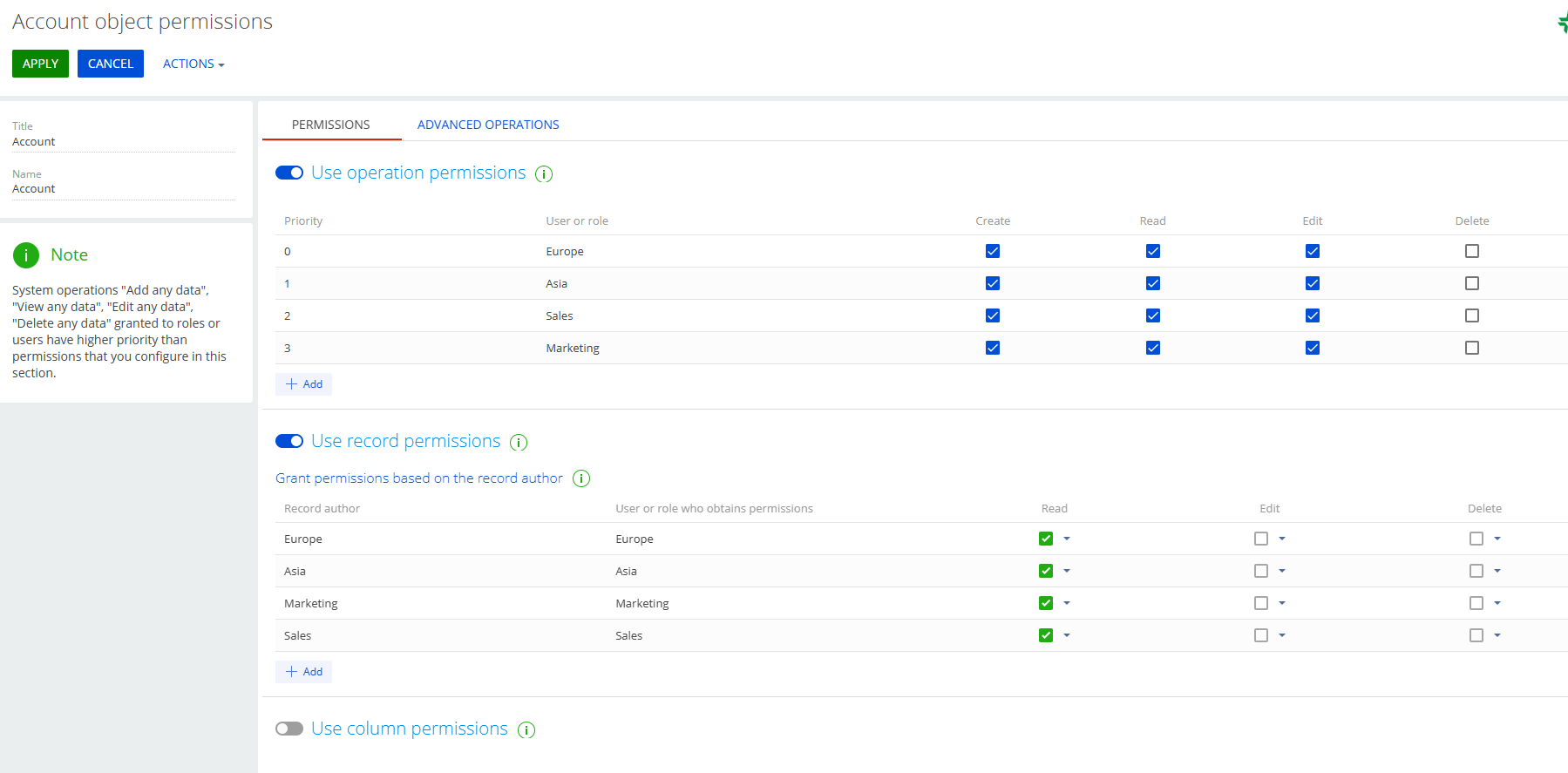
  • Europe
  • Asia

We have two functional roles 

  • Marketing
  • Sales

We want:

  • Europe/Marketing to see only Europe/Marketing records. 
  • Asia/ Marketing to see only Asia/ Marketing records. 


Same applies to Sales. 

  • Europe/Sales to see only Europe/Sales records,
  • Asia/Sales to see only Asia/Sales records.

Can this be achieved somehow?

Sasor

Like 0

Like

4 comments

++

Sasori Oshigaki,

Hello , this Code should work 
{
  request: "crt.LoadDataRequest",
  handler: async (request, next) => {
    // Check if this is your MultiSelect's data source
    if (request.dataSourceName !== "MultiSelect_lf952eo_List_Items_DS") {
      return await next?.handle(request);
    }
 
    try {
      // MAIN filter group for the lookup
      const filter = new sdk.FilterGroup();
      filter.logicalOperation = sdk.LogicalOperatorType.And;
 
      // Build a nested OR group for the 3 roles
      const roleOrGroup = new sdk.FilterGroup();
      roleOrGroup.logicalOperation = sdk.LogicalOperatorType.Or;
 
      // Role 1
      await roleOrGroup.addSchemaColumnFilterWithParameter(
        sdk.ComparisonType.Equal,
        "[SysAdminUnit:Contact:Id].[SysUserInRole:SysUser:Id].SysRole.Name",
        "Marketing"
      );
 
      // Role 2
      await roleOrGroup.addSchemaColumnFilterWithParameter(
        sdk.ComparisonType.Equal,
        "[SysAdminUnit:Contact:Id].[SysUserInRole:SysUser:Id].SysRole.Name",
        "Sales"
      );
 
 
      // Add the OR group to the main filter
      filter.add(roleOrGroup);
 
      // SDK workaround for versions < 8.1.1 (copy items)
      const newFilter = Object.assign({}, filter);
      newFilter.items = filter.items;
 
      // Push the filter into the request
      request.parameters.push({
        type: "filter",
        value: newFilter
      });
 
      return await next?.handle(request);
    } catch (error) {
      console.error("Error filtering contact list:", error);
      // Continue with original request if filtering fails
      return await next?.handle(request);
    }
  }
}

Hello Sasor,

To achieve the requirement where specific organizational and functional roles can only see records relevant to their combination (e.g., Europe/Marketing can only see Europe/Marketing records), you can configure access permissions in Creatio by following these steps:

1. Create Organizational Roles:
Ensure you have the organizational roles "Europe" and "Asia" set up in the system.
 

https://academy.creatio.com/docs/8.x/setup-and-administration/administration/user-and-access-management/user-management/organizational-roles


2. Create Functional Roles:
Ensure you have the functional roles "Marketing" and "Sales" set up.
 

https://academy.creatio.com/docs/8.x/setup-and-administration/administration/user-and-access-management/user-management/functional-roles


3. Assign Users to Roles:
Assign users to the appropriate combination of organizational and functional roles (e.g., users in Europe/Marketing should be assigned to both the "Europe" organizational role and the "Marketing" functional role).
 

https://academy.creatio.com/docs/8.x/setup-and-administration/administration/user-and-access-management/user-management/assign-a-user-role


4. Configure Record Permissions:
- Go to the System Designer and open the Object permissions section.
- Select the object for which you want to configure permissions (e.g., a specific entity or section).
- Set up record-level permissions to restrict visibility based on both organizational and functional roles.
This can be done by creating filters or conditions in the access settings that check for both role types assigned to the user.


https://academy.creatio.com/docs/8.x/setup-and-administration/administration/user-and-access-management/access-management/record-permissions


Let me know if you have any more questions - happy to help further.

Hello Valeriia,

Thank you for the answer. Are you suggesting that this combination might achieve what we need?

Thank you 

Sasor

Show all comments
permissions
403
PATCH
Studio_Creatio
8.0

Hello!
I created a new Functional role with oData operations permission and add it to User. 
Using Postman can GET data from "Contact" collection with this User credentials. It also can create new Contact using POST method.
PATCH returns:  403 - Forbidden: Access is denied
DELETE returns:  405 - HTTP verb used to access this page is not allowed

What permissions I have to grant to this Functionsl role and how?

This instruction
https://academy.creatio.com/docs/developer/integrations_and_api/data_se…
say for 405
"The response should contain the Allow header with the list of request methods the resource supports."
Postman returns:
 405 - HTTP verb used to access this page is not allowed

 The page you are looking for cannot be displayed because an invalid method (HTTP verb) was used to attempt access.


Can you help?

Like 0

Like

1 comments
Best reply

Greetings! 


For the user to work through OData, you need to grant them access using the CanUseODataService code in the Operation permissions section. 

Greetings! 


For the user to work through OData, you need to grant them access using the CanUseODataService code in the Operation permissions section. 

Show all comments
Business Process
permissions
Object Permissions
Studio_Creatio_enterprise_edition
8.0

Hello 

I have created a business process that reads in the creation and modification of a project id and project manager, 

I then wanted to change the permissions so that only the project manager could delete it, but during the execution of the process the values still remain on true 

What could be the reason for this?  I run the process as an administrator and the delete test is run on a user who does not have these permissions. The way it should work is that no one but the administrator should be able to delete projects. 


even though the process is executed, the value remains true 

    "Parametr": "List of rights to delete",
            "Wartość": {
                "Before execution": "[{Id:\"54e9e783-704b-4d77-b621-d8054d39f52a\",ParameterName:\"Role1\",Name:\"All employees.a29a3ba5-4b0d-de11-9a51-005056c00008\",CanRead:true,CanEdit:true,CanDelete:true,Source:\"3\",Grantee:\"Role\",Value:\"[#Lookup.84f44b9a-4bc3-4cbf-a1a8-cec02c1c029c.a29a3ba5-4b0d-de11-9a51-005056c00008#]\"}]",
                "After execution": "[{Id:\"54e9e783-704b-4d77-b621-d8054d39f52a\",ParameterName:\"Role1\",Name:\"All employees.a29a3ba5-4b0d-de11-9a51-005056c00008\",CanRead:true,CanEdit:true,CanDelete:true,Source:\"3\",Grantee:\"Role\",Value:\"[#Lookup.84f44b9a-4bc3-4cbf-a1a8-cec02c1c029c.a29a3ba5-4b0d-de11-9a51-005056c00008#]\"}]"
            }


Like 0

Like

3 comments

Are you sure the remaining access rights for All employees role is not "Deny"? I believe that process element won't technically remove the access rights, you'll still see it there but will be "deny" instead of allow.

Hello!  
 

I created a similar business process and successfully ran it. 

The process worked correctly, and I’m attaching screenshots as proof.  


You can also set the field "Which access rights to add?" to "All employees—Restrict", and the process should work as you expect.

In my example, I did exactly that, and I’m attaching the screenshots:


The reason why permissions are not changing as expected might be due to incorrect configuration of the "Change Access Rights" element in the business process. Please review the configuration of this element and ensure that the correct conditions and access rights are specified.  
 

If everything seems correct, please create a support request by contacting support@creatio.com

We will review the issue and assist with a solution.  

Regards,
Orkhan

I was able to successfully set the rights for the employees according to the instructions; interestingly enough, the rights edit page does not show that anything has changed. 

Show all comments

Hello , 


I have been struggling with permissions lately , I have a Freedom UI Details page that shows sections depending on the user role or the user contact specific information .

When I try to create a Business rule I only find User contact But can't Access User Contact informations . 

Any suggestions please ?

Like 0

Like

1 comments

Could you please provide us with more details. For example, which permissions do you have on Contacts object.

Show all comments
permissions
Object Permissions
edit
delete
feedsection
Sales_Creatio_enterprise_edition
8.0

Hello,

I would like to ask how to enable additional options such as editing or deleting notes in this section.

Currently, I can delete and edit them, but only from the message card; however, I am unable to edit directly on the object. It is important to me that the person who adds a note can independently edit it directly on the opportunity,

Best Regards 


Like 0

Like

3 comments

Hello


You should be able to delete records from the feed either on the feed page itself or from the communication panel, but only your own records. You cannot edit or delete other people's notes.


Dymytriy Vykhodets,

I understand, in that case how can you turn on the ability to edit own records 

Michał Zieliński,


Hello,


This option should be enabled by default. We would need to get access to your environment in order to investigate this issue. Please write to support@creatio.com and we will assist you with the request.

Show all comments

Dear colleagues


To enable normal users to edit some specific HomePage (Dashboards) in Freedom UI, we need to grant permission to CanManageSolution Operation Permission, but this Operation permission grants permission also to:


  • * ALL Homepages
  • * Edit Page Schemas
  • * other schemas


And this could be a risk to app implementation to give this kind of "power" to some users.


What I'm proposing is to add, link in Classic UI dashboards, permission to some users just to some dashboards/homepages.


Are you agree with me?


Thanks


Julio Falcón

1 comments

Hi Julio,

The roadmap does show that there will be the ability for regular users to add dashboard widgets coming soon in Q3 2024. It sounds like it will be a new control type that you can add to a page that allows regular users to be able to add/remove/modify widgets in the same way as they could with classic dashboards. 

Ryan

Show all comments
permissions
access
rights
Sales_Creatio
8.0

Hi,

A specific Organizational Role has 'Reading' access rights in the Accounts, but can have 'Editing' access rights in the Communication Options Detail.

However whenever I update a record in 'Communication Options' i revieve this pop-up

1- I have given the correct access rights to object 'Communication Options' for the specific Organizational Role

2- Also modified 'Object to inherit access rights from'

What am I missing here ?

Sasori

Like 0

Like

3 comments

Hello Sasori,


According to your description, the issue is that when modifying data in the "Communication Options Detail" object, the system attempts to update related data in the "Accounts" object, and the user doesn't have the necessary permissions for this action.


Bogdan,

Thats correct.The mentioned Role has only 'Reading' rights in the Accounts.

However we have applied columns permission in the Accounts fields (like Phone,Alternate Phone) that can be affected by the Update of the 'Communication Options Detail" object but still not working.

Sasori

Sasori Oshigaki,


Please contact our support team on this matter - support@creatio.com

Show all comments