folders
folderpane
Sales_Creatio
8.0

Hello, we recently converted to FreedomUI and was wondering is there a way that our end users can adjust the size of the folder pane, like you could in ClassicUI? I know on the designer I can adjust the size, but would like to have our end users have the ability that they once had.

Like 0

Like

1 comments

Hello,

Unfortunately, it's not possible to adjust the size of the folder panel at this time. However, we've registered this idea in our R&D team backlog for consideration and implementation in future application releases. 
 

Thank you for helping us to improve our product.
 

Show all comments
folders
folder
Filters
Studio_Creatio_enterprise_edition
8.0

Hi.  
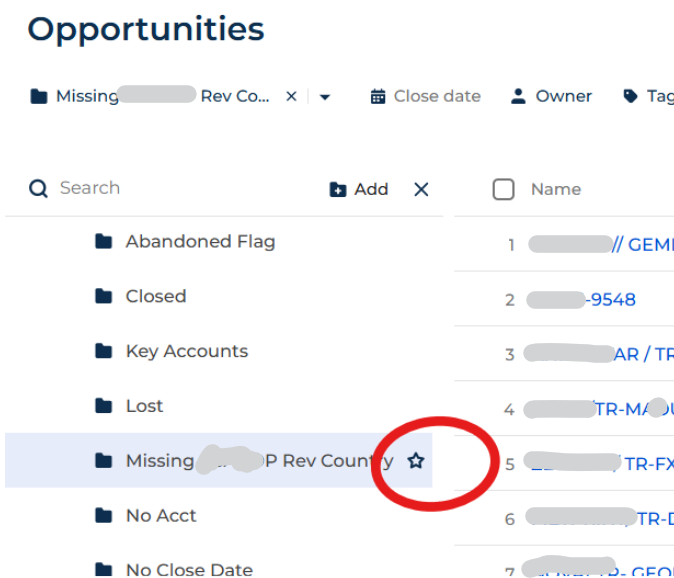
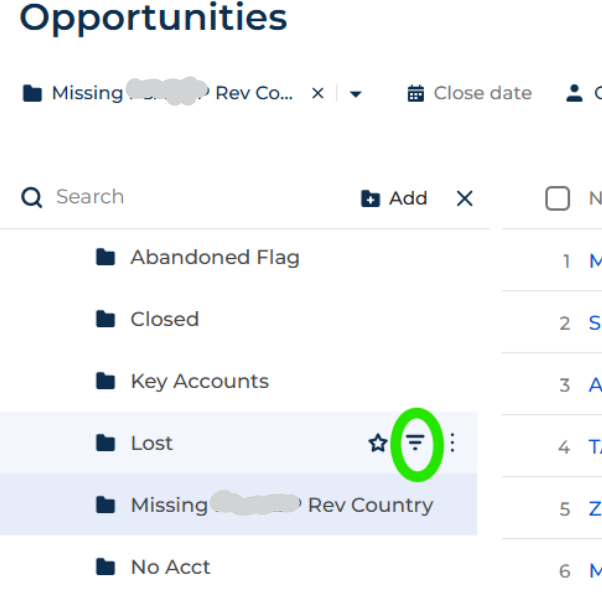
If a folder name is too long, I can't edit the "filter" because the filter icon is hidden.   Is there a way to get around this?  
No matter how high I set my resolution, I do not see the filter icon/button, only the "favorite" button.

screencap


Here, with a short folder name, I can see the filter button:
 

screencap


Thanks
Rob

Like 0

Like

4 comments

The folders scroll to the right when they get too long. You should be able to scroll right to get to the buttons if the folder name is too long.

Ah yes!  So they do ... 

Creatio's virtually invisible scroll bars strike again!  (I think that at some point all of our 250+ users have asked if the scroll bars can be made bigger ... difficult to use on a smaller laptop)

Thanks for pointing that out!

Rob Rudloff,

Yes - I only know this because of the same complaint from my users as well. It's so easy to miss.

Ryan

Yes, some UX improvement with these scroll bars is definitely needed :)

Show all comments
script task
c#
folders
Business Process
Studio_Creatio
8.0

Hi all,

I have a process where a user selects a contact folder from a list on a preconfigured page. A sub process then needs to run for each contact in the selected folder.

I've read the article for Programmatically Using Section Folder Filters in Processes or Server-Side Code in Creatio | Customer FX and I have borrowed a script task for creating the list of contacts.

var sectionName = "Contact";
var folderId = "2d3c0306-1e43-4ba7-943b-a3d261b66897"; //I will pass this in from the preconfigured page

// get folder SearchData
var folderSchema = UserConnection.EntitySchemaManager.GetInstanceByName(sectionName + "Folder");
var esq = new EntitySchemaQuery(folderSchema);
var dataCol = esq.AddColumn("SearchData").Name;
var folderData = esq.GetEntity(UserConnection, folderId).GetBytesValue(dataCol);

// convert filter data to esq filters
var serializedFilters = System.Text.Encoding.UTF8.GetString(folderData, 0, folderData.Length);
var dataSourceFilters = Terrasoft.Common.Json.Json.Deserialize(serializedFilters);

// MUST INCLUDE using Terrasoft.Nui.ServiceModel.Extensions;
var folderFilters = dataSourceFilters.BuildEsqFilter(UserConnection.EntitySchemaManager.GetInstanceByName(sectionName).UId, UserConnection);

// now can include folderFilters as filters in new esq
var contactEsq = new EntitySchemaQuery(UserConnection.EntitySchemaManager, "Contact");
contactEsq.AddColumn("Id");
contactEsq.Filters.Add(folderFilters); // using the filters from the folder
var contacts = contactEsq.GetEntityCollection(UserConnection);

I would like to either pass the results into a collection or run a sub process for each contact directly from the script task.

Any help would be much appreciated,

Like 0

Like

3 comments
Best reply

An easy way to accomplish what you're after is to: 

  1. Create a collection parameter in the process
  2. Populate the contacts from the ESQ into the collection parameter (see link below)
  3. Then use normal subprocess for each contact in the collection

See here for how to add the results of the ESQ from the folder to a collection param: https://customerfx.com/article/working-with-collection-parameters-in-a-process-in-creatio/

Ryan

An easy way to accomplish what you're after is to: 

  1. Create a collection parameter in the process
  2. Populate the contacts from the ESQ into the collection parameter (see link below)
  3. Then use normal subprocess for each contact in the collection

See here for how to add the results of the ESQ from the folder to a collection param: https://customerfx.com/article/working-with-collection-parameters-in-a-process-in-creatio/

Ryan

Ryan Farley,

Thanks Ryan. I'll give this a go now.

Ryan Farley,

I'm still struggling to get the result I'm after with the following code:

Parameters: 
- ContactFolderId (Guid)
- ContactsList (Collection)
    - ContactsList.ContactId
    - ContactsList.Name

var sectionName = "Contact";
var folderId = Get<Guid>("CommunityFolderId"); //"2d3c0306-1e43-4ba7-943b-a3d261b66897";

	var folderSchema = UserConnection.EntitySchemaManager.GetInstanceByName(sectionName + "Folder");
	var esq = new EntitySchemaQuery(folderSchema);
	var dataCol = esq.AddColumn("SearchData").Name;

	var folderEntity = esq.GetEntity(UserConnection, folderId);
	var folderData = folderEntity.GetBytesValue(dataCol);

	var serializedFilters = System.Text.Encoding.UTF8.GetString(folderData, 0, folderData.Length);
	var dataSourceFilters = Terrasoft.Common.Json.Json.Deserialize<Terrasoft.Nui.ServiceModel.DataContract.Filters>(serializedFilters);

	var folderFilters = dataSourceFilters.BuildEsqFilter(
		UserConnection.EntitySchemaManager.GetInstanceByName(sectionName).UId,
		UserConnection
	);

	var contactEsq = new EntitySchemaQuery(UserConnection.EntitySchemaManager, "Contact");
	contactEsq.AddColumn("Id");
	contactEsq.AddColumn("Name");
	contactEsq.Filters.Add(folderFilters);

	var contacts = contactEsq.GetEntityCollection(UserConnection);

	var list = Get<CompositeObjectList<CompositeObject>>("ContactsList");

	foreach (var contact in contacts)
	{
		var item = new CompositeObject();
		item["ContactId"] = contact.GetTypedColumnValue<string>("Id");
		item["Name"] = contact.GetTypedColumnValue<string>("Name");
		list.Add(item);
	}
return true;

When I run the process (passing 2d3c0306-1e43-4ba7-943b-a3d261b66897 into the ContactFolderId parameter, I'm getting an error saying:


Terrasoft.Common.ItemNotFoundException: Value "Id" was not found.
  at Terrasoft.Core.Entities.EntityColumnValueCollection.GetByName(String name)
  at Terrasoft.Core.Entities.Entity.InternalGetColumnValue(String valueName)
  at Terrasoft.Core.Entities.Entity.GetTypedColumnValue[TResult](String valueName)

I tried changing it to the following alternatives but I got the same error:

var item = new CompositeObject();
	item["ContactId"] = contact.GetTypedColumnValue<Guid>("Id");

and

var item = new CompositeObject();
	item["ContactId"] = contact.Get<Guid>("Id");

I feel like I'm missing something obvious somewhere.

Show all comments
filter
NoBusinessRules
folders
8.0

i am trying to configure/make  a filter system that let's me select a set of options based on another set of options, basically a filter system for lookups based on lookups, what i understand is using business rules like so...

if Provinsi = DKI Jakarta 

then Kota = (Dropdown => Jakarta pusat, Jakarta Barat, Jakarta Utara, etc)

if Provinsi = Aceh

then Kota = (Dropdown => Aceh Selatan, Aceh Utara etc)


now im trying to find a better way to filter the dropdown without going through them 1 by 1 i want to do it for 5 fields

Provinsi, Kota, Kecamatan, Kelurahan, Kode Pos

and each one needs to have the right option values

can anyone suggest a better way to handle this since i have no idea on how to do this

Like 0

Like

4 comments
Best reply

Michael Fernando Handoyo,

Hi Michael, 

I updated the screenshots in the article to reflect the current version of Creatio. https://customerfx.com/article/how-to-make-dependent-lookups-in-creatio-formerly-bpmonline/

Ryan

You can set them up as dependent lookups by adding a Provinsi column to the Kota lookup and then just one simple business rule to filter. See https://customerfx.com/article/how-to-make-dependent-lookups-in-creatio-formerly-bpmonline/

Ryan

Ryan Farley,

ok the tutorial stated for an older version of creatio(formerly bpm'online) but how do you do it on the newer version where do i find the subcategory and category folders? is it in lookup folder?

Michael Fernando Handoyo,

Hi Michael, 

I updated the screenshots in the article to reflect the current version of Creatio. https://customerfx.com/article/how-to-make-dependent-lookups-in-creatio-formerly-bpmonline/

Ryan

Ryan Farley,

thank you, now it is easier to understand

Show all comments

Create a two folders in contact page Active users and Inactive users and add 2 buttons Activate and deactivate, after selecting multiple records from contact page when ever we click on deactivate the selected records should me moved to Inactive users folder and it shouldn't  available in Active folder, and from Inactive folder after selecting multiple records and after click on Activate all the selected records moved to Activate folder. how to achieve this using business process.

Like 1

Like

1 comments

Hello!


To set up something like this u will need:


At first create process which which will deactivate user depends on contact Id. I named it Deactivate sub.


  1. 1. Add parameter "Contact" type "Id"


2. Setup read data element, to find the user connected to this contact.


3. Modify this user.


Then create a parent process that will run "Deactive sub" i named it Deactive.


  1. 1. Add parameter collection and add inside it parameter type Id.


2. Add a subprocess parameter which is "Deactivate sub" and set process parameters.


Add a button to the page, and set it to run the process as it shown on the screenshot.


Use this to create a similar process for activating users. However, I recommend adding checking if a user exists for this contact.

Show all comments
FreedomUI
folders
dynamic folder
handlers
Studio_Creatio
8.0

Hey Community,

I'm looking to access the `onclick` / 'FolderTreeVisibleChanged' handler of the Folders button on Freedom UI list pages. What is the name of the handler method that i can use?


Like 0

Like

3 comments
Best reply

Hello sprity,

If i understood you correctly, you want to control visibility state or togle mode of the folders tree. The handler you provided, well, is responsible for this logic.  

Here is an example of how you can do it:

Toggle mode (open if closed, close if open):

    request: 'crt.FolderTreeVisibleRequest', 
    params: { 
        folderTreeName: "FolderTree_blabla", 
        togglePanel: true 
    } 
}

Explicit visibility mode (always open or always close, regardless of current state):


    request: 'crt.FolderTreeVisibleRequest', 
    params: { 
        folderTreeName: "FolderTree_blabla", 
        visible: true  // or false to close 
    } 
}

As mentioned, this handler also saves the state to the user profile, meaning that when the page is reopened, the folder tree will be in the same state (open or closed) as it was before. If you'd prefer not to save the state in the profile, you can manually update the visibility attribute, like so:

{folder tree name}_visible => FolderTree_blabla_visible

Hope this helps! Let me know if i understood you correctly and if you have any questions let.

Hello sprity,

If i understood you correctly, you want to control visibility state or togle mode of the folders tree. The handler you provided, well, is responsible for this logic.  

Here is an example of how you can do it:

Toggle mode (open if closed, close if open):

    request: 'crt.FolderTreeVisibleRequest', 
    params: { 
        folderTreeName: "FolderTree_blabla", 
        togglePanel: true 
    } 
}

Explicit visibility mode (always open or always close, regardless of current state):


    request: 'crt.FolderTreeVisibleRequest', 
    params: { 
        folderTreeName: "FolderTree_blabla", 
        visible: true  // or false to close 
    } 
}

As mentioned, this handler also saves the state to the user profile, meaning that when the page is reopened, the folder tree will be in the same state (open or closed) as it was before. If you'd prefer not to save the state in the profile, you can manually update the visibility attribute, like so:

{folder tree name}_visible => FolderTree_blabla_visible

Hope this helps! Let me know if i understood you correctly and if you have any questions let.

Yevhenii Grytsiuk,

Thank you for this Yevhenii. One of the more difficult parts of working with Freedom UI is the inability to dig into the out of the box code to see how to change the behavior. This was easy with classic, but for Freedom we have to dig through all the minified code to see if we get lucky finding what we are after. 
Until there's better documentation outlining what all the various requests are to handle, it would be great to have some sort of switch (like the IsDebug setting to enable debug mode) that just dumps all the fired requests to the console (and maybe include what object/component fired the request?) Not sure how reasonable that would be since it's likely quite a bit of stuff would show there, but might make it easier to see the requests that fire when some action is taken.

Ryan

Ryan Farley,

Sounds great to me. I will register your idea so that our r&d team hopefully would implement it.

Show all comments
folders
NewSection
FoldersInSection
Sales_Creatio

Hello!

I added a new section based on the ActivityFile object but the folders  are not displayed in the section? and in  the actions menu .

Who can i display folders in the section!

Thanks


Like 0

Like

1 comments

Hello!


We checked your problem and unfortunately, there is no possibility to add a “Show folders” button item.

When you created a new section, you should have seen this popup:


Best regards,

Kate

Show all comments
lookup
folders
dynamic folder
staticfolders
8.0

Hello colleagues,


I didn't find how can I create a Dynamic Folder in LOOKUPS to include my own lookups, from a specific package or with some specific prefix in the name or whatever.


Somebody have this need?


we want to bind my lookups and the folder to deploy to a production instance, but just can bind the lookups, the static folder where I added them (so cannot create a Dynamic one), but the static folder have no elements, I guess when imported to a new instance the id of the elements is another and didn't include them


I have no this problem in folder lookups of System setting, processes and another, just with lookups, I suppose is due to the another folders are dynamic ones.


So the question are:

  • It's possible to create a Dynamic Folder to lookups with met the conditions above, and
  • In case it isn't, how can I bind the static folder to lookups content?


Thanks in advance


Best regards


Like 0

Like

5 comments

Hello ,

You can Create Dynamic Folder based on their name . Please see the Attachment.

smit suthar,

Thanks Smith, I know to do this, but I have dozens of Lookups, for this reason I want to do a Dynamic Folder of LOOKUPS using the Starting as Using the Name (with my own prefix) or specifiing the package... But don't know how to get this filter (repeat for lookups)


Thanks again

Hello Julio.Falcon_Nodos,


You can create a dynamic folder and add "starts with" filtering for your prefix.


Anton, I have no access to object Code, I mean the internal code name of the lookup. What you get there is the name, localizable, not unique of the lookup, what I need to access is what you see in the image, below, and select "Code starts with Ndos" or "Package = Nodos.BirthdayGreeting"  to get all lookups created in the package in the folder.

Anton Starikov,

Anton, when I saw Name I refer to the internal code name, not to the localizable Name of the lookup, see my comment above. Thanks

Show all comments
staticfolders
folders
Sales_Creatio
7.18

Hi Team!


Can you help us on how to add static folders to:

1. custom section?

2. Creatio OOTB section, where the static folders functionality is not available by default (for example, Contracts)?


I've tried inserting folder of Static type into %Section%Folder, but it works only for the sections where static folder already available in UI. 


Thanks in advance!

Like 0

Like

3 comments

Hello,


1. Please be informed that static folders functionality is not available in the custom section. We have created a corresponding query for our R&D team.


2. In the basic system version only the following section can have static folders:

employees

process library

process journal

lookups

system settings

As for the Contacts section, static folders are available with the "Marketing" product only.

Is this going to be added at some point? It seems dumb not to have it everywhere. 

Hello!


Unfortunately, this functionality is still not available. Our team is working on it, but we can not provide an ETA for it. 

Show all comments
folders
Filtering
getfilters
Sales_Creatio_enterprise_edition
7.18

Hello,


I have set up default filters on a section by following these links:


https://customerfx.com/article/programmatically-overriding-or-adding-fi…

https://community.creatio.com/questions/default-filter-section


Is there a way to filter records with folders in addition to the default filter made in getFilters?


Here is my getFilters method:

			getFilters: function() {
                var filters = this.callParent(arguments);
				filters.logicalOperation = this.Terrasoft.LogicalOperatorType.OR;
				filters.add("FilterByAM", this.Terrasoft.createColumnFilterWithParameter(
					this.Terrasoft.ComparisonType.EQUAL,
					"MQAccountManager.Id",
					Terrasoft.SysValue.CURRENT_USER_CONTACT.value
				));
				if (this.get("CanAssignAccountManager")) {
					filters.add("FilterByManager", this.Terrasoft.createColumnFilterWithParameter(
						this.Terrasoft.ComparisonType.EQUAL,
						"MQManager.Id",
						Terrasoft.SysValue.CURRENT_USER_CONTACT.value
					));
				}
            	return filters;
            }

Kind regards,


Julien

Like 0

Like

2 comments
Best reply

Hi Julien,

Yes, the filter from folders will get appended to the filters you set for the section. You just need to add your filters in a filter group so they are properly applied as a whole, in addition to the folder filters - rather than just add the filters individually to the filters returned from callParent. For example:

getFilters: function() {
    var filters = this.callParent(arguments);

    // now create a filter group for your filters
    var customFilters = Ext.create("Terrasoft.FilterGroup");
    customFilters.logicalOperation = Terrasoft.LogicalOperatorType.AND;
    customFilters.add("ActiveFilter", 
        Terrasoft.createColumnFilterWithParameter(
            Terrasoft.ComparisonType.EQUAL, "Active", true
        )
    );
    customFilters.add("NoWidgetFilter", 
        Terrasoft.createColumnFilterWithParameter(
            Terrasoft.ComparisonType.NOT_EQUAL, "Type.Name", "Widget"
        )
    );

    // now add your filter group to the filters that get returned
    filters.add(customFilters);
    return filters;
}

It does work without a filter group if you're just adding a single condition, however, in your code you're "OR"ing all your new conditions together with the folder conditions. Using a separate group keeps it all grouped with the same conditions and will work as expected.

Ryan

Hi Julien,

Yes, the filter from folders will get appended to the filters you set for the section. You just need to add your filters in a filter group so they are properly applied as a whole, in addition to the folder filters - rather than just add the filters individually to the filters returned from callParent. For example:

getFilters: function() {
    var filters = this.callParent(arguments);

    // now create a filter group for your filters
    var customFilters = Ext.create("Terrasoft.FilterGroup");
    customFilters.logicalOperation = Terrasoft.LogicalOperatorType.AND;
    customFilters.add("ActiveFilter", 
        Terrasoft.createColumnFilterWithParameter(
            Terrasoft.ComparisonType.EQUAL, "Active", true
        )
    );
    customFilters.add("NoWidgetFilter", 
        Terrasoft.createColumnFilterWithParameter(
            Terrasoft.ComparisonType.NOT_EQUAL, "Type.Name", "Widget"
        )
    );

    // now add your filter group to the filters that get returned
    filters.add(customFilters);
    return filters;
}

It does work without a filter group if you're just adding a single condition, however, in your code you're "OR"ing all your new conditions together with the folder conditions. Using a separate group keeps it all grouped with the same conditions and will work as expected.

Ryan

Thank you Ryan !

Show all comments