


I'm working in in a cloud-based dev environment. I've created a message template and I'm trying to move it to QA. I've created a package, and I've added the EmailTemplate data to that package. I've added SysImage to the package, too, but adding it or removing it makes no difference to my problem.
When I import the package into my QA environment and open the template in the designer, the panel with the controls for adding blocks, image, text, spacers, etc. are all missing and it views the entire email as one large HTML block.
A package I created yesterday and imported to QA (with a different version of the template)_works fine. I can open the designer with no issues, the individual blocks, images, and text are all individually editable. (I'd use the package I created yesterday, but I thought I no longer needed it so I created a new one.)
When I compare the contents of the exported zip files using Beyond Compare, the one that works has a JSON element like the below (I only include the first part...it's a long string).
"Value": "{\"ItemType\":\"sheet\",\"Caption\":\"Content designer\",\"Width\":600,\"BackgroundColor\":\"#ffffff\",\
I'm assuming the fact the JSON with Content Designer missing is a part of my problem (there are other differences in the package, too - a large number of references to .csproj files that my broken package doesn't have). But I can't figure out why one package included it and the other doesn't. Anyone have an idea?
Like

Hello Jeff,
I suggest you to manually move the template from your dev-site to to your QA. You can easily download the template information and import it using OData.
- Copy the email template Id that you want to move
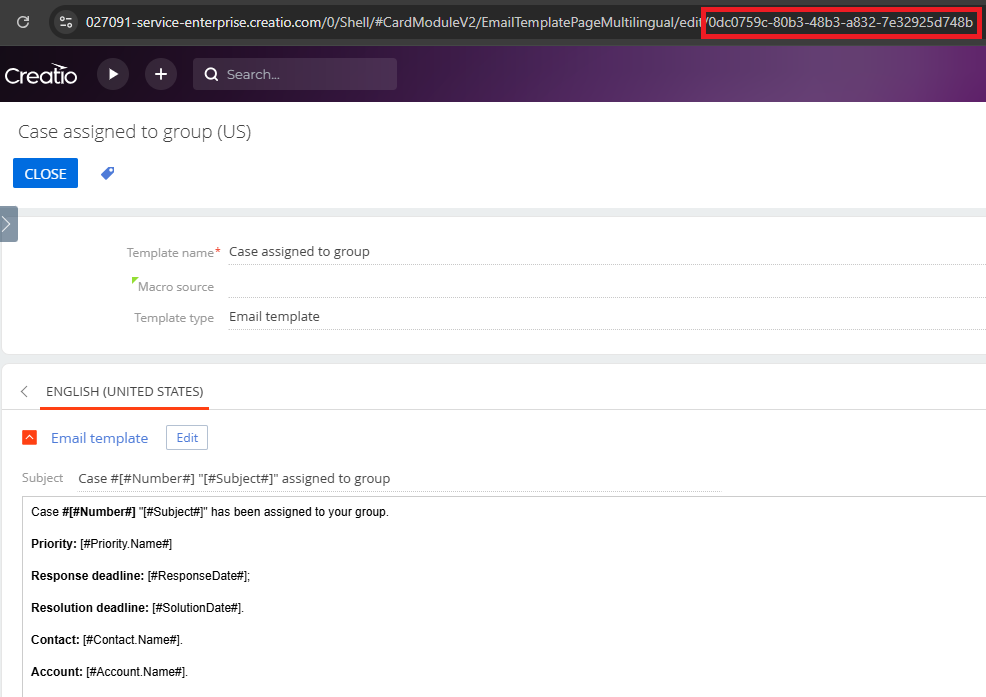
-
Access the email template information in the EmailTemplate table:
https://your-dev-site.creatio.com/0/odata/EmailTemplate(template_id)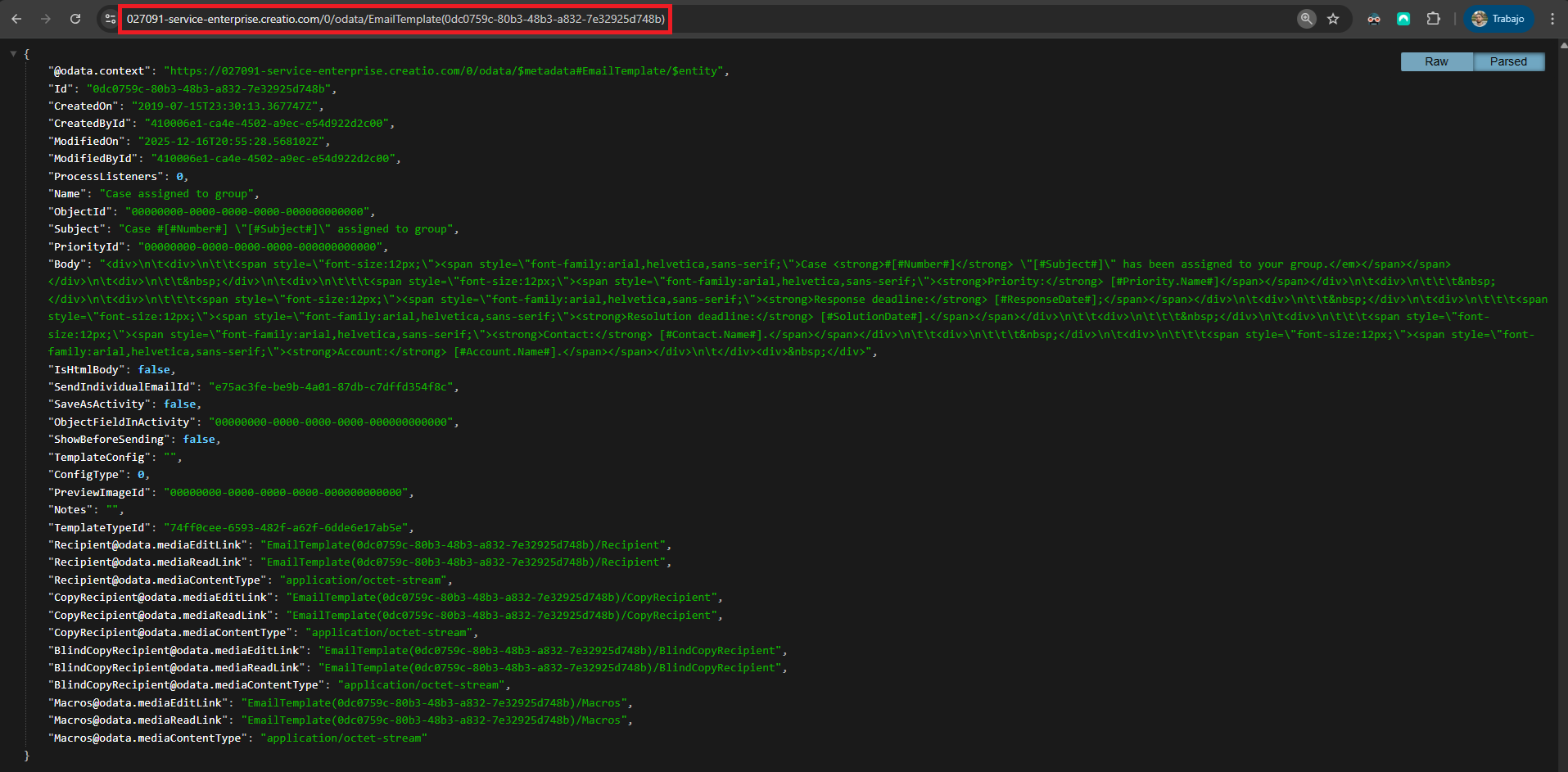
You will need to take this JSON and remove the lines that have "@odata." in the name (the first line the last 12 lines) as they are not needed for the import. If you have any fields with value "00000000-0000-0000-0000-000000000000", you will need to remove those lines too. For this example, the result parsed JSON would be:{ "Id": "0dc0759c-80b3-48b3-a832-7e32925d748b", "CreatedOn": "2019-07-15T23:30:13.367747Z", "CreatedById": "410006e1-ca4e-4502-a9ec-e54d922d2c00", "ModifiedOn": "2025-12-16T20:55:28.568102Z", "ModifiedById": "410006e1-ca4e-4502-a9ec-e54d922d2c00", "ProcessListeners": 0, "Name": "Case assigned to group", "Subject": "Case #[#Number#] \"[#Subject#]\" assigned to group", "Body": "<div>\n\t<div>\n\t\t<span style=\"font-size:12px;\"><span style=\"font-family:arial,helvetica,sans-serif;\">Case <strong>#[#Number#]</strong> \"[#Subject#]\" has been assigned to your group.</em></span></span></div>\n\t<div>\n\t\t </div>\n\t<div>\n\t\t\t<span style=\"font-size:12px;\"><span style=\"font-family:arial,helvetica,sans-serif;\"><strong>Priority:</strong> [#Priority.Name#]</span></span></div>\n\t<div>\n\t\t\t </div>\n\t<div>\n\t\t\t<span style=\"font-size:12px;\"><span style=\"font-family:arial,helvetica,sans-serif;\"><strong>Response deadline:</strong> [#ResponseDate#];</span></span></div>\n\t<div>\n\t\t </div>\n\t<div>\n\t\t\t<span style=\"font-size:12px;\"><span style=\"font-family:arial,helvetica,sans-serif;\"><strong>Resolution deadline:</strong> [#SolutionDate#].</span></span></div>\n\t\t<div>\n\t\t\t </div>\n\t<div>\n\t\t\t<span style=\"font-size:12px;\"><span style=\"font-family:arial,helvetica,sans-serif;\"><strong>Contact:</strong> [#Contact.Name#].</span></span></div>\n\t\t<div>\n\t\t\t </div>\n\t<div>\n\t\t\t<span style=\"font-size:12px;\"><span style=\"font-family:arial,helvetica,sans-serif;\"><strong>Account:</strong> [#Account.Name#].</span></span></div>\n\t</div><div> </div>", "IsHtmlBody": false, "SendIndividualEmailId": "e75ac3fe-be9b-4a01-87db-c7dffd354f8c", "SaveAsActivity": false, "ShowBeforeSending": false, "TemplateConfig": "", "ConfigType": 0, "Notes": "", "TemplateTypeId": "74ff0cee-6593-482f-a62f-6dde6e17ab5e" } - Send all this information to your QA site:
- If you want to update the existing template, send a PATCH request to https://your-qa-site.creatio.com/0/odata/EmailTemplate(template_id) with the parsed JSON in the body without the Id field
- If you want to re-create the template, remove it first and then send a POST request to https://your-qa-site.creatio.com/0/odata/EmailTemplate with the all the parsed JSON in the body.
I have moved a lot of templates from many sites using this method and it is by far the simplest for me when I want to have an exact copy between them. As you already moved the SysImage information, you won't need to migrate anything from that table using this method.
You can find more information about Creatio OData here:
- https://academy.creatio.com/docs/8.x/dev/development-on-creatio-platform/integrations-and-api/data-services/odata/basics/overview
- https://documenter.getpostman.com/view/10204500/SztHX5Qb?version=latest
Regards
Hello Jeff,
I suggest you to manually move the template from your dev-site to to your QA. You can easily download the template information and import it using OData.
- Copy the email template Id that you want to move
-
Access the email template information in the EmailTemplate table:
https://your-dev-site.creatio.com/0/odata/EmailTemplate(template_id)
You will need to take this JSON and remove the lines that have "@odata." in the name (the first line the last 12 lines) as they are not needed for the import. If you have any fields with value "00000000-0000-0000-0000-000000000000", you will need to remove those lines too. For this example, the result parsed JSON would be:{ "Id": "0dc0759c-80b3-48b3-a832-7e32925d748b", "CreatedOn": "2019-07-15T23:30:13.367747Z", "CreatedById": "410006e1-ca4e-4502-a9ec-e54d922d2c00", "ModifiedOn": "2025-12-16T20:55:28.568102Z", "ModifiedById": "410006e1-ca4e-4502-a9ec-e54d922d2c00", "ProcessListeners": 0, "Name": "Case assigned to group", "Subject": "Case #[#Number#] \"[#Subject#]\" assigned to group", "Body": "<div>\n\t<div>\n\t\t<span style=\"font-size:12px;\"><span style=\"font-family:arial,helvetica,sans-serif;\">Case <strong>#[#Number#]</strong> \"[#Subject#]\" has been assigned to your group.</em></span></span></div>\n\t<div>\n\t\t </div>\n\t<div>\n\t\t\t<span style=\"font-size:12px;\"><span style=\"font-family:arial,helvetica,sans-serif;\"><strong>Priority:</strong> [#Priority.Name#]</span></span></div>\n\t<div>\n\t\t\t </div>\n\t<div>\n\t\t\t<span style=\"font-size:12px;\"><span style=\"font-family:arial,helvetica,sans-serif;\"><strong>Response deadline:</strong> [#ResponseDate#];</span></span></div>\n\t<div>\n\t\t </div>\n\t<div>\n\t\t\t<span style=\"font-size:12px;\"><span style=\"font-family:arial,helvetica,sans-serif;\"><strong>Resolution deadline:</strong> [#SolutionDate#].</span></span></div>\n\t\t<div>\n\t\t\t </div>\n\t<div>\n\t\t\t<span style=\"font-size:12px;\"><span style=\"font-family:arial,helvetica,sans-serif;\"><strong>Contact:</strong> [#Contact.Name#].</span></span></div>\n\t\t<div>\n\t\t\t </div>\n\t<div>\n\t\t\t<span style=\"font-size:12px;\"><span style=\"font-family:arial,helvetica,sans-serif;\"><strong>Account:</strong> [#Account.Name#].</span></span></div>\n\t</div><div> </div>", "IsHtmlBody": false, "SendIndividualEmailId": "e75ac3fe-be9b-4a01-87db-c7dffd354f8c", "SaveAsActivity": false, "ShowBeforeSending": false, "TemplateConfig": "", "ConfigType": 0, "Notes": "", "TemplateTypeId": "74ff0cee-6593-482f-a62f-6dde6e17ab5e" } - Send all this information to your QA site:
- If you want to update the existing template, send a PATCH request to https://your-qa-site.creatio.com/0/odata/EmailTemplate(template_id) with the parsed JSON in the body without the Id field
- If you want to re-create the template, remove it first and then send a POST request to https://your-qa-site.creatio.com/0/odata/EmailTemplate with the all the parsed JSON in the body.
I have moved a lot of templates from many sites using this method and it is by far the simplest for me when I want to have an exact copy between them. As you already moved the SysImage information, you won't need to migrate anything from that table using this method.
You can find more information about Creatio OData here:
- https://academy.creatio.com/docs/8.x/dev/development-on-creatio-platform/integrations-and-api/data-services/odata/basics/overview
- https://documenter.getpostman.com/view/10204500/SztHX5Qb?version=latest
Regards
Alejandro González Momblán,
Thank you 100x!
I missed removing some of the odata on my first attempt at an insert but got past that pretty quickly.
Thanks again and I really appreciate this community!