


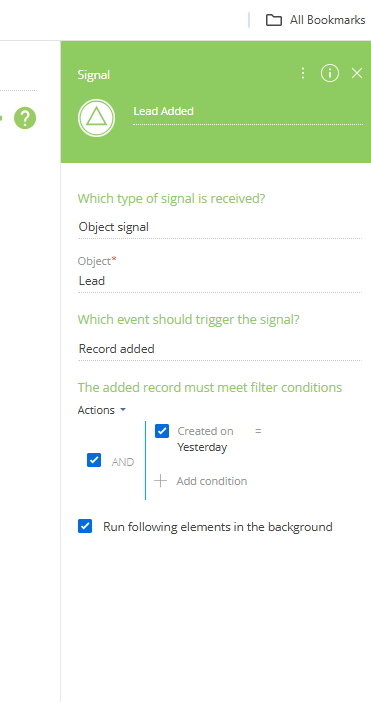
I am looking to do a business process that applies to all leads created yesterday. It does not appear when I do the signal start and filter it to leads created yesterday the process is being initiated. See below. Does anyone know how to correct that.
Like
Hello,
An Object Signal configured with the "Record added" event is triggered only when a new Lead record is created. At the time the record is created, the process evaluates the configured filter conditions. Since the Created on field is automatically set to the current date for a newly created record, it cannot satisfy the condition Created on = Yesterday. As a result, the Object Signal is not triggered.
For your use case of processing all Leads created during the previous day, we recommend using a scheduled business process instead of an Object Signal. The process can be configured to run once per day, retrieve all Lead records created on the previous day, and execute the required actions for each of those records.
For additional guidance on configuring business processes, please refer to the following Academy articles: https://academy.creatio.com/docs/8.x/no-code-customization/category/bus…
Viktor Komarov,
The purpose of the process is to create a tasks for employees to follow up with the customers that submitted leads yesterday. I was able to use the timer to create a task for the one lead but not multiple leads. Is this something you've done before and do you have any suggestions?

Hello,
The recommended approach is to configure the process as follows:
- Configure the process to start on a Timer so that it runs once per day at the required time.
- After the timer, add a Read Data element that reads all Lead records (collection of records) matching your criteria (for example, Created On = Yesterday). This element will return a collection of leads rather than a single record.
- Pass this collection to a Sub-process element. The Sub-process automatically iterates through the collection and starts a separate instance of the sub-process for each lead in the collection.
- Inside the sub-process, configure the logic for creating the task according to your business requirements and conditions. Since each sub-process instance processes only one lead, you can easily reference that lead and create the corresponding task.
This approach is typically recommended when the same action needs to be performed for multiple records, as it keeps the main process simple while allowing the sub-process to handle each lead individually.