


Please, can someone help me?.
I need to import the tables into Power BI. I've tried using the 'Connector' and I've also tried using the API. And yes, I did everything according to the documentation.
When trying to use the 'Connector', I used the "Creatio.GetBigData" instruction, which according to the documentation is appropriate for obtaining large tables. However, it doesn't work, because it keeps giving me a credential error and constantly asking me to enter my credentials. And if my credentials are accepted, it takes many hours to import a table. This connector doesn't work at least for importing large tables. And let's face it, in 99% of cases the tables are large with much... much more than 20 thousand rows. In other words, this connector doesn't work for 99% of cases.
When trying to use the API, the same thing happens, because I can't import a table with more than 20 thousand records at once, and when trying to use pagination to import a few records at a time, the process takes me several hours to completely import a single table. This is not productive, it is tiring and takes up a lot of my time to do something that should be simple.
I am being charged to bring CRM data into Power BI, please can someone help me?
Like
Hello, thank you for the detailed explanation.
What you're seeing is likely to be related to a known limitation of the Creatio Power BI connector. The connector supports approximately 20,000 records per request, and larger datasets can sometimes result in authentication or data loading errors, even when the credentials are correct.
To help resolve the issue, we recommend:
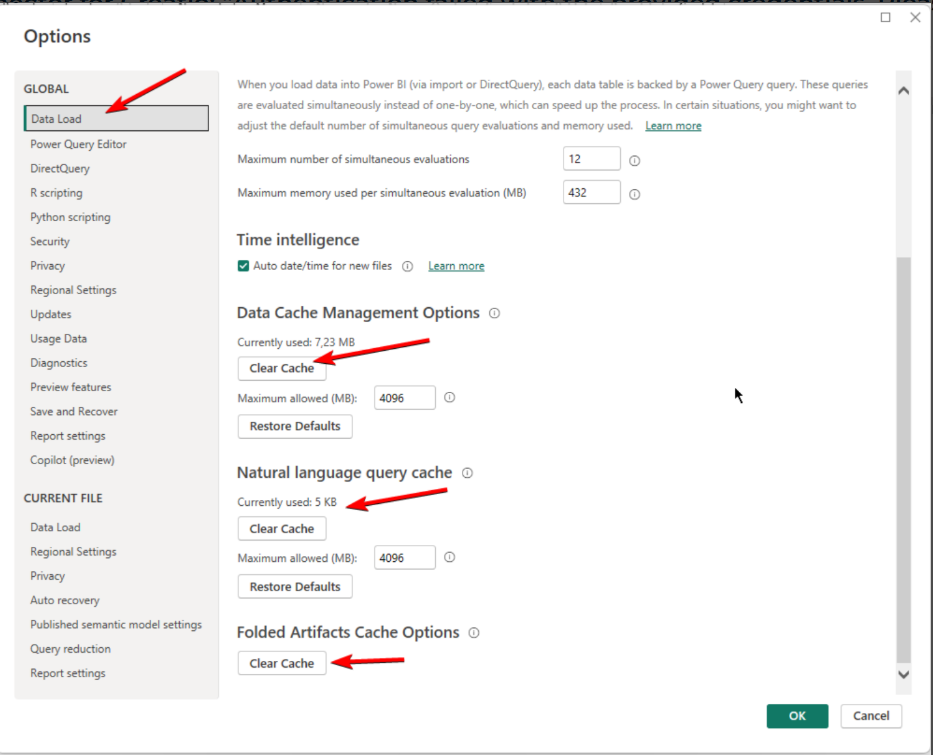
- Clearing the Power BI cache and resetting the connector permissions to remove any stored credentials and cached connection settings.
- Exporting the data from Creatio to Excel and then importing the files into Power BI when working with larger datasets.
- If available in your environment, connecting Power BI directly to the database server.
Unfortunately, the current connector does not provide a way to bypass this record limit.
Olga,
Are you telling me that Creatio CRM doesn't work with Power BI? Your suggestion to import first to a local database and then connect to Power BI doesn't make sense; I would have to consume local resources. Other CRMs on the market, like Salesforce, offer features specifically geared towards Power BI. I'm concerned that Creatio hasn't solved this problem yet.
Exporting to Excel is also equally unfeasible, as the CRM has hundreds of tables, and each table has at least 100,000 rows. Some tables have over 1 million rows. Excel isn't capable of handling that volume of data.
Raí,
Hello!
Creatio does support integration with Power BI; however, the current connector has a known limitation and supports loading up to approximately 20,000 records per request. Attempting to load larger datasets may result in data retrieval or authentication errors.
As a workaround, the connector provides the GetBigData and GetBigTopData functions, which allow you to work around the standard OData 20,000-record limitation. However, these functions still require applying filters so that each request retrieves fewer than 20,000 records. Please also refer to the Power BI Setup Guide, which describes these functions and their usage in more detail:
https://marketplace.creatio.com/sites/marketplace/files/app-guide/Power…
Hello Kateryna,
I have already tried all the connector's features. I understand that it has a limit of 20,000 requests at a time, but it keeps freezing, and the import fails constantly. I have followed the instructions in the connector's manual, and I can assure you that it is not working.
Raí,
Hello,
We have discussed this topic with RnD team. Please try clearing cache one more time .
You should clear the application cache and reset the permissions:
If this will not help , please create support ticket by sending message on mailbox support@creatio.com .