


Hi,
Could you explain a bit more how the data protection layer works ( as shown on https://www.creatio.com/ai/ai-trust-and-governance ) ? Does it anonymize data before sending to the LLM ? Is there more documentation about it ? What do we need to configure for custom fields ? How does it handle data in files ?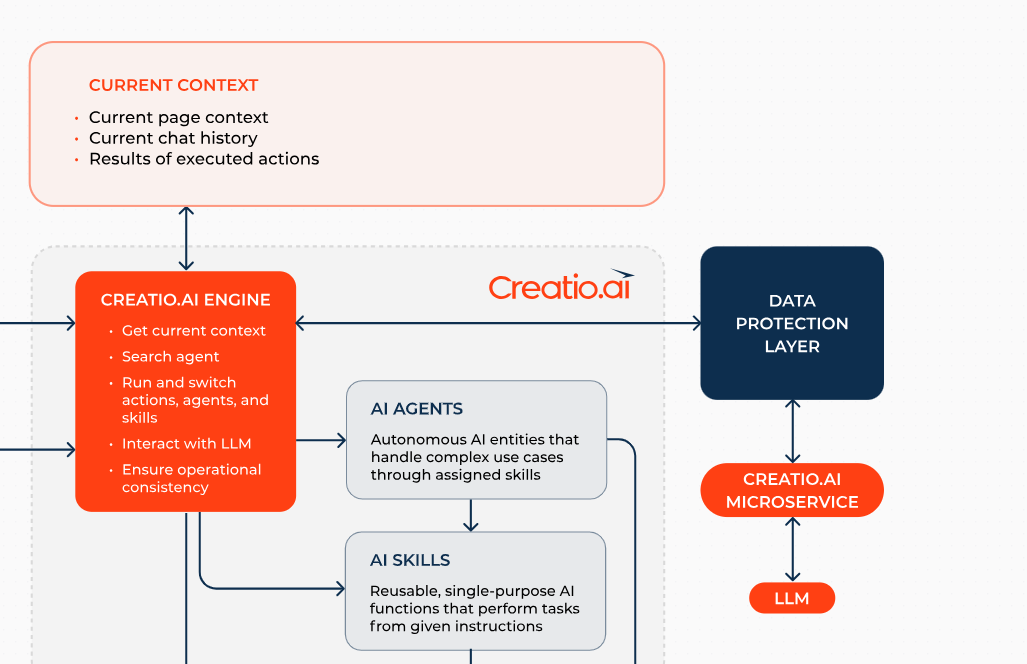
Does it work such as mentioned below ?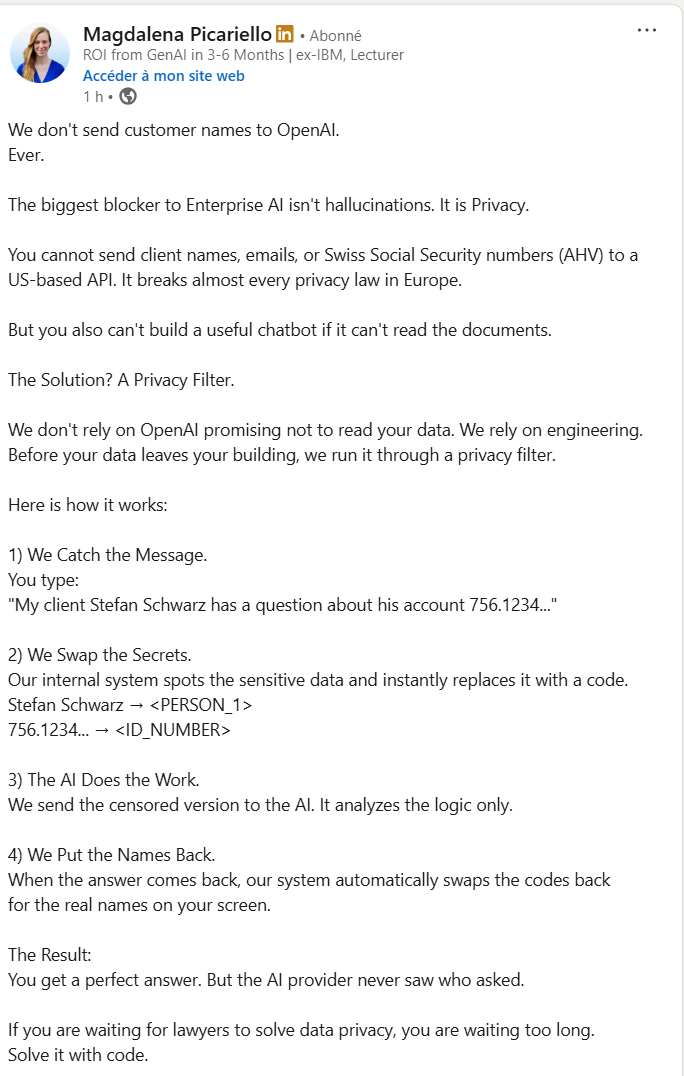
Like

Greetings,
Regarding your questions about the data protection layer in Creatio AI:
- The data protection layer does not anonymize or encrypt data before sending it to the LLM. LLMs cannot process encrypted or anonymized text by default. Data sent to the LLM may include page data, message history, and business process context, including custom fields if configured.
- Sensitive data management: There is no built-in anonymization for custom fields or file content. You are responsible for configuring which data is shared with the LLM, and for excluding or masking sensitive data as needed.
- File data: Content from files (from version 8.3+) can be sent to the LLM, but automatic anonymization is not performed. If files contain sensitive data, ensure that it is not included in the AI context.
Also, please note that data does not leave the region where Creatio is deployed.
Relevant references for documentation are:
https://academy.creatio.com/docs/8.x/no-code-customization/ai-tools/cre…
https://www.creatio.com/ai/ai-trust-and-governance
https://academy.creatio.com/docs/8.x/no-code-customization/ai-tools/creatio-ai/creatio-ai-overview
Please let us know if you have other questions.
Thank you for reaching out!
Greetings,
Regarding your questions about the data protection layer in Creatio AI:
- The data protection layer does not anonymize or encrypt data before sending it to the LLM. LLMs cannot process encrypted or anonymized text by default. Data sent to the LLM may include page data, message history, and business process context, including custom fields if configured.
- Sensitive data management: There is no built-in anonymization for custom fields or file content. You are responsible for configuring which data is shared with the LLM, and for excluding or masking sensitive data as needed.
- File data: Content from files (from version 8.3+) can be sent to the LLM, but automatic anonymization is not performed. If files contain sensitive data, ensure that it is not included in the AI context.
Also, please note that data does not leave the region where Creatio is deployed.
Relevant references for documentation are:
https://academy.creatio.com/docs/8.x/no-code-customization/ai-tools/cre…
https://www.creatio.com/ai/ai-trust-and-governance
https://academy.creatio.com/docs/8.x/no-code-customization/ai-tools/creatio-ai/creatio-ai-overview
Please let us know if you have other questions.
Thank you for reaching out!
Daria Mudragel,
Thank you very much for this clarification :) . It will help a lot to clarify the processing of data to our customers.
Could you clarify where can I find in the academy (and if not available, explain) the mecanisms/procedures to :
1) - Sensitive data management: How to mask sensitive data ?
2) File data: How to ensure that a file is not included in the AI context
Thank you,
Damien
Hi,
-
Sensitive data management: how to mask sensitive data?
At the moment, we do not apply automatic masking or anonymization before sending data to the LLM. We designed the solution so that data stays within the region where the customer’s website is deployed, and the model provider does not use customer data for training.
Also, the system reads data based on the end user’s permissions. If a user does not have read access to specific sensitive fields or records, the AI flow will not be able to read or use them either.
-
File data: how to ensure that a file is not included in the AI context?
The safest approach is to avoid sending files in the chat and to disable skills that can read or process files.
Please note: we do not send the raw file as a binary attachment to the LLM. The platform reads the file content and sends an extracted text snippet to the LLM, up to the first - 60,000 characters. If you want to ensure file content never appears in AI context, you should disable file-reading skills and enforce a process where users do not attach files in AI conversations.
I hope this information helps.
Daria Mudragel,
Thanks for the additional information Daria. It helps a lot ! 🙂
Damien