

Not able to send an PDF as attachment in send email element

Hi Everyone,
I have written an business process to send an email with attachment. I have added process file element and reading the files from "Uploaded file" object. Refer below: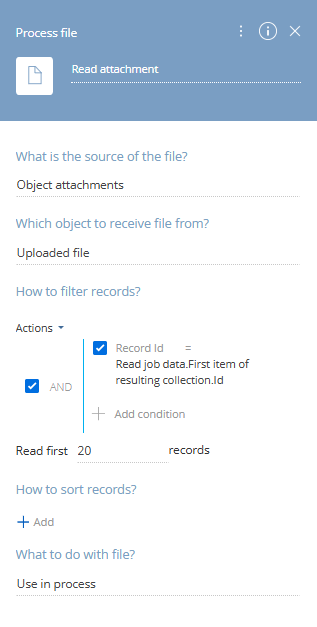
Now, in my send email element I am attaching the files received from this element.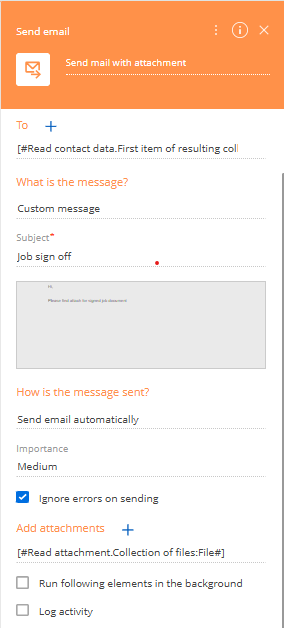
I am receiving emails, but the attachments are missing.
Can someone please let me know what I might be missing here?
Like

Hello.
From what you've shared, it looks like the process isn't retrieving the uploaded file as expected. To help pinpoint the issue, here are a few steps to take:
1. Turn on tracing for the business process. This will show whether the record ID and file attachment are actually being passed to the process at runtime.
2. Make sure that the RecordId used in the “Process file” element is the same ID as the one associated with the uploaded attachment. If you're triggering the process manually, double-check that the correct record is selected or passed in.
3. In your “Process file” element, you've selected the Uploaded file as the object. Confirm that the attachment was uploaded to this exact object. If the file was uploaded to a different object (e.g. another section or lookup), you’ll need to change the source object in the element configuration accordingly.
4. You can directly query the SysFile table (or the relevant attachment table) and check if the uploaded file is tied to the expected record ID and object schema.
Best regards,
Antonii.