


Hi,
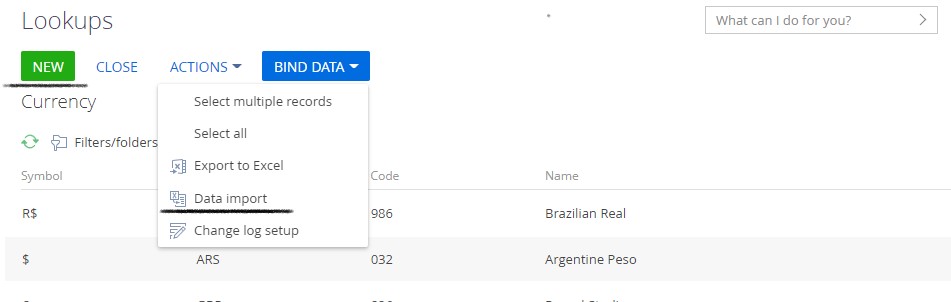
I need to hide/remove the New button and the "Data Import" option available under Actions in a lookup object.
Like
5 comments
15:56 Aug 23, 2022
Hi Bogdan,
I need to restrict import for only few specific lookup objects and not for all objects.
I see the operation permission restricts for all objects.
15:59 Aug 23, 2022
Janhavi Tanna,
Please feel free to check the similar Creatio Community post, where discussed your question:
https://community.creatio.com/questions/how-hide-or-remove-actions-sect…
Best regards,
Bogdan
16:07 Aug 23, 2022
Bogdan,
I'm unable to find the page for lookup objects in which the above mentioned code can be executed.

13:45 Nov 17, 2022
Janhavi Tanna,
Please check methods in the BaseLookupConfigurationSection schema.
In order to hide the specific action, you will need to change a Visible property:

getSectionActions: function() {
                var actionMenuItems = this.callParent(arguments);
                actionMenuItems.each(function(item) {
                    if(item.values.Caption.bindTo === "Resources.Strings.ExportListToExcelFileButtonCaption"){
                        item.values.Visible = false;
                    }
                });
                return actionMenuItems;
            }
In order to remove the specific action from the collection:

getSectionActions: function() {
                var actionMenuItems = this.callParent(arguments);
                var itemToRemove;
                actionMenuItems.each(function(item) {
                    if(item.values.Caption.bindTo === "Resources.Strings.ExportListToExcelFileButtonCaption"){
                        itemToRemove = item;
                    }
                });
                actionMenuItems.remove(itemToRemove);
                return actionMenuItems;
            }
BR,
Bhoobalan Palanivelu.
Show all comments