7.12
sales_enterprise

Hi Support, i want to ask you about web tracking, how to add tracking event in button and view number on the tracking?

Like 0

Like

1 comments

Dear Lily,

Please see the following academy article, which will help you to set up website even tracking for button click.

https://academy.bpmonline.com/documents/marketing/7-12/how-set-list-tracked-events?document=marketing&document=marketing&document=marketing#HT_chapter_tracking_website_events_setup_click

In order to count number of clicks on the button, you can create a dashboard for "SiteEvent" object. Set filters to display only particular events. Please see videos on how to create a dashboard:

https://academy.bpmonline.com/video-course/dashboards?document=team

Regards,

Anastasia

Show all comments
Button
7.12
sales_enterprise


I have a case, I want to make two or more buttons on a page.

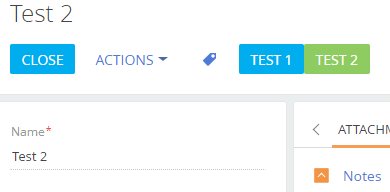
I've create it, but only one button appears, the second button doesn't appear.

When I refresh the page, a second button appears. Below screenshoot and the code that I use to make these 2 buttons.
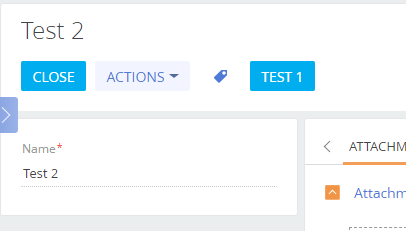
Source code in section: 

define("UsrExampleBtn1Section", [], function() {
	return {
        entitySchemaName: "UsrExampleBtn",
        methods: {
            onClickTest1: function() {
                console.log("Test 1 Button Clicked..");
            },
            onClickTest2: function() {
                console.log("Test 2 Button Clicked..");
            },
        },
		diff: /**SCHEMA_DIFF*/[
            /**
             * Element Test Button 1
             */
            {
                "operation": "insert",
                "parentName": "CombinedModeActionButtonsCardLeftContainer",
                "propertyName": "items",
                "name": "Test1Btn",
                "values": {
                    itemType: Terrasoft.ViewItemType.BUTTON,
                    caption: {
                        bindTo: "Resources.Strings.TestBtn1Caption"
                    },
                    click: {
                        bindTo: "onClickTest1"
                    },
                    "style": Terrasoft.controls.ButtonEnums.style.BLUE,
                }
            },

            /**
             * Element Test Button 2
             */
            {
                "operation": "insert",
                "parentName": "CombinedModeActionButtonsCardLeftContainer",
                "propertyName": "items",
                "name": "Test2Btn",
                "values": {
                    itemType: Terrasoft.ViewItemType.BUTTON,
                    caption: {
                        bindTo: "Resources.Strings.TestBtn2Caption"
                    },
                    click: {
                        bindTo: "onClickTest2"
                    },
                    "style": Terrasoft.controls.ButtonEnums.style.GREEN
                }
            },
            
        ]/**SCHEMA_DIFF*/,
        details: /**SCHEMA_DETAILS*/{}/**SCHEMA_DETAILS*/,
	};
});

Source code in page:

define("UsrExampleBtn1Page", [], function() {
	return {
		entitySchemaName: "UsrExampleBtn",
        methods: {
            onClickTest1: function() {
                console.log("Clicked Test Button 1");
			},
            onClickTest2: function() {
                console.log("Clicked Test Button 2");
            },
        },
		diff: /**SCHEMA_DIFF*/[
			
			/**
             * Element Test Button 1
             */
            {
                "operation": "insert",
                "parentName": "LeftContainer",
                "propertyName": "items",
                "name": "Test1Btn",
                "values": {
                    itemType: Terrasoft.ViewItemType.BUTTON,
                    caption: {
                        bindTo: "Resources.Strings.TestBtn1Caption"
                    },
                    click: {
                        bindTo: "onClickTest1"
                    },
                    "style": Terrasoft.controls.ButtonEnums.style.BLUE
                }
			},
			
			/**
             * Element Test Button 2
             */
            {
                "operation": "insert",
                "parentName": "LeftContainer",
                "propertyName": "items",
                "name": "Test2Btn",
                "values": {
                    itemType: Terrasoft.ViewItemType.BUTTON,
                    caption: {
                        bindTo: "Resources.Strings.TestBtn2Caption"
                    },
                    click: {
                        bindTo: "onClickTest2"
                    },
                    "style": Terrasoft.controls.ButtonEnums.style.GREEN
                }
			},
		]/**SCHEMA_DIFF*/,
	};
});

Is there something wrong in my code? I have checked the console, but there is no error. any solution for my case? Thanks


*SOLVED

Add all button caption in section and page

Like 1

Like

4 comments

Dear Romadan,

It seems you have forgot to add the caption "TestBtn2Caption" in Section schema.

I have added the same buttons with 2 captions both in Section and Page schemas and they are displayed correctly, but once I delete the caption in Section schema I was able to see the same results - the second button was appearing only after I refresh the page.

Please check the caption in the Section schema and make sure it is added correctly.

Oleh


I check caption 'TestBtn2Caption' in schema, and I forgot to add.

Thanks Oleh.


Dear Romadan & Oleh,


This case is same with my problem.

Thank you for this post and solved very helpful.


Ali

Dear Romadan,

Don't forget about me.

Show all comments
7.12
sales_enterprise

Hello Community! 

I need make enabled the save button after save based on a field condition.

Is that posible?

Regards,

Like 0

Like

5 comments

Hi Federico, could you please clarify what do you mean by "after save on a field condition"? What is the business task you want to solve? 

Dennis Trieskunov,

In the save: function() in js o onsave: i need after run the base logic function keep the button save in the edit page visible.

Dear Federico,

If you open BasePageV2 schema you will find there onSaved() function. At the last line of this method you can see:

this.set("IsChanged", this.isChanged());

So now you know where and how modification property is set.

You need to override onSaved() as you wish. For example:

methods: {

            onSaved: function() {

                this.callParent(arguments);

                this.set("IsChanged", true); // always show Save button after saving

            }

        },

Peter Vdovukhin,

hi,

Can you please clarify on opportunity section if any one filled details by using opportunity mini page after filling the details if you click on save i need to go directly to edit page of opportunity.

praveen n,

You need to override the basic save method, so to firstly run parent realization and save the record. Afterwards, use other basic functionality to open current record card. You can use the following code snippet:

save: function() {
				this.callParent(arguments);
				var elementUId = this.get("ProcessElementId");
				if (elementUId) {
					Terrasoft.ProcessModuleUtilities.tryShowProcessCard.call(this, {
						procElUId: elementUId,
						recordId: this.get("Id")
					});
				} else {
					NetworkUtilities.openEntityPage(this.getOpenEntityPageConfig());
				}
			}

Regards,

Anastasia

Show all comments
API
7.12
sales_enterprise

Hello, 

We have an API that we are trying to grab information from and show the information on a detail on the edit page. We are already the API is working and we are getting a response, however we are not sure how to now display the data on the detail. 

(We are using a detail because on the edit page we are grabbing a new values and passing them through parameters for a query done on the other server getting the API call.) 

Do you have any thought on this? We looked into virtual columns/tables but were unsuccessful.  

Like 0

Like

1 comments

Hello Philip,

So, you have a REST-service and you are looking for a way to display the response from it on some detail on the edit page. Do I understand you correctly?

The best way to achieve this goal is create a business process. Please, take a look on the [Call web service] process element.

You can find all needed information and examples on our academy web-site - https://academy.bpmonline.com/documents/technic-bpms/7-12/call-web-serv…

Also, you will find an example of setting up web service integration following this link - https://academy.bpmonline.com/documents/technic-bpms/7-12/calling-web-s…

Show all comments
7.11
sales_enterprise

Hello Community!

I would like get the current selected folder in the product catalog section. How can do that?

Regards,


Like 0

Like

3 comments

Hello Federico,

In order to get the current folder id in the product section, you need to subscribe to the ResultFolderFilter message in your replacing client module ProductSectionV2.

Please, see my example - http://prntscr.com/kiucak. 

Tetiana Markova,

That's work for ProductSelectionSchema? I´m trying there but is not working for me.

Federico,

I tried the same solution for ProductSelectionSchema and it didn't work for me as well.

So I looked into this case deeper and would like to share my findings with you. 


In case you need to get the current folder in the Section (for example, ProductSectionV2 as I did in my previous example) you need to subscribe for the "ResultFolderFilter" message.

Such message is published in the FolderManagerViewModel schema in the applyFolderFilters method. 

But in case of ProductSelectionSchema the publication for such message should be done in the ProductCatalogueFolderManagerViewModel, but it is missed. That's why the subscription for such message doesn't work for ProductSelectionSchema. I'll forward such question to our developers' team in order to figure out if there is any reason for that.


If such functionality is crucial for you, the only way to get it work is override applyFolderFilters method in the ProductCatalogueFolderManagerViewModel schema and implement the publication for "ResultFolderFilter" message.

So, you will need to replace the base ProductCatalogueFolderManagerViewModel in your package and modify     applyFolderFilters methods in the following way:

    applyFolderFilters: function(rowId) {

            if (this.get("IsProductSelectMode")) {

                var currentItem = this.currentEditElement;

                var currentItemType = currentItem.get("FolderType");

                var resultFiltersObject = null;

                var filtersGroupResult = Terrasoft.createFilterGroup();

                var filtersGroup = this.getFolderFilters(rowId);

                filtersGroupResult.add("FolderFilters", filtersGroup);

                var filterItem = {

                    filters: filtersGroupResult

                };

                this.sandbox.publish("UpdateCatalogueFilter", filterItem);

                var serializationInfo = filtersGroup.getDefSerializationInfo();

                serializationInfo.serializeFilterManagerInfo = true;

                resultFiltersObject = {

                    value: currentItem.get("Id"),

                    displayValue: currentItem.get("Name"),

                    filter: filtersGroup.serialize(serializationInfo),

                    folder: currentItem,

                    folderType: currentItemType

                };

                    this.sandbox.publish("ResultFolderFilter", resultFiltersObject);

            } else {

                this.callParent(arguments);

            }

        }

After that, you'll be able to receive the current folder value in the message handler method in the ProductSelectionSchema schema as was shown in my previous post. 

Please, pay attention, that it is not recommended to change the default logic of the base methods to prevent the possible issues in the future releases.

Show all comments
7.12
sales_enterprise

Hello Community!

I need in a specific page not return to the list section, when the user put save the config set in IsSilent =  true; how allways can set true?

Like 0

Like

1 comments

Dear Federico,

All you need is overriding a save() method in your page schema.

    methods: {

            save: function(config) {

                if (config) {

                    config.isSilent = true;

                }

                else {

                    config = {

                        isSilent: true

                    };

                }

                this.callParent([config]);

            }

        },

Show all comments
add detail
7.12
sales_enterprise

Hi community,

 I need to add a detail into contact with information from another entity without link to contact. for example: promos to be offer to the contact.

If it possible? How can I do? 

Have a nice weekend.

Regards

Like 0

Like

3 comments

Dear Uriel,

You can create database view and then add the detail based on it. Please note that there are some limitations in this case - you will be able to view the detail content, though there will be no option to edit it or add new data there.

Lisa

Lisa Brown,

Thank you Lisa. I miss that I need to filter the data based on some contact field. For example: get records for the new entity where some field match with contact city.

Could you help me?

Regards

Uriel,

The previous advice works with the new condition too.

Show all comments

Hello Community!

I need block the edition of one field in a detail list. I try:

        attributes: {
            // Determines whether the editing is enabled.
            "IsEditable": {
                // Data type — logic.
                dataValueType: Terrasoft.DataValueType.BOOLEAN,
                // Attribute type — virtual column of the view model.
                type: Terrasoft.ViewModelColumnType.VIRTUAL_COLUMN,
                // Set value.
                value: true
            },
            "UsrPorcentaje": {
            	enabled: false
            }
        },

but not works. Any idea?

http://prntscr.com/kd46x3

Like 0

Like

3 comments

Solved adding the function:

	getCellControlsConfig: function(entitySchemaColumn) {
					debugger;
						if (!entitySchemaColumn) {
							return;
						}
						var columnName = entitySchemaColumn.name;
						var enabled = (entitySchemaColumn.usageType !== this.Terrasoft.EntitySchemaColumnUsageType.None) &&
								!this.Ext.Array.contains(this.systemColumns, columnName);
						var config = {
							itemType: this.Terrasoft.ViewItemType.MODEL_ITEM,
							name: columnName,
							labelConfig: {visible: false},
							caption: entitySchemaColumn.caption,
							enabled: enabled
						};
						if (columnName === "MyColumn") {
							config.enabled = false;
						}
						if (entitySchemaColumn.dataValueType === this.Terrasoft.DataValueType.LOOKUP{
							config.showValueAsLink = false;
						}
						if (entitySchemaColumn.dataValueType !== this.Terrasoft.DataValueType.DATE_TIME &&
								entitySchemaColumn.dataValueType !== this.Terrasoft.DataValueType.BOOLEAN) {
							config.focused = {"bindTo": "Is" + columnName + "Focused"};
						}
						return config;
					},


Federico Buffa,

Hi Frederico or anyone else,

Can you please provide more details on the function you added?

I tried coping it but get compiler error for those: '&&'

I need the exact same thing you were trying to do, if you can help it will be very helpful.

Thanks,

Chani

Sollved by removing the '&&' and left just 1 & instead

Show all comments
7.12
sales_enterprise


Hello Community!

Is posible add a filter for a lookup field in a edit list grid? I need filter the lookup base a condition for each row.

Also, is work the dependencies attribute, to execute a function on the field change?

Regards,

https://academy.bpmonline.com/documents/technic-sdk/7-12/adding-detail-editable-list

Like 0

Like

7 comments

Dear Federico,

There was a similar question here about detail filter.

As to your second question, could you explain what do you mean?

Peter Vdovukhin,

 Is not the same question a need filter the items inside of lookup based on the primary id of the row.

Is like add the confg on the attributes to the field in the page edit but in the detail.

And the second question is like add a OnChage on the field of the grid.

http://i.prntscr.com/_BWbe4t1SUymnWMfUvsN-w.png

If speak about the detail filter I still don't see the difference. Could you add more information?

Answering your second question. There is no anything special between changing something in a detail and edit page. So you will need to create an attribute with dependencies and to set what method will fire when the attribute is changed. For example here is an example for an edit page

Or you may look at BaseProductDetailPageV2 schema:

attributes: {

...

                "TaxAmount": {

                    name: "TaxAmount",

                    dataValueType: Terrasoft.DataValueType.FLOAT,

                    dependencies: [

                        {

                            columns: ["Amount", "DiscountTax"],


                            methodName: "setTaxAmount"

                        }

                    ]

                },

...

}

...

methods: {

...

setTaxAmount: function() {

                    var taxAmount = this.calcTaxAmount();

                    if (this.get("TaxAmount") !== taxAmount) {

                        this.set("TaxAmount", taxAmount);

                    }

                },

...

}

...

diff: {

...

{

                    "operation": "insert",

                    "name": "DiscountTax",

                    "parentName": "AmountBlock",

                    "propertyName": "items",

                    "values": {

                        "bindTo": "DiscountTax",

                        "enabled": false,

                        "layout": {

                            "column": 12,

                            "row": 3,

                            "colSpan": 12

                        }

                    }

                },

...

}

Peter Vdovukhin,

 But this is work in a editble list detail? I add the dependencies attribute in a editable list detail and not execute de function.

Yes, It works for me. I tested this yesterday. I told you, check BaseProductDetailPageV2 schema. The setTaxAmount method will be launched when you change some of the dependent columns in an order in a product editable list

Peter Vdovukhin,

In the BaseProductDetailPageV2 the attributes is work on the edit page. I don't have a edit page. I need put the filter in the lookup listed in the editable list detail to filter the field in the image, the equivalent of ProductDetailV2. Exist a example of that?

http://i.prntscr.com/_BWbe4t1SUymnWMfUvsN-w.png

Dear Federico,

Just try it and you will see it works. You may also use Detail wizard from the parent page to add some business rules such filters and making fields editalble and you will see that these rules work in an editable list and stored in a DetailPageV2.

Show all comments
7.12
sales_enterprise

Hello Community!

Is posible set a default active tab when a page is init? Not remember the last tab active.

Like 0

Like

1 comments

Dear Federico,

Yes, it is possible. Lets take CasePage as an example. You will find the method setDefaultActiveTab here.

Simply delete the if part and change the "CaseInformationTab" to any tab you need. This tab will be displayed by default.

Feel free to find similar logic in other pages. 

Oliver

Show all comments