Hi Community,

How can I dynamically replace the file name of the report generated in printable, lets say for example i want to put some transaction code or current date time it was generated.

Like 0

Like

4 comments

Dear Fulgen,

As for now this logic is not implemented in out-of-the-box version of the application and we do have a correspondent problem registered for our R&D team and it is in "Accepted" status.


You need to create a replacing schema for PrintReportUtilities and overwrite the current logic. This is the out of the box logic used for naming the file:

    getCaption: function() {

            var baseCaption = this.get("Caption") || this.get("NonLocalizedCaption");

            return baseCaption + ((this.get("ConvertInPDF") || this.isDevExpressReport()) ? ".pdf" : ".docx");

        },


Also you can use function downloadReport (in PrintReportUtilities object):

function downloadReport(caption, key) {

        var report = document.createElement("a");

        report.href = "../rest/ReportService/GetReportFile/" + key;

        report.download = caption;

        document.body.appendChild(report);

        report.click();

        document.body.removeChild(report);

    }

You can try adding this function to section edit page and develop additional logic for report generation.

Best regards,

Oscar


Oscar Dylan,

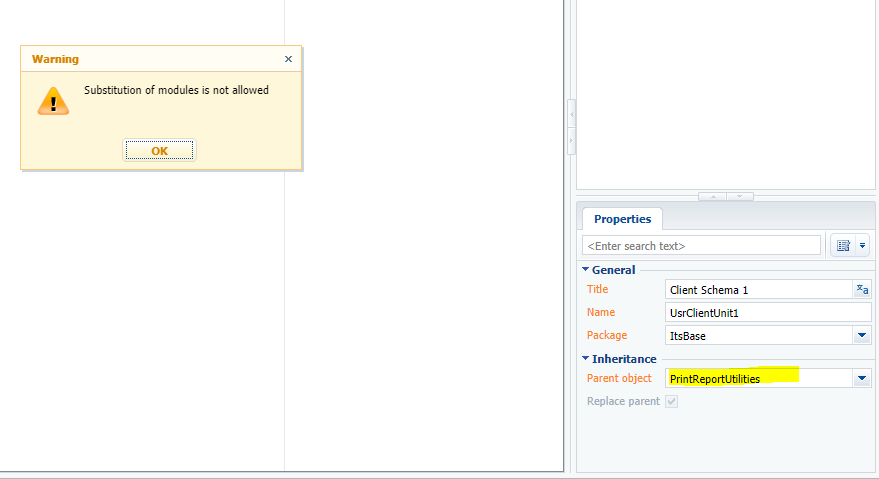
Hi Oscar Thanks for your reply, I tried to create a replacing client module for

PrintReportUtilities but there is a warning message "Substitution of modules is not allowed". Is it possible?


Oscar Dylan,

I also used this code on my edit page and changed the report.download to my file name but the file name is not replacing

function downloadReport(caption, key) {

        var report = document.createElement("a");

        report.href = "../rest/ReportService/GetReportFile/" + key;

        report.download = caption;

        document.body.appendChild(report);

        report.click();

        document.body.removeChild(report);

    }


Fulgen Ninofranco,

Try to find the answer in the article by the link below.

https://academy.bpmonline.com/documents/technic-sdk/7-13/client-modules

Show all comments
report designer
report script
Error Message
7.13_()
studio

Hi,

There is an error message which occurring on save of script in report designer.

I'm not sure what is missing. Any help will be highly appreciable.


Regards

Like 0

Like

2 comments

it's hard to say what's wrong by the screenshot. Somehow the system can't find the report schema. Try to find an answer in the development guide

https://academy.bpmonline.com/sites/default/files/documents/docs_en/technic/SDK/7.10.0/bpmonline_development_guide.pdf

Eugene Podkovka,

Thanks. Its already resolved


Regards

Show all comments
Send email to contact on case status change
7.13_()
studio

Hi Community,

I just noticed when I am creating Case and updating Case status upon checking the process log, Send email to contact on case status change BP is not triggered. Any idea what causes the isse?

Like 0

Like

1 comments

Dear Fulgen,

As many other processes this process is hidden from Process Log. It will appear there only if it ends with error so absence of this process means that everything is fine. 

Best regards,

Angela

Show all comments

Hi Community,

Any Idea how can i fix this issue, I want to modify the OOB send email to case assignee business process, but when I saved it as new version I am getting "Parameter StringComparison not found" error, please take note I have not modified any process element yet, i just saved it as new version

Like 0

Like

1 comments

Dear Fulgen, 

To fix this in formula Change subject you would need to change

"([#First activity.First item of resulting collection.Subject#]).IndexOf("RE: ", StringComparison.OrdinalIgnoreCase) == 0 ? ([#First activity.First item of resulting collection.Subject#]) : "RE: " + ([#First activity.First item of resulting collection.Subject#])"

to 

"([#First activity.First item of resulting collection.Subject#]).ToLower().IndexOf("RE: ".ToLower()) == 0 ? ([#First activity.First item of resulting collection.Subject#]) : "RE: " + ([#First activity.First item of resulting collection.Subject#])"

After that you would get an error in conditional flow Owner = Modified. 

You would need to read case from starting signals and replace this conditional flow to conditional flow comparing Owner and Modified by for the read case. 

Best regards, 

Dennis

Show all comments
sysadminunit
permissions
7.13_()
studio

Hi Community,

Any Idea how I can give read permission to access SysAdminUnitPage to non Admin Users (Please refer to first screenshot below). I am also triying to give default read permission but the new button is disabled (Please refer to second screenshot below).

Like 0

Like

5 comments

Dear Fulgen,

If you want certain role to access users section you can use CanManageUsers operation permission. We do not recommend enabling or changing access right for System administration object. Users with CanManageUsers will be able to view users and change their login/passwords. The will not be able to change licenses or roles.   

Best regards,

Angela

Angela Reyes,


Hi angela, thank you for your reply, where can i find this CanManageUsers? can you show me any example

Fulgen Ninofranco,

It is located in operation permissions section: 

http://prntscr.com/n26sj3 and has code CanManageUsers

Hi Angela, Thanks for your reply, I alredy tried but it seems it is giving all the permissions, what I want is only read permission. Any Idea how can I achieve this?

Fulgen Ninofranco,

Please note that SysAdminUnit is a system table and almost all of other table are in connection with SysAdminUnit, so making any changes to this section is a pretty dangerous operation.

Information that is stored in this table is intended for system administrators and should not be processed by a regular user.

However, you always can create your own section and fill it with data from the "System users" section via business process.


Best regards,

Alex

Show all comments
custom button
edit view
7.13_()
studio

Hi,

I'm following this article (https://academy.bpmonline.com/documents/technic-sdk/7-12/how-add-button…) and its working but only showing 1 button

in code I tried to add 2 buttons but only the last button is showing


Any help will be highly appreciable.


Regards

Like 0

Like

4 comments
You must use unique "name" in diff

ex:

                {
                    "operation": "insert",
                    ..
                    "name": "Button1",
                    ..
                },
                {
                    "operation": "insert",
                    ..
                    "name": "Button2",
                    ..
                },
                ...


Hello Muhammad,


There is no limit of custom controls on edit page in bpm'online, you are able to add as much customizations as you need.

Please note on Dmitry`s comment, he is right, every control that is added to the edit page should have unique name to prevent collisions.

Please, in future, read articles with instructions more attentively :)

Hello Alex_Tim,

Thank you for suggestion. But kindly note that I realized and issue was already resolved.

If possible please help on other issues I posted I will be very thankful.


Regards

Show all comments
custom button
customer portal
dashboard
7.13_()
studio

Hi,

I need a custom button on dashboard of customer portal.

On click for example Contact create form should appear.


I have another idea, OOB on customer's dashboard there is OOB dashlet of Case with "New" button. On click the form is populating and we can create new case.

But on custom dashlet of custom section "Multi Currency" there is no "New" button. Any idea for enabling this button?


Any help will be highly appreciable.


Regards

Like 0

Like

1 comments

Hello Muhammed,

What I recommend to do in this case is to understand how the "new" button is already added on a existing dashlet. 

At first, I recommend to use the chrome debugger and try to search the name of the button in the entire client code (ctrl+shift+f), so you will find where it is added.

Then, after analysis of the code, something similar for your custom object should be implemented.

Also, don`t forget to enable minipage usage in custom section settings.

Hope, my answer will help you.


Regards,

Alex

Show all comments
custom button
7.13_()
studio
customer portal

Hi Community,

Any idea how we can add a custom button on Portal Dashboard same way as adding custom button on edit page. 


Like 0

Like

1 comments

Hello Fulgen,


Unfortunately, there is no possibility to add a custom button on dashboard as you do it on edit page.

I suggest to add a new action in "Actions" dropdown instead. https://academy.bpmonline.com/documents/technic-sdk/7-13/how-add-section-action-handling-selection-several-records

Show all comments
custom button
printables
customer portal

Hi Community,

I have a custom section, I added a custom button on edit view and button is visible on CRM and Customer portal as well.

On CRM that button is functional and on click the pdf is successfully downloading.

But on Customer portal that button is only visible and on click the pdf is not downloading.

from this post ( https://community.bpmonline.com/articles/how-show-printables-print-butt…) I come to know that I need to apply some permissions to enable OOB printable functionality for customer portal. I tried to apply all from this post but that button is still not functional and not downloading pdf (only button is appearing on edit view)

but since I'm not using OOB printable and I'm using custom button so may be there will be another solution to fix this issue like we need to add some code for enabling that button to download.


Like 0

Like

1 comments

Please deploy the application locally and debug the functionality. This way you'll find what exactly wrong. 

https://academy.bpmonline.com/documents/technic-sdk/7-13/server-code-de…

The main idea is that you need to give portal users access rights for all objects that you use in the printables. 

Show all comments

Hi Community,

How to disable the Sort by and Select fields to display options for All Portal Users. We want to set a standard column layout for them, we don't want them to access this functionality


Like 0

Like

4 comments

Hello. You can add method to your section file:

methods: {

...

    getViewOptions: function () {

        if (this.isSspUser()) {

            return this.Ext.create("Terrasoft.BaseViewModelCollection");

        }

    }

...

},


It will hide all view options for portal users.

Hello Fulgen. 

I'm trying to do the same, but i see your question doesn't has answer.

Pedro Longa,

Please check the answer Alexander provided Fulgen with:

Hello. You can add method to your section file:

methods: {

...

    getViewOptions: function () {

        if (this.isSspUser()) {

            return this.Ext.create("Terrasoft.BaseViewModelCollection");

        }

    }

...

},

It will hide all view options for portal users.

Best regards,

Oscar


Oleg Drobina,

Hi Oleg i need something similar about it,

Change the getViewOptions function so that only the Supervisor could change the column layout of the different sections for Employee Users


any advice?

Show all comments