organizational roles
functional roles

 Set up permissions:

a. Create 3 new roles: “Department employee”, “Financial controller”, “Department manager”.

b. Set up operation permissions in the object of the “Returns” section:

                      Users with the “Department employee” role must have all permissions in the section, except for permission to delete records.

                      Users of the “Financial controller” role have full access.

                      The rest of the users only have permission to view data in the section


in this case i need to know the 3 roles that are need to be created are organizational roles or functional roles .


thanks

Like 0

Like

3 comments

Dear Ibrahim, 


Could you please provide us with detailed information on your task?


Thank you in advance!


Best regards,

Bogdan.

Bogdan,

it's a task in while I'm practicing and this is all info about the roles 

how could i know if these are organizational role or functional role

thanks

Dear Ibrahim Nour Eldin,


Please find the information about Functional roles and Organizational roles in our Creatio Academy.


Thank you for your post.


Best regards,

Bogdan.


Show all comments
organizational roles
roles
functional roles

Hi All,


I need to get the contact organizational role hierarchy, i.e., Parent roles of a Contact.

Like 0

Like

3 comments

Hello!


The hierarchy can be set up in the Organizational roles section. Organizational roles are user groups that represent company units, departments, or subdivisions in the organizational structure. More detailed information can be found in the User management - Organizational roles Academy article. 


Otherwise, you can create a relationship diagram directly on the Contact page that will show all internal and external contact and account relationships as a chart. The relationships can be depicted with either a vertical hierarchy or a horizontal connection. Please take a look at the Relationships between accounts and contacts Academy article. 


Best regards, 

Olga.

Can we get this on server side using c#?

I Set up the organizational role hierarchy.

for example we have a field like RM on Lead page which is contact lookup and we need to get the organizational role hierarchy, i.e., Parent roles of a selected RM(contact lookup).

i.e., RM >> Branch Manager >> Cluster Head >> IBU Head.

Hi Yelda, 


In the SelectType parameters, indicate you choose parents or children.


This is enum : 


public enum HierarchicalSelectType

{

Children,

Parents

}


Best Regards, 


Bogdan L.

Show all comments

Hi Community,


How can I move the existing functional role under another existing functional role.


Based on the below, currently CC agent and CC Base are on the same level, now I wanted to put CC agent under CC Base. It is possible to that if we are adding a new role, but for existing one how can I do that? I do not want to delete a Role and re-create it since there are already lots of users configured under that role.


Like 2

Like

2 comments

Hello Fulgen,


Hope you're doing well.


At the moment, there is no such functionality due to the out-of-the-box logic, as far as changes of the parent role in this way can cause various errors during actualization of roles. So as for now changing of roles on the code level is too risky and demands changes in core.


We have informed our R&D department about this case so they could consider enhancing the following functionality in the upcoming releases.


Best regards,

Roman

Any update on the ability to do this? Restructuring for clarity would be useful for us.

Show all comments
functional roles
7.15_()
Studio_Creatio_()

Hi Community,

How I can convert existing functional role as Portal Functional Role?

Like 0

Like

0 comments
Show all comments
functional roles
organizational roles
Export Data
data import
7.14_()

I would like to know how I can export and import the data I created in the Organization roles and fuctional roles. Thanks!

File attachments
Like 0

Like

4 comments

Dear Marcelo, 

Unfortunately, there is no possibility to export or import data created in the Organization and Functional roles. We recommend setting the roles manually. 

Best regards, 

Olga. 

Thanks for the feedback. To migrate from one environment to another (Example DEV to PROD), has to be done manually? Thanks

Dear Marcelo, 

Yes, the best practice is to do it manually. 

Kind regards, 

Olga. 

Thanks Olga!

Show all comments
functional roles
portal users
7.13_()
studio

Hi Community,

How we can add functional roles to Portal Users?

Thanks


Like 0

Like

1 comments

Hi Fulgen,

You can fallow the below link for creating the portal users 

https://academy.bpmonline.com/documents/portal/7-14/add-portal-users#XREF_48563

If you observed in below screenshot there is an option called function roles you can add there.

Regards,

praveen

Show all comments
Activity
tasks
Owner
functional roles
7.14_()
studio

Hi,

I am trying to set-up the activity tasks and the owner of that activity, as in the users who get notified of that activity, should be the users who belong to one of the functional roles in the organisation.

Question 1: Is it possible to do that?

Question 2: How to do that?

P.S. I did try inputting one functional role from the lookup Roles(view) but then the process goes into the ERROR stage when it reaches that task.

Like 0

Like

6 comments

Hello!

Could you please specify, how do you want to notify about the task? Did we clearly understand - you want to notify both owner and other users, which belongs to one of the functional roles? Maybe you can attach a screenshot of your business process?

Best regards,

Anastasia

Anastasia Polo,

In the process below, I want to all of the users of a functional role to get notified of the task and then anyone can go in the record and perform the task.

Can that be done?

Regards,

AK

Hello!

It is possible to set up a described process. Firstly, use please "Add data" element instead of "Perform task" element http://prntscr.com/nx4e36, after that use another "Add data" element with such settings http://prntscr.com/nx4gcc, http://prntscr.com/nx4glm. This part of the business process will create an activity and send a notification for users of the chosen functional role (System administrators in the example). If you want to continue the business process running after completing an activity, use the "Wait for signal" element http://prntscr.com/nx4jqd.

Best regards,

Anastasia

Hi,

Thanks for your response.

I didn't try it yet but looks like it should work.

Thanks again. :)

AK

Hi,

I am trying this now for one of our clients but it's not giving any notification for the selected roles.

Attaching the screenshots of the Process and the Process log. You'll see that the process did run but it did not give the notification to the users in the roles selected.

Process: https://prntscr.com/ogm9iq https://prntscr.com/ogm9g4 https://prntscr.com/ogm9dj https://prntscr.com/ogm9a1 https://prntscr.com/ogm94q https://prntscr.com/ogm8zn

Process Log: https://prntscr.com/ogm9ok


Regards,

AK

Hello!

To resolve this issue we need access to this process. Please submit a case to the support team (support@bpmonline.com) and we will investigate the issue.

Best regards,

Anastasia

Show all comments
functional roles
organizational roles
edit page

I'm trying to limit the selection of a person by their organizational role.  Contact and Employee sections don't surface the roles associated with the user. Trying to assign the User in roles or similar lookup generates the error, "Property 'Displayed value' is not set in the selected lookup. You cannot select values from this lookup without this property. Set this property in 'Advanced settings' section and try again."  How do you filter a Lookup column in an Edit page to only display contacts or users with a specific organizational or functional role?

Like 0

Like

1 comments

Dear Janine,

It is not possible to display the user's roles on his contact page. However, if you need to filter the contacts by their roles, as a workaround you can make up the following filter in the section - http://prntscr.com/n0zv8p

You can also modify the highlighted part and choose the required roles that will be displayed.

Best regards,

Dean

Show all comments
Discussion
functional roles
organizational roles
roles

Enable drag and drop or list sorting and in/outdenting to reorganize Organizational roles and Functional roles.  This will enable easily correcting mistakes in the the structure and implementing changes due to changes in a company structure.

4 comments

Dear Janine,

Thank you for this idea! We do have this problem of creating of graphical hierarchy of roles so to make the process of modification much more easier and quicker registered for our R&D team and deploying of such logic is planned for one of future versions. Your idea raised the priority of this problem and we can hope seeing this functionality in one of nearest versions! Thank you for helping us to make our application better!

As for now changing of roles on code level is to risky and demands changes in core, so lets wait for an update from our R&D team.

Best regards,

Oscar

Is there any way to make the re-organization happen? If we do this via scripts, is the SysAdminutUnit table the only one involved?

++++

Sasori Oshigaki,

Greetings,

In theory, you can modify the roles using SQL scripts; however, this process requires caution and a good understanding of the database structure.

Key Tables:

The main tables responsible for organizational roles and their hierarchy are:

  • SysAdminUnit: contains information about system roles and users.
  • SysAdminUnitInRole: links users to roles.
  • SysAdminUnitRole: defines functional roles assigned to users.

To modify the role hierarchy, the ParentRoleId field in the SysAdminUnit table is crucial, as it determines the hierarchical structure.

Risks of Direct Changes:

  • Data consistency issues: Direct updates may result in inconsistencies and performance problems.
  • Not recommended for production: Such changes should only be performed in a test environment after thorough validation.
  • No built-in UI support: Creatio currently does not offer interface-based tools for drag-and-drop or hierarchy reordering of roles.

Although we do not recommend using SQL scripts for production environments, you may apply them for internal testing if needed. Our general recommendation is to wait for full platform support via the UI.

Important Before Running:

  • Back up your database.
  • These scripts modify the ParentRoleId, which defines the role structure.

Example Scenario:

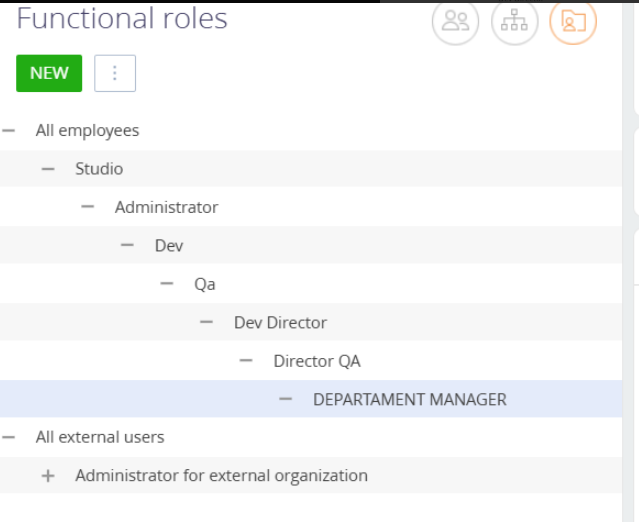
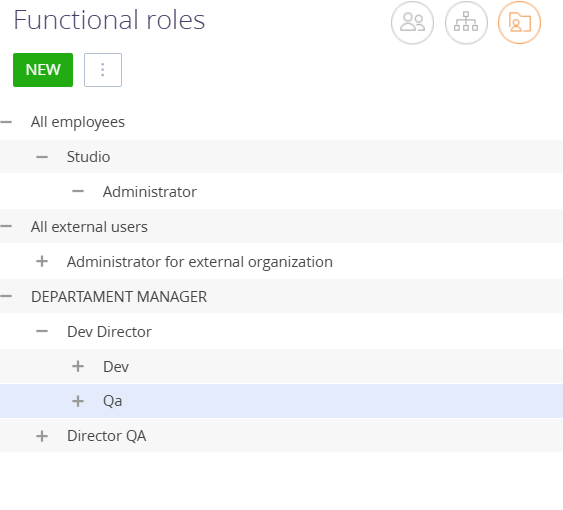
You want the role hierarchy to be:

  • DEPARTAMENT MANAGER at the top,
  • Dev Director and Director QA under it (same level),
  • Dev and Qa under Dev Director (same level).


Role Links:

Role \ New ParentRoleId

DEPARTAMENT MANAGER \ NULL (top level)

Dev Director \ 62ed9c49-9475-4a96-bca8-648822800b9d

Director QA \ 62ed9c49-9475-4a96-bca8-648822800b9d

Dev \ bc11e256-8578-4642-954b-1e60893a0715

Qa \ bc11e256-8578-4642-954b-1e60893a0715

SQL Script:

-- DEPARTAMENT MANAGER — top-level (no parent)
UPDATE public."SysAdminUnit"
SET "ParentRoleId" = NULL
WHERE "Id" = '62ed9c49-9475-4a96-bca8-648822800b9d';
 
-- Dev Director and Director QA — children of DEPARTAMENT MANAGER
UPDATE public."SysAdminUnit"
SET "ParentRoleId" = '62ed9c49-9475-4a96-bca8-648822800b9d'
WHERE "Id" IN ('bc11e256-8578-4642-954b-1e60893a0715', '24e0365f-68f5-4c9a-9106-43bb48e638f7');
 
-- Dev and Qa — children of Dev Director
UPDATE public."SysAdminUnit"
SET "ParentRoleId" = 'bc11e256-8578-4642-954b-1e60893a0715'
WHERE "Id" IN ('9937d0b2-ba45-4f47-9ea3-45328553ff00', 'aa929414-46e7-4e4e-8211-6e92a688d57f');

Outcome:

  • DEPARTAMENT MANAGER becomes the root.
  • Dev Director and Director QA are on the second level.
  • Dev and Qa are on the third level, both under Dev Director.


    Regards,
    Orkhan
Show all comments
roles
functional roles
organizational roles

We're setting up our functional and organizational roles and have a growing company.  How can I change the hierarchy of organizational and functional roles without deleting and recreating the roles? If I delete a role, how will that affect the processes that reference it?

Like 0

Like

3 comments

Dear Janine,

First of all please don't delete "All employees" and "System adminsitrators" roles from the application, because they are essential for correct work of the system. Also we don't recommend deleting of roles, just rename them if you have a need to do it (just open roles tree and use a role you need to rename and after that you will be able to do that in this field http://prntscr.com/mwg2ct). If you delete a role then you will need to find all processes where it is used and add newly created role. In other words - if you delete a role that is used somewhere then it will prevent processes from being executed. Please rename available roles or create your new ones. Meanwhile we have a problem registered for our R&D team about displaying of roles and creating of ways to easy delete them if it is needed. I will notify them about your request so to raise the priority of this problem. Thank you for helping us to make our application better!

Best regards,

Oscar

Oscar Dylan,

Renaming a role doesn't work when the role needs to be in a different location in the hierarchy.  I would want the processes to fail and need to be updated if the wrong people are being assigned to roles.

Janine White,

Then please create a separate role that you need to use and find all processes where you used the previous role and update the business process so to use newly created role. This is the only way how it can be done now.

Show all comments