I have implemented a Business Process that sends an email notification whenever a user is @mentioned in a Case feed. While the emails are sending successfully, they are not appearing in the Case Timeline tab.
How can I properly associate the Email activity created by my process with the parent Case object so that these notifications are logged and visible in the Timeline widget?
To ensure that email notifications sent by your business process are visible in the Case Timeline:
1. Please verify that the Activity (Email) record generated by the process includes a direct association with the Case. The "Case" field (CaseId) of the Activity must be set to the Id of the related Case when creating the Email activity. 2. Additionally, check that the "Log activity" flag is enabled in your email element within the BP. If the checkbox is selected, the process will create a corresponding activity when executing this process step. Selecting the checkbox will make the Email connections field group available.
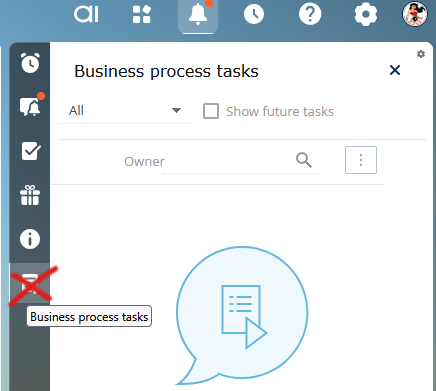
Unfortunately, currently it is not possible to remove/hide the Business process tasks icon from the Notifications panel. However, we have registered this idea for the responsible R&D team and they will review the possibility of changing this logic in future.
Whenever certain event occurs, send notification to
Group of people
Only the assignees of the case
Some of these notification may contain extra description along with them.
Current approach
I am doing 2 different things
If i need to send a notification to individual I am adding a record in the notification table. Con of doing this is I am unable to give extra information sort of description, even though I am filling the Popup title and description it is not showing up.
If I need to send to a group of people I am using a business process and use a Mini Page for description. Con: Process keeps on running till someone closes the page for everyone.
Here's a potential approach to improve your current process:
For Individual Notifications:
Instead of directly adding records to the notification table, consider using a business process that dynamically populates the notification title and description fields. This ensures that the extra information is displayed correctly.
For Group Notifications:
To avoid the issue of the process running until someone closes the mini page, you can use a combination of a business process and a custom notification mechanism. For example:
Use a business process to trigger the notification.
Instead of relying on a mini page, send the description as part of the notification content directly to the group members.
Unified Approach:
Create a custom notification mechanism that supports both individual and group notifications. This mechanism can include fields for title, description, and recipient type (individual or group). A business process can then handle the logic for sending notifications based on the recipient type.
I'm wanting to setup a business process so that when a user is mentioned in the feed they receive an email notification. Also, there may be instances where more than 1 user is mentioned in a single comment and I'd want each person to get an email notification in that case.
I've tried creating this business process and am stuck as it sends the notification to the person who created the comment in the feed, not the user mentioned in the comment. Any tips on this are greatly appreciated!
Thanks so much for the assistance! I do have one follow up question, what is the best way to limit this process to a certain object? We only want to turn on these notifications for one object, not every object.
If we are talking about the cloud instances and scheduled updates of the sites then we already have the notification procedure for this. The clients are being notified by email about the upcoming update of the site a few days before the update.
1. If you are not receiving notifications about the upcoming updates for a specific site, please contact support team via support@creatio.com as such situation should be checked individually. Such situation may occur if your contact is not added to the list of recipients of such emails for a specific site.
As for the 2nd and 3rd points we'd like to ask you to contact your responsible manager for further assistance, as they could provide you with more detailed information.
Thank you for sharing your idea with us! We've created a query for a responsible R&D team to consider implementing this functionality in the nearest future.
Unfortunately we don't have a ready to use code for this task. The logic of the notification in the CTI panel is stored in the VisaNotificationsSchema module. If you need to add additional columns in this notification schema you need to insert them into the diff array of the schema. You can also study how data is received to fields like NotificationSubjectCaption or NotificationDate columns.
Is there a way to add a notification in Communication panel to notify user when an initiated business process fails, indicating them to re-run the process or contact Sys admin?
According to OOB logic, you cannot start a business process based on the SysProcessLog table. But there is a very simple workaround. You can create a view based on the SysProcessLog table and add this newly created object into your business process as a starting signal. Also, you can add different conditions for the records that can be added to your view so having it done you can manage the list of processes that will be added into your view.
You can find a way how to add a view on our Community.
According to OOB logic, you cannot start a business process based on the SysProcessLog table. But there is a very simple workaround. You can create a view based on the SysProcessLog table and add this newly created object into your business process as a starting signal. Also, you can add different conditions for the records that can be added to your view so having it done you can manage the list of processes that will be added into your view.
You can find a way how to add a view on our Community.
In the screenshot I can not see the notification panel on Portal Workspace when portal user logs in. I want it to be visible to portal user in case of notification comes. Or else if there is another approach to notify portal user then please suggest.
Unfortunately, there is no OOB tools or information about partner customizations available which would add the notification panel for the portal user.
We will pass this request as an idea to the responsible R&D team so they will consider the possibility of adding the requested functionality in future Creatio releases.
I wanted the notification panel on Portal Workspace for process/requests he need to complete. The process has a pre-configured page. Which needs to be filled by Portal user. But process will only show in notification. Not in the Case I build on the section page.
Is there any other way to notify user to access and complete the process.
It may be done with the help of Add Data element. You would need to add the new record to the Notification object with the required parameters what to display.
Apart from that, I suggest you to take a look a this marketplace template. It may be also helpful: