account
Contact
Activity
Email
Sales_Creatio
8.0

Dear,

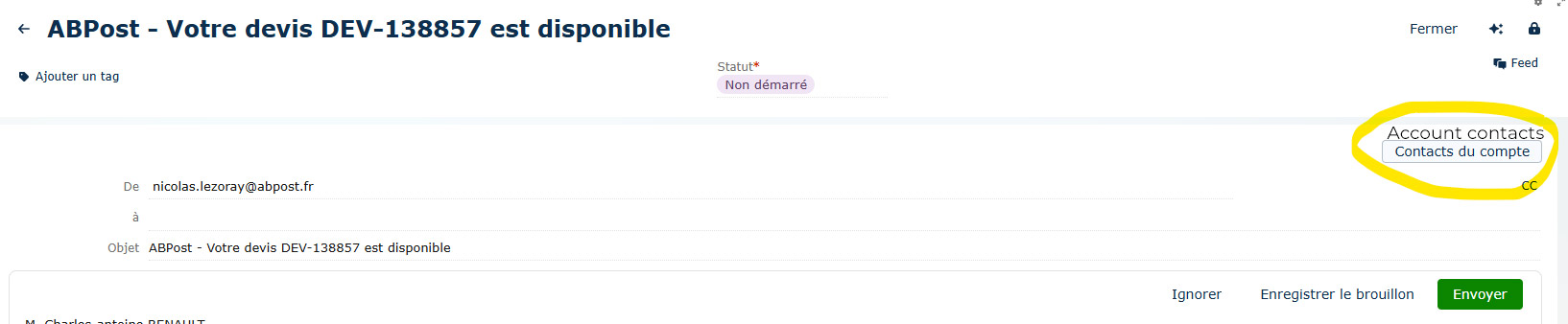
On the email page, I added a button that displays a modal window via a process and shows the account's contacts.

Button

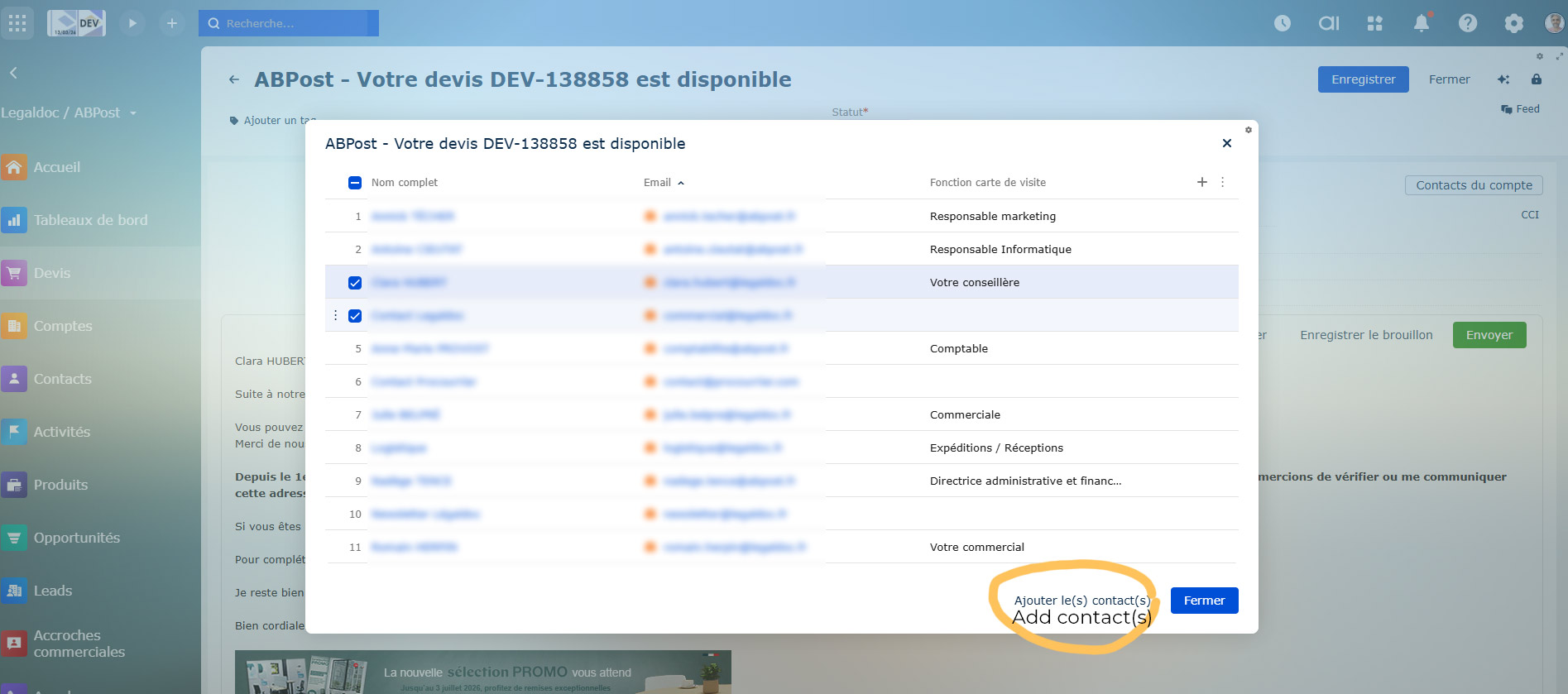
This is to allow users to select contacts from the account and add them as recipients to email activities.

Select contacts

But when you click the "add contacts" button, the contacts are not added to the "to" field of the email.
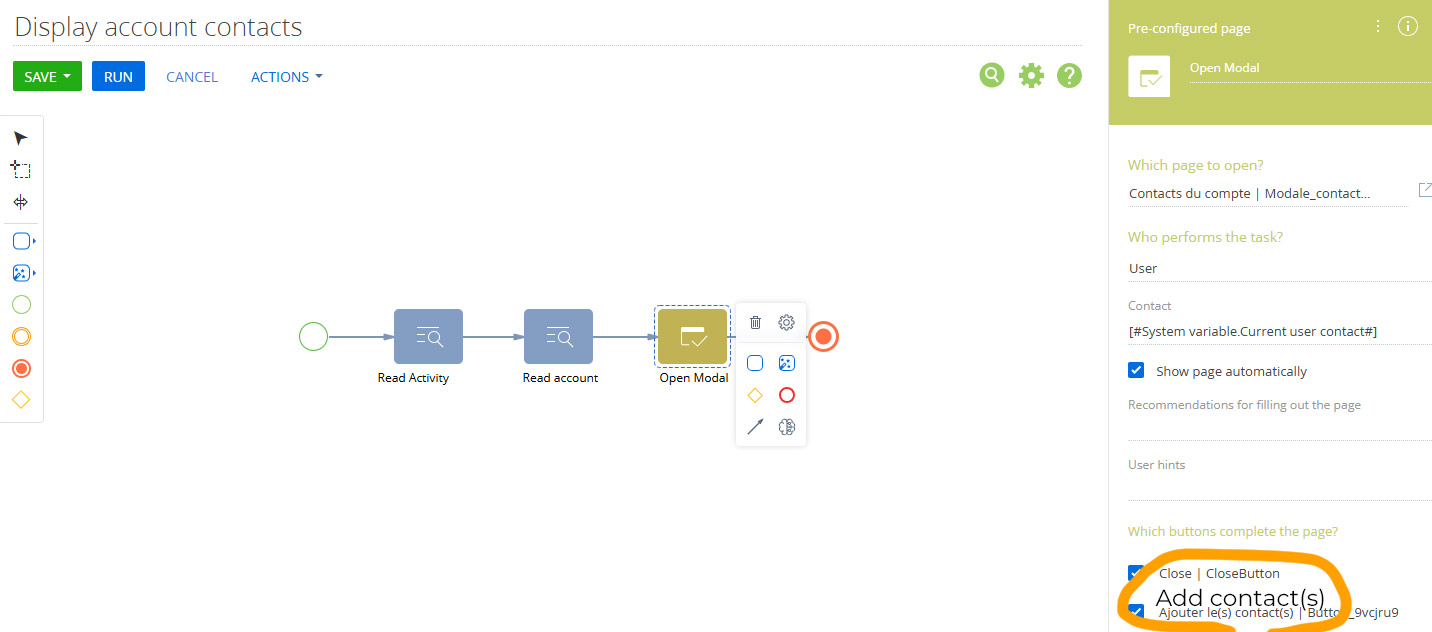
Here is the process:

Process

I tried adding an action to modify the activity and add the selected contacts, but I don't see how to retrieve the list of contacts selected by the user.

Has anyone ever successfully performed this operation ?

Thank you !
Nicolas

Like 1

Like

2 comments

Hello,
Most likely, the participants weren't added because your email was in the "New" state, meaning it wasn't created and still does not have a dedicated ID. In order to connect a contact to an email, an ActivityId should be present.
To make this work, you would need to ensure either that:
- the email activity is already created
- the logic of adding recipients is executed after the record is saved

LÉZORAY Nicolas, you have to read selected rows depending selection state from datagrid on the your modal page. and then fill outbound parameter on the page. then process this collection in process. or process selected contacts (emails) on the modal page and update Activity.To there.

Show all comments

Currently, when users click on the Email or Phone fields on the Contact page, the browser triggers its default behavior (launching the default mail client or calling application).

Is there a recommended way in Creatio (configuration, Freedom UI, or CSS/JS customization) to disable this on-click behavior so the fields are displayed as plain text instead of hyperlinks?

Like 0

Like

3 comments
Best reply

Probably the only way to do that currently is with some CSS. The following CSS will work for that on the contact page: 

crt-communication-options#ContactCommunicationOptions a {
    pointer-events: none !important;
    cursor: initial !important;
    color: initial !important;
    text-decoration: none !important;
}

Ryan

Probably the only way to do that currently is with some CSS. The following CSS will work for that on the contact page: 

crt-communication-options#ContactCommunicationOptions a {
    pointer-events: none !important;
    cursor: initial !important;
    color: initial !important;
    text-decoration: none !important;
}

Ryan

Thanks, @Ryan Farley, for the quick suggestion. However, clicking the phone icon is still triggering the browser’s default application to open.

Mohammad Arman Khan,

You'll need to inspect that as well to see how to identify that in CSS and add the "pointer-events: none !important" to that as well. 

Ryan

Show all comments
auto
Assignment
of
Lead
Owner
to
Contact
with
least
number
oof
Leads

I’m working on a business process that randomly assigns contacts as owners of new leads, but only after checking how many leads are already assigned to each contact. The goal is to ensure that each new lead is assigned to the contact who currently owns the fewest leads.

I need guidance or a solution for implementing this logic so that the system correctly identifies the contact with the lowest lead count and assigns the new lead to them.

Purpose is to distribute leads fairly and ensure every lead gets timely attention.

Like 0

Like

3 comments

What I would likely do is:

  1. Create a database view that provides a list of users that are potential lead owners with a count of open leads for each (see sample below)
  2. Expose the view as an object (see here)
  3. In a process when a new lead is created, add a Read Data element to read from the object above and sort by the open lead count in ascending order. The user read will be the one with the fewest open leads to assign the lead to.

The view could be something like this (this is for postgres and is not tested). You might need to adjust which users are included if you don't want to consider all users (maybe with a join to SysUserInRole to check if they belong to a role?)

create or replace view "UsrVwLeadOwnerCount"
as

select 
    con."Id",
    con."CreatedById",
    con."CreatedOn",
    con."ModifiedById",
    con."ModifiedOn",
    con."ProcessListeners",
    con."Id" as "UsrContactId",
    coalesce(leadstat."NumLeads", 0) as "UsrOpenLeads"
from 
    "Contact" con

    inner join "SysAdminUnit" adm
    on con."Id" = adm."ContactId" and adm."SysAdminUnitTypeValue" = 4
    
    left join (
        select 
            l."OwnerId", 
            count(l."Id") as "NumLeads"
        from 
            "Lead" l
            inner join "QualifyStatus" qs on l."QualifyStatusId" = qs."Id"
        where 
            qs."IsFinal" = false
        group by 
            l."OwnerId"
    ) as leadstat on con."Id" = leadstat."OwnerId"

where
    adm."Name" not in ('Supervisor','Mandrill','SysPortalConnection')
    and 
    adm."Active" = true

(I'd possibly add another subquery for most recently assigned lead date, so you could add a secondary sort on that in case multiple users have the same open lead count). 

Ryan

Hello,

You can implement this logic in a business process, but it cannot be done using standard elements only - a Script Task is required to correctly identify the contact with the lowest lead count.

Here is the recommended approach:

1) Use a Read Data element to retrieve all eligible contacts. Make sure it returns a collection of records.

2) Use a subprocess that runs for each item in this collection. Inside the subprocess, add another Read Data element to count how many leads are currently assigned to that specific contact (using the Owner field or your custom ownership field). Pass the result back to the parent process through process parameters.

3) In the parent process, use a Script Task to analyze the collected results and determine which contact has the lowest lead count.

4) Finally, use a Modify Data element to assign the selected contact to the new lead.

This approach ensures that the system always selects the contact with the smallest workload and distributes leads fairly.

Anastasiia Zhmud,

Can you help with the script task code which i should include in business process?


Show all comments
chat
Contact
Marketing_Creatio
8.0

Hi Team,

 I am working with the chat integration in Creatio, and I noticed that every incoming chat message automatically creates a new Contact in the system.

 For my use case, I do not want Creatio to generate a Contact record every time a new chat message arrives. Instead, I want to either prevent automatic Contact creation or apply my own custom logic to decide when a Contact should be created.

 Could you please guide me on:

 1. How to disable automatic Contact creation for chat channels?

 2. Whether there is a system setting, business rule, or configuration that controls this behavior?

 3. If customization is required, what would be the recommended approach?

 Any help or documentation reference would be greatly appreciated.

 Thank you!

 

Like 2

Like

2 comments

+1

Hello,

Currently, Creatio’s chat functionality requires every chat session to be associated with a Contact record. This design ensures correct processing of chats, message history, and further communication tracking. Because of this dependency, it is not possible to fully disable automatic Contact creation.

New contacts are automatically created for incoming chats when the following conditions are met:

  • The customer is messaging through Facebook, Telegram bot, or WhatsApp for the first time.
  • No existing contact in Creatio is associated with that messenger user ID.

When a chat from a previously unknown contacts arrives, Creatio only receives the external messenger user ID. Since this identifier (ContactIdentity) is not yet linked to any contact record in the system, the platform must create a new contact. This applies only to the very first interaction.

For all future chats from the same person, Creatio will recognize the messenger user ID and correctly link the conversation to the existing contact — so no duplicates will be created going forward.

Despite this, the operator, working with the very first chat, has the ability to merge duplicate contacts (if any are found according to the duplicate search rules configured in the system).

The OOTB logic of contact identifier can be viewed in OmnichannelContactIdentifier method.

To summarize, this behavior is currently built into the system and cannot be disabled using out-of-the-box settings. However, if needed, it is possible to implement a custom solution to adjust the logic to better fit your requirements. However, we don't have an example of such an implementation.

In addition, a task has already been registered in our R&D team to consider and implement the possibility of stopping the automatic contact creation in future releases. 
 

Show all comments
CTI
call
Contact
integration
Studio_Creatio
8.0

Hi Community, 

[FreedomUI]

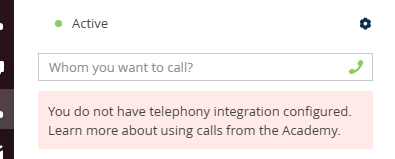
Today I come with a problem regarding CTI integration with third party provider. I want to ask if anyone knows how to override call action link which you can find in the contact page, so instead of launching it to external handler or by built in CTI Creatio solution in cloud in communication panel, I want it to different action with my CTI Iframe that I have implemented with custon Angular component also in communication panel. The main problem here is how I override it (the onclick action in contact page and list for phone number input, but also in other places), to invoke my custom implementation ex. invoking call action on Iframe (I will do it with browser bus API) and then saving the call to the database (by calling to the webservice).

Second question: Is it a must to integrate the solution with the CTI Model or use Terrasoft.integration? I don't use CTI panel and creatio CTI interface for calling implementation, I use custom Angular component with IFrame, so I guess I don't need to. Not sure how to tackle it. I guess I could integrate with it somehow to use built in solutions. I have also seen some solutions overriding the BaseCtiProvider. How do I use it, so I could maybe also implement other things such as holdings etc.? 

Thanks for help in advance, Tuan.

Like 24

Like

6 comments

Hi Tuan,
 

Thank you for reaching out.
 

1. Unfortunately, you cannot currently override the call action in Freedom UI. The only possible way is to create your own Telephony integration.
 

2. You can find the main concepts and architecture of Creatio’s CTI model in the following documentation:
https://academy.creatio.com/docs/8.x/dev/development-on-creatio-platform/platform-customization/classic-ui/telephony-integration/overview
​​​​​​​

There are unfortunately no detailed step-by-step guides for implementing custom telephony providers. This is due to the high variability of external APIs and the level of customization required for each provider. We typically recommend reviewing existing provider implementations and using the Academy materials as a foundation.

Eduard Dovydovskyi,

Hi. Thanks for answering. 

Overriding by writing my own provider is something that I have recently found out. It could work for me.

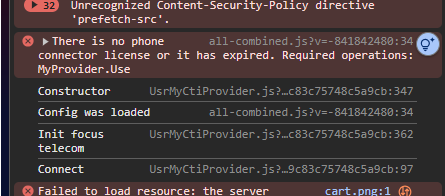
I did make some implementations with it, but I encountered a new problem when changing the default message provider to my own. The issue is that clicking the phone number on contact page or list instead of invoking the makeCall method in the i guess CTI model and then provider it handles it as a tel:phoneNumber with default implementation and force me to use external appliation. Somehow the CTI Model does not invoke makeCall to then invoke makeCall on provider side. The init method does not even run with my provider.

I want to also mention that the code for my provider was copied 1:1 from VirtualCTIProvider. Just changed the define string to my own.

For on prem environemnt instead of getting the dialog, I get nothing. The link does not even work.

Do you have any idea how can i solve that? I'm almost done with the solution and that's should be my last obstacle.

Same issue is with third party providers. I'm not sure if it has something to do with licensing, but init runs normally, i get the log in the console, but the click on phone number still opens the external app modal/dialog. 

Hi Tuan,

You need to check if Telephony is enabled. To do so you need to:

1. Go to System settings in the System setup block, open the "Default messages exchange library" ("SysMsgLib" code) system setting and check if the default value is set.
 

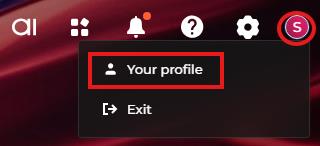
2. Open the user profile page, e. g., by clicking Your profile on the Creatio homepage.

image
 

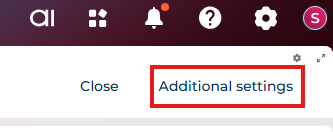
3. Open Additional settings


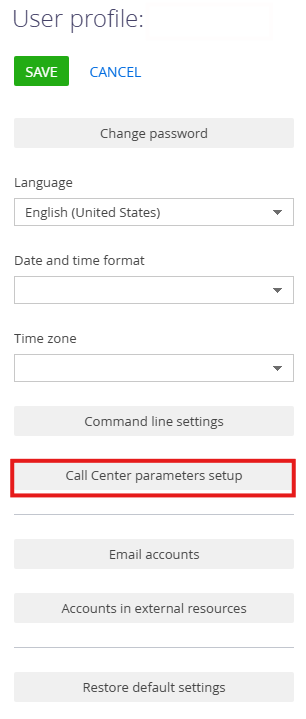
4. Open Call Center parameters setup


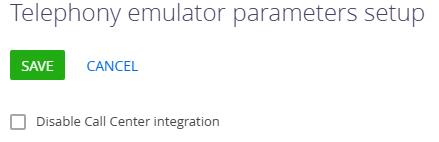
5. Check if "Disable Call Center integration" is unchecked and press the Save button. In the User profile press the Save button again.

image


This should enable Telephony. Hope it helps

Eduard Dovydovskyi,

Thanks for advice, but still it's not working. I had that option already set to enable. However I made some changes to my solution and it works better now. I still cannot click on phone number and invoke makeCall method, still I get the external dialog. Now it might have something to do with license operation which I don't really know how to set and where.

Everything will work fine if I use Webitel license, but I don't think that should be solution to the license issue.

Tuan,

Please register this issue for our support team directly via support@creatio.com so we could investigate it properly.

Show all comments
Feed
Contact
Sales_Creatio
8.0

Hello,

I'm wondering — is there a way to add Contacts of the type 'Client' to Feed messages so I can later filter the Feed by those specific contacts? Right now in Creatio, it seems I can only tag or mention employees, not customers.


Like 0

Like

1 comments

Hello,

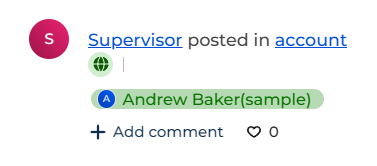
This functionality has been developed and already available in FreedomUI, where you can tag internal and external users via @ and use Timeline as desired.

Tagged portal user will look like this:

A screenshot of a chat</p>
<p>AI-generated content may be incorrect.
Best regards,
Ivan

Show all comments
Contact
Compact
profile
customize
8.0

Hello, i am trying to customize a component called Contact Compact Profile, this is the default state

how do i customize adding a field in here? where do i go to customize the field here?

i tried using the page but this is the only settings, can anyone help me please?

Like 0

Like

2 comments
Best reply

Hello,

The contents and structure of the AccountCompactProfile / ContactCompactProfile elements are immutable in the system. Their behaviour is preconfigured and is, unfortunately, impossible to alter.

A request to improve this logic has already been submitted to our R&D team, and they are looking into the possibility of expanding it in the future versions of Creatio.

Hello,

The contents and structure of the AccountCompactProfile / ContactCompactProfile elements are immutable in the system. Their behaviour is preconfigured and is, unfortunately, impossible to alter.

A request to improve this logic has already been submitted to our R&D team, and they are looking into the possibility of expanding it in the future versions of Creatio.

i see thank you for the information :D

Show all comments

I am trying to create a folder in the Contacts Freedom UI List Page that only contains Contact records that are currently active. I know there is a field in the System Administration Object that is an Active status field (shown in the Users list page). I am trying to access this field; however, it is not showing up in the dropdown list of columns in the filter builder popup page. Any help would be great. I attached an image showing the columns currently visible to me for that System Admin Object. 

Like 0

Like

3 comments
Best reply

It would look like this - I typically also add Type=4 for users (although that’s a little redundant) and also add Connection Type=0 to get employee users (not external/portal users). 

Basically, from your screenshot, click "Quantity". Then set count > 0 (or click count to change to exists), then add the sub-conditions under that.

Ryan

It would look like this - I typically also add Type=4 for users (although that’s a little redundant) and also add Connection Type=0 to get employee users (not external/portal users). 

Basically, from your screenshot, click "Quantity". Then set count > 0 (or click count to change to exists), then add the sub-conditions under that.

Ryan

Ryan Farley,

Thank you Ryan for your time and help! This solution worked for me. 

Ryan Farley,

Hi! I´m trying to do the same thing but it doesn´t work, can you help me? thanks

Show all comments

Hello Community,

I want to remove "New Contact" from the contact name (e.g., New Contact (email address)).

I tried using a business process that runs when a new record is added to an activity. It retrieves the name from the "From" field (name ). However, since the contact field in the activity is empty, I cannot access other contact details.

To work around this, I used a timer signal with a 5-second delay, which worked. However, the issue now is that the case registration email is sent before the business process updates the contact name. I also tried delaying the case registration email, but when I do, it is not sent at all.

Is there another way to update the contact name?

Additionally, why is the email delay not working?


Like 0

Like

5 comments

Hello,


Please provide a screenshot of your business process, along with settings of the element that updates the name.

Dymytriy Vykhodets,


This is business process - 

It runs every time an email message is added. After waiting for five seconds, it reads the "From" and "Contact" fields from the activity section. Then, using a script task, it extracts the name from the "From" field and sets it as the full name of the contact.

Darshan Dev Prajapat,


Please also provide the screenshot of the settings of the element that updates the name.

Mira Dmitruk,


You mean this 


After getting resultname from here i am setting full name of contact in set full name.

Any update on this?


Show all comments
errors
deduplication
merging
Contact
Sales_Creatio
8.0

Hi everyone,

Trying to merging 2 different pairs of duplicate contact records and i receive the following errors: 

1. P0001: User with specified contact already exists
2. Npgsql.PostgresException: 42601

Has anyone ever encountered these errors? 

Like 0

Like

1 comments

Hi Shemroy!

This error can occur when the contacts you are trying to merge are linked to a system user.

When trying to merge them, the system attempts to link one contact to another user, but a contact cannot be linked to more than one user. This results in an error, since the system does not allow this situation.

Such user-linked contacts should not be merged. If necessary, you can deactivate one of the users and rename the contact to avoid confusion.

Since deleting a user is not supported by the system by design, deleting a contact linked to such a user is also not possible.
 

If you have any further questions, please let us know, we would be happy to help.
Thank you for choosing Creatio!

Show all comments