auto
Assignment
of
Lead
Owner
to
Contact
with
least
number
oof
Leads

I’m working on a business process that randomly assigns contacts as owners of new leads, but only after checking how many leads are already assigned to each contact. The goal is to ensure that each new lead is assigned to the contact who currently owns the fewest leads.

I need guidance or a solution for implementing this logic so that the system correctly identifies the contact with the lowest lead count and assigns the new lead to them.

Purpose is to distribute leads fairly and ensure every lead gets timely attention.

Like 0

Like

3 comments

What I would likely do is:

  1. Create a database view that provides a list of users that are potential lead owners with a count of open leads for each (see sample below)
  2. Expose the view as an object (see here)
  3. In a process when a new lead is created, add a Read Data element to read from the object above and sort by the open lead count in ascending order. The user read will be the one with the fewest open leads to assign the lead to.

The view could be something like this (this is for postgres and is not tested). You might need to adjust which users are included if you don't want to consider all users (maybe with a join to SysUserInRole to check if they belong to a role?)

create or replace view "UsrVwLeadOwnerCount"
as
 
select 
    con."Id",
    con."CreatedById",
    con."CreatedOn",
    con."ModifiedById",
    con."ModifiedOn",
    con."ProcessListeners",
    con."Id" as "UsrContactId",
    coalesce(leadstat."NumLeads", 0) as "UsrOpenLeads"
from 
    "Contact" con
 
    inner join "SysAdminUnit" adm
    on con."Id" = adm."ContactId" and adm."SysAdminUnitTypeValue" = 4
 
    left join (
        select 
            l."OwnerId", 
            count(l."Id") as "NumLeads"
        from 
            "Lead" l
            inner join "QualifyStatus" qs on l."QualifyStatusId" = qs."Id"
        where 
            qs."IsFinal" = false
        group by 
            l."OwnerId"
    ) as leadstat on con."Id" = leadstat."OwnerId"
 
where
    adm."Name" not in ('Supervisor','Mandrill','SysPortalConnection')
    and 
    adm."Active" = true

(I'd possibly add another subquery for most recently assigned lead date, so you could add a secondary sort on that in case multiple users have the same open lead count). 

Ryan

Hello,

You can implement this logic in a business process, but it cannot be done using standard elements only - a Script Task is required to correctly identify the contact with the lowest lead count.

Here is the recommended approach:

1) Use a Read Data element to retrieve all eligible contacts. Make sure it returns a collection of records.

2) Use a subprocess that runs for each item in this collection. Inside the subprocess, add another Read Data element to count how many leads are currently assigned to that specific contact (using the Owner field or your custom ownership field). Pass the result back to the parent process through process parameters.

3) In the parent process, use a Script Task to analyze the collected results and determine which contact has the lowest lead count.

4) Finally, use a Modify Data element to assign the selected contact to the new lead.

This approach ensures that the system always selects the contact with the smallest workload and distributes leads fairly.

Anastasiia Zhmud,

Can you help with the script task code which i should include in business process?


Show all comments
Lead
Leads
similar
Sales_Creatio_team_edition
8.0

How to add Detail on Lead form and show all Other Leads with the same Phone Number

I'd like to add Detail (list of Leads) and show all Leads with the same Phone Number (numer field), and exlude currect record on the list

I'll call it Similar Leads (and search similar only by Phone Number)

Like 0

Like

5 comments

Hello Leonid!

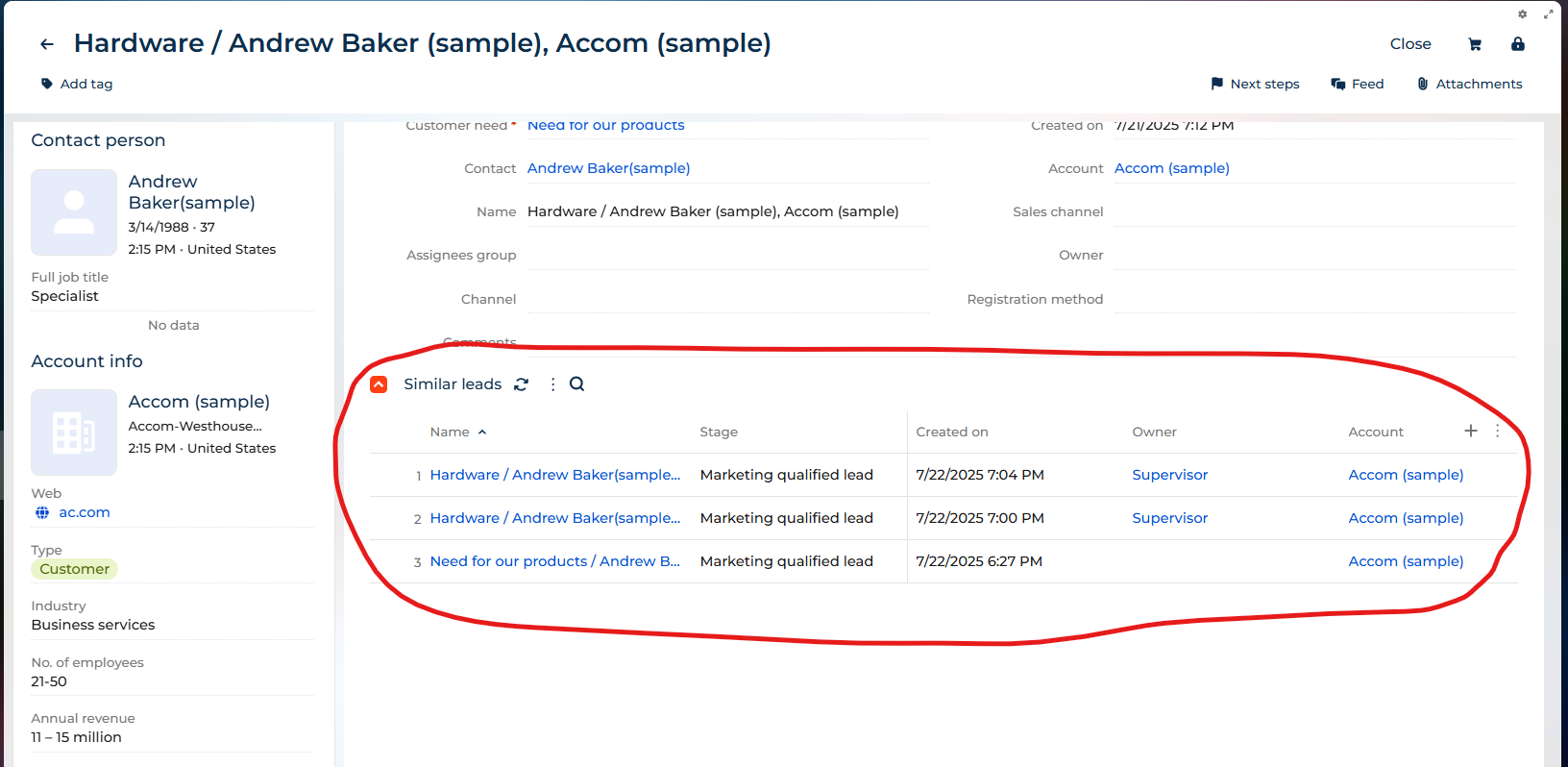
Creatio already provides out-of-the-box functionality through the 'Expanded List' on the Lead form page to help identify Similar Leads as can be seen on the screenshot below.


The lead duplicate search feature enables you to detect customers with similar needs and manage duplicate records effectively. Creatio automatically displays potential matches in the 'Similar Leads' section of the lead page. 

To tailor the duplicate detection rules to your specific requirements, navigate to the System Designer, then go to the 'System setup' section and select 'Setup duplicate rules.' There, you can customize the rules that govern the behavior of the Expanded List on the Lead form.

For more information on Lead duplicate search you can refer to our Academy article here:
https://academy.creatio.com/docs/8.x/creatio-apps/products/sales-tools/lead-and-opportunity-management/leads/lead-duplicate-search

Thank you for choosing Creatio!

I've deleted that section from Freeform UI and don't know how to show it again

Leonid,

If you've removed the Similar Leads Expanded List from the Leads_FormPage, follow these steps to restore it:

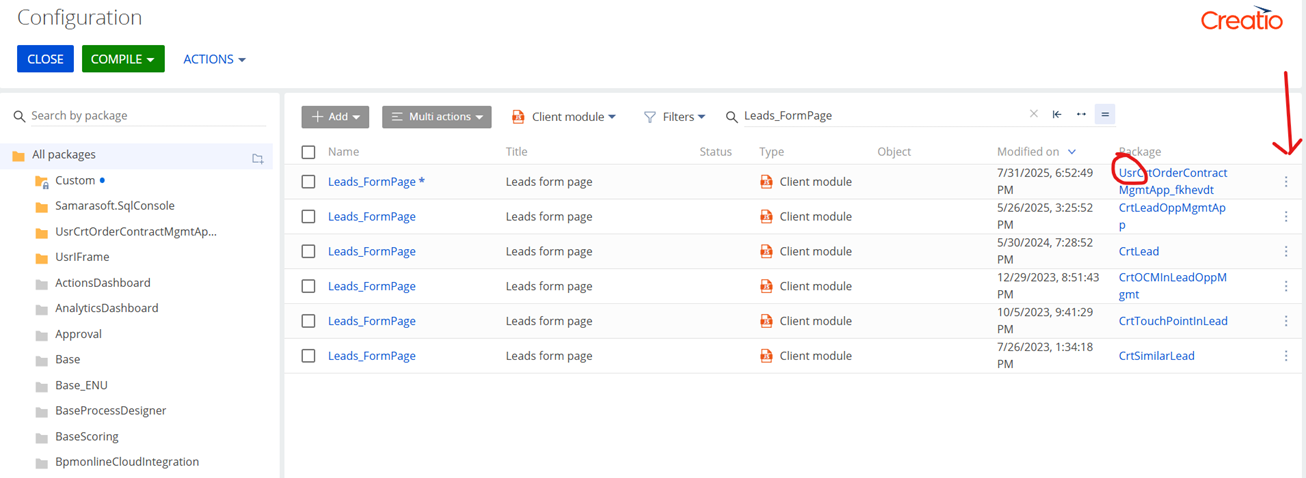
  1. Identify the package where the Leads_FormPage schema was modified.
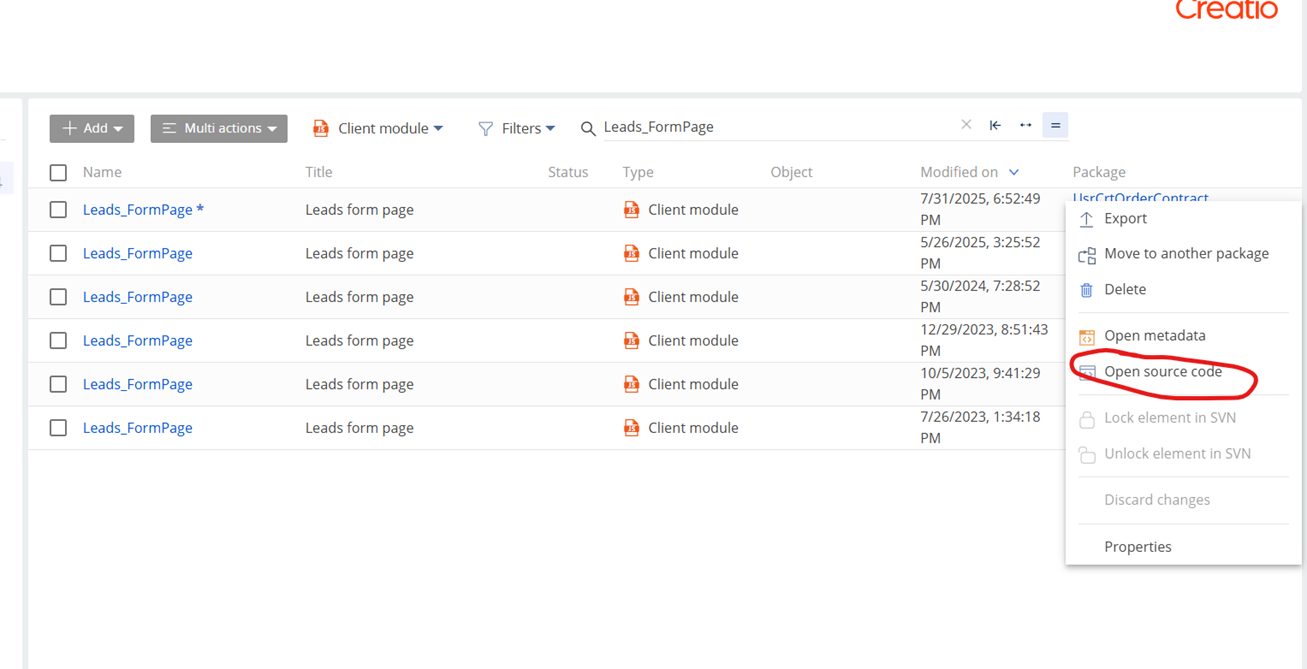
    Go to System Designer → Advanced Settings, and open the Leads_FormPage schema under your custom packages (these are typically named Custom or have a Usr prefix).
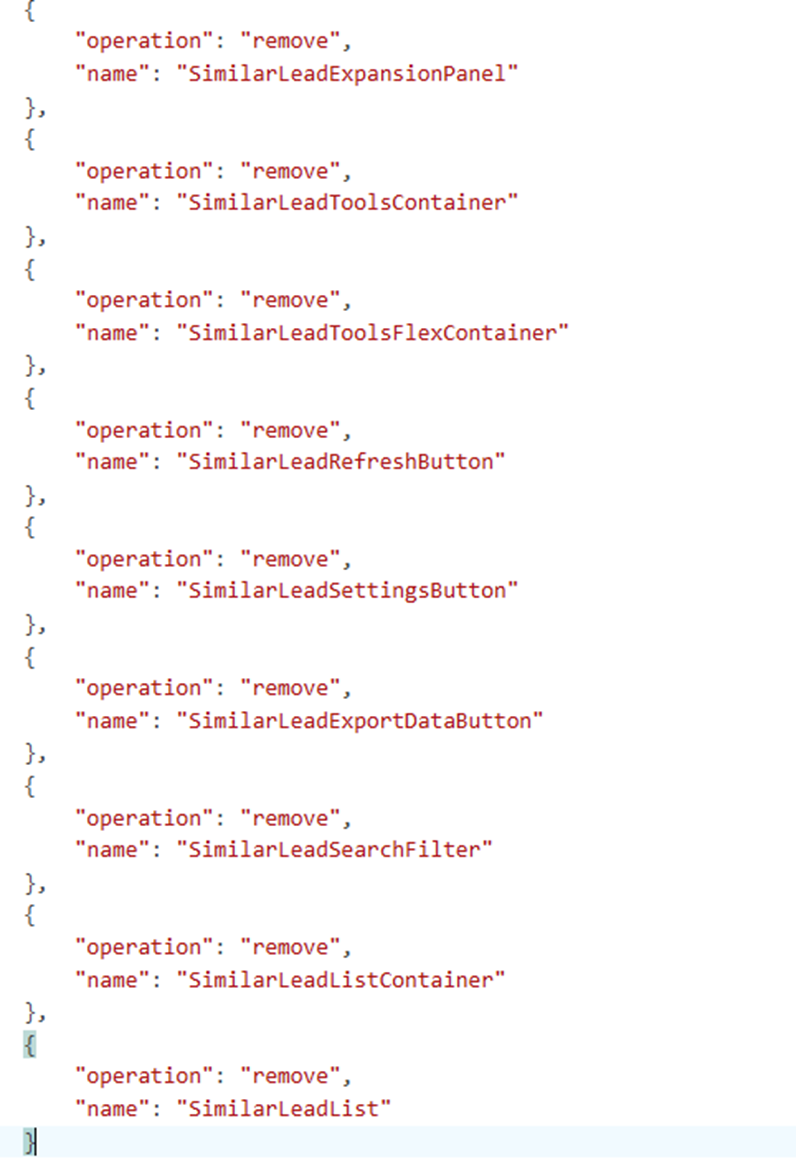
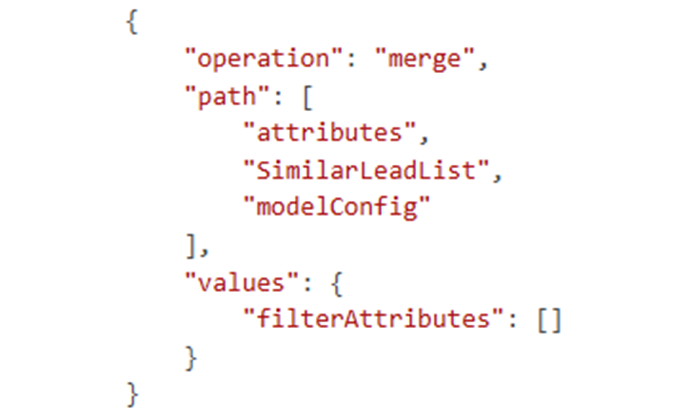
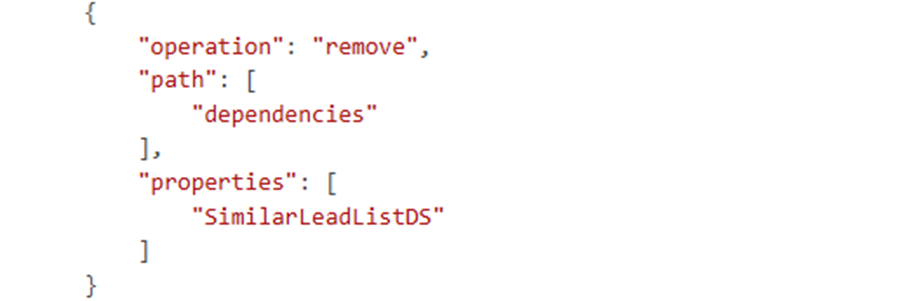
  2. Look for removal instructions related to Similar Leads as presented on screenshot below.
    If the schema contains lines like the ones shown in the screenshots (e.g., operations removing SimilarLeadExpansionPanel, SimilarLeadList, etc.), these are the changes that need to be reverted.
  3. Cautiously delete those instructions from the schema and save the Leads_FormPage, and verify the change.

    If everything was done correctly, the Similar Leads expanded list will reappear on the Lead Page.

Is there any other way to add custom filtering?
As Similar Leads are not working as expected

I've created a custom field that is calculated by Business Process on  Created trigger (signal) - GenPersonUniqueID

So I'd like to apply filter to Detail on Lead form to show only Leads that have the same attribute GenPersonUniqueID

This is needed to filter Duplicated records by GenPersonUniqueID field

thanks, it works!

Show all comments
Freedom_UI
#ListPage
Lead

Hi,

I'm working on Lead Module. We have currently 20 leads records. Each Lead record is associated with a specific SBU such as: A, B, C. (below image)


Lead ListPage


Also, Users under the organizational roles are assigned roles that correspond to these SBUs i.e. A, B, C.

Query: When A User with Role 'A' log into Creatio, Only Leads with SBU 'A' should be displayed on Lead ListPage.


( I have used Handler method for this. User role is being fetched but lead-detail filter is not working.)
handlers: /**SCHEMA_HANDLERS*/[
         {
             request: "crt.HandleViewModelInitRequest",
             handler: async (request, next) => {
               await next?.handle(request);
               request.$context.events$.subscribe((async (evt) => {
           
      
                     const userId = Terrasoft.SysValue.CURRENT_USER.value;
                     console.log("userId >>", userId);
             
                     const esq = Ext.create("Terrasoft.EntitySchemaQuery", {
                         rootSchemaName: "SysUserInRole"
                     });
             
                     esq.addColumn("SysRole.Name", "RoleName");
                     esq.filters.addItem(
                         esq.createColumnFilterWithParameter(
                             Terrasoft.ComparisonType.EQUAL,
                             "SysUser",
                             userId
                         )
                     );
             
                     const roles = [];
             
                     // Wrap ESQ in Promise
                     await new Promise((resolve, reject) => {
                         esq.getEntityCollection((result) => {
                             if (!result.success) {
                                 reject(result);
                                 return;
                             }
                             result.collection.each(item => {
                                 roles.push(item.get("RoleName"));
                             });
                             resolve();
                         });
                     });
             
                     console.log("User Roles:", roles);
             
                     if (roles.length > 0) {
                       const filterGroup = Terrasoft.createFilterGroup();
                       filterGroup.logicalOperation = Terrasoft.LogicalOperatorType.OR;
                 
                       roles.forEach(role => {
                         console.log(role);
                         filterGroup.addItem(
                           Terrasoft.createColumnFilterWithParameter(
                             Terrasoft.ComparisonType.EQUAL,
                             "UsrSBU", // replace with your correct field
                             role
                           )
                         );
                       });
                 
                       // ✅ Reference to Lead datasource (PDS)
                       if (request.$context.PDS) {
                         request.$context.PDS.filters = filterGroup;
                         console.log("Filters applied to PDS datasource");
                       } else {
                         console.warn("PDS datasource not found in context!");
                       }
                     }
             
                 }));
                 
                 return next?.handle(request);
             }
         }
       ]/**SCHEMA_HANDLERS*/,


Platform: Creatio:Energy (Freedom UI)

Like 0

Like

2 comments

This might be easier with record access rights, plus it would be all no code. You could create three roles for SBU A, SBU B, and SBU C. Then, create a process that uses a signal of lead added (or also lead modified in the SBU column) that reads the Lead's SBU value and then removes the current access rights and assigns the appropriate/matching role to the leads. 

Then, add whatever uses to each of the roles. Then users on the role for SBU A would only see leads for SBU A. 

Ryan

Thanks for your response.

If I need to filter list-page records on some condition such as Name, SBU, Status, Lead Source or other fields, can't we do this using custom code or custom web-service?

Show all comments
FreedomUI
tabs
Lead

I'm looking for help with setting a default tab in a Freedom UI page.

I want the "Lead Info" tab (which is the first tab) to always be selected by default when opening a lead record. However, after I perform or complete an activity and return to the Lead page, it automatically opens the "Lead Activities" tab instead of the "Lead Info" tab.

Is there a way to set the page to always open the "Lead Info" tab, regardless of the last active tab or navigation history?

Like 0

Like

2 comments

You can set the active tab using something like this (where "Tabs" is the name of the tab control): 

request.$context.Tabs_SelectedTabIndex_Profile = 0;

I've not tried setting that in the crt.HandleViewModelInitRequest, but it could work - although might need to wrap in a setTimeout just to break out of the message loop and let the page load first and for the saved user profile for selected tab is loaded first (I don't believe there is a way to prevent that). Try something like this:

{
    request: "crt.HandleViewModelInitRequest",
    handler: async (request, next) => {
        setTimeout(() => { request.$context.Tabs_SelectedTabIndex_Profile = 0; }, 1000);
        return await next?.handle(request);
    }
}

Might need to play with the timeout interval (the 1000), although it's not 100% it will work.

Ryan

Try using this code in the  handler:

      {

      request: "crt.HandleViewModelInitRequest",

      handler: async (request, next) =>{

        request.$context.Tabs_SelectedTabIndex_Profile=0;

        return next?.handle(request);

      }

    }

Show all comments
Lead
qualification
leadqualification

Hi,


After upgrading our environment to 8.2.1, we've discovered that there are more buttons in the 'Disqualify' section. I would like to hide some of them, but without deleting the value from the Disqualification reason' lookup.


I found this code in the LeadPageV2 of Lead package. 


Does anybody know where exactly these buttons/values are created?

Thank you!

Like 0

Like

1 comments

Hello.


Those are formed in the initDisqualifyButtonItems method of the LeadPageV2 (along with others getActions methods in the LeadPageV2 (study them from the "Sources" tab of the developer console in the browser), but still you can remove actionMenuItems elements from the method you highlighted and as a result they won't appear in the "Actions" button list.

Show all comments
bug
Lead
Leads
attachments
FreedomUI
8.0

Hi everyone,
 

I am looking to replace the AttachmentList component on the Leads form page with a DataGrid component that uses the FileLead (Lead attachment) entity. The goal is to disable the downloading of attachments.
 

However, I’ve encountered an issue where the Name column in the DataGrid appears as a hyperlink, which attempts to navigate to a non-existent form page for the FileLead entity (refer attachment below with the navigation URL at the bottom left). Since FileLead is an attachment entity, it ideally should not have navigation associated with it, even when displayed in a list.

image
 

Interestingly, other sections like Contacts and Attachments are functioning as expected—the Name column in those sections is not hyperlinked to any entity page.
 

This behavior appears to be a product bug. Could anyone else confirm if they are experiencing the same issue?
 

Best regards,
Ramya

Like 0

Like

1 comments

Hello!

This does not seem to be a basic problem. 
Please contact our support team to help resolve the issue - support@creatio.com

Best regards,
Anton

Show all comments
Button
delete
Lead

Hello,


I'm trying to make the DELETE button on Lead to be available only for certain users. This is my code:
 

In diff:


In methods:


In console IsDeleteButtonVisible appears as true, but the button is hidden no matter what.

Like 0

Like

9 comments

Change events to attributes bound in row action buttons do not occur. So changing the attribute won't change the button's properties. The only way I've been able to accomplish this is to override the onRowAction with tag delete to display a message if the action is not allowed. I've also hidden that using some conditional CSS as well, but that route is a bit hacky.

Ryan

You can hide the "delete button" on the detail inheriting from Detail Schema where you need, and add some of the following pieces of code to remove New, Copy, Delete & Edit


If you also want to remove delete in Methods, just need to add:


// remove the delete option
			getDeleteRecordMenuItem: Terrasoft.emptyFn	  


define("NdosSchema26d0e559Detail", [], function() {
	return {
		entitySchemaName: "NdosProductosServiciosRequisionCompra",
		details: /**SCHEMA_DETAILS*/{}/**SCHEMA_DETAILS*/,
		diff: /**SCHEMA_DIFF*/[]/**SCHEMA_DIFF*/,
		methods: {
			// Remove New record
			getAddRecordButtonVisible: function() {
				return false;
 
			},
 
			// remove the edit option           
			getEditRecordMenuItem: Terrasoft.emptyFn,
 
			// remove the copy option
			getCopyRecordMenuItem: Terrasoft.emptyFn,
 
			// remove the delete option
			getDeleteRecordMenuItem: Terrasoft.emptyFn	          
        }
	};
});


Regards

Julio

Julio Falcon (Cibernética),

True, as Julio says, you can hide it so it is not shown at all, but you cannot conditionally hide it. Actually, I was thinking you can't change the visible value for it at runtime (since it doesn't respond to change events). However, the current user isn't going to change, so you could use the approach of using an attribute as long as the attribute is set BEFORE the detail grid is rendered. You'd need to somehow pre-fetch that the user is in the role (like from MainHeaderSchema when they first log in), and add it to the Terrasoft.SysValues so it's retrievable without doing an ESQ, then you could set it easily in the detail's init.

Ryan

Ryan Farley,


Ryan, how can disable/delete the option in the same detail to select multiple records? Can help me, please?


Thanks

Julio

Julio.Falcon_Nodos,

Not 100% sure if this is all that is needed, so you'll have to test, but looks like it might work to add the following to disable multiselect (which means you can't delete multiple at once): 

init: function() {
	this.callParent(arguments);
	this.set("MultiSelect", false);
}

Ryan

Ryan Farley,  Julio Falcon (Cibernética),

I actually found a way to do this with your help. 
I kept the function that checks when the button should be displayed and changes the attribute value, but instead of trying to set the button through diff I called another function that sets the attribute through CSS.


Ryan Farley,

Thanks Ryan,


It didn't works :-(


Also what really I want to do is to know how can I detect the multiple deletion signal in a process, to recalculate the result regarding the records remaining in the detail, so If I didn't how to detect this, I found the best option is to inactivate the "Select multiple records" option in the detail menu


Ryan Farley,

I'm also try another approaches, but without results, to hide the "Select multiple records" menu option :-(


Based on article on https://community.creatio.com/questions/remove-new-and-import-buttons-lookup-object


define("NdosSchema82b72e2cDetail", [ "ConfigurationConstants" ], function(ConfigurationConstants) {
	return {
		entitySchemaName: "NdosDetalleDeCotizaciones",
		details: /**SCHEMA_DETAILS*/{}/**SCHEMA_DETAILS*/,
		diff: /**SCHEMA_DIFF*/[]/**SCHEMA_DIFF*/,
		methods: {
          init: function() {
         	this.callParent(arguments);
            this.getSectionActions();
          },
 
            getSectionActions: function() {
            	var actionMenuItems = this.callParent(arguments);
                //var itemToRemove = [];
            	actionMenuItems.each(function(item) {
            		if (item.values.Caption === "Resources.Strings.MultiModeMenuCaption" )  { //"Seleccionar varios registros" || item.values.Caption == "Select multiple records") {
            			item.values.Visible = false;
                      //item.values.Enabled = false;
                        //itemToRemove = item;
                      //itemToRemove.push(item);
 
            		}
            	});
                //actionMenuItems.remove( itemToRemove );
            	return actionMenuItems;
            }, 
 
            /* Delete the [Copy] menu item. */
            getCopyRecordMenuItem: Terrasoft.emptyFn,
 
          /* Delete the [Edit] menu item. */
            getEditRecordMenuItem: Terrasoft.emptyFn,
 
        }
	};
});

Ryan Farley,

Hi Ryan


Solved, the solution was shared by Pavlo Sokil and it's posted on article on https://community.creatio.com/questions/there-any-way-detect-process-wh…

Show all comments
date
FreedomUI
tasks
Lead
Javascript
Activity
parameter
Development
Studio_Creatio_enterprise_edition
8.0

Hello Community,

We have created a button in Leads_FormPage that opens AddTaskMiniPage

Code in Leads_FormPage that opens the AddTaskMiniPage

  {
        request: "usr.OpenTaskModalPageRequest",
        handler: async (request, next) => {
            const handlerChain = sdk.HandlerChainService.instance;
            await handlerChain.process({
                type: 'crt.OpenPageRequest',
                schemaName: 'AddTaskMiniPage',
                $context: request.$context,
                scopes: [...request.scopes]
            });
            return next?.handle(request);
        }
    }		,


Our end goal: We want that upon the Activity is created (Save button clicked in AddTaskMiniPage) the value of 'Start' field in AddTaskMiniPage, is copied to another Date field in the Leads_FormPage.

How can this be acheived?

Regards

Sasor

Like 0

Like

3 comments

Hello Sasori,

You can try using BP for this case. For example, when you save a record in a mini page, you also run a business process that will update a value in your lead record. You pass date value to the BP and set (update) relevant field in the lead record. 
 

An easy way to accomplish this is to just use a process with a signal of Activity added with Type=Task, Category=To do, Lead is filled in. Then update the lead with the date. If you have live data updates enabled for the Lead object you'll even see the screen refresh with the value. 

Ryan

Ryan Farley,

Thank you for your input! However, the challenge with this approach is that there might be multiple activities associated with a single Lead that have this specific configuration (Type = Task, Category = To Do, Lead is filled in).

Would it be possible to handle this scenario directly via the Frontend instead?

Looking forward to your thoughts!

Show all comments
Lead
to
Opportunity
Studio_Creatio

I am trying to convert a lead in to a opportunity based on a field value.Below is the workflow i have configured. But it is showing an error upon saving. can someone explain me easily what this is and how to fix this issue.

Like 0

Like

1 comments

Greetings!


This error occurs because you are using an object from the *UsrCrt* package on a page that belongs to another package. 

Since the package is lower in the hierarchy than the *UsrCrt* package, you are encountering a cyclic dependency error. 

To resolve this issue, you need to move the schema to the correct package.
 

Alternatively, you can restructure the package dependencies to ensure that the schemas are accessible.
 

You can find more details in the article:

https://academy.creatio.com/docs/8.x/no-code-customization/customization-tools/app-management/cyclic-connection-chains
 

Best regards, 
Orkhan

Show all comments
pop up
lookup
Lead
message
field
Javascript

Hello,


I am trying to add a popup message that displays a lookup field where the user selects a value from it.


Unfortunately, the lookup doesn't appear. I have no error in the console. The lookup is from the same page (Lead).


This is the code:


I tried to modify the example of inserting a text box in a popup message.


Thank you!

Like 0

Like

2 comments

Ryan Farley,

Thank you so much, it works great!

Show all comments