Hi Community,

We are trying to add a inline editing/adding of data for a detail. With the academy link : https://academy.creatio.com/documents/technic-sdk/7-16/adding-detail-editable-list , was able to add the editable list. But the number of fields in the detail is more than 8.  As we can’t have a editable for tiles view.


Is there a way to add more column in "select fields to display" and How can I add horizontal to this "select fields to display" in the settings page?


Also, how to add horizontal scroll in the mail detail page to scroll and add content if there are more columns?

Like 3

Like

1 comments

Hello Amritha,


To add more columns to the "Columns setup" they should be added to the detail object directly and then they will become available in the "Columns setup". Starting from 7.16.4 horizontal scroll in the column setup is available out-of-the-box so please update your app to 7.16.4 to get needed functionality without additional development. As for adding the scroll to the main detail - I am not sure if it is possible since properties like "overflow-y" or "scroll-padding-top" are CSS properties that can be theoretically added to the grid wrap of the detail data grid, but it would be easier to use the "Show more" option at the bottom of the detail rather than developing custom CSS and connecting it as a separate module to the detail schema.


Best regards,

Oscar

Show all comments

Hi Community,

I am trying to create a new lead and qualifying it, to create a new contact & account but when i am trying to create another lead with the same account name and contact name, later qualifying it.  Duplicate contact and account is getting created via the OOB lead management and lead qualification process, is it possible to link it to the existing account and contact.


Scenario: 

1.We create a new lead providing all the mandatory field data and later qualify the lead.

2. A new account and contact gets created and it is linked to the lead.

3. Create another lead with the same account name and contact name.

4. Qualify this lead also.

5. OOB process lead management and lead qualification process starts

6. It creates a new account and contact


Question : is it possible to link the lead to the existing account and contact instead of creating a duplicate account and contact.

Like 0

Like

1 comments

Dear Amritha,


You can modify the OOB business process and add a search for an existing contact - the process is called Lead qualification. Feel free to modify it according to your business tasks! Make sure to update the Lead management process system setting after a new version of the process is created. 


Best regards,

Angela

Show all comments
publish
support
Facebook Integration
custom
7.16
Marketing_Creatio

Hi!

When i publish my changes the system (7.16.3.1473) pop up this message/warning:

FacebookMessagingService.OmnichannelMessaging.cs | 49 | 
This async method lacks 'await' operators and will run synchronously. Consider
using the 'await' operator to await non-blocking API calls, or 'await Task.Run(...)'
to do CPU-bound work on a background thread.

Can you help me to fix this, please?

Thx!


Like 0

Like

4 comments

Hello Wolf, 


This warning message appears because there is no await operator in the RegisterFacebookMessenger async function of the FacebookMessagingService schema (the await operator is actually presented in this function but is commented and as a result, the compilator returns a warning). Please ignore it since it doesn't impact the system functionality at all. We have already created the request for our R&D team to review the logic of this schema and apply changes to it to remove the warning message in further releases. 


Our apologies for this inconvenience!


Best regards, 

Olga. 

Hello Wolf,


There is a system setting you can change to ignore compiler warnings (you’ll still see errors). See https://customerfx.com/article/turning-off-compiler-warnings-in-creatio…


Ryan

Olga Avis,

thank you for your reply. 


No problem. :)


Best regards,

Wolf

Ryan Farley,

Hi Ryan,

good to know, thanks.


Wolf

Show all comments
knowledge base
SDK
support
Q&A

Question

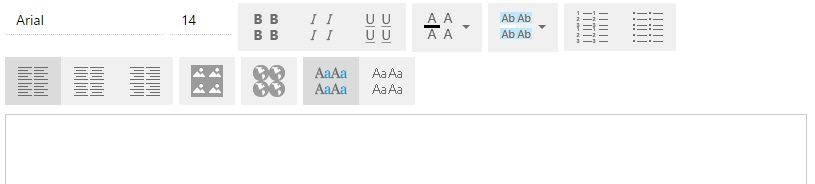
When I paste a RICH_TEXT element, its toolbar looks as follows:

Could you clarify what might be wrong with it?

Answer

The reason might be that some of the base styles  in your configuration might be overridden, e.g., the .t-btn-image style.

Like 0

Like

Share

0 comments
Show all comments

Case

We need to create users of an "Our company" type for the employees of any company, and not only for those belonging to the "Our company" that exists out-of-the-box.

Solution

Change the PrepareEmployeeEditFilter method in the UserEditPage  schema as follows:

var filters = e.Filters;
filters.Add(new Dictionary<string, object> {
    {"comparisonType", FilterComparisonType.Equal},
    {"leftExpressionColumnPath", "[SysAdminUnit:Contact].Id"},
    {"aggregationType", AggregationTypeStrict.Count},
    {"useDisplayValue", false},
    {"rightExpressionParameterValues", new object[] {0}}});
filters.Add(new Dictionary<string, object> {
    {"comparisonType", FilterComparisonType.Equal},
    {"leftExpressionColumnPath", "Account.Type"},
    {"useDisplayValue", false},
    {"rightExpressionParameterValues", new object[] { new Guid("57412fad-53e6-df11-971b-001d60e938c6")}}});
e.ParametersValue.Add("hideButtons", true);

where "57412fad-53e6-df11-971b-001d60e938c6" is the ID of the AccountType table that corresponds to the "Our company" value.

Necessary conditions

For version 7.4 only

Like 0

Like

Share

0 comments
Show all comments

Question

When creating a case through the portal, the user sets the case Assignee using a code. Though, the [Assignee] field remains blank after saving the record.

Answer

When you save a Case object (the Portal package), you basically run the event sub-process defined in the CaseInserting event of the object. If you meet the UserType = SSP condition in this process,  the [Assignee] field is cleared.

Like 1

Like

Share

0 comments
Show all comments
knowledge base
SDK
support
Q&A

Case

I need to create a widget

Solution

You can use widgets to display data from in-built modules. It enables displaying data in non-standard views.

Example of implementing a widget:

define('SxClientUnitTable', ['ext-base', 'terrasoft', 'sandbox', "BaseFiltersGenerateModule", 'SxClientUnitTableResources', "ChartModuleHelper", "css!SxClientUnitTableCss", "ServiceHelper"],
	function(Ext, Terrasoft, sandbox, BaseFiltersGenerateModule, resources, ChartModuleHelper, css, ServiceHelper, ConfigurationConstants) {
 
		function getViewModel() {
					return Ext.create('Terrasoft.BaseViewModel', {
				//todo SysModuleAnalyticsChart deleted
						entitySchema: 'Order',
						methods: {
							getChart: function(key) {
							debugger
								sandbox.publish('GenerateChart', key);
								var filters = this.getReportFilters();
							},
							load: function() {
 
							}
						}
					});
				};
		var result = "";
		function generateMainView(renderTo) {
 
			var resultConfig = Ext.create('Terrasoft.Container', {
				id: 'tableOtchetMetkiParamContainer',
				selectors: {
					wrapEl: '#tableOtchetMetkiParamContainer'
				},
				renderTo: renderTo
			});
			return resultConfig;
		}
		function getInfoMetki(parameters) {
 
			var serviceData = {
				site: parameters[0].toString(),
				ownerId: parameters[1].toString(),
				startDate: parameters[2].toString(),
				dueDate: parameters[3].toString(),
				countryId: parameters[4].toString()
			};
 
			ServiceHelper.callService("UsrOtchetMetkiGetCollectionConfigurationService", "GetCollectionOtchetMetki",
				function (response) {
				debugger
					if (response.status == 404) {
						this.showInformationDialog("\t Error: \n" + response.message);
					}
					else if(response.GetCollectionOtchetMetkiResult.length > 0){
						result = response.GetCollectionOtchetMetkiResult;
						var arrR = result.split(":");
						var htmlAdded = "<table><tr><th>Mark</th><th>Number of orders</th><th>Being specified</th><th>% Specified.</th><th>Confirmed</th><th>% Conf.</th><th>Completed</th><th>% Compl.</th><th>Canceled</th><th>% Canc.</th></tr>";
						for(var i = 0; i < arrR.length - 1; i++){
							//get items
							var strArr = arrR[i].split(" ");
							var metkaOne = strArr[0].replace("{","");
							var metka = metkaOne.replace("}","");
 
							htmlAdded += "<tr><td>" + metka + "</td><td>" + strArr[1].toString() + "</td><td>"  + strArr[2].toString() + "</td><td>" + strArr[3].toString() + "</td><td>" + strArr[4].toString() + "</td><td>" + strArr[5].toString() + "</td><td>" + strArr[6].toString() + "</td><td>" + strArr[7].toString() + "</td><td>"  + strArr[8].toString() + "</td><td>" + strArr[9].toString() + "</td></tr>";
						}
						//end table
						htmlAdded += "</table>";
						var el = Ext.get('tableOtchetMetkiParamContainer').setHTML(htmlAdded);
						var elemV = Ext.get('Module1');
						elemV.toggleCls('my-table');
					}
					else
						result = null;
				}, serviceData, this);
		}
		function getReplaceString(str, separator){
		debugger
		var arSt = str.split(separator);
			var res = arSt[2] + separator + arSt[1] + separator + arSt[0];
			while(res.indexOf(separator) > 0){
				res = res.replace(separator,"-");
			}
			return res;
		}
 
		var render = function(renderTo) {
 
 
			debugger
			var viewConfig = generateMainView(renderTo);
			var viewModel = getViewModel();
			var getStartD = Ext.get("fixedFilterDateView-wrap").dom.innerText;
			var getEndD = Ext.get("fixedFilterDateDueView-wrap").dom.innerText;
 
			var startD = getStartD.indexOf("Начало") > 0 ? "2016-05-01" : getReplaceString(getStartD, ".");
			var endD = getEndD.indexOf("Завершение") > 0 ? "2016-07-04" : getReplaceString(getEndD, ".");
			var ar = [];
			ar.push("all");
			ar.push("all");
			ar.push(startD);
			ar.push(endD);
			ar.push("a570b005-e8bb-df11-b00f-001d60e938c6");
			getInfoMetki(ar);
 
 
			viewConfig.bind(viewModel);
			//viewConfig.render(renderTo);
		};
		return {
			schema: 'Order',
			methods: {
				onLookupChange: function(newValue, columnName) {
 
                                this.callParent(arguments);
                                if (columnName === "UsrCityFilter") {
                                        this.set("UsrCityFilter", newValue);
                                        this.onUsrCityFilterChanged();
                                }
                        },
 
                        onUsrCityFilterChanged: function() {
                                this.reloadGridData();
                        },
				getOrdersForFilter: function(){
					var items = [];
					var selOrders = Ext.create("Terrasoft.EntitySchemaQuery", {
						rootSchemaName: "Order"
					});
					selOrders.addColumn("SxMark.Name");
					selOrders.addColumn("SxCountry.Name");
					var filterByUser = Terrasoft.createColumnFilterWithParameter(
					Terrasoft.ComparisonType.EQUAL, "SxCountry.Name", "Россия");
					selOrders.filters.addItem(filterByUser);
					selOrders.getEntityCollection(function (response) {
					debugger
						if (response.collection.collection.length > 0)
							items = result.collection.getItems();
						else
							items = null;
					}, this);
					return items;
				}
 
			},
			userCode: function() {
 
			},
			init: function() {
 
			},
			filterChanged: function( filter, eOpts ){
				debugger
				var c = [];
			},
			render: render
		};
	}
)
;



Like 0

Like

Share

0 comments
Show all comments

Case

Access to section disappeared for all users, except for the Supervisor. Standard script for granting access permissions works but does not add records.

Solution

The [CreatedById] field in the user's database table is not populated. To solve the issue, populate the field and specify "Supervisor" as a creator:

Update Account --change the object
SET CreatedById = (SELECT id FROM Contact c WHERE c.Name = 'Supervisor')
where CreatedById is null;


Like 0

Like

Share

0 comments
Show all comments

Question

We cannot add contacts. The page freezes when doing so.

Answer

The details "Detail: Contact address" and "Detail: Contact communication options" have been deleted from the contact page. That is the reason why you cannot add new contacts.

Restore the details and you will receive no errors.

To do this, add the below code to the ContactPageV2 schema:

details: {
    "AccountAddress": {
        "schemaName": "AccountAddressDetailV2",
        "entitySchemaName": "AccountAddress",
        "filter": {
            "detailColumn": "Account",
            "masterColumn": "Account"
        },
        "useRelationship": true,
        "filterMethod": "accountAddressFilter"
    },
    "AccountCommunication": {
        "schemaName": "AccountCommunicationDetail",
        "entitySchemaName": "AccountCommunication",
        "filter": {
            "detailColumn": "Account",
            "masterColumn": "Account"
        },
        "useRelationship": true,
        "filterMethod": "accountAddressFilter"
    }
},
/**......*/
methods: {
    accountAddressFilter: function() {
        var account =  this.get("Account");
        var accountId = this.Terrasoft.GUID_EMPTY;
        if (account && account.value) {
            accountId = account.value;
        }
 
        var filterGroup = new this.Terrasoft.createFilterGroup();
        filterGroup.logicalOperation = this.Terrasoft.LogicalOperatorType.AND;
        filterGroup.add("AccountFilter", this.Terrasoft.createColumnFilterWithParameter(
        this.Terrasoft.ComparisonType.EQUAL, "Account", accountId));
        return filterGroup;
    }
},
/**......*/


Like 0

Like

Share

0 comments
Show all comments

Symptoms

When creating details via the "Detail wizard" and switching to the "Page" tab, the browser fails and provides the below error:

message: The 7f889822-86af-4b53-bd7d-b8b153f0a5c4 key element Does not exist

Solution

Find an element with the necessary CardSchemaUId in the SysModuleEdit table of the database and delete it.

Necessary conditions and restrictions

Occurred in version 7.7

Like 1

Like

Share

0 comments
Show all comments