


I would like to ask if it is in any kind possible to make the visibility of mandatory fields in the system better.
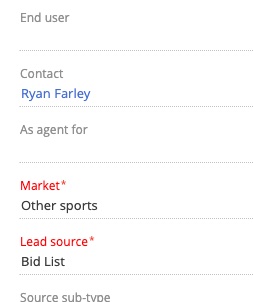
For users the little red star "*" next to the requested value is not straight forward and they would like to highlight them for example in a colour. Maybe something like that:

Like


Julio.Falcon_Nodos,
Yes, for Freedom UI pages, the CSS would look like this:
label.crt-input-label.crt-input-required {
    color: red !important;
}
Ryan

Ryan Farley,
Could you tell me if this would work with business rules and DCM stages? E.g. the color would be standard when business rule is not active and applied when is? Thank you!
Jacek Harlejczyk,
Yes should work whether required via business rules or if the column is set as always required. When the field is required, the attributes in the CSS are applied to the control, so the CSS should work either way. You wouldn't just apply the CSS in some cases, it would always be present on the page. However, it would only have an effect when the fields are required, via rules or any other way.