

Important!!! Business Process From Custom Web-Service (Cookie-Based / Anonymous)

Hi Team,
There is an Usecase where I have to call Business Process from web service. In Creatio, we have 2 types of service: cookie-based & Anonymous. I have tried both type of services to invoke Business Process, but getting below error: 401
Query: Can you guide me how to call BP using Anonymous & Cookie Based Web-service ?
(Cookie-Based Service)
[OperationContract]
[WebGet(UriTemplate = "UnsubscribeStatusBP?ContactId={ContactId}&BulkemailId={BulkemailId}&EndUserResult={EndUserResult}", ResponseFormat = WebMessageFormat.Json)]
public string UnsubscribeStatusBP(string ContactId, string BulkemailId, string EndUserResult)
{
// 1. Get UserConnection from the BaseService context
UserConnection userConnection = UserConnection;
IProcessExecutor processExecutor = userConnection.ProcessEngine.ProcessExecutor;
// SessionHelper.SpecifyWebOperationIdentity(HttpContextAccessor.GetInstance(), SystemUserConnection.CurrentUser);
// 1. Validate ContactId (GUID)
if (!Guid.TryParse(ContactId, out Guid contactGuid)) {
return JsonConvert.SerializeObject(new { Success = false, Message = "❌ Invalid Parameter ContactId. Must be a valid GUID." });
}
// 2. Validate BulkemailId (GUID)
if (!Guid.TryParse(BulkemailId, out Guid bulkemailGuid)) {
return JsonConvert.SerializeObject(new { Success = false, Message = "❌ Invalid Parameter 'BulkemailId'. Must be a valid GUID." });
}
// 3. Validate EndUserResult (String length, null check, and basic sanitization)
if (string.IsNullOrWhiteSpace(EndUserResult) || EndUserResult.Length > 10) {
return JsonConvert.SerializeObject(new { Success = false, Message = "❌ Invalid Parameter 'EndUserResult'. Must be 1-10 characters." });
}string sanitizedResult = Regex.Replace(EndUserResult, @"[^a-zA-Z_]", "");
try {
// 1. Prepare parameters
var inputs = new Dictionary {
{ "ContactId", contactGuid },
{ "BulkemailId", bulkemailGuid },
{ "EndUserResult", sanitizedResult }
};
// 2. Execute process via ProcessEngine
userConnection.RunProcess(
"UsrAllManageUnsubscribeStatus",
inputs
);
return JsonConvert.SerializeObject(new { Success = true, Message = "✅ Business Process is triggered." });
}
catch (Exception ex) {
return JsonConvert.SerializeObject(new { Success = false, Message = $"❌ {ex.Message}" });
}
}
(Anonymous Web-Service)
[OperationContract]
[WebGet(UriTemplate = "UnsubscribeStatusBP?ContactId={ContactId}&BulkemailId={BulkemailId}&EndUserResult={EndUserResult}", ResponseFormat = WebMessageFormat.Json)]
public string UnsubscribeStatusBP(string ContactId, string BulkemailId, string EndUserResult)
{
	// 1. MUST BE FIRST: Set the identity to SystemUser for anonymous calls
	// This connects the "guest" request to a real user account (Supervisor) internally
	SessionHelper.SpecifyWebOperationIdentity(HttpContextAccessor.GetInstance(), SystemUserConnection.CurrentUser);

	string result = "{}";

	// 1. Validate ContactId (GUID)
	if (!Guid.TryParse(ContactId, out Guid contactGuid)) {
		return JsonConvert.SerializeObject(new { Success = false, Message = "❌ Invalid Parameter ContactId. Must be a valid GUID." });
	}

	// 2. Validate BulkemailId (GUID)
	if (!Guid.TryParse(BulkemailId, out Guid bulkemailGuid)) {
		return JsonConvert.SerializeObject(new { Success = false, Message = "❌ Invalid Parameter 'BulkemailId'. Must be a valid GUID." });
	}

	// 3. Validate EndUserResult (String length, null check, and basic sanitization)
	if (string.IsNullOrWhiteSpace(EndUserResult) || EndUserResult.Length > 10) {
		return JsonConvert.SerializeObject(new { Success = false, Message = "❌ Invalid Parameter 'EndUserResult'. Must be 1-10 characters." });
	}

	string sanitizedResult = Regex.Replace(EndUserResult, @"[^a-zA-Z_]", "");

	try {
		// 1. Prepare parameters
		var inputs = new Dictionary {
			{ "ContactId", contactGuid },
			{ "BulkemailId", bulkemailGuid },
			{ "EndUserResult", sanitizedResult }
		};

		// 2. Execute process via ProcessEngine

		SystemUserConnection.RunProcess(
			"UsrAllManageUnsubscribeStatus",
			inputs
		);

		return JsonConvert.SerializeObject(new { Success = true, Message = "✅ Business Process is triggered." });
	}
	catch (Exception ex) {
		return JsonConvert.SerializeObject(new { Success = false, Message = $"❌ {ex.Message}" });
	}
}
Like
Hello!
Please refer to the Creatio documentation on custom web services that use cookie-based authentication. This type of web service requires an authenticated HTTP session, which is why you are receiving a 401 error.
Eduard Dovydovskyi,
Hi Eduard,
Anonymous Web-Service: UsrUnsubscribeEmailService
Usecase: There is an anonymous endpoint 'GetHtmlPage' that is rendering HTML Web-Page (below image).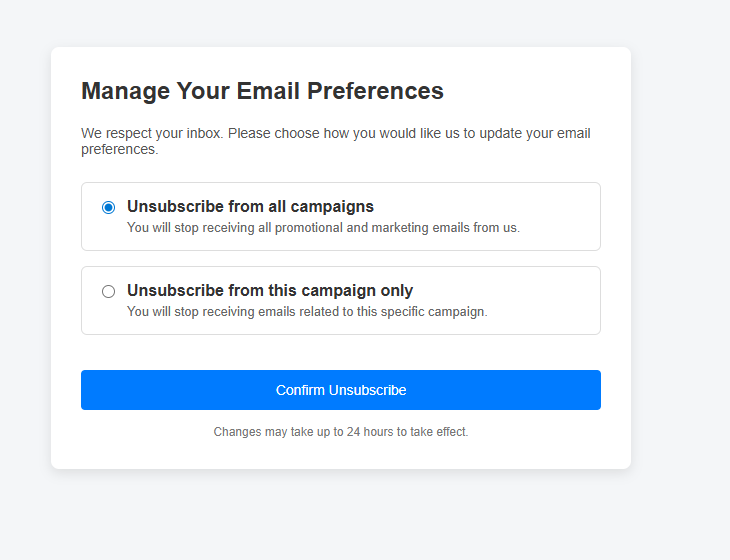
When user press confirm button then It should call Business Process to perform some action. To achieve this, I have created another anonymous endpoint 'RunBP' to call Business Process.
(Endpoint: GetHtmlPage)
(using JavaScript inside Html page to call endpoint `RunBP` on button click):
fetch(`/0/rest/UsrUnsubscribeEmailService/RunBP`, {
method: 'GET',
headers: {
'Content-Type': 'application/json'
}
})
.then(response => response.json())
.then(data => {
console.log('Server Response: ', data);
})
.catch(err => {
console.error('Fetch error:', err);
});
(Endpoint: RunBP)
[OperationContract]
[WebInvoke(Method = "GET", UriTemplate = "RunBP", RequestFormat = WebMessageFormat.Json, ResponseFormat = WebMessageFormat.Json, BodyStyle = WebMessageBodyStyle.Bare)]
public string RunBP()
{
try
{
IProcessEngine processEngine = SystemUserConnection.ProcessEngine;
IProcessExecutor processExecutor = processEngine.ProcessExecutor;
processExecutor.Execute("UsrTest");
return "SUCCESS";
}
catch (Exception ex)
{
return "ERROR: " + ex.Message;
}
}
Note: (UsrTest business process is for testing purpose only)
(Error: 401 Unauthorized)
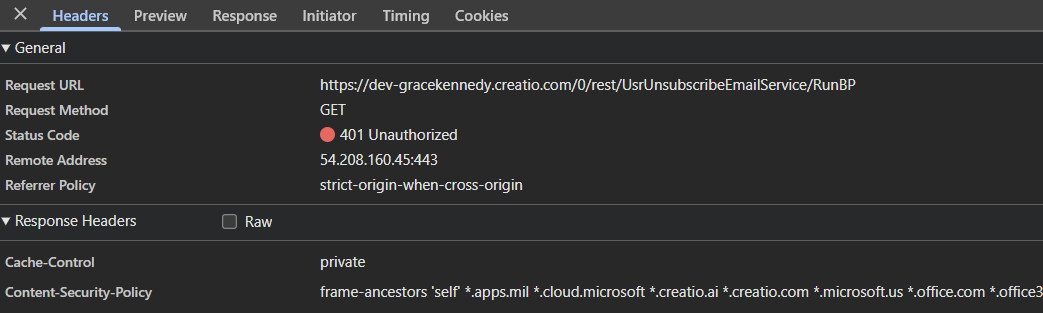
Query: Guide me how can I call business Process from
- Anonymous Service
- Cookied-Based Service (If required), then how to connect or call this service from anonymous service not to get 401 error

souresh khandelwal,
Does this all work if you're in an incognito window?
I have an anonymous webservice that is used this way as well. However, if my browser session is already logged into Creatio, I get the 401 error as well, but worked if I wasn't already logged in to Creatio in the browser session (or using an incognito window). I suppose if there's an active session for the user it's expecting the CSRF header as well, even when calling it via the anonymous endpoint address.
To resolve this, I check to see if there is a cookie named BPMCSRF for the user and if so I add it as a BPMCSRF header in the request. Then it works whether my browser is logged into Creatio or not and it works both ways.
The code to check for the cookie I use is something like this:
function checkBpmCookie() {
	var name = "BPMCSRF=";
	var cookieParts = document.cookie.split(';');
	for (var i = 0; i < cookieParts.length; i++) {
		var cookie = cookieParts[i];
		while (cookie.charAt(0) == ' ') {
			cookie = cookie.substring(1);
		}
		if (cookie.indexOf(name) == 0) {
			return cookie.substring(name.length, cookie.length);
		}
	}
	return "";
}
And then in my request from the page to the service (in my case this is an older page that uses jQuery)
var postPayload = {
	url: "https://" + host + "/0/ServiceModel/CfxSubscriptionService.svc/SaveSubscriptions",
	method: "POST",
	timeout: 0,
	headers: {
		"Accept": "application/json",
		"Content-Type": "application/json"
	},
	data: JSON.stringify(data),
};

var bpmCsrf = checkBpmCookie();
if (bpmCsrf) {
	postPayload.headers.BPMCSRF = bpmCsrf;
}

$.ajax(postPayload).done(function (data) {
	//...
}
Ryan
souresh khandelwal,
You are calling your endpoint using cookie-based authentication via /0/rest/ServiceName/EndpointName, that is why you are getting a 401 error.
Anonymous services are called via /0/ServiceModel/ServiceName.svc/EndpointName.
Please refer to the documentation.