

Question
How to include External JS Library or CDN into module pages

15:18 Feb 04, 2026
Hi,
I am working on developing custom handler that will be using Chart.JS (External JS CDN) to perform some action as requirement.
Error: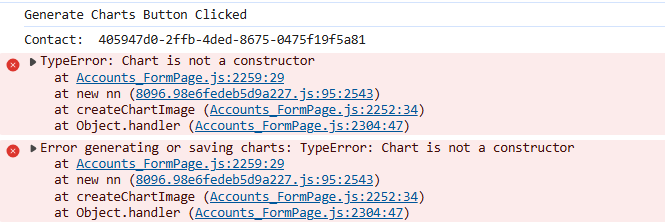
Handler Method:
{
    request: "usr.GenerateContactChartRequest",  // On Button Click
    handler: async (request, next) => {


        try {
            // 1. Fetch Context Data
            console.log("Generate Charts Button Clicked");
            const contactId = await request.$context.Id;
            console.log("Contact: ",contactId);

            if (!contactId) {
                console.error("No Contact ID found. Cannot generate charts.");
                return next.handle(request);
            }

            // --- 2. Define Data Variables (Fetch from Page Context) ---
            // Replace 'PDS_UsrInPerson_...' with your actual attribute codes
            const isPersonValue = await request.$context.PDS_UsrInPerson_64gzj70 ? 100 : 20;
            const consentValue = await request.$context.PDS_UsrDataProtectionConsent_urep1g6 ? 80 : 30;

            // A. Chart Generation Helper
            const createChartImage = async (type, data, options = {}) => {
                return new Promise((resolve) => {
                    const canvas = document.createElement('canvas');
                    canvas.width = 600;
                    canvas.height = 400;
                    const ctx = canvas.getContext('2d');

                // 3. Initialize using the extracted class
                new Chart(ctx, {
                    type: type,
                    data: data,
                    options: {
                        animation: false,
                        responsive: false,
                        ...options
                    }
                });

                    // Resolve the promise with the Base64 string
                    const base64String = canvas.toDataURL("image/png");
                    resolve(base64String);
                });
            };

            // B. Database Save Helper
            const saveChartSnapshot = async (ContactId, ChartType, ImgStr) => {
                return new Promise((resolve) => {
                    // Check if modern Model API is available (Freedom UI Best Practice)
                    if (request.$context && request.$context.getModel) {
                        const runSave = async () => {
                            const model = await request.$context.getModel("UsrChartSnapshot");
                            await model.insert({
                                UsrContact: { value: ContactId },
                                UsrChartType: ChartType,
                                UsrImageData: ImgStr
                            });
                            resolve();
                        };
                        runSave();
                    } else {
                        // Fallback to Classic ExtJS API
                        var insert = Ext.create("Terrasoft.InsertQuery", { rootSchemaName: "UsrChartSnapshot" });
                        insert.setParameterValue("UsrContact", ContactId, Terrasoft.DataValueType.GUID);
                        insert.setParameterValue("UsrChartType", ChartType, Terrasoft.DataValueType.TEXT);
                        insert.setParameterValue("UsrImageData", ImgStr, Terrasoft.DataValueType.TEXT);
                        insert.execute(() => resolve());
                    }
                });
            };

            // --- 4. Execute Chart Generation ---
            // A. Generate and Save Pie Chart
            const pieBase64 = await createChartImage('pie', {
                labels: ['In Person', 'Remote'],
                datasets: [{
                    data: [isPersonValue, 100 - isPersonValue],
                    backgroundColor: ['#36a2eb', '#ff6384']
                }]
            });
            await saveChartSnapshot(contactId, "Pie", pieBase64);
            console.log("'Pie Chart' saved.");
        }
        catch (error) {
            console.error("Error generating or saving charts:", error);
        }
        return next.handle(request);
    }
}
Like
2 comments

16:46 Feb 05, 2026
In recent versions, external sources are blocked by default. You need to add an exception for the URL in the content security policy area.
If you look in dev tools, you will often see more information, so you can tell if the URL is attempting to load and being blocked, etc.
15:06 Feb 12, 2026
In addition to Ryan answer, you could check the documentation of CSP on how add exceptions
https://academy.creatio.com/docs/8.x/setup-and-administration/administr…
Show all comments