


i need to check if the caselifecycle has been replaced or not what confirion ?
Like
Hi Manal,
Thanks for reaching out. To confirm whether a case's lifecycle stage has actually changed, you can check a few places:
- The case page itself - open the case and look at the progress bar at the top. The highlighted stage shows the case's current status.
- The case's history - on the case page, there's a history/timeline section that logs each stage change along with the date and time it happened, so you can see the full sequence of transitions.
- The case's activity feed – status and stage changes are also posted as system messages here, which gives you another way to cross-check the timeline.
If you're checking something more specific, could you share a bit more detail about what you mean by "replaced" (for example, a particular stage, a notification you expected, or something else)? That'll help point you to the right place.
For a closer look, please reach out to support@creatio.com with a full description of the issue, including the case record in question and any screenshots you have. Our support team can dig into it directly.
Hi Manal,
You can retrieve the Case Lifecycle and then build a condition based on it within the business process. Here is how:
First, read the case whose lifecycle you need to evaluate. Then add a Read data element on the "Case Lifecycle" object to retrieve the relevant records - either all of them by selecting "Read a collection of records", or a specific one (for example, the latest) by selecting "Read the first record in the selection":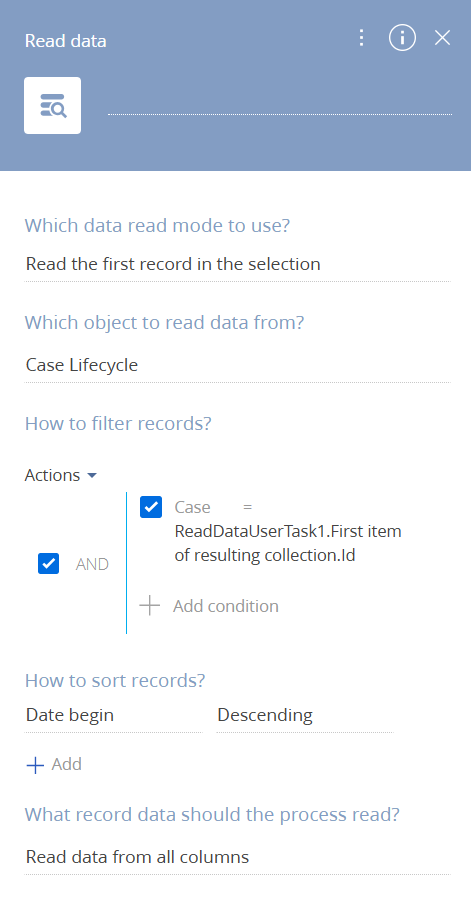
Once the lifecycle records are retrieved, add an Exclusive gateway (OR) and configure its conditional flows to evaluate the data you need (for example, the case status). This lets the process follow one branch if the condition is met and another if it is not.
Let me know if this answers your question, or clarify what you meant by "replaced" case lifecycle.