

Custom section is not filtering as per logged in user in portal

Hi everyone,
I’ve added my custom section “Services” for external users, and it is now visible in the portal workplace. However, the list currently displays all records, instead of filtering them based on the logged-in portal user.
In my Services entity, I have a lookup field called Site Contact that references the Contact object. I would like the portal to show only those service records where the Site Contact matches the currently logged-in portal user.
Could someone please guide me on how to implement this filtering on the portal section list?
Thank you!
Like

Good day,
Thank you for your question.
The best way to implement filtering for specific records by a particular column would be to approach it from the level of record permissions rather than direct section filtration to prevent any security breaches.
The approach you may consider implementing, therefore, is as follows:
1. Go to System Designer > Object permissions.
2. Locate and select your custom "Services" object.
3. Enable the "Use record permissions" option.
4. Create a business process that would automate rights redistribution to Services records that already exist or are yet to be created based on the contents of the Site Contact column
Articles you may find useful are as follows:
Manage permissions Business Process
We hope this helps!
Nikita Kudin,
Thanks for the feedback....I am facing trouble with my custom entity jobs. When I try to give rights below error pop up comes up: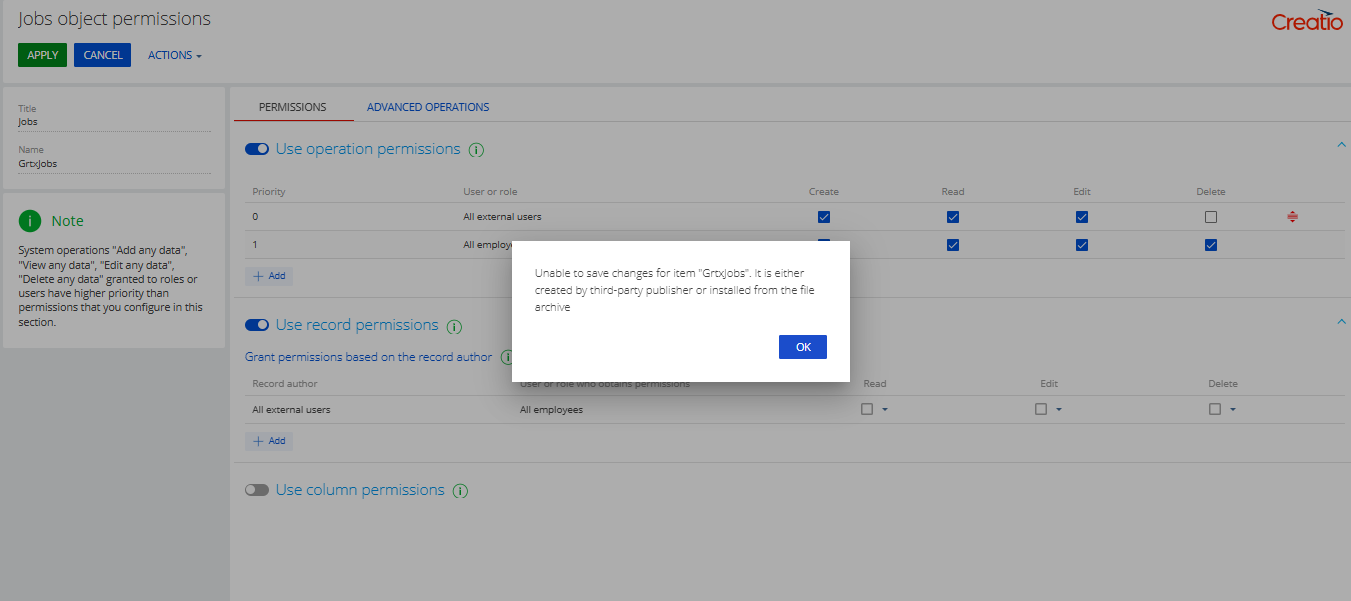
If I check the record checkbox in object setting in application hub , no records are shown in portal for logged in contact. What exactly am I missing here?