


Good afternoon,
We are trying to pass a list of GUID's we are generating into a Collection parameter that will be fed into a Call Sub element in a process.
We have gotten stuck with the following, not being able to pass a list into the Collection parameter. Can anyone advise how we need to approach this?
var collection = new List();

//apply child query parameters
var query = new CustomQuery(userConnection, queryString);

		//establish db connection
using (var db = userConnection.EnsureDBConnection())
{
	//executes the query
    using (var reader = query.ExecuteReader(db))
    {
    	//while the query returns a result, add it to the list.
        while(reader.Read())
        {
			//assign the value from the first column
			var databaseResult = reader.GetGuid(0);
      		collection.Add(databaseResult);
        }
 	}
}

//set the collection equal to the list
Set("ServiceLines", collection;
Thank you so much!
Like

Hello,
Here is a simple script-task that will set the collection to the parameter of the process:
var list = new CompositeObjectList<CompositeObject>();
var item1 = new CompositeObject();
item1[ "Id" ] = Guid.NewGuid();
item1[ "Name" ] = "Name1";
item1[ "Age" ] = 26;
list.Add(item1);
Set<CompositeObjectList<CompositeObject>>("CompositeObjectListParameter", list);
return true;
And here is the screenshot of both main and sub process and their parameters:
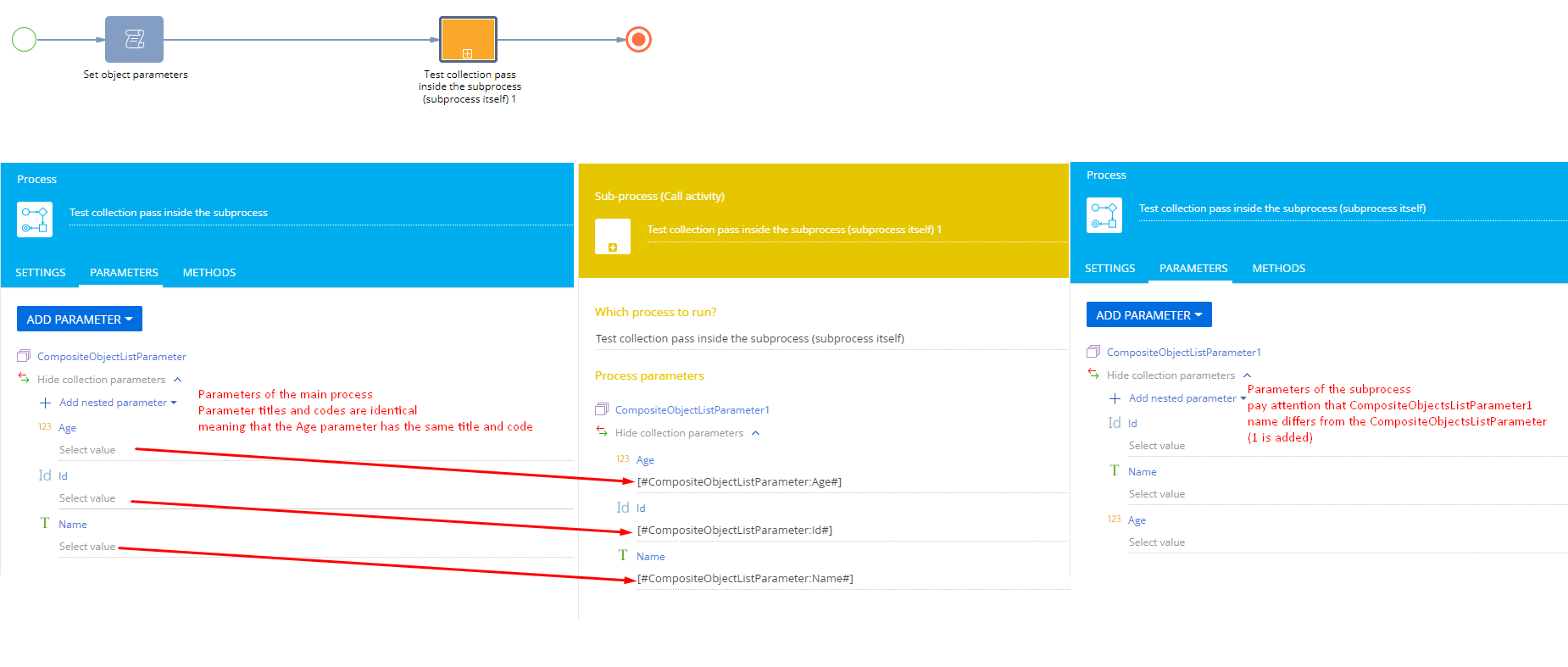
As a result if we review the data tracing for both main and subprocess we will see that the collection was successfully passed to the subprocess:
1) Main process trace data (on the call subprocess element):
"Process parameters": [
		{
			"Parameter": "CompositeObjectListParameter",
			"Value": {
				"Before execution": [
					{
						"Id": "fd30c884-8c44-41c6-9739-9bfbbd549270",
						"Name": "Name1",
						"Age": 26
					}
				],
				"After execution": [
					{
						"Id": "fd30c884-8c44-41c6-9739-9bfbbd549270",
						"Name": "Name1",
						"Age": 26
					}
				]
			}
		}
	]
2) Subprocess parameters (on any noncompiled element of the process):
"Process parameters": [
		{
			"Parameter": "CompositeObjectListParameter1",
			"Value": {
				"Before execution": [
					{
						"Name": "Name1",
						"Id": "fd30c884-8c44-41c6-9739-9bfbbd549270"
					}
				],
				"After execution": [
					{
						"Name": "Name1",
						"Id": "fd30c884-8c44-41c6-9739-9bfbbd549270"
					}
				]
			}
		}
	]
So you will need to find a way to:
1) Create as many items inside the CompositeObjectList as needed
2) Specify values for keys in these items
Best regards,
Oscar
Hello,
Here is a simple script-task that will set the collection to the parameter of the process:
var list = new CompositeObjectList<CompositeObject>();
var item1 = new CompositeObject();
item1[ "Id" ] = Guid.NewGuid();
item1[ "Name" ] = "Name1";
item1[ "Age" ] = 26;
list.Add(item1);
Set<CompositeObjectList<CompositeObject>>("CompositeObjectListParameter", list);
return true;
And here is the screenshot of both main and sub process and their parameters:
As a result if we review the data tracing for both main and subprocess we will see that the collection was successfully passed to the subprocess:
1) Main process trace data (on the call subprocess element):
"Process parameters": [
		{
			"Parameter": "CompositeObjectListParameter",
			"Value": {
				"Before execution": [
					{
						"Id": "fd30c884-8c44-41c6-9739-9bfbbd549270",
						"Name": "Name1",
						"Age": 26
					}
				],
				"After execution": [
					{
						"Id": "fd30c884-8c44-41c6-9739-9bfbbd549270",
						"Name": "Name1",
						"Age": 26
					}
				]
			}
		}
	]
2) Subprocess parameters (on any noncompiled element of the process):
"Process parameters": [
		{
			"Parameter": "CompositeObjectListParameter1",
			"Value": {
				"Before execution": [
					{
						"Name": "Name1",
						"Id": "fd30c884-8c44-41c6-9739-9bfbbd549270"
					}
				],
				"After execution": [
					{
						"Name": "Name1",
						"Id": "fd30c884-8c44-41c6-9739-9bfbbd549270"
					}
				]
			}
		}
	]
So you will need to find a way to:
1) Create as many items inside the CompositeObjectList as needed
2) Specify values for keys in these items
Best regards,
Oscar
Oleg Drobina,
Hello,
I did exactly the same as in Oleg's example,
but I get the error message:
System.Collections.Generic.KeyNotFoundException: The given key was not present in the dictionary.
   at System.ThrowHelper.ThrowKeyNotFoundException()
   at System.Collections.Generic.Dictionary`2.get_Item(TKey key)
   at Terrasoft.Core.Process.ProcessParameterProvider.SaveCollection(String parameterPath, ICompositeObjectList`1 items)
   at Terrasoft.Core.Process.ProcessParameterProvider.SetParameterValueInternal[TValue](String parameterPath, TValue value, Boolean setMustReadFromParameterStore)
   at Terrasoft.Core.Process.ProcessParameterProvider.UpdateParameterValue[TValue](String parameterPath, TValue value)
   at Terrasoft.Core.Process.ProcessParameterProvider.SetParameterValue[TValue](ProcessSchemaParameter parameter, Guid schemaElementUId, TValue value)
   at Terrasoft.Core.Process.ProcessModel.SetParameterValue[T](FoundParameterData result, T value)
   at Terrasoft.Core.Process.ProcessModel.TrySetValue[T](ProcessSchema processSchema, String propertyPath, T value)
   at Terrasoft.Core.Process.ProcessModel.Set[T](String propertyPath, T value)
   at Terrasoft.Core.Process.CbProcessTestMethodsWrapper.ScriptTask1Execute(ProcessExecutingContext context)
   at Terrasoft.Core.Process.ProcessScriptTask.InternalExecute(ProcessExecutingContext context)
   at Terrasoft.Core.Process.ProcessFlowElement.ExecuteItem(ProcessExecutingContext context)
   at Terrasoft.Core.Process.ProcessFlowElement.Execute(ProcessExecutingContext context)
I do not understand why this error occurred.
The name and the code of collection parameter are the same...
The system will not fill the collection...
Best regards,
Oliver
Oliver Herzog,
I have the same issue, I used the example on the website, and it just gives this exact error message. Anyone?
I figured out how to solve it, there MUST be a subprocess attached to the collection of records.. I do not know why or how. I created an empty businessprocess as mockup sub process. Then attach the collection of records made in the script to this sub process.