Please make sure that the URL of Identity service has the following appearance in the field: https://yoursite-is.creatio.com without a slash at the end.
We are implementing CyberArk Alero in our environment. Our environment already have saml authentication. I need to add another saml authentication method for Alero. So how can I add Alero SAML authentication to the existing SAML configuration?
For the grid container, the size of one column will always depend on the size of the grid. For example, you have a 100x100 px grid with 2 columns, the grid will be divided into 2, each column taking a half of the space (with spacing specified in settings). You can of course take up a whole space with the element if needed.
You can modify the column set up in the grid container with system definer sizes like "small", "medium", "large" in the column spacing for example:
To clarify, my question was related to the list component, not the layout grid.
As it stands, the list component allows me to manually set the width of each column. However, this width can only be defined using a fixed size (like pixels), not percentages. This fixed sizing leads to two main issues:
On smaller screens: The content doesn't fit the screen width, resulting in the addition of a horizontal scrollbar.
On larger screens: There's excess white space to the right of the last column, as the columns do not expand to use the available width.
My goal is to have the column widths dynamically adjust to the screen size, utilizing percentages to ensure they fill the entire width of the list component, without unnecessary scrollbars or white space.
Is there a way to make the columns within the list component responsive, so that their widths adjust in proportion to the screen size, using percentages instead of fixed sizes?
Any guidance or suggestions on how to achieve this would be greatly appreciated.
Hello community, I'm currently working on creatio 8.09 and I'm trying to make use of the Activity Section for multiple reasons but i don't seem to find where i can add this specific section to any of my workplaces since it doesn't show as an option.
It appears that i have the activity section in my packages since i can make a replace object of it:
You can add add HTML to a tooltip in Freedom UI. .
If you need some dynamic content for the tooltip, you can add an attribute and bind it to the tooltip property, then set the tip at runtime by setting the attribute.
Just wondering whether is there any way that we can run some javascript code / callback function upon completion of business process execution in client module?
If so, could you provide the sample code for reference?
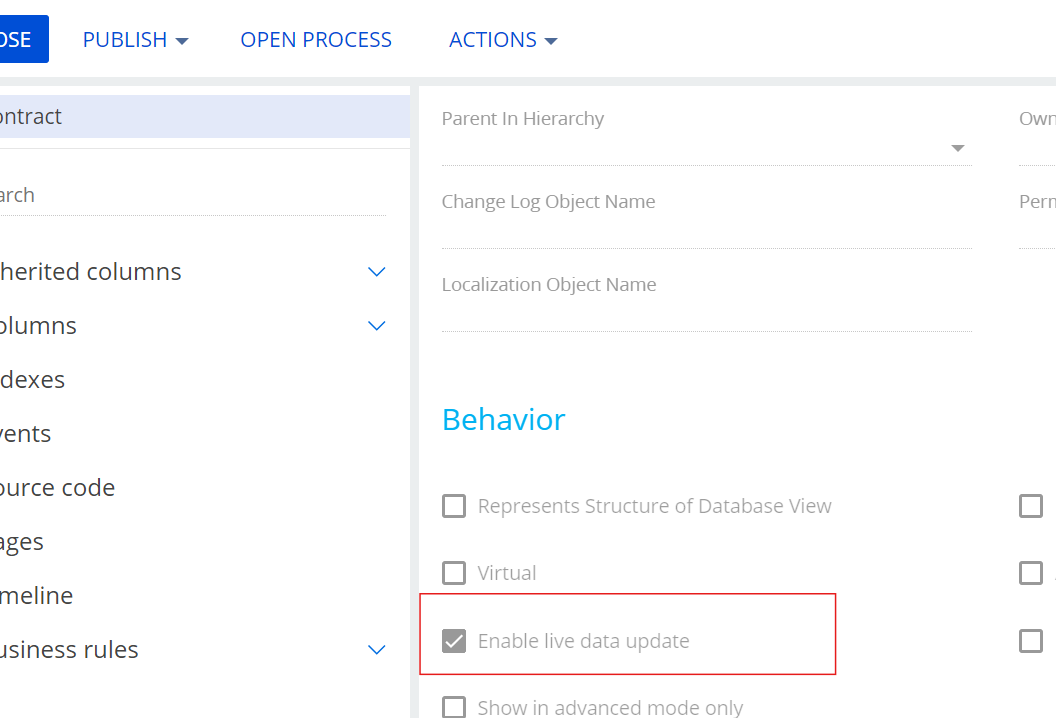
If this is needed for versions lower than 8.0.6 (version when the LiveEditing feature was added out-of-the-box that will reload entity automatically in case changes to it were applied by a process) - you can always send a socket message to the client-side logic (like in the example but the message sending mechanism should be in the last script-task of the business process, on the client-side create a method that is triggered upon receiving the message) or use an already-developed marketplace addon for it.
To elaborate more on what Oleg mentioned. There's no way to have a callback for when the process completes (the callback commented in your code is a callback for the completion of *starting* the process). A process can have things that wait for a period of time, so not really possible to wait for completion.
The approach to take is for the process to notify the client-code that it has completed by sending it a message. This article shows how to send the message:
However, if the page is Freedom UI, a better approach is to enable live data updates for the object so the refresh happens automatically when the data changes in the process. More about that here:
From the code you posted, it looks like this is a classic page, so you'd have to go the first route for sending a message from the process to the client page.