manytomany
relationship
list
grid
Records
object
Studio_Creatio
8.0

Hi Creatio Community,
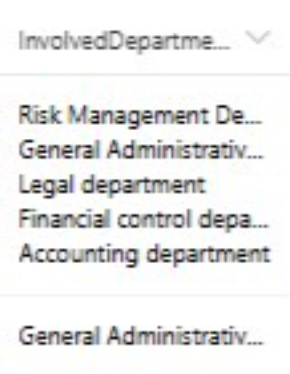
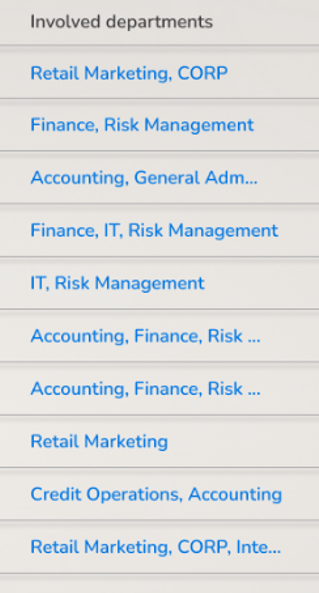


In my Freedom UI application, I have this setup:

  • Object: Document
  • Lookup: Functional Area
  • Many-to-many table: DocumentFunctionalArea

I’ve configured a multiselect lookup field that stores the selected Functional Areas using the intermediate table. It works on the page and values are saved correctly.

But the problem is:
In the record list (grid), I want to display the related Functional Areas for each document. Not as a field above the grid - I want them to be shown as a column, like "Functional Areas: Sales, Marketing, Finance", etc.

However, in Freedom UI, I can't add this as a column because the multiselect field is based on an intermediate object.

Is there a built-in way to show many-to-many values inside the record list view, or is it currently not supported?

I attached screenshots to illustrate what I'm trying to achieve.
It’s totally okay if values are comma-separated or listed vertically - the main goal is to show multiple related values in a single column of the Document list.

Thanks a lot!

Like 0

Like

1 comments

Hello ,

Thank you for your detailed explanation and the screenshots, they really help clarify what you're aiming to achieve.
Currently, Freedom UI does not support displaying values from a many-to-many relationship (like your "Functional Areas") directly as a column in the list view.
That said, I completely understand how useful this functionality would be, it’s a very reasonable and practical request. I’ll go ahead and register this as an idea on our internal roadmap for potential future improvements to the Freedom UI framework.

Show all comments

We need to manage users such way, so they are unable to change table/grid arrangement unless they have specific role.

Like 0

Like

7 comments

Would this be for a Freedom UI list or a classic list?

Ryan Farley,

Freedom UI

Davit Gharagebakyan,

I believe currently there's no way to do this without some some CSS tricks. I typically add some code that executes globally and adds an attribute to the body tag - in this case you'd check if the user is a member of a role, then add the tag, so the body is something like this:

<body user-is-admin="true" .... >

Then add CSS globally that will only apply if that attribute is true. 

Here's an article with a similar approach that does this for portal (external) users only (instead of checking if the user is a portal user, you'd check if the user is in the role) https://customerfx.com/article/applying-global-css-styles-in-the-creatio-portal-formerly-bpmonline/

As far as the CSS to hide the ability to modify the list columns, that would be this (assuming you want this to apply to all lists) - Note, this HIDES the ability to edit the list layouts:

crt-data-table crt-button[data-qa="add-columns-button"], 
crt-data-table crt-button.crt-column-toolbar {
    display: none;
}

Ryan

Thank you very much. Worked for me

Looks like you can find all of the possible options for setting these grid list features in the code by adding a breakpoint (I found this by searching for "features.columns." using Chrome's search all sources feature, ctrl+shift+f):


e.g. I have disabled row toolbars, column toolbars (the ones you get by clicking on each column's 3 dot menu), resizing, rearranging (dragAndDrop), and sorting, and these all take effect as expected and make the list basically static & read only. Currently working on 8.1.3.


Example of the page code to apply this for me:

			{
				"operation": "insert",
				"name": "DataGrid_p5zr1sl",
				"values": {
					"type": "crt.DataGrid",
					"features": {
						"rows": {
							"selection": false,
							"numeration": false,
							"toolbar": false
						},
						"editable": {
							"enable": false,
							"itemsCreation": false
						},
						"columns": {
							"adding": false,
							"toolbar": false,
							"dragAndDrop": false,
							"editing": false,
							"resizing": false,
							"sorting": false
						}
					},
					/* rest of the data grid setup */
				}
			}

Thanks for your insight, but that will not work for me, because that construction does not support "$Attr" values, only constants

Davit Gharagebakyan,

That's frustrating, didn't realise that as my current use case is consistent for all users. Would be good to be able to control these via attributes though, Creatio!

Show all comments
FreedomUI
tile_view
grid
Studio_Creatio
8.0

Hi can anyone help to build a tile view in freedom ui , I wanted to recreate the grid view that was present in classic ui .

Like 1

Like

1 comments
Best reply

Hello,

Unfortunately, a tile view currently cannot be recreated in Freedom UI, and there is no option to display the images on the list page. We have registered a request with the responsible development team, and this team is working on adding this functionality in future releases.
 

Hello,

Unfortunately, a tile view currently cannot be recreated in Freedom UI, and there is no option to display the images on the list page. We have registered a request with the responsible development team, and this team is working on adding this functionality in future releases.
 

Show all comments
iframe
detail
grid
Studio_Creatio
7.18

Hello! Does anyone know how to add an iframe to a specific entry in the details?
It’s just that an iframe should appear inside a specific entry below the values. It will appear when a detail entry is active.

Thank you in advance!

Like 0

Like

1 comments

Hello.
In the current version of Creatio, it is not possible to add an iframe directly into a details column. However, you can add a button to a grid detail that opens a modal window containing an iframe. I followed the guidelines from - here.

I added an "Account Detail Test" to the Account section with a "Link" column and a "View Frame" button. When this button is clicked, it sets the detail record field values into session storage. Here is an example of the logic I implemented:1
Code of UsrFrameControl:
1
Code of UsrModalPage:
1
Code of test detail on account page:
2
The main point is to store the link in session storage. To achieve this, I added a "Link" column to the detail. In the FrameControl module, you read this value and set it as the src attribute of the iframe.

Hope this helps!
 

Show all comments
Freedom
grid
lookup
Studio_Creatio
8.0

Hi All,


Is there any way to configure the comboboxes inside the Grid in a similar way we configure the ones in a page?


I'd like to be able to configure these 2 properties:

  • "showValueAsLink" 
  • "isAddAllowed"
     
  • Thanks!
     
Like 0

Like

2 comments

Hello,
 

Thank you for your question. To provide a more detailed analysis, could you please clarify the following:
 

  1. 1. We need screenshots of the specific functionality you require.
  2. 2. Please specify whether this functionality is needed in the Freedom UI or the Classic UI.
     

Your cooperation will help us assist you more effectively.
 

Thank you!

Hello Andres,
Did you find any solution ?

Show all comments
ExpansionPanel
FreedomUI
grid

Hi all, 

I'm trying to make a freedom UI Form readonly. 

I know there are "Make Readonly" actions for input controls, buttons, etc, but I want to change the behavior of a grid inside an Expansion Panel.

- I don't want users to be able to delete a record.


Is that possible?

Thank you,

Ignacio.

Like 0

Like

2 comments
Best reply

https://customerfx.com/article/adding-row-action-menu-items-to-a-creati… this article tells you how to add items to the row menu, and also that if you override the row menu to add your own it will remove the default ones, so you can just override the row menu with nothing (so no row menu) or with just the ones you want to keep (e.g. just the Open option, removing Delete and Copy to make it ready only).

https://customerfx.com/article/adding-row-action-menu-items-to-a-creati… this article tells you how to add items to the row menu, and also that if you override the row menu to add your own it will remove the default ones, so you can just override the row menu with nothing (so no row menu) or with just the ones you want to keep (e.g. just the Open option, removing Delete and Copy to make it ready only).

Harvey Adcock,

Thank you Harvey! This exactly what I need. I will give it a try. 
Will let you know!
Regards,

Ignacio.

Show all comments
Sales_Creatio
8.0
Custom Details
custom
custom button
grid

I made a post earlier that helped me with a section grid but I currently need to add a custom button that should be on every grid line of a detail that was added in Orders.

As an example in the image above, you should have a custom button on all rows of the Detail grid.

Like 0

Like

5 comments

Hi Gabriel,


Have you tried to implement the logic in the corresponding detail Schema? https://community.creatio.com/questions/add-custom-button-all-rows. If implemented, could you please post the results after implementing them in your detail schema?


BR,

Bhoobalan Palanivelu.

Yes, it was from this post that I tried, but for the Detail that I put in the printout, I couldn't get it to work with the Detail grid.

Gabriel Cassimiro,


Could you please share with us the current implementation that you are using from the previous post so we can investigate how can it be resolved?


Best regards,

Dariy

Dariy Pavlyk,

I made the attempt to implement as in this post here: https://community.creatio.com/questions/add-custom-button-all-rows But for what I would like in specific it doesn't work.

Gabriel Cassimiro,


As Dariy Pavlyk mentioned, please share with us what has been implemented. The previously shared article is for the section and please share how did you implement in your scenario (the schemas you used, the implementation you did) With that further investigation could be made.


BR,

Bhoobalan Palanivelu.


Show all comments
grid
layout
checkbox
Center
Service_Creatio
8.0

Hi,


I need to place a checkbox in the center of a grid cell. I have tried with a text label and I could justified it by adding the following code to the diff property of the attribute:


"styles": {

     "labelStyle": {

          "textAlign": "center"

     }

}


The label finally looked like this:

However, I did not find a way to center a checkbox field into the grid:

I hope you can offer me a solution. Thank you in advance!

Like 0

Like

1 comments

Hello,

As a suggestion, you may modify the diff part of these elements, so that they will be in the same container.

After that, you should apply a needed style to both elements.

In this article, you can find an example of how to center different elements.

Show all comments
editable
grid

Hi Team,


I have created a editable GRID and added some business rule . I have added few field as read only but still i was able to edit in the editble GRID . Any idea what is causing this problem ?


Regards,

Sethuraghav N

Like 0

Like

1 comments

Hi Sethu, 


Unfortunately at the moment Business Rules don't work with details with editable grid. 

This is a known issue and our developers are already working to fix this issue in future releases. 


Best regards,

Yurii.

Show all comments
editable
grid

Hi team ,


Im trying to use explore out of the box editable list options in some details the check box is enabled and in some details its not enabled ,


Is there anywhere i can check how this is working ?


Like 0

Like

1 comments

Hello Sethu, 


I would like to suggest you to check the below articles where you can find the requested information, as well we have a lot of useful posts on community on this topic:

https://academy.creatio.com/docs/user/no-code_customization/ui_and_busi…

https://academy.creatio.com/docs/developer/elements_and_components/basi…


If you have any additional or specific questions, please let me know!


Best regards, 

Anastasiia

Show all comments