Hi.

Our intention is create a console app (C#) using EntitySchemaQuery  that query an entity (like Account or Contact) and gets its rows to populate a local table.

We are trying to connect our bpmonline using this example:

source: https://www.bpmonline.cz/bpmonlinesdken/UsingEntitySchemaQuery.html

//////////
// Creating a query instance, adding columns and a data source in the query.
Select selectQuery = new Select(UserConnection)
                    .Column("Id")
                    .Column("Name")
                    .From("Contact");
// Executing a database query and getting the resulting dataset.
using (DBExecutor dbExecutor = UserConnection.EnsureDBConnection())
{
    using (IDataReader reader = selectQuery.ExecuteReader(dbExecutor))
    {
        while (reader.Read())
        {
            // Handling the query results.
        }
    }
}
/////////////
The problem is we do not know how to create the connection string (UserConnection) to our cloud services, https://mycompany.bpmonline.com.
How to create this UserConnection? Someone has an example or may guide us?
Theoretically, it's possible to use bpm'online local .dll-s and create the connection. However, it's very hard and usually pointless. If you need to get data from bpm'online, please create a web service in bpm'online. The service should get the needed data and give it to the requested.
I'm trying to achieve the same goal to increase our developers' productivity.
We usually use task script in the process designer to manipulate data using EntitySchemaQuery.
Each time, we have to update the process, run it and check the log or attach visual studio debugger (which is painful) to verify our code.
Imagine if we are able to get a UserConnection instance directly into a standalone app. we can test our functions faster and increase the overall productivity.
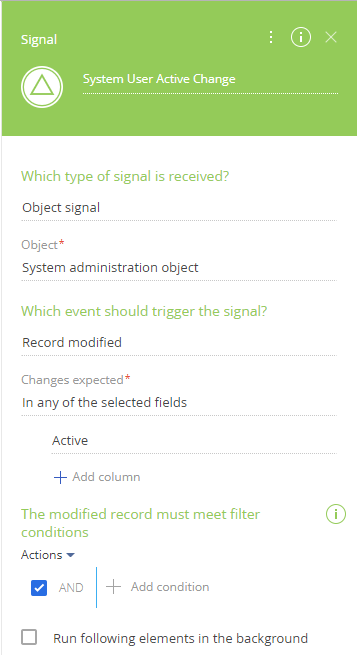
Whether or not a System User is Active can be read from System administration object. However, when the state of Active is changed in System Users, no Signal is caught using Record Modified if the Active flag was changed manually in System Users. The Signal only triggers a process if the Active status is changed by another process.
How can a process be started when changing the Active status of a System User manually?
You can use read element to find employee record and ther read manager value from it: http://prntscr.com/pi74m7. Then you can use second read data element to find contact of this manager.
Regarding second read data to find the contact of this manager, I am doing as below, but it does not return manager contact, what should be the correct filter here.
Use Employee object for second read data (http://prntscr.com/pix585) and then you can take needed contact from it (http://prntscr.com/pix5r3). Since manager is also part of Employee object it cannot find such contact.
I figured out how to get the link for an attachment, but when I include it in a Send email system action, the link is automatically converted to an attachment, which is undesirable because the attachment is too large. How do I include a link to an attachment in an email and have it remain text or a hyperlink?
According to the [Send email] element logic, your hyperlinks to bpm'online attachments will be automatically converted to actual attached files in the email, there is no way you can leave them as text links.
When I include an URL for an attachment in an email sent by bpm'online, the URL is converted to cid: and an attachment is added to the URL. However, I just want the URL displayed as text or a link to the file. I tried including a space after https:// so that it would be recognized as an URL, but the same thing happened. I tried using %252F for the forward slashes, but it wasn't converted back to text. How do I stop attachment URLs from being converted to attachments when used in email templates and/or Send email actions?
Bpm'online R&D team has prepared a feature which will be available in the next release 7.15.1 which would allow our users to send emails with a link to attachments without getting them converted to cid format.
Once the 7.15.1 version is released, please contact bpm'online support team in order to get this feature enabled.
In mobile application we can show/hide field using business rule but how we can configure that field will only show in edit page and it will be hidden in preview page.
As far as I understand you are using the marketplace application. We suggest you to approach the application developer directly via bpmonlinelabs@bpmonline.com for further consultations.
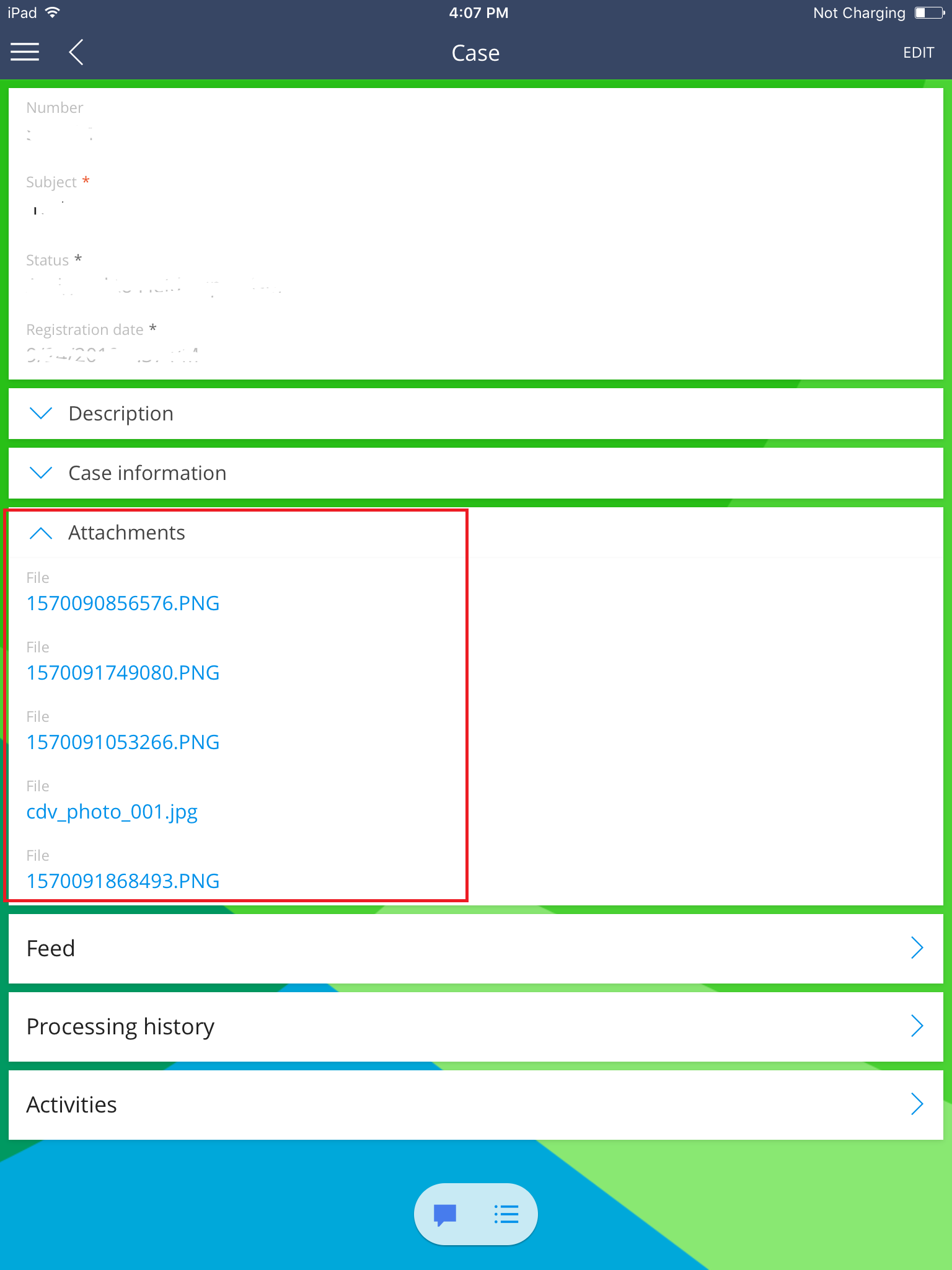
I am not using using marketplace application, I am referring to the OOB attachments in Case (Please see screenshot below). Once you click on the attachment it will allow you to preview the attachment. This is working fine for users of type "Employee" but for users of type "Portal user" i'm getting this error "Schema CaseFile is not found" is there any configuration i need to set up? I already check CaseFie object, "Portal Users" has already access rights on it but I am still getting this error.
The only suggestion we have is to debug the preview finctionality using mobile application emulator, analyze the functionality logic and implement it for portal users, since the out of the box version of the application doesn't allow portal users to use mobile app.Unfortauntely, we do not have any solution examples for this reason.
I tried to debug the preview functionality using mobile application. Both users of type 'Employee' and of type 'Portal users' has the same logic. It is doing select query in VwSysEntitySchemaInWorkspace object where filter is 'Name' is 'CaseFile'. This query is returning error "Schema CaseFile is not found" for users of type 'Portal Users'. Case File is already added in the List of objects available for portal users but still this error occurs. Is there any other configuration to where I need to add the 'CaseFile' schema aside from List of objects available for portal users for this to work?
Since the portal users are not able to access the mobile app by default, we cannot debug the system and tell you exactly how the portal user should preview the files. Developing the mobile application for portal users purposes might be followed by multiple pitfalls. That is why this option is not available in out of the box version and we do not have any examples for the solution.