FreedomUI
Javascript
DataGrid
tooltip
hover
Service_Creatio
8.0

Hi Community,

I’m trying to implement a small UX feature in a Freedom UI native DataGrid and wanted to check whether there is any supported/native way to do this.

I have a DataGrid column that contains a masked value. What I would like to achieve is:

  • when the user hovers over that cell (preferred),

or at least:

  • when the user hovers over the row,

I want to show the full value in a tooltip.


I went through the Freedom UI List/DataGrid documentation and page customization docs, but I could not find anything describing:

  • a hover listener / mouseenter event for DataGrid cells or rows
  • a native way to bind a tooltip on hover to a specific grid column
  • a request/handler that is triggered by hovering a native DataGrid cell

So at the moment it looks like hover is not exposed as a native event in the standard DataGrid.

By inspecting the rendered DOM, I can see the table and cells generated by Angular/CDK/Material, for example something like:

document.querySelector('#cdk-drop-list-0')

and column/cell selectors such as:

td[crt-data-table-column-id="f6"]

So one idea I had was to try with plain JS / DOM event delegation, for example:

  • attach a mouseover / mouseenter listener to the rendered table
  • detect when the event target is inside the masked-number column
  • inject a title attribute or custom tooltip dynamically

However, this feels quite fragile because this does not seem like an officially supported Freedom UI extension point.

My question is:

Has anyone implemented hover behavior in a native Freedom UI DataGrid without using a custom component?

More specifically:

  1. Is there any native/supported way to react to hover on a DataGrid cell or row?
  2. Is there any native way to show a tooltip for one specific column?
  3. Has anyone successfully used a DOM hack like querySelector(...).addEventListener(...) for this in Freedom UI?
  4. If hover is not supported, what would be the best native workaround?

If anyone has an example, that would help a lot.

Thanks

Like 17

Like

1 comments

Hello Krzysztof,

I have not found any native or supported way to handle hover events for a DataGrid cell or row. Using DOM-based workarounds such as querySelector(...).addEventListener(...) is not recommended, because the DOM structure is internal and may change in future Creatio updates.

As a supported workaround for displaying a tooltip, I tested the following approach.

The crt.EncryptedInput component supports the tooltip property. Since the Creatio DataGrid allows you to customize how cells are displayed, I added a custom cell to the DataTable (crt.DataGrid) and used crt.EncryptedInput inside it:

{
	"operation": "merge",
	"name": "DataTable",
	"values": {
		"columns": [
			{
				// ... other columns ...
			},
			{
				"id": "EncryptedTooltipColumn",
				"code": "PDS_EncryptedTooltip",
				"caption": "#ResourceString(PDS_EncryptedTooltip)#",
				"cellView": {
					"type": "crt.EncryptedInput",
					"control": "$Items.PDS_UsrEncryptedString",
					"readonly": true,
					"tooltip": "$Items.PDS_Id | usr.UnmaskValue"
				}
			}
		]
	}
}

Where:

  • id - unique identifier for the column
  • code - unique column code, must be formed according to the pattern [data source code]_[column code], for example PDS_DeleteAction
  • caption - resource string macro for the column header
  • cellView - cell view config, where you can specify any input or bind it to a column value

Why is the tooltip property bound to $Items.PDS_Id and not to $Items.PDS_UsrEncryptedString? The reason is in how the value unmasking works in Creatio.

To see the value in the UI, you need to click on the “Show value” icon next to the value input field:
Encrypted Input

If you inspect how the "Show value" option is working, you will find that it calls for the "ValueUnmaskingService" internal web service and its "GetUnmaskedValue" endpoint:
unmaskRecord

You need to pass this endpoint an object containing a schema name, a column name, and a record ID.

Therefore, the custom converter receives the record ID and uses the Creatio DevKit SDK to retrieve the unmasked value:

converters: /**SCHEMA_CONVERTERS*/{
	"usr.UnmaskValue": async function(value) {
		const httpClientService = new sdk.HttpClientService();

		const endpoint = "ServiceModel/ValueUnmaskingService.svc/GetUnmaskedValue";
		const body = {
			"schemaName": "SchemaName", // use your schema name
			"columnName": "UsrEncryptedString", // use your column name
			"recordId": value
		};

		const response = await httpClientService.post(endpoint, body);

		return response.body.unmaskedValue;
	}
}/**SCHEMA_CONVERTERS*/

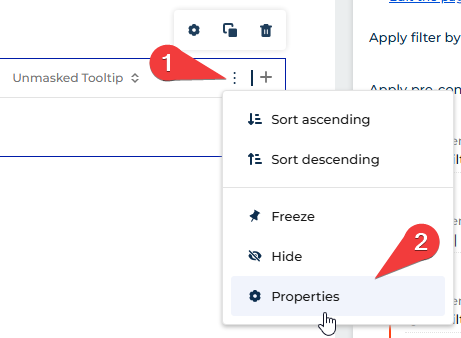
After saving the configuration, open the page in the Freedom UI page designer and set the column title:
Column Properties

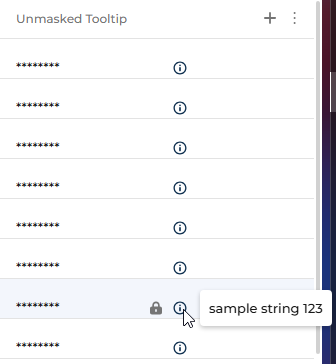
The result is that the encrypted value remains displayed through crt.EncryptedInput, while the tooltip shows the unmasked value.:
Result

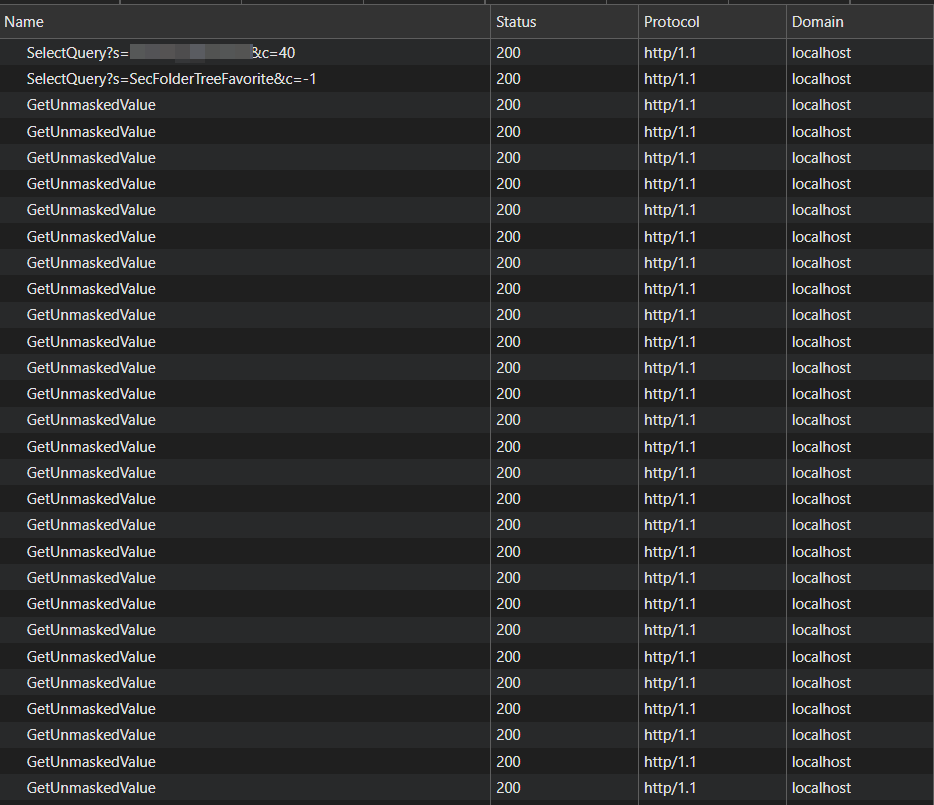
One important concern is performance. When the list page opens, in addition to the main SelectQuery, Creatio sends a separate request to 0/ServiceModel/ValueUnmaskingService.svc/GetUnmaskedValue for every record currently present in the DOM. This may affect page loading time if the list contains many visible records:
Network tab

Show all comments
CommunicationPanel
FreedomUI
angular
Javascript
telephony
phone_integration
8.0

Hi everyone!
 

We embed a custom Angular Web-phone inside the standard Communication Panel. The panel must be expanded right after user login and on every page reload, otherwise the phone widget cannot initialise incoming/outgoing calls.

  1. Is there an out-of-the-box way to auto-expand the Communication Panel right after user authorization (and after every reload)?
  2. Is there any supported API to programmatically open the panel from a custom Angular component located on the same page? (when the component receives a call we have to reopen the communication panel)

Any best-practice, hints or code snippets would be highly appreciated. Thanks!

Like 1

Like

3 comments
Best reply

You can fire a "crt.OpenSidebarRequest" request and provide the code of the sidebar to indicate which sidebar to open. 

handlerChain.process({
    type: 'crt.OpenSidebarRequest',
    sidebarCode: SOME_SIDEBAR_CODE,
    $context: {}
});

You can see this request plus others related to the sidebar here: https://academy.creatio.com/docs/8.x/dev/development-on-creatio-platform/platform-customization/freedom-ui/sidebar/overview 

Ryan

You can fire a "crt.OpenSidebarRequest" request and provide the code of the sidebar to indicate which sidebar to open. 

handlerChain.process({
    type: 'crt.OpenSidebarRequest',
    sidebarCode: SOME_SIDEBAR_CODE,
    $context: {}
});

You can see this request plus others related to the sidebar here: https://academy.creatio.com/docs/8.x/dev/development-on-creatio-platform/platform-customization/freedom-ui/sidebar/overview 

Ryan

Ryan Farley,

Hi Ryan, Thanks a lot. Now I can open the sidebar page when I get a call from the component. But one more question remains: how can I make the sibebar page opened after reloading page and after login in system? I didn`t find the answer in Creatio academy

To do something like that you might need to either override the MainShell or MainHeaderSchema so that on initialize you send the request to open it (might need to use a setTimeout to delay and make sure the UI is all loaded)

To override the MailShell you'll need to enable the feature that allows you to override angular schemas - see this thread: https://community.creatio.com/questions/how-create-replacing-schema-freedom-ui-basepagetemplate

Ryan

Show all comments
Readonly
Formpage
Javascript
Sales_Creatio
8.0

Hello Community,

Is it possible that when double clicking a record in a list, we are not redirected to the Form page of that record?

Example

  1.  when double clicking a Contact Record in the Accounts Form page, we want nothing to happen.

2) Currently when we double click we are redirected to the Contact Form page

3) We can not allowed to modify the current apge config due to various reasons.

Is there any codesnippet to add in the DataGrid

Sasor

Like 0

Like

1 comments
Best reply

You can add a property rowDoubleClick with an empty object to remove the ability to open the record by double clicking on a row: 

{
   "operation": "merge",
   "name": "TheListNameHere",
   "values": {
      "rowDoubleClick": {}
   }
}

Ryan

You can add a property rowDoubleClick with an empty object to remove the ability to open the record by double clicking on a row: 

{
   "operation": "merge",
   "name": "TheListNameHere",
   "values": {
      "rowDoubleClick": {}
   }
}

Ryan

Show all comments
FreedomUI
OpenSelectionWindowRequest
Javascript
lookup
Sales_Creatio
8.0

Hello Community,

In this article it is described on how to deal with selection windows crt.OpenSelectionWindowRequest. https://academy.creatio.com/docs/8.x/dev/development-on-creatio-platform/8.1/platform-customization/freedom-ui/selection-window/overview

but no information at all about predefined values.

Is there any possibilty that when clicking 'NEW' there are some predefined default values?

Example

The Account type is set to 'Our Company'

Thank you,

Sasori

Like 0

Like

4 comments

Hello,
 

You don't need to use programming for this task.
You need to create an object replacement (in your example, an Account object replacement), in which you can set the default value for the corresponding columns, save the changes, and publish the object.

defValue
defValue


 After that, when you open the pages of creating records, you will see the fields immediately filled with the default values.

defValue in Runtime

These links can also be useful for you to find more options for achieving your goal:

https://academy.creatio.com/docs/8.x/dev/development-on-creatio-platform/development-tools/creatio-ide/configuration-elements/object

https://community.creatio.com/questions/it-possible-set-default-value-f…

Thank you.

Hello Serhii,

Thank you for the reply.

1) We can not utilize the generic default value, becasue depending on the conditions the Type, might have differnetvalues.

2) Our frontend logic is associated with OpenSelectionWindowRequest. In the documentation of OpenSelectionWindowRequest there is no documentation for default values.

Is there any workaround to achieve this?
Sasor

If you need to use a value based on one of the fields of an object, it is fashionable to use business rules at the object level, which, depending on the value in one field, will set the value for another field using the “Set values” option.

setValBusRul

setValBusRul
 

Hello community,

any new development in the new versions of the codebase that allows us to set default values on OpenSelectionWindowRequest?

Sasor

Show all comments
local instance
Classic_UI
FileSystemDevelopmentMode
Javascript
SectionModuleV2
Studio_Creatio
8.0

I recently completed the Development on Creatio guided learning course. With my instructor's assistance, I set up a local Creatio instance—labeled Dev1_DEV—on my Windows server.
 

After switching my D1_DEV local development environment to use File System Development Mode instead of the default Creatio IDE mode, I encountered an issue where my Creatio instance failed to load the necessary JS files related to SectionModuleV2 for Classic UI sections (e.g., System Settings, Lookups). I reverted my Web.Config file changes to disable File System Development Mode, which resolved the issue.
 

For reference, I have attached screenshots of the error messages from my console when attempting to access Classic UI sections while File System Development Mode was enabled.
 

Could you help me understand why switching to File System Development Mode prevents access to the required JS files for Classic UI sections? Aside from modifying the Web.Config file, I did not make any other changes to the system. 

Any guidance on resolving this would be greatly appreciated.

Like 0

Like

14 comments

Hello,


We recommend checking if all the steps from the article have been completed:

https://academy.creatio.com/docs/8.x/dev/development-on-creatio-platfor…


For example, ensure that these values are set:

<fileDesignMode enabled="true"/>
...
<add key="UseStaticFileContent" value="false"/>


All steps must be completed.

Hello Kalymbet,
Hope all is well. 

Thank you for providing that link. I followed its steps listed on the page as follows: 
Enabled file design mode
Disabled UseStaticFileContent 
Compiled my instance (no errors)
Downloaded packages to file system successfully (no errors)
Gave IIS Usr full access to the Terrasoft.Configuration file

I still received the same error. It looks like it is not able to find the SectionModuleV2.js file. 


Kalymbet Anastasia,


Hello,
 

We also recommend that the user under which the application pool is running should also have full access to the {rootAppFolder}\Terrasoft.WebApp folder

Folder access

Serhii Parfentiev,

Thank you for the suggestion. I added Full control access to the IIS User for the Terrasoft.WebApp folder and I still received the same issue. For reference, I attached an image of the Terrasoft.WebApp security properties. 


Hello,
Could you please verify under which user the Application Pool is running? If you have changed the user, please make sure to grant permissions for this user too.

If this doesn't help, additionally please try the following scenario:
1) Deploy the application.
2) Authorize and allow the inner part of the application to initialize (after login, wait for the application to finish loading).
3) Only after that, make changes in the Web.config file to enable development on the file system and follow further instructions. 

i have done all the steps and facing the same issue
not able to open lookup, process log , but contact , account , creatio ai dashboard is opening 

Varun Mishra,

Please confirm that you have completed all the steps described in each message in this thread above, including the last one.

Mira Dmitruk,

Any Update

Pranshu Basak,

Could you please specify what update you are expecting?

Mira Dmitruk,

hello, i tried all the steps still not working 

Varun Mishra,

Hello!

Please run a full generation and compilation.

Although from the screenshot it’s clear that the script did not load, it’s possible that you still haven’t granted the necessary permissions to the folder. We recommend giving full access to the folder for the IIS user under which the application pool is running.

If the error persists, please register a ticket via email: support@creatio.com

Regards, 
Orkhan

Orkhan,

I updated my local version from 8.2.1.5446 to 8.2.3 and issue resolve  using this article https://customerfx.com/article/automated-upgrade-procedure-for-on-premise-implementation-of-creatio/

Show all comments
Client-side
Javascript
Studio_Creatio
8.0


I have this list page, which has two QuickFilters, I need to get the values ​​from these quickfilters so that when the New button is pressed, these values ​​are passed to this new page to be taken into account when creating a new Payment.
One of the filters selects the contact and another selects the Loan to which the payment will be made. I have tried many ways, but I am unable to get the data from the quick filter.

Like 0

Like

5 comments
Best reply

How are you trying to do it? there is an element in the $context.attributes that must have the quickfilterName + "_value" and could be an array

How are you trying to do it? there is an element in the $context.attributes that must have the quickfilterName + "_value" and could be an array

Hi Jesus, I have tried to do it through that way but I only get undefined

hmm, if you do a console log to every change request in the handler (without specifying the attributeName) you can make sure you're using the correct name. I guess you've already done it, but just to make sure. 


Aditionally, there you could see in what format it comes. From what I see, it should show an array of objects, each object with an id and a displayValue


Probably the undefined is because of trying to get directly the value from the array without specifying which indexes. Or maybe you're trying to get the value from an inexistent field in the lookup. It's hard to tell without seeing the actual code

Carlos Soto,

Jesus is absolutely right. You may cover your task by taking the element code + "_value" in handler.

Please check one more time where exactly you are trying to take the filter value.

Hi Anhelina,


this is the code in the javascript of my form page


As you can see, the quickfilter does not have a control with which you can control the change in the field or recover the value that is set to it.


	"operation": "insert",
				"name": "QuickFilter_Loans",
				"values": {
					"layoutConfig": {
						"column": 1,
						"row": 1,
						"colSpan": 1,
						"rowSpan": 1
					},
					"type": "crt.QuickFilter",
					"config": {
						"caption": "#ResourceString(QuickFilter_Loans_config_caption)#",
						"hint": "",
						"icon": "filter-column-icon",
						"iconPosition": "left-icon",
						"defaultValue": [],
						"entitySchemaName": "DfcLoans",
						"recordsFilter": null
					}
Show all comments
Javascript
Business Process
save record
Validation
Sales_Creatio_enterprise_edition
8.0

Hi community,

Calling a Business process is quite easy in FreedomUI, by adding a button and choosing

Action: Run process.

The problem with this approach is that once the button is clicked, there is no validation happening in the page.

Is there any code snippet or workaround that when clicking a button that runs a business process, prior to the calling of the process a validation(practically a Save) happens?

Sasori

Like 1

Like

6 comments

The only option currently is to wire up code for the button. It would first save the page, then if the save was successful you would execute the process. 

See how to save the page and detect if it was successful here: https://customerfx.com/article/saving-a-page-before-some-action-on-a-creatio-freedom-ui-page/

See how to start the process via code here: https://customerfx.com/article/starting-a-process-from-client-side-code-on-a-creatio-freedom-ui-page/

Ryan

Ryan Farley,

Thanks for the response Ryan. Do you actually have an example on how to integrate within the 'CustomMethod' both crt.SaveRecordRequest and crt.RunBusinessProcessRequest ?

Ryan Farley,

Ryan if im not mistaken, with the suggested approach , every time the user will click the SAVE button, the overriden crt.SaveRecordRequest will be called?

In the first linked example, you would only be running that `usr.CustomCodeRequest` handler when you click your custom button. If you put the code inside the crt.SaveRecordRequest handler, then it would be run every time the user saved the page in some way.

Sasori Oshigaki,

As Harvey mentioned, the code for your button will only execute when the button is clicked, not when the Save is clicked. Your button will also initiate a save and then, if successful and validated (and the save occurred) it will then execute the process. The code from the first article triggers the save to happen and then provides the result. In the article (the first one) the save returns a result, where the code has // save was successful, continue with something else here you'd replace that with the code to start the process (the second article). If needed, you can see how to wire up custom code to your button in this article: https://customerfx.com/article/adding-a-button-to-execute-custom-code-on-a-creatio-freedom-ui-page/

Ryan

Thank you  both Ryan and Harvey! Was able to achieve what i intended!

     {
    request: "so.SaveAndRunBP",
    handler: async (request, next) => {
            const saveRecordRequest = {
            type: "crt.SaveRecordRequest",
            preventCardClose: true,
            $context: request.$context
        };
        if ((await request.$context.executeRequest(saveRecordRequest)))
        {
          const handlerChain = sdk.HandlerChainService.instance;
          const result = await handlerChain.process({
              type: "crt.RunBusinessProcessRequest",
              processName: "SoGenerateContact",
              processParameters: {
                  ContactId: await request.$context.Id,
              },
              $context: request.$context
          });
        }
        return next?.handle(request);
    }
}
Show all comments

Hi, 

I have some hard times trying to iterate an array of object and insert/display the values one by one on this object detail named Product in Receive


and here is a chunk of the code:

var splitResult = decodedText
          .split("*")
          .filter((item) => item.trim() !== "");
        var doNumber = splitResult[0];
        var prodDataObj = [];
        var slocCode = doNumber.split("/")[1];

        for (let i = 1; i < splitResult.length; i++) {
          var prodDataSplit = splitResult[i].split("/");
          var productName = "";
          var materialcode = prodDataSplit[1] || "";

          if (materialcode) {
            productName = await new Promise((resolve) => {
              Terrasoft.productByMaterialCode(materialcode, (productData) => {
                if (productData && productData.Name) {
                  resolve(productData?.Name || "");
                }
              });
            });
          }
          prodDataObj.push({
            Line: prodDataSplit[0] || 0, //line number
            MaterialCode: prodDataSplit[1] || "", //mat code
            ProductName: productName,
            Quantity: prodDataSplit[2] || 0, //quantity
            UoM: prodDataSplit[3] || "", //uom
          });
        }
prodDataObj.forEach((data) => {
          const newRecord = Ext.create("Terrasoft.BaseModel", {
            modelName: "UsrEntity_93626c0",
          });

          newRecord.set("UsrSKUName", data.ProductName, true);
          newRecord.set("UsrQty", data.Quantity, true);

          Terrasoft.getUom(data.UoM, (record) => {
            newRecord.set("UsrUoM", record, true);
          });

          newRecord.save({
            isCancelable: false, 
            success: function (savedRecord) {
              
              const pageController = Terrasoft.PageNavigator.getLastPageController();
              pageController.refreshDirtyData();
            },
            failure: function (error) {
              console.error("Failed to create record:", error);
            },
          });
        });

i tried to iterate using forEach but when i use newRecord.save, some weird error appears, this is one of them: 

Error in Success callbackId: TSQueryExecutorPlugin1965367711 : TypeError: Cannot read properties of undefined (reading 'rule')


I would greatly appreciate any assistance or guidance in resolving this issue.
Thank you.

 

Like 1

Like

1 comments

Hello,
In this situation, only the full debug of the set code can tell what exactly went wrong. Based on the code alone it is impossible to tell where is the issue in it.
The error "TypeError: Cannot read properties of undefined (reading 'rule')" doesn't tell much easier, with it we can only tell that at some point the system didn't receive a correct parameter or didn't receive anything at all, either way, a debug is still needed.

Show all comments
date
FreedomUI
tasks
Lead
Javascript
Activity
parameter
Development
Studio_Creatio_enterprise_edition
8.0

Hello Community,

We have created a button in Leads_FormPage that opens AddTaskMiniPage

Code in Leads_FormPage that opens the AddTaskMiniPage

  {
        request: "usr.OpenTaskModalPageRequest",
        handler: async (request, next) => {
            const handlerChain = sdk.HandlerChainService.instance;
            await handlerChain.process({
                type: 'crt.OpenPageRequest',
                schemaName: 'AddTaskMiniPage',
                $context: request.$context,
                scopes: [...request.scopes]
            });
            return next?.handle(request);
        }
    }		,


Our end goal: We want that upon the Activity is created (Save button clicked in AddTaskMiniPage) the value of 'Start' field in AddTaskMiniPage, is copied to another Date field in the Leads_FormPage.

How can this be acheived?

Regards

Sasor

Like 0

Like

3 comments

Hello Sasori,

You can try using BP for this case. For example, when you save a record in a mini page, you also run a business process that will update a value in your lead record. You pass date value to the BP and set (update) relevant field in the lead record. 
 

An easy way to accomplish this is to just use a process with a signal of Activity added with Type=Task, Category=To do, Lead is filled in. Then update the lead with the date. If you have live data updates enabled for the Lead object you'll even see the screen refresh with the value. 

Ryan

Ryan Farley,

Thank you for your input! However, the challenge with this approach is that there might be multiple activities associated with a single Lead that have this specific configuration (Type = Task, Category = To Do, Lead is filled in).

Would it be possible to handle this scenario directly via the Frontend instead?

Looking forward to your thoughts!

Show all comments
filter
FreedomUI
Javascript
Service_Creatio
8.0

Hi, 


I need to set a complex filter for a grid. How do I create a filter in JS and set it to a list in a page in freedom?


Best regards, 


Javier 

Like 0

Like

1 comments

Have you tried adding a crt.LoadDataRequest handler to dump request.dataSourceName out to the console to see if you can determine the name of the dataSourceName attriubute the list uses - and that it does fire that request? I assume it triggers this request when it get's it's data - similar to how lookups do, see https://customerfx.com/article/dynamically-filtering-a-lookup-on-a-creatio-freedom-ui-page/

Assuming it does and once you know the name of the dataSourceName it uses for the request you could add the conditions.

Alternatively, I believe you can add the filter conditions directly in the datasource in the viewModelConfigDiff, but you'd need to know the attribute name used in that scenario as well. Something like https://academy.creatio.com/docs/8.x/dev/development-on-creatio-platform/front-end-development/freedom-ui/data-sources/data-processing#title-2438-3

Ryan

Show all comments