I’m trying to set up a customer feedback flow where, once a lead is converted, the system automatically sends an email to the contact. The email should display three images, and when the customer clicks on an image, it should record a CSAT score (e.g., clicking the first image sets the score to 1, the second to 2, and so on).
Could anyone guide me on how to implement this or point me to best practices/resources for doing this?
The difference would be that for you the method would accept some parameters, like the LeadId and the Score. Then in the method, you'll use those values to update the Lead record with the score. Like this:
[OperationContract]
[WebInvoke(Method = "GET")]
public Stream GetHtmlPage(Guid LeadId, int Score)
{
    // find and update Lead using LeadId
}
Then, expose that as an anonymous web service (you''ll contact support for those steps).
In the email, you'll include the link to the web service like this (depending on the setup of the anonymous service), each link including the Lead Id and the Score value 1 2 or 3:
When the user clicks the link, a GET request calls the web service, which updates the lead score and then returns HTML to the user which they'll see as a page in their browser.
Hello, i am trying to add an image attachment to be shown in the Report setup, as shown i put in a File tag however i am unable to add it into the report setup
do i add it into the Report data or report tables? and how?
Hi Michael, Here’s how you can add images to the report:
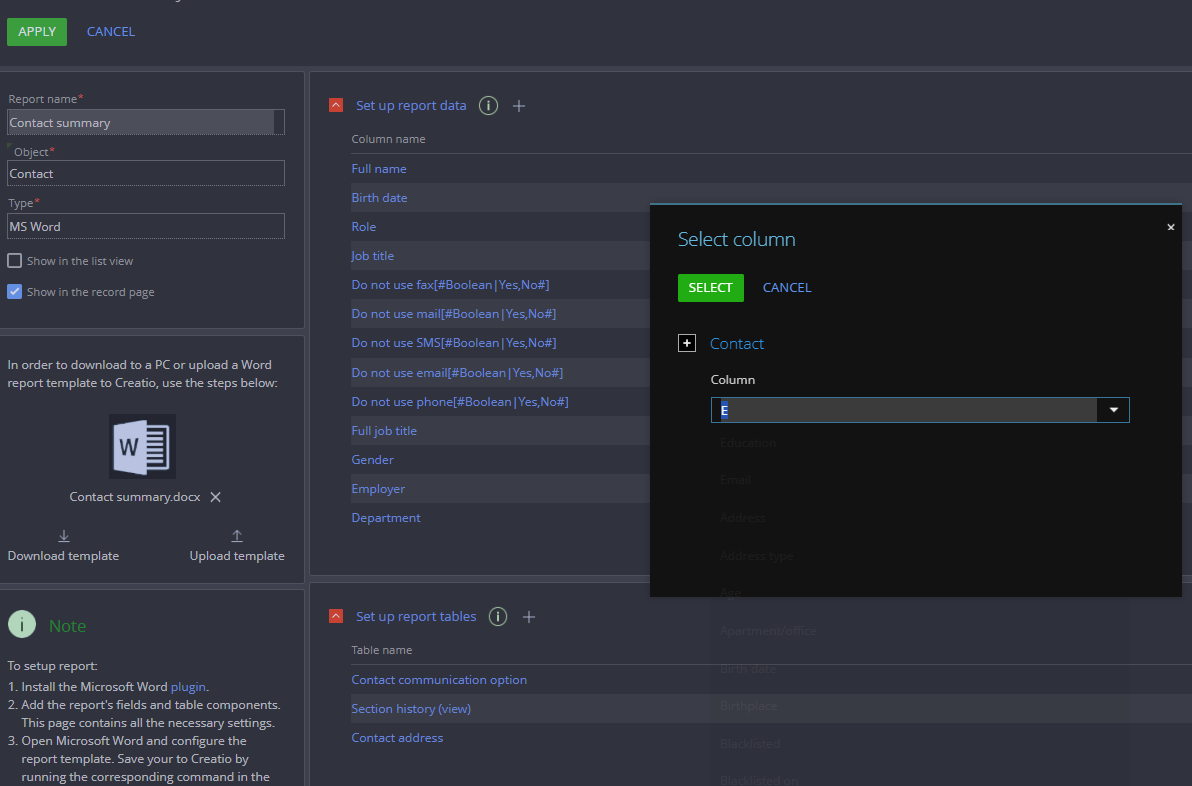
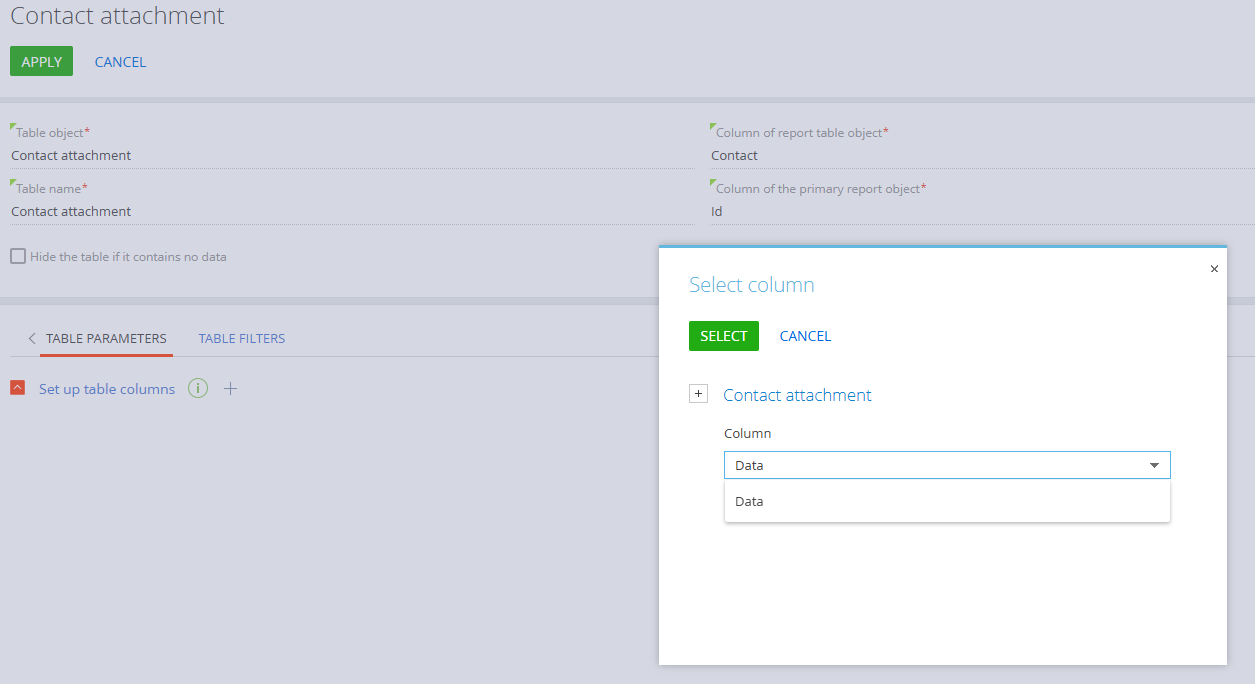
1) In Set up report tables, add Contact attachment table and add table parameters as shown below: You need to select Data column from the list. If you need to apply any filters, you can configure them in the Table Filters section.
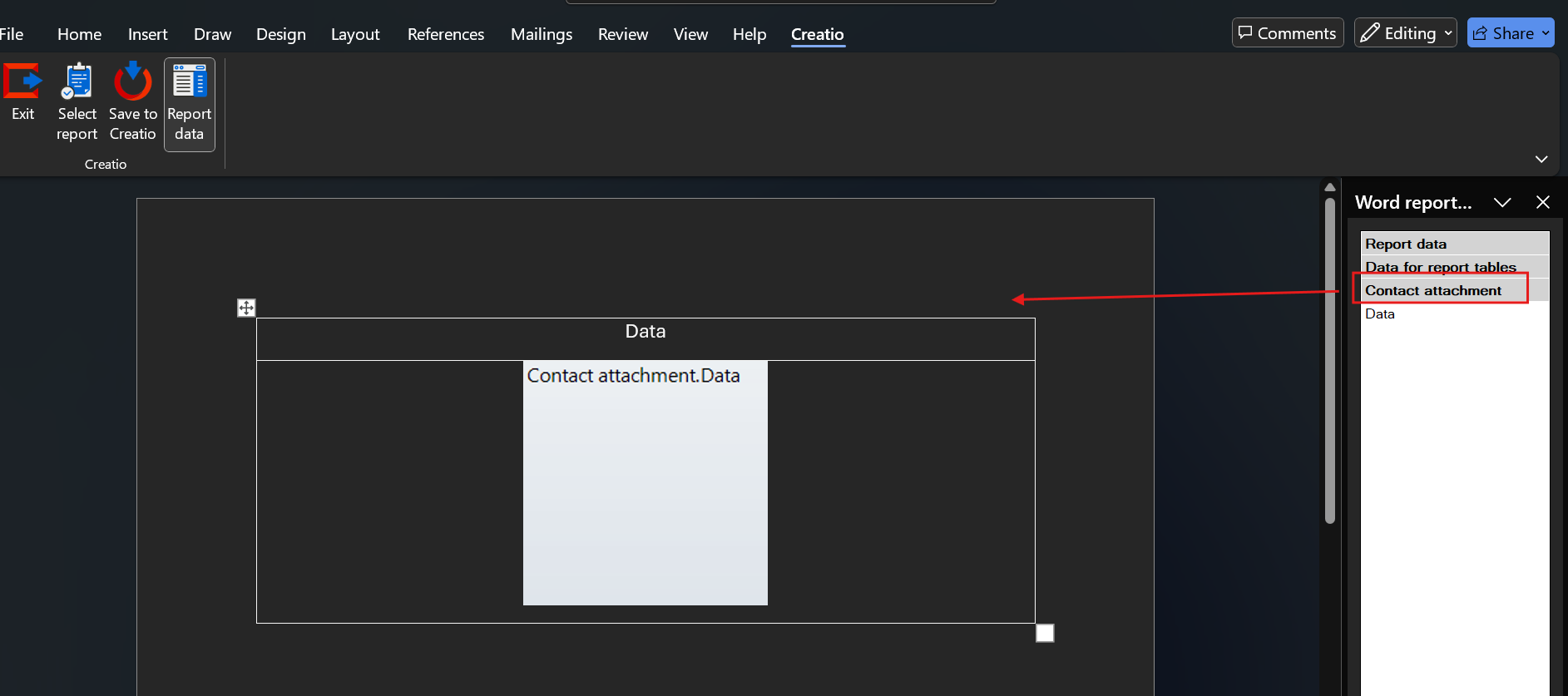
2) Then proceed to the Report Editor in Word and add necessary tables and columns. For the attachments, make sure to drag the table "Contact Attachment" (not the Data field). See screenshot below: 3) Save the changes and try running the report.
Hope this helps! Feel free to reach out if you have more questions or need further assistance.
thank you so much, after more research i found out that this part
is the one giving me trouble essentially i needed a lookup by contact dropdown field to select which contact i need to get in the form page itself then add that into the bottom part of the Column of the primary report object
This is a known issue related to base64-encoded images.
They aren't supported in most web email clients (including Gmail) and are completely blocked in Outlook. Apple Mail is one of the few clients that does support them. Such emails also influence the site's performance, as the email size becomes larger if it contains base64 images.
We have a few recommendations for you on how to avoid this behavior:
1. Increase the system setting (create it if it doesn't exist) for LargeSizeEmailValue and LargeSizeEmailValueInFreedomUI.
This is a known issue related to base64-encoded images.
They aren't supported in most web email clients (including Gmail) and are completely blocked in Outlook. Apple Mail is one of the few clients that does support them. Such emails also influence the site's performance, as the email size becomes larger if it contains base64 images.
We have a few recommendations for you on how to avoid this behavior:
1. Increase the system setting (create it if it doesn't exist) for LargeSizeEmailValue and LargeSizeEmailValueInFreedomUI.
We will follow your recommendation and host our images on external servers, this will also improve our deliverability.
I added the LargeSizeEmailValueInFreedomUI parameter to the system settings but now when I click on "see more" I have an error in the console (image attached) and the system does not show me more of the email.
Otherwise, could you please tell me how to enable the LargeEmailsInTimeline.DisableEmailPreviewLoader setting? I can't find it.
If we're talking about Data Binding, when transferring the KnowledgeBase, it's likely necessary to also transfer the KnowledgeBaseFile, since the article references attached files in order to display them properly.
If we're talking about Data Binding, when transferring the KnowledgeBase, it's likely necessary to also transfer the KnowledgeBaseFile, since the article references attached files in order to display them properly.
Unfortunately, currently this is not possible with the out-of-the-box solution. If you want to display a certain image for the record, for example company logo for the account record, you can use an Image component.
is it possible to custom image size ? not using template 'S, M, L, XL' in page No-Code editor, but more like custom value in form page client module or custom css?
I intend to increase the width of the image; the size would be the same as the field width.
Hello.

I need to send an image through an API to convert it to base 64, I tried to do it using the Web service tool but it does not allow me to place an image or file field to use it from the bpm, I was looking for some information and I saw that it could be done using a script, I just haven't found a way to do it. Could you help me with some example or idea so I can do this please?
In the classic UI, it was possible to display the image fields on list pages (like for Products). As I am experiencing in the Freedom UI, if I add an image field to the list, the image doesn't display.
Is it possible to display images in a list in Freedom UI?
what was done is adding the image to NuiLogin.aspx page css (add body elemnt there):
<style>
		.font-preload {
			position: absolute;
			opacity: 0;
		}
		.font-preload-open-sans {
			font-family: "Bpmonline Open Sans";
		}
		.font-preload-open-sans-light {
			font-family: "Bpmonline Open Sans Light";
		}
		.font-preload-open-sans-bold {
			font-family: "Bpmonline Open Sans Bold";
		}
		body {
			background-image: url("783px-Test-Logo.svg.png");
		}
	</style>
and put this image to the root directory of app binary files. Only css should be modified in case you don't need to repeat this image and to set the size for it.
what was done is adding the image to NuiLogin.aspx page css (add body elemnt there):
<style>
		.font-preload {
			position: absolute;
			opacity: 0;
		}
		.font-preload-open-sans {
			font-family: "Bpmonline Open Sans";
		}
		.font-preload-open-sans-light {
			font-family: "Bpmonline Open Sans Light";
		}
		.font-preload-open-sans-bold {
			font-family: "Bpmonline Open Sans Bold";
		}
		body {
			background-image: url("783px-Test-Logo.svg.png");
		}
	</style>
and put this image to the root directory of app binary files. Only css should be modified in case you don't need to repeat this image and to set the size for it.
Strange, this approach worked in my local app perfectly. Maybe there is an error message in the console when trying to reach the Login page and it will provide more details? Or maybe the image is empty? Also try restarting the application in IIS.



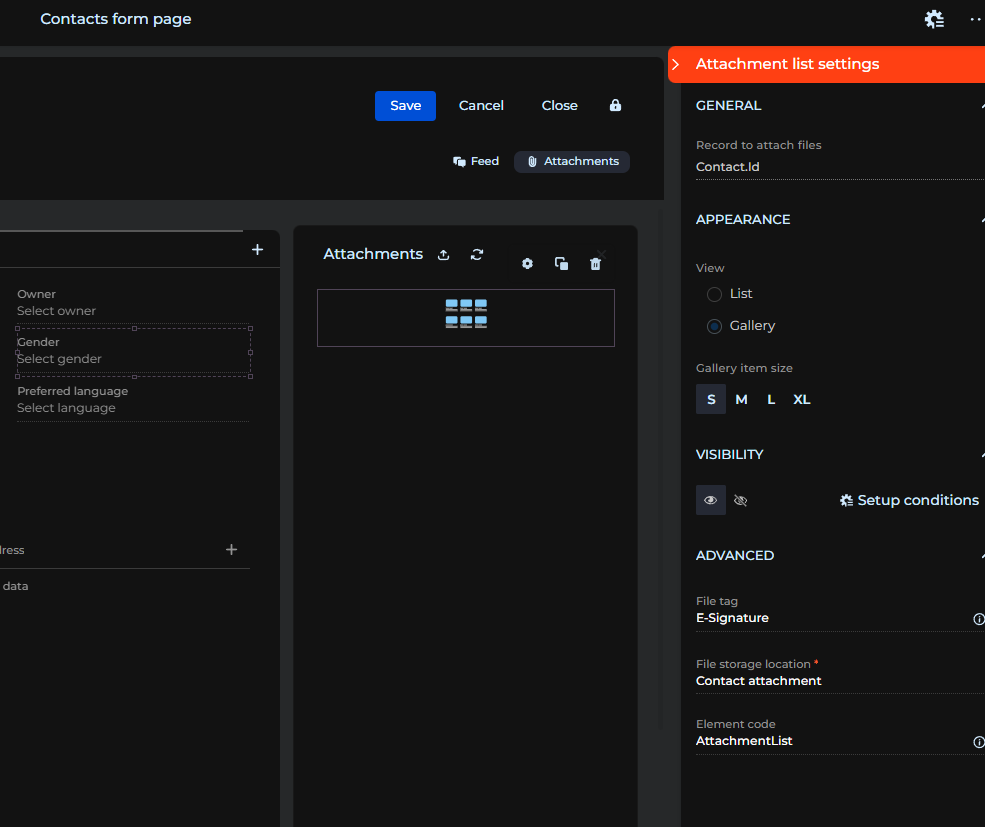 as shown i put in a File tag however i am unable to add it into the report setup