dashboards
FreedomUI
Sales_Creatio
8.0

Hello

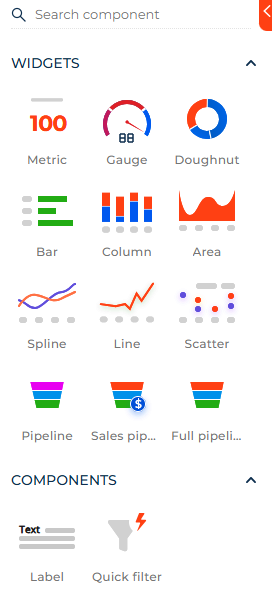
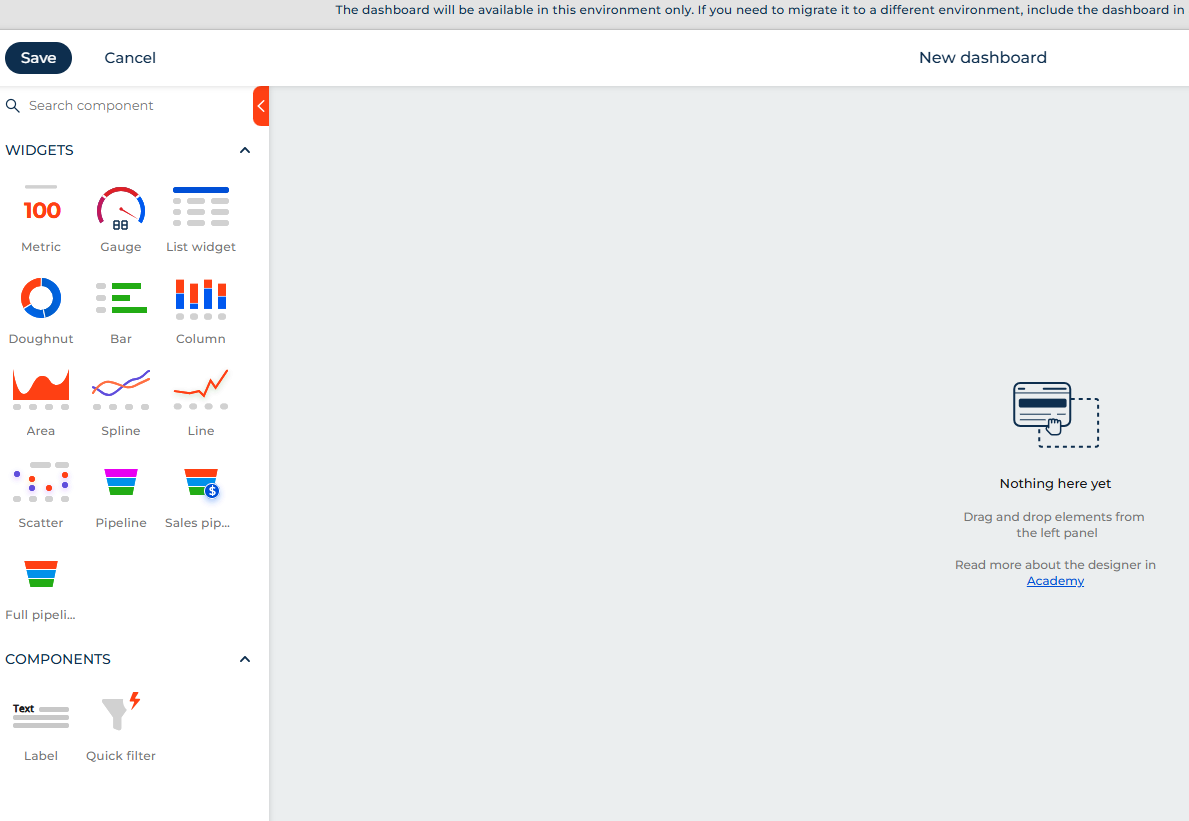
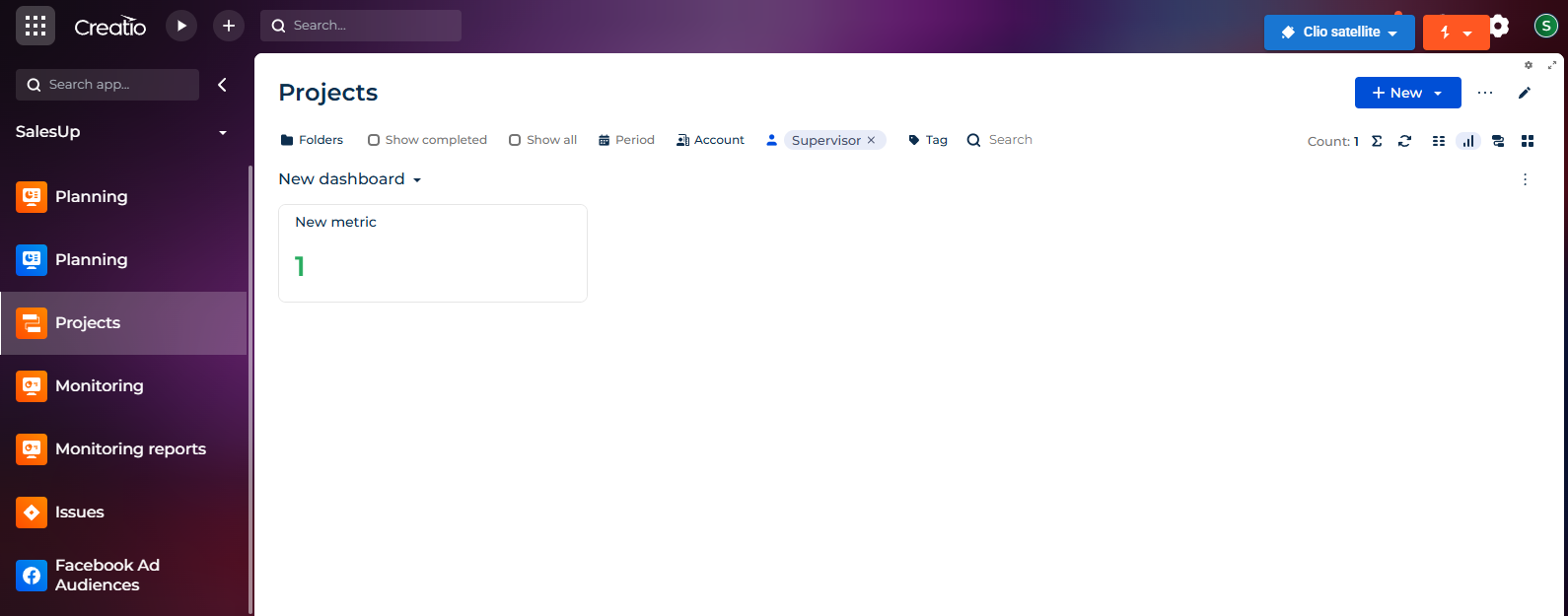
In Freedom UI Dashboard component now it's possible only adding chart widgets, text label and quick filter:

In Freedom UI pages there are several components, like buttons, Lists, etc.

Users coming from classic ui section dashboard view are used to see not only charts but also lists.

How can we add a List component to a Freedom UI Dashboard?

Thanks

Regards

Like 3

Like

3 comments
Best reply

Available iņ Creatio 8.3.1 :)

I don't understand why this is missing currently. Would have thought the most basic component in dashboards would be available, considering all the other chart types are there.

Available iņ Creatio 8.3.1 :)

Damien Collot,

I created a demo environment from Creatio homepage that is version 8.3.1.4437 and I confirm the "List widget" is now available:

Dashboard widgets


Thanks !

Show all comments
dashboards
FreedomUI
Sales_Creatio_enterprise_edition
8.0

Hello

Creatio 8.3.0 added the dashboard view in section list, thath allows authorized users to create their own dashboard more or less as it was possible in dashboard of Classic UI.

The object that "hosts" the dashboard is SysFreedomDashboard but it's a virtual object and there's not a table with the same name.

What are the tables involved in Freedom UI Dashboards management? How is it possible creating a SQL script to create some Freedom UI dashboards?

Thanks

Regards


Like 0

Like

5 comments
Best reply

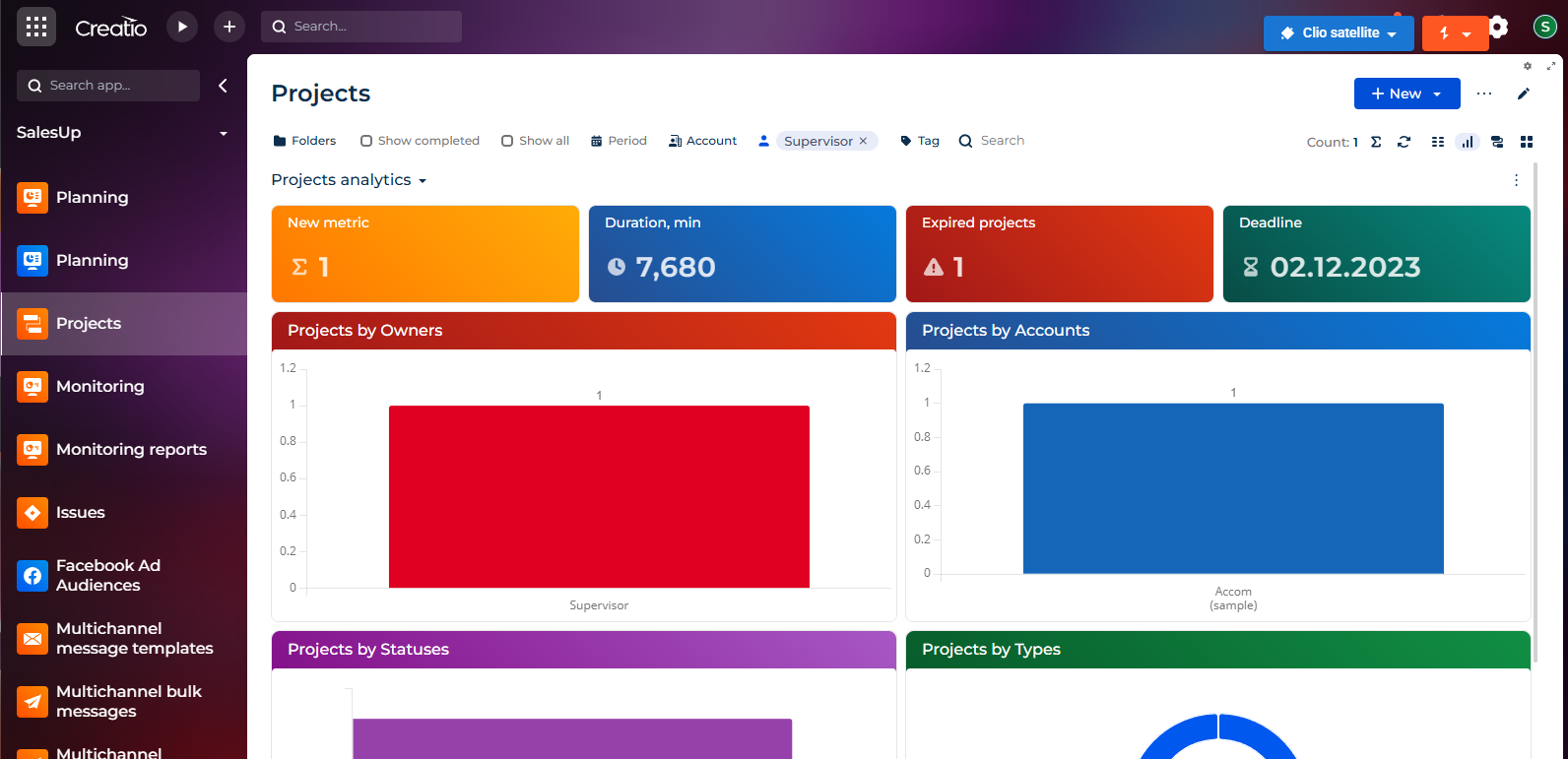
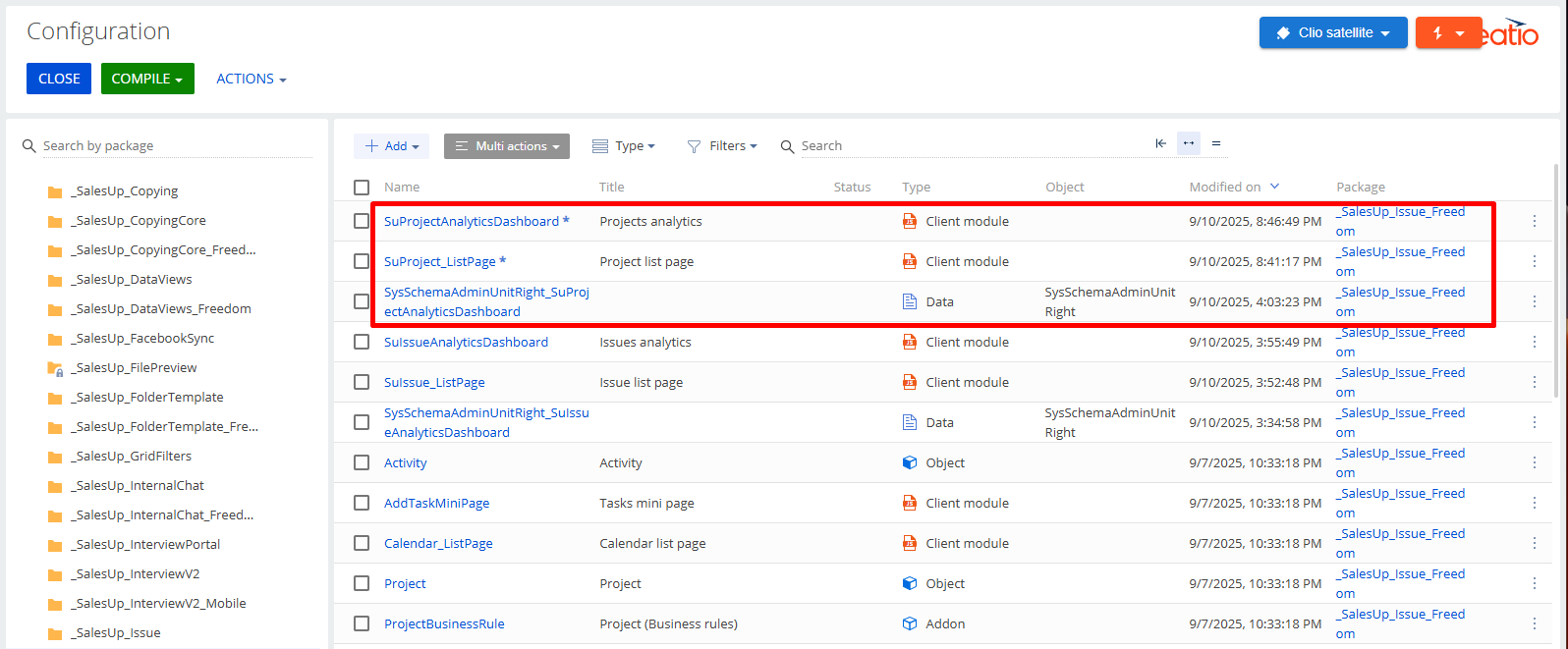
If you configure the dashboard in another way, then it will be a scheme in the package, as described earlier (screenshots 1-2).

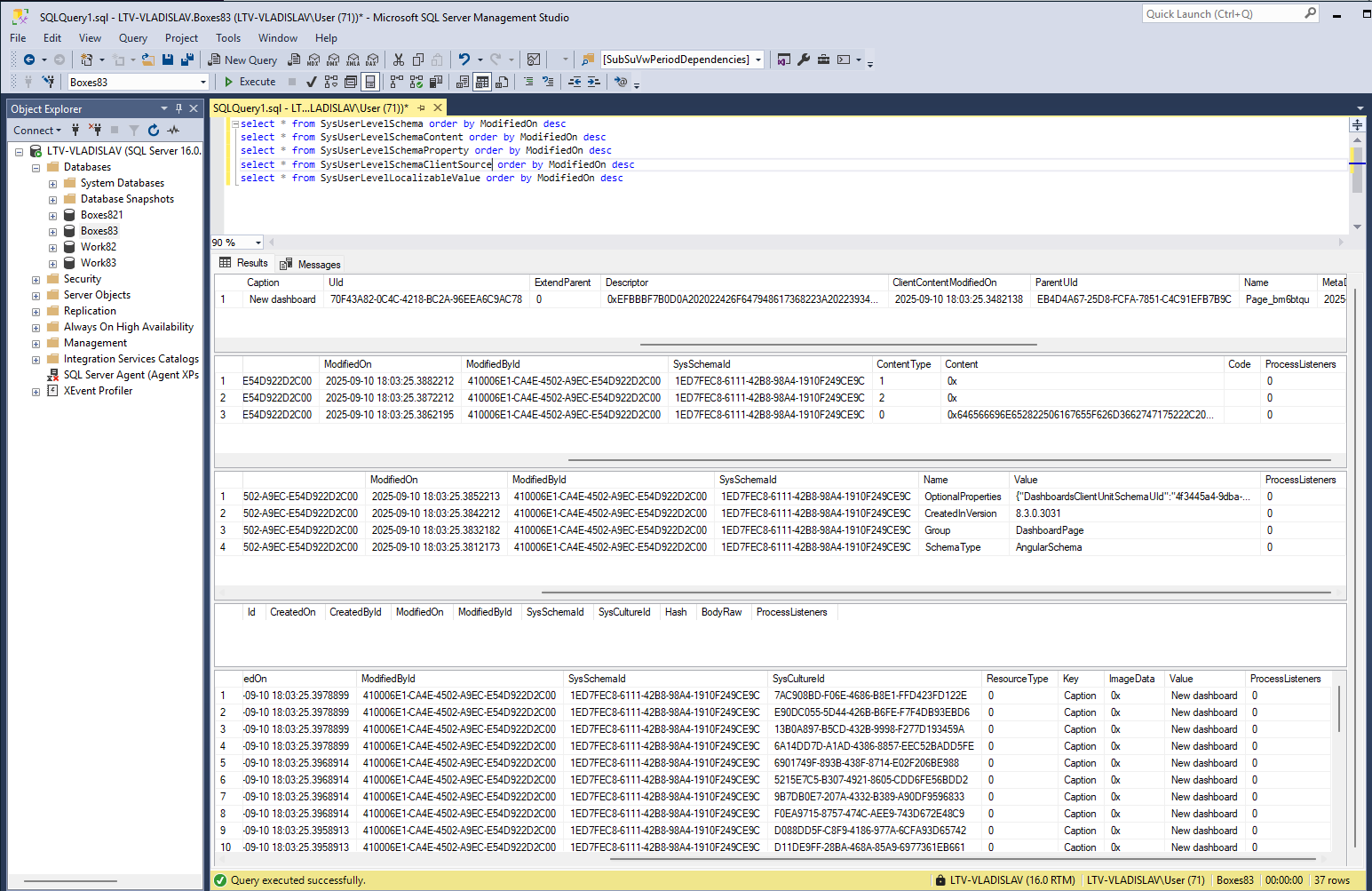
If you want to configure the dashboard without changing the package, then such a dashboard is saved in the SysUserLevelSchema table and dependents (screenshots 3-4)

Hello,


Thank you for your question regarding Freedom UI Dashboards in Creatio 8.3.0. 


To clarify, the object SysFreedomDashboard is indeed a virtual object and does not correspond to a physical database table.

 However, the information related to Freedom UI Dashboards is managed using the following physical tables:

 - SysDashboard: Stores dashboard-related metadata, including configurations and layout details. 

- SysDashboardItem: Contains the configuration of individual dashboard widgets. 

- SysDashboardLcz and SysDashboardItemLcz: Responsible for storing localized strings for dashboards and their items.

If you intend to create a SQL script to query or manipulate data, you can use these tables as a starting point. Please bear in mind that manipulating these tables directly is not recommended and should only be done after ensuring no impact on system functionality

If you need further clarification or have specific requirements, please provide additional details, and we would be happy to assist.

Embedding a "Data" element in a package selecting the freedom UI records from SysDashboard and SysDashboardItem is a good solution? The "Lcz" records would be automatically included in Data package element?

Thanks

Hi,

Freedom does not use SysDashboard tables and others.
You can see how the virtual SysFreedomDashboard object works in the SysFreedomDashboardQueryExecutor scheme.
The system does not store dashboard settings in the DB, but collects them from all client schemes that you create through the designer, for example, OrdersAnalyticsDashboard, AccountsAnalyticsDashboard, etc.
Therefore, you do not need to bind anything additionally to the package if you saved your scheme there.

Hello Lytvynchuk Vladyslav,

Valeriia listed those entities to be the ones involved in SysFreedomDashboard virtual object. When you edit or create a new Freedom UI dashboard nothing changes in current packages then the new dashboards seems not stored in client modules but only in some database tables.

There are two ways for creating a Freedom UI dashboard: 

  1. editing a client schema page, then it goes to the current package
  2. Creating it without editing any pages, then it seems to go only to database tables via SysFreedomDashboard virtual object. This is the method we need to use.

Checking for the tables listed by Valeriia it seems that those tables are really involved in Freedom UI dashboards (they have new records when you create a new freedom ui dashboard).

Were you talking about the "way 1" or the "way 2" to create freedom ui dashboards?

Thanks

If you configure the dashboard in another way, then it will be a scheme in the package, as described earlier (screenshots 1-2).

If you want to configure the dashboard without changing the package, then such a dashboard is saved in the SysUserLevelSchema table and dependents (screenshots 3-4)

Show all comments
Trial_edition
dashboards
Sales_Creatio
8.0


Hello! 


Would anyone know how to open dashboards in Section view in Creatio free trial?

Is there an additional package I need to install? If yes, what is it? 


Thanks,

Jacek


What I see...

What I am looking for

Like 0

Like

2 comments

Not yet available in Freedom UI sections.

Hi Ryan,


I have noticed some other posts where a link to this Academy page was mentioned with information that Dashboards can be added as a tab to a section page. Is this correct? 
 

https://academy.creatio.com/docs/8.x/no-code-customization/8.1/customization-tools/ui-and-business-logic-customization/element-setup-examples/layout-elements/set-up-a-tabs-layout-element

Would the final result be like the one showed on the page below posted by Harry in the post here? https://community.creatio.com/questions/dashboard-data-list-view-freedom-ui 
 

Show all comments
FreedomUI
Sections
dashboards
8.1
Sales_Creatio_enterprise_edition
8.0

How do you add a dashboard page as a section in Freedom UI? I have an existing dashboard page which I want users to be able to access as though it were its own section, but I can't add the existing page to the workplace as it doesn't exist in the lookup window. I had a look at creating a new section in the application hub, but this will either create a new entity or have to be based over an existing entity, but this dashboard isn't based over any one particular entity and presumably doing this would create a new Section page which I didn't want. Any info on how to turn an existing page into a Section in Freedom UI?

Like 1

Like

5 comments
Best reply

Hi,


In general, there isn't a built-in feature for this. However, for such usage, we have the option to set a Homepage for the workplace. You can set this page instead of the current one.


But if you need two of your dashboard pages to be on the same workplace and displayed as a section, you can create a new section in the Freedom UI and replace its SectionSchemaUId with the UId of your dashboard page schema.


update "SysModule" set "SectionSchemaUId" = 'UId of dashboard schema module' where "Id" =  'Id of the section you want to open with the dashboard'


For example, I successfully set the SalesEnterpriseHomePage to open from the test section.


Hope this helps!

Hi Harvey!

Please confirm, am I understanding correctly that you want to replace the section ListPage with your own page containing dashboards?

Is your dashboard page implemented in FreedomUI?

Which page does this page inherit from? Is it the Homepage?

Hi Pavlo, Essentially I want to create a standalone section page, so one that isn't tied to a specific entity or have to be created using the section template in the application hub.

Yes, using Freedom UI exclusively.

And the page I have created is inherited from the Homepage exactly. Is it possible to register this page as a section page?

Hi,


In general, there isn't a built-in feature for this. However, for such usage, we have the option to set a Homepage for the workplace. You can set this page instead of the current one.


But if you need two of your dashboard pages to be on the same workplace and displayed as a section, you can create a new section in the Freedom UI and replace its SectionSchemaUId with the UId of your dashboard page schema.


update "SysModule" set "SectionSchemaUId" = 'UId of dashboard schema module' where "Id" =  'Id of the section you want to open with the dashboard'


For example, I successfully set the SalesEnterpriseHomePage to open from the test section.


Hope this helps!

Thanks Pavlo, we already have a page being used as the Home page of the workplace the additional dashboard needs to reside in, so we had to do the database editing you suggested to get it to work, which it now does - thank you! This would be a very useful option to be able to do without custom SQL, no code being the aim of Creatio config going forward!

Pavlo Sokil,

If I understand, after creating the freedom ui dashboard page, I should create a new "Freedom UI Section" in my app using Application Hub? When I do this, doesn't Creatio automatically create the list and form pages related to the new section?

After executing the SQL statement to update the "SectionSchemaUId" field of the SysModule table record with the Id of my new section, what happens to the object and database table created by Creatio when the new section was created?

Thanks

Show all comments
dashboard
dashboards
calculated_metrics
Calculated_metrics
8.0

Hello everyone,

I would like to calculate sales KPI and show them in dashboard like Last year to date, year to date sales, calculate the year to date difference and also made it also in percentage.


First I tried with a list and used pivot table to calculate these KPIs but I encounter a case wich if an account made an order this year but not the previous year, an error : divide by 0 occurs. I can't use any operators in the formula to avoid this case.


So I tried another solution by using the "calculated metrics" plugin to calculate the difference in sales since the beginning of the year and the difference in sales since the beginning of the last year as a percentage.

This works but the display is only in the form of metric values, is it possible to build a column dashboard with the metric data as input?


Can I create an object from my metric data and use it in a dashboard ?

Or even a function that takes order.account.owner as currentUser and returns the data?

Like 1

Like

1 comments

Hi,


Unfortunately, it is impossible to change the display of the dashboard from the Calculated metrics add-on using basic methods.


Regarding the "Divide by zero error encountered" error, to avoid this error, you can add +0.01 /(last year to date + 0.01) to the value by which the division is performed, but this will cause a slight difference in the calculations.


You can also add filtering to the Pivot table so that records with the value "last year to date" are not included in the list, so division by 0 will not occur and you will avoid the display error.


We have created a task for our development team to investigate and develop a mechanism to address this error in future versions of the application as the error occurs at the database level.


Thank you!

Show all comments
Charts
dashboards
FreedomUI
Sales_Creatio_enterprise_edition
8.0

We're trying to create a chart to analyse Lead progression through the different Lead Stages, but the only sorting options are alphabetically by the grouping column or by the measure value. We want this to be sorted by an additional column on the Lead Stage that defines the order within the Lead progression rather than alphabetically or by the value to keep a consistent and logical order to the data, but cannot see an option for this unless there's a trick we're missing. Could someone please advise on how this might be done? We're mostly working with Freedom UI pages and therefore charts.

Like 2

Like

6 comments

Vladimir Sokolov,

it may be related, but that question is discussing combo boxes in pages, whereas I’m looking for chart sorting (e.g. in a bar graph) so I expect any solution would be fairly different.

Harvey Adcock,


Good day,


Could you please provide more details about your business task?


Perhaps you could take a screenshot with a description of your requirements so that we can better understand them and offer advice.


We are looking forward to your feedback.


Best regards,

Pavlo

Hi Pavlo,


Sure, what the business is asking for is to be able to sort a chart's columns by the lead stage through the process, rather than by the stage's name alphabetically or by the total number of leads in each stage as can be selected by default in the chart options. For example, see this chart available in the Home section of the Sales workplace in a clean CRM trial environment:


It is currently sorted by the stage name alphabetically, which doesn't align with the progression you actually get through the Opportunity stages. Looking at the sorting options, we can see that the only ones available are to sort by the grouping name alphabetically, or by the measure value:


So we are unable to sort by another field on the Lead Stage lookup that we've created - Stage Number - which would order it correctly. What we'd like is to be able to use that additional field for sorting without using it as the labels for the x axis.


If there are any workarounds for this besides numbering the stage names themselves, we'd love to hear about them!


Many thanks,

Harvey

Harvey Adcock,

Good day,


Unfortunately, it's not possible to implement this with the current basic functionality. However, we have registered the idea for our development team to consider implementing this feature.

Perhaps the "Full pipeline" dashboard type may work for you, where stages are grouped according to their placement in the DCM field?


Thank you for reaching out!

Hi Pavlo


Would you know if more advance sorting of dashboards has been enabled in any further Creatio releases? 


Thanks,

Jacek

Show all comments
dashboards
8.0

Hi all,


Is it possible to have "master filters" on dashboards with Freedom UI Designer ?


For example, to keep it simple, I create a dashboard with 3 KPIs in widgets such as : number of leads generated, number of opportunities generated, $ value of opportunities signed.


Then as a manager, I would like to be able to have a drop down list where I can select a sales rep, and the data in the dashboard widgets filter on the selected sales rep. Another use case, would be to have start / end dates to filter to choose from, that would filter the data shown in the 3 widgets.


(In the end, the same way we can filter data shown on list pages.)


This is the kind of feature offered by pretty much all the CRM competing brands OOTB but not Creatio (before Freedom UI) and is a big limitation for management.


However, I am not 100% familiar with the potential of Freedom UI.


Thank you for your contribution,


Damien

Like 0

Like

3 comments
Best reply

Hello Damien,


This feature was available in OOTB sections in Old UI:


Unfortunately, though - it is still not aviable in Freedom UI at the moment. Thank you for your question, it's aviability will be prioritised in our development roadmap.


Best Regards,

Dan


Hello Damien,


This feature was available in OOTB sections in Old UI:


Unfortunately, though - it is still not aviable in Freedom UI at the moment. Thank you for your question, it's aviability will be prioritised in our development roadmap.


Best Regards,

Dan


Denis Bidukha,


Hi Denis,


Thank you for you answer - it's great to know it exists on the "contextual" dashboards in Creatio - it would be great to also work OOTB in the Dashboards Section itself too :) !


Best day,


Damien

Hello Team


Has this request been taken up? We have had  many conversations on this with our customers and it is the most wanted feature for Management groups.


Thanks

Show all comments
dashboard
dashboards
Access Rights

Hello all!

I modified the leads dashboard to show an additional chart as can be seen in the left of the screenshot.

When logging in with my test user the newly created chart is invisible (right side).

The test user has of course default reading rights for the dashboard as he can see all the other charts.

What do I have to do to fix this?

Like 0

Like

3 comments

Hello Christian, 


Please write to support@creatio.com, as this issue needs more analysis and will require external access to your instance (from Supervisor and test user).


Thanks, 

Igor

Thanks, will do.

Support helped me out - solution is not perfect. Recreate all relevant dashboard in English and then they are visible in other languages too.

Show all comments
Discussion
dashboards
Sales_Creatio
7.18

Hi it would be great to be able to group series by trimester.


For example if we want to compare signed opportunities by quarter, either we have to create 4 tables at the moment with filters on specific dates (need to rework the dashboard each year), or make due with visualization of 3 months. But we would like to group per quarter for the whole year and compare par current versus last year.


Also, in the visualization, could we have months in text and not numbers ?


(January, February, etc... instead of 1, 2, ...)


3 comments

Hello 


We have already registered the idea for our R&D team to implement this functionality in further releases. I will assign your case to this project in order to increase its priority.  


Thank you for helping us to improve our product. 


Best regards,

Bogdan

Ditto - we have the same need to be able to report quarterly results ie.  Sales Sold by Quarter by Sales Manager


Hi Team !


Do you have any idea on planned availability ? :)


Cheers,


Damien

Show all comments
analytics
dashboards

Hi community,

is it possible to move a dashboard to another section?

eg. a dashboard is created in the account section, but should be moved or copied to the dashboard section


Like 2

Like

1 comments

Hello Jasmin,


You'll need Data elements to your package for either SysDashboard or SysWidgetDashboard:

  1. SysDashboard - Stores the dashboards in the Dashboards section or in the Analytics part of a Section
  2. SysWidgetDashboard - Stores the dashboards on pages - for example if you've added dashboard widgets on a page

If your dashboard is just a normal dashboard, bind data to your package from SysDashboard where the Title is the title of your dashboard. If these are dashboard widgets added to a page, look for the modules part of the page code and make note of the recordId values for the dashboard widgets there. Bind the records from SysWidgetDashboard with those Id values to your package. 

Note, this doesn't apply to the newer Homepage dashboard views.

Ryan

Show all comments