Hi,
I have created one button on case with some criteria which display value from "field1" in popup window . I wanted it to be disabled if "field1" is not filled in.
" field1" is a custom field.
Thanks
Sachin
Like
Dear Sachin,
You can pass the value of the field on the modal window to a page using sandbox.
In order to create a modal window, please, do to the configuration, add new "Schema of the edit page". Create a page for the modal window. Pease see the example below:
define("UsrMyModalPage", ["ModalBox"], function(ModalBox) {
    return {
        attributes: {
            "TestText": {
                dataValueType: Terrasoft.DataValueType.TEXT,
                type: Terrasoft.ViewModelColumnType.VIRTUAL_COLUMN
            }
        },
        messages: {
            "DataFromModal": {
                mode: Terrasoft.MessageMode.PTP,
                direction: Terrasoft.MessageDirectionType.PUBLISH
            }
        },
        methods: {
            init: function(callback, scope) {
                this.callParent(arguments);
            },
            onRender: function() {
            },
            onCloseButtonClick: function() {
                this.sandbox.publish("DataFromModal", { test: this.get("TestText") }, [this.sandbox.id]);
                ModalBox.close();
            }
        },
        diff: [
            {
                "operation": "insert",
                "name": "MyContainer",
                "propertyName": "items",
                "values": {
                    "itemType": Terrasoft.ViewItemType.CONTAINER,
                    "items": []
                }
            },
            {
                "operation": "insert",
                "parentName": "MyContainer",
                "propertyName": "items",
                "name": "MyGridContainer",
                "values": {
                    "itemType": Terrasoft.ViewItemType.GRID_LAYOUT,
                    "items": []
                }
            },
            {
                "operation": "insert",
                "parentName": "MyGridContainer",
                "propertyName": "items",
                "name": "TestText",
                "values": {
                    "bindTo": "TestText",
                    "caption": "Test text",
                    "layout": {"column": 0, "row": 0, "colSpan": 10}
                }
            },
            {
                "operation": "insert",
                "parentName": "MyGridContainer",
                "name": "CloseButton",
                "propertyName": "items",
                "values": {
                    "itemType": Terrasoft.ViewItemType.BUTTON,
                    "style": Terrasoft.controls.ButtonEnums.style.BLUE,
                    "click": {bindTo: "onCloseButtonClick"},
                    "markerValue": "CloseButton",
                    "caption": "OK",
                    "layout": { "column": 0, "row": 1, "colSpan": 3 }
                }
            }
        ]
    };
});
Afterwards, add a new "Module" in the configuration. Add a dependancy to the abovecreated "UsrMyModalPage" in the right panel menu.
Here is an example of the module:
define("UsrMyModalModule", ["ModalBox", "BaseSchemaModuleV2"],
        function(ModalBox) {
    Ext.define("Terrasoft.configuration.UsrMyModalModule", {
        extend: "Terrasoft.BaseSchemaModule",
        alternateClassName: "Terrasoft.UsrMyModalModule",
        /**
         * @inheritDoc Terrasoft.BaseSchemaModule#generateViewContainerId
         * @overridden
         */
        generateViewContainerId: false,
        /**
         * @inheritDoc Terrasoft.BaseSchemaModule#initSchemaName
         * @overridden
         */
        initSchemaName: function() {
            this.schemaName = "UsrMyModalPage";
        },
        /**
         * @inheritDoc Terrasoft.BaseSchemaModule#initHistoryState
         * @overridden
         */
        initHistoryState: Terrasoft.emptyFn,
    });
    return Terrasoft.UsrMyModalModule;
});
Finally, on the page schema, where your button is located recieve the info from the modal window trought the sandbox. You can see the below code as an example:
define("ContactPageV2", ["ContactPageV2Resources", "GeneralDetails", "ModalBox"],
function(resources, GeneralDetails, ModalBox) {
    return {
        entitySchemaName: "Contact",
        messages: {
            "DataFromModal": {
                mode: Terrasoft.MessageMode.PTP,
                direction: Terrasoft.MessageDirectionType.SUBSCRIBE
            }
        },
        details: /**SCHEMA_DETAILS*/{
        }/**SCHEMA_DETAILS*/,
        methods: {
            subscribeSandboxEvents: function() {
                this.callParent(arguments);
                this.sandbox.subscribe("DataFromModal", function(arg) {
                    console.log("msg from modal: " + arg.test);
                }, this, [this.sandbox.id + "_" + "UsrMyModalModule"]);
            },
            loadMyModal: function() {
                var sandbox = this.sandbox;
                var config = {
                    heightPixels: 420,
                    widthPixels: 750
                };
                var moduleName = "UsrMyModalModule";
                var moduleId = sandbox.id + "_" + moduleName;
                var renderTo = ModalBox.show(config, function() {
                    sandbox.unloadModule(moduleId, renderTo);
                });
                sandbox.loadModule(moduleName, {
                    id: moduleId,
                    renderTo: renderTo
                });
            },
            onMyClick: function() {
                this.loadMyModal();
            },
            onEntityInitialized: function() {
                this.callParent(arguments);
            }
        },
        diff: /**SCHEMA_DIFF*/[
            {
                "operation": "insert",
                "parentName": "CombinedModeActionButtonsCardContainer",
                "propertyName": "items",
                "name": "MainContactButton",
                "values": {
                    "itemType": Terrasoft.ViewItemType.BUTTON,
                    "caption": "My button",
                    "click": {"bindTo": "onMyClick"}
                }
            }
        ]/**SCHEMA_DIFF*/
    };
});
Anastasia Botezat,
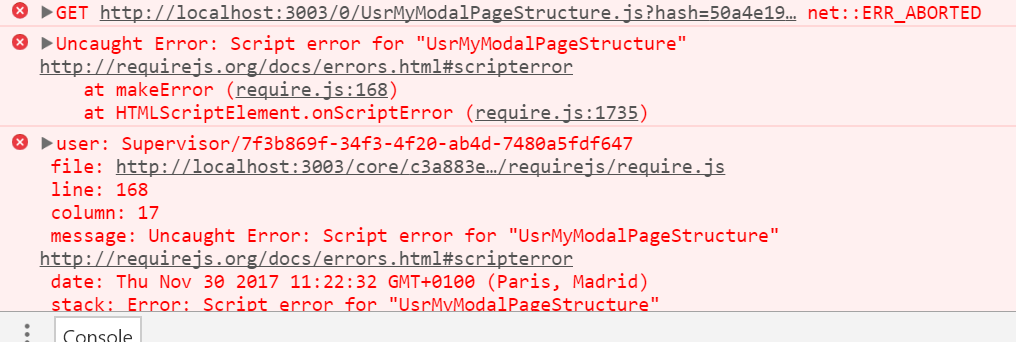
I've tried yoursample on the InvoiceSectionV2 page, it throws an exception, any idea why ?