Symptoms

Uncaught TypeError: Cannot read property 'PrimaryColumnName'

Cause

The "Products" section has been added through the mobile application wizard

Solution

It is necessary to make changes to the "Products" section, namely re-saving the list and card settings.

Necessary conditions

Admin rights


Like 0

Like

Share

0 comments
Show all comments

Symptoms

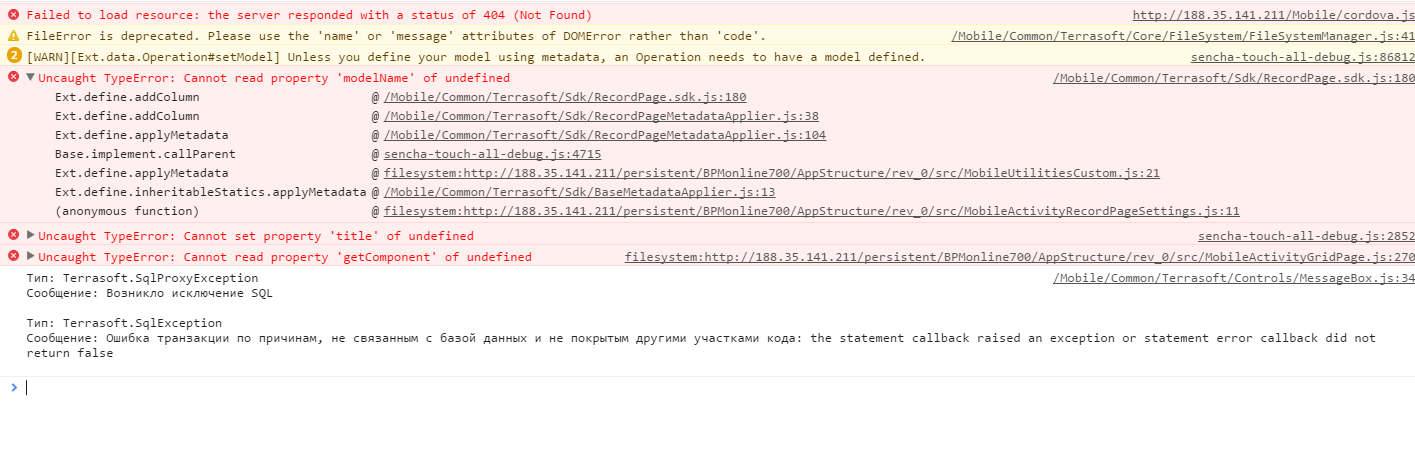
When I set up the mobile app, all objects work fine, except for "Activity". When I try to access an activity, the following error is displayed - Uncaught TypeError:Cannot read property “modelName” of undefined.

I tried to delete all columns to add them again (thought maybe the "Type" column is causing this issue) - it didn't work. 

Once I changed the settings, I re-distributed access rights, cleared the cache and re-synchronized with the database. 

Solution

Some of the fields were removed on the activity card, and, most importantly, the “Participants” detail was removed. This detailed is required for correct operation of the "Activities" section.

By default, bpm'online only syncs the activities with the current user specified on the “Participants” detail.

If this detail is removed, the activities may not sync correctly.

A workaround for deleted objects used in parent packages:

- Create a custom schema (e.g., "MobileUtilitiesCustom").

Ext.define("Terrasoft.sdk.RecordPageMetadataApplier.Override", {
 
                override: "Terrasoft.sdk.RecordPageMetadataApplier",


                addEmbeddedDetail: function(modelName, operation) {
 
                               this.embeddedDetails[operation.name] = operation.values;
 
                               var values = operation.values;
 
                               var filter = values.filter;
 
                               var detailName = operation.name;
 
                               Terrasoft.sdk.RecordPage.addEmbeddedDetail(modelName, {
 
                                               name: detailName,
 
                                               title: values.caption,
 
                                               position: values.position,
 
                                               modelName: values.entitySchemaName,
 
                                               primaryKey: filter.masterColumn,
 
                                               foreignKey: filter.detailColumn,
 
                                               hidden: values.hidden
 
                               });
 
                },


                applyMetadata: function() {
 
                               this.callParent(arguments);
 
                               for (var itemName in this.removedMetadataItems) {
 
                                               if (!Terrasoft.util.isGuid(itemName) && Terrasoft.util.String.contains(itemName, "EmbeddedDetail")) {
 
                                                               this.addEmbeddedDetail(this.modelName, {
 
                                                                              name: itemName,
 
                                                                              values: {
 
                                                                                              entitySchemaName: itemName.substring(0, itemName.indexOf("Detail")),
 
                                                                                              filter: {
 
                                                                                                              masterColumn: "Id",
 
                                                                                                              detailColumn: "Id"
 
                                                                                              },
 
                                                                                              hidden: true
 
                                                                              }
 
                                                               });
 
                                               }
 
                               }
 
                }
 
});


Terrasoft.sdk.RecordPage.configureColumn = function(model, columnSetName, columnName, columnConfig) {
 
                var modelConfig = Terrasoft.ApplicationConfig.getModelConfig(model);
 
                var columnSetConfig = modelConfig.columnSets.get(columnSetName);
 
                if (!columnSetConfig) {
 
                               return;
 
                }
 
                var columnSetColumns = Terrasoft.sdk.RecordPage.getColumns(model, columnSetName);
 
                if (!columnSetColumns) {
 
                               return;
 
                }
 
                var columnSetColumn = columnSetColumns.get(columnName);
 
                var columnOriginalConfig;
 
                if (columnSetColumn) {
 
                               columnOriginalConfig = columnSetColumn.columnOriginalConfig;
 
                } else {
 
                               columnOriginalConfig = {};
 
                               columnConfig.hidden = true;
 
                               var modelInstance = Ext.ClassManager.get(columnSetConfig.modelName || model);
 
                               var realModelColumnConfig = modelInstance.ColumnConfigs.get(columnName);
 
                               columnConfig.columnType = realModelColumnConfig.columnType;
 
                               columnConfig.name = columnName;
 
                }
 
                Ext.merge(columnOriginalConfig, columnConfig);
 
                var contextModel = columnSetConfig.modelName || model;
 
                if (columnConfig.hidden) {
 
                               var columns = this.getColumnSetColumns(model, columnSetName);
 
                               columns.remove(columnName);
 
                } else {
 
                               var resolvedColumnConfig = this.resolveColumnConfig(contextModel, columnOriginalConfig,
 
                                                               !!columnSetConfig.modelName);
 
                               columnSetConfig.columns.configure(columnName, resolvedColumnConfig);
 
                }
 
};


Terrasoft.sdk.RecordPage.addColumn = function(model, columnConfig, columnSetName) {
 
                var modelConfig = Terrasoft.ApplicationConfig.getModelConfig(model);
 
                if (!columnSetName) {
 
                               columnSetName = modelConfig.primaryColumnSetName;
 
                }
 
                var columnSetConfig = modelConfig.columnSets.get(columnSetName);
 
                if (!columnSetConfig) {
 
                               return;
 
                }
 
                var contextModel = columnSetConfig.modelName || model;
 
                var isEmbeddedDetail = !!columnSetConfig.modelName;
 
                if (!columnConfig.hidden) {
 
                               columnSetConfig.columns.add(this.resolveColumnConfig(contextModel, columnConfig, isEmbeddedDetail));
 
                }
 
                this.addColumnToQueryConfig(model, columnConfig.name, columnSetName, isEmbeddedDetail);
 
                if (columnConfig.displayColumn) {
 
                               this.addColumnToQueryConfig(model, columnConfig.displayColumn, columnSetName, isEmbeddedDetail);
 
                }
 
};

- In the mobile application manifest (e.g., "UsrMobileApplicationManifestCustomMobile") specify the custom schema.

Like 0

Like

Share

0 comments
Show all comments
SDK
Q&A
support
knowledge base

Question

Is there a way to allow locked fields to be edited by certain groups?

Answer

You can do it this way:

1. Open the ‘Opportunity’ section, click ‘View’ and select ‘Open section wizard’:

2. Select ‘Page’:

3. Select a field you want to make editable and click ‘Edit’:

4. Clear the ‘Read-only’ checkbox:

This will make the field editable. Now you need to make it editable by certain groups only.

1. To do this, open ‘System designer’:

2. Select "Object permissions":

3. Select "Sections":

4. Find the ‘Opportunity’ string and if the ‘Managed by columns’ is marked with an ‘X’ – click it. It should look as follows:

5. Select the ‘Opportunity’ string and scroll down to the bottom of the page, where you can find ‘Columns permissions’. You need to find the field you want to make editable by certain groups (the "Type" field is used in this example, but you can choose any other):

6. You will see the role and the role permission level on the right:

7. Click ‘New’ to add permissions for a user or a role and click an icon in the "Access level" column. The eye sign allows only to read, the pen sign allows to edit and the X sign doesn’t allow any access to this column.

You need to set it as follows:

The necessary conditions:

System administrator rights.

Like 0

Like

Share

0 comments
Show all comments
knowledge base
SDK
Q&A
support

Question

Receiving messages does not work. Version 7.7.

methods: {
    editRecord: function(editPageUId) {
        this.callParent(arguments);
        var text = "ilaySchema6Detail";
        this.sandbox.publish("PublishDetailName", text);
    }
},
messages: {
    "PublishDetailName": {
        "mode": this.Terrasoft.MessageMode.BROADCAST,
        "direction": this.Terrasoft.MessageDirectionType.PUBLISH
    }
}
methods: {
    subscribeSandboxEvents: function() {
        this.callParent(arguments);
        this.sandbox.subscribe("PublishDetailName", this.getDetailNameFromWhoOpen, this); 
    },
    getDetailNameFromWhoOpen: function(detailName) {
        var a = 5;
    }
},
messages: {
    "PublishDetailName": {
        "mode": this.Terrasoft.MessageMode.BROADCAST,
        "direction": this.Terrasoft.MessageDirectionType.SUBSCRIBE
    }
}

The getDetailNameFromWhoOpen() method cannot be called.

Answer

The issue is that you publish the message before (!) the detail edit page is open. When the page is open, you perform subscription. But the moment is lost. You subscribe to the message when noone will publish it.

You need to execute publish on the edit page, taking the result as a variable.

In the detail schema, execute subscribe, whose handler must be the function returning the value.

Example.

Detail schema:

define("ilaySchema6Detail", [], function() {
    return {
        entitySchemaName: "ilayRecomendation",
        details: /**SCHEMA_DETAILS*/{
        }/**SCHEMA_DETAILS*/,
        diff: /**SCHEMA_DIFF*/[
        ]/**SCHEMA_DIFF*/,
        methods: {
            addRecord: function(editPageUId) {
                this.callParent(arguments);
            },
            init: function() {
                this.callParent(arguments);
                console.log("id in detail: " + this.sandbox.id);
                this.sandbox.subscribe("PublishDetailName",
                    this.getDetailNameFromWhoOpen, this,
                    [this.sandbox.id]
                );
            },
            getDetailNameFromWhoOpen: function() {
                return {
                    param: "test!"
                };
            }
        },
        messages: {
            "PublishDetailName": {
                mode: Terrasoft.MessageMode.PTP,
                direction: Terrasoft.MessageDirectionType.SUBSCRIBE
            }
        }
    };
});

Page schema:

define("ilayilayRecomendation1Page", [], function() {
    return {
        entitySchemaName: "ilayRecomendation",
        details: /**SCHEMA_DETAILS*/{}/**SCHEMA_DETAILS*/,
        diff: /**SCHEMA_DIFF*/[
        ]/**SCHEMA_DIFF*/,
        methods: {
            onEntityInitialized: function() {
                this.callParent(arguments);
                var res = this.sandbox.publish("PublishDetailName",
                    null,
                    [this.getDetailId()]
                );
                alert(res.param);
            },
            getDetailId: function() {
                var index = this.sandbox.id.indexOf("ilayilayRecomendation1Page");
                var newId = this.sandbox.id.substring(0, index);
                console.log("id in page: " + newId);
                return newId;
            },
        },
        rules: {},
        messages: {
            "PublishDetailName": {
                mode: Terrasoft.MessageMode.PTP,
                direction: Terrasoft.MessageDirectionType.PUBLISH
            }
        },
        attributes: {
        }
    };
});


Like 0

Like

Share

0 comments
Show all comments

Case description:

We want to add tab with attachments and notes into custom section.

This tab looks like this:

Figure 0. "Attachment and notes" tab on contact page.

Algorithm of realization:

  1. Create object which will represent file object in DataBase (ex. ContactFile object in base packages). This object can be exist.
    • You should create new Object and configure it like at next figure:

      Figure 1. Configuration of custom file object.


      IMPORTANT!!! This object must be inherited from File (Base)

       
  2. Add "Notes" field to your section object. It must be multi-line string and have unlimited length 
  3. Add detail to client schema of your page in details section

    Files: {
        schemaName: "FileDetailV2",
        entitySchemaName: "ContactFile", //Name of your object which represent file which connected with you main object
        filter: {
            masterColumn: "Id",
            detailColumn: "Contact"
        }
    },


  4. Add code for "define tab", "attachment detail" and "notes field group" in your page. This code you should insert in diff section of your client schema.

     Collapse source

    {
        "operation": "insert",
        "name": "NotesAndFilesTab",
        "parentName": "Tabs",
        "propertyName": "tabs",
        "index": 3,
        "values": {
            "caption": {"bindTo": "Resources.Strings.NotesAndFilesTabCaption"},
            "items": []
        }
    },
    {
        "operation": "insert",
        "parentName": "NotesAndFilesTab",
        "propertyName": "items",
        "name": "Files",
        "values": {
            "itemType": Terrasoft.ViewItemType.DETAIL
        }
    },
    {
        "operation": "insert",
        "name": "NotesControlGroup",
        "parentName": "NotesAndFilesTab",
        "propertyName": "items",
        "values": {
            "itemType": Terrasoft.ViewItemType.CONTROL_GROUP,
            "items": [],
            "caption": {"bindTo": "Resources.Strings.NotesGroupCaption"}
        }
    },
    {
        "operation": "insert",
        "parentName": "NotesControlGroup",
        "propertyName": "items",
        "name": "Notes", //Name of notes field in your main object
        "values": {
            "contentType": Terrasoft.ContentType.RICH_TEXT,
            "layout": {"column": 0, "row": 0, "colSpan": 24},
            "labelConfig": {
                "visible": false
            },
            "controlConfig": {
                "imageLoaded": {
                    "bindTo": "insertImagesToNotes"
                },
                "images": {
                    "bindTo": "NotesImagesCollection"
                }
            }
        }
    }


  5. Add localizable strings to resources of your client schema:

    1. NotesAndFilesTabCaption - tab caption 

    2. NotesGroupCaption - notes group caption

  6. IMPORTANT!!! If you have some troubles try to clear browser cache, redis, recompile schemas in bpm'online or restart web-site.  
Like 1

Like

Share

0 comments
Show all comments
  • Add new operation permission “CanManageAccessRight” and add roles who have access.

     
  • Create replacing client module for "Section base schema":


BaseSectionV2 schema code

define("BaseSectionV2", [], function() {
    return {
        attributes: {
            "CanManageAccessRight": {
                dataValueType: this.Terrasoft.DataValueType.BOOLEAN
            }
        },
        messages: {
            "UpdateCanManageAccessRight": {
                "mode": Terrasoft.MessageMode.PTP,
                "direction": Terrasoft.MessageDirectionType.SUBSCRIBE
            }
        },
        methods: {
            subscribeSandboxEvents: function() {
                this.callParent(arguments);
                this.sandbox.subscribe("UpdateCanManageAccessRight", function(result) {
                    this.set("CanManageAccessRight", result);
                }, this, [this.getCardModuleSandboxId()]);
            },
            getSchemaAdministratedByRecords: function() {
                return this.callParent(arguments) && this.get("CanManageAccessRight");
            }
        }
    };
});
  • Create replacing client module for "Base card schema":


BasePageV2 schema code

define("BasePageV2", ["RightUtilities"], function(RightUtilities) {
    return {
        attributes: {
            "CanManageAccessRight": {
                dataValueType: this.Terrasoft.DataValueType.BOOLEAN
            }
        },
        messages: {
            "UpdateCanManageAccessRight": {
                "mode": Terrasoft.MessageMode.PTP,
                "direction": Terrasoft.MessageDirectionType.BIDIRECTIONAL
            }
        },
        methods: {
            init: function() {
                this.callParent(arguments);
                this.checkCanManageAccessRight();
            },
            checkCanManageAccessRight: function() {
                RightUtilities.checkCanExecuteOperation({operation: "CanManageAccessRight"}, function(result) {
                    this.set("CanManageAccessRight", result);
                    this.sandbox.publish("UpdateCanManageAccessRight", result, [this.sandbox.id]);
                }, this);
            },
            subscribeSandboxEvents: function() {
                this.callParent(arguments);
                this.sandbox.subscribe("UpdateCanManageAccessRight", function() {
                    return this.get("CanManageAccessRight");
                }, this, this.getDetailIds());
            },
            getSchemaAdministratedByRecords: function() {
                return this.callParent(arguments) && this.get("CanManageAccessRight");
            }
        }
    };
});
  • Create replacing client module for "Base schema - Detail with list":


BaseGridDetailV2 schema code

define("BaseGridDetailV2", [], function() {
    return {
        attributes: {
            "CanManageAccessRight": {
                dataValueType: this.Terrasoft.DataValueType.BOOLEAN
            }
        },
        messages: {
            "UpdateCanManageAccessRight": {
                "mode": Terrasoft.MessageMode.PTP,
                "direction": Terrasoft.MessageDirectionType.PUBLISH
            }
        },
        methods: {
            init: function() {
                this.callParent(arguments);
                var canManageAccessRight = this.sandbox.publish("UpdateCanManageAccessRight", null, [this.sandbox.id]);
                this.set("CanManageAccessRight", canManageAccessRight);
            },
            getSchemaAdministratedByRecords: function() {
                return this.callParent(arguments) && this.get("CanManageAccessRight");
            }
        }
    };
});


Like 5

Like

Share

0 comments
Show all comments
knowledge base
SDK
Q&A
support

Question

I need to set up displaying of a date of adding a file to the "Files" detail.

Answer

Create a detail replacing schema:

define("FileDetailV2", ["ViewUtilities", "ConfigurationConstants", "ConfigurationEnums", "ImageListViewModel",
        "css!FileDetailCssModule"], function(ViewUtilities, ConfigurationConstants, ConfigurationEnums) {
    return {
        attributes: {
        },
        messages: {
        },
        methods: {
            getGridDataColumns: function() {
                var baseGridDataColumns = this.callParent(arguments);
                var gridDataColumns = {
                    "Type": {
                        path: "Type"
                    },
                    "Version": {
                        path: "Version"
                    }
                };
                return this.Ext.apply(baseGridDataColumns, gridDataColumns);
            }
        },
        diff: /**SCHEMA_DIFF*/[
            {
                "operation": "remove",
                "name": "DataGrid"
            },
            {
                "operation": "insert",
                "name": "DataGrid1",
                "parentName": "Detail",
                "propertyName": "items",
                "values": {
                    "itemType": Terrasoft.ViewItemType.GRID,
                    "listedZebra": true,
                    "collection": {"bindTo": "Collection"},
                    "activeRow": {"bindTo": "ActiveRow"},
                    "primaryColumnName": "Id",
                    "isEmpty": {"bindTo": "IsGridEmpty"},
                    "isLoading": {"bindTo": "IsGridLoading"},
                    "multiSelect": {"bindTo": "MultiSelect"},
                    "selectedRows": {"bindTo": "SelectedRows"},
                    "sortColumn": {"bindTo": "sortColumn"},
                    "sortColumnDirection": {"bindTo": "GridSortDirection"},
                    "sortColumnIndex": {"bindTo": "SortColumnIndex"},
                    "linkClick": {"bindTo": "linkClicked"},
                    "type": "listed",
                    "visible": {
                        "bindTo": "isImageManagerDetailView",
                        "bindConfig": {"converter": "getDataGridVisible"}
                    },
                    "listedConfig": {
                        "name": "DataGridListedConfig",
                        "items": [
                            {
                                "name": "NameListedGridColumn",
                                "bindTo": "Name",
                                "position": {
                                    "column": 1,
                                    "colSpan": 14
                                },
                                "type": Terrasoft.GridCellType.LINK
                            },
                            {
                                "name": "VersionListedGridColumn",
                                "bindTo": "Version",
                                "position": {
                                    "column": 15,
                                    "colSpan": 3
                                }
                            },
                            {
                                "name": "CreatedOnListedGridColumn",
                                "bindTo": "CreatedOn",
                                "position": {
                                    "column": 22,
                                    "colSpan": 2
                                }
                            }
                        ]
                    },
                    "tiledConfig": {
                        "name": "DataGridTiledConfig",
                        "grid": {
                            "columns": 24,
                            "rows": 3
                        },
                        "items": [
                            {
                                "name": "NameTiledGridColumn",
                                "bindTo": "Name",
                                "position": {
                                    "row": 1,
                                    "column": 1,
                                    "colSpan": 24
                                },
                                "type": Terrasoft.GridCellType.LINK
                            },
                            {
                                "name": "ModifiedByTiledGridColumn",
                                "bindTo": "ModifiedBy",
                                "position": {
                                    "row": 1,
                                    "column": 25,
                                    "colSpan": 12
                                }
                            },
                            {
                                "name": "VersionTiledGridColumn",
                                "bindTo": "Version",
                                "position": {
                                    "row": 1,
                                    "column": 27,
                                    "colSpan": 12
                                }
                            },
                            {
                                "name": "ModifiedOnTiledGridColumn",
                                "bindTo": "ModifiedOn",
                                "position": {
                                    "row": 1,
                                    "column": 39,
                                    "colSpan": 12
                                }
                            },
                            {
                                "name": "SizeTiledGridColumn",
                                "bindTo": "Size",
                                "position": {
                                    "row": 1,
                                    "column": 51,
                                    "colSpan": 12
                                }
                            }
                        ]
                    },
                    "linkClick": {"bindTo": "linkClicked"}
                }
            }
        ]   /**SCHEMA_DIFF*/
    };
});

 

Like 0

Like

Share

0 comments
Show all comments

Symptoms

An error occurs while adding the "Feed" section to the new workplace in the mobile application wizard.

Solution

1. Add the following code in the schema settings of the "Feed" section grid (UsrMobileSocialMessageGridPageSettingsSupervisorworkplace):

{
    "operation": "insert",
    "name": "e0de54d7-b417-42b1-8081-36337aa344a1",
    "values": {
        "row": 0,
        "content": "Created by",
        "columnName": "CreatedBy",
        "dataValueType": 1,
        "operation": "insert"
    },
    "parentName": "settings",
    "propertyName": "items",
    "index": 1
}

2. Change the Message column proprety ("row") to "1" in the settings above. 

"row": 1,


Like 0

Like

Share

0 comments
Show all comments
SDK
support
Q&A
knowledge base

Question

How can i hide the [Edit] button for portal users?

Answer

setIsEditTemplateButtonVisible: function(scope) {
var select = Ext.create("Terrasoft.EntitySchemaQuery", {
    rootSchemaName: "SysAdminUnit"
});
 
select.addMacrosColumn(Terrasoft.QueryMacrosType.PRIMARY_COLUMN, "Id");
select.addColumn("ConnectionType");
 
var filters = Ext.create("Terrasoft.FilterGroup");
filters.addItem(select.createColumnFilterWithParameter(Terrasoft.ComparisonType.EQUAL, "Id",
    scope.Terrasoft.SysValue.CURRENT_USER.value));
select.filters = filters;
 
select.execute(function(response) {
    if (response.success) {
        if (response.collection.getCount() > 0) {
            var connectionType = response.collection.getByIndex(0).get("ConnectionType");
            if(connectionType === 1){
                scope.set("isEditTemplateButtonVisible", false);
            }else{
                scope.set("isEditTemplateButtonVisible", true);
            }
        }
    }
}, this);


Like 0

Like

Share

1 comments

Hi S.Kobizka,

Please confirm where this code we can update?

also please guide, how to add custom button on customer portal dashboard, on click it should open create form of a oob/custom module


Regards

Show all comments
knowledge base
SDK
Q&A
support

Question

How can I pass an account identifier from an order page to the "Product in the order" detail edit page via sandbox messages?

Answer

The code of the order page replacing schema:

define("OrderPageV2", ["OrderPageV2Resources", "GeneralDetails"],
function(resources, GeneralDetails) {
    return {
        entitySchemaName: "Order",
        details: /**SCHEMA_DETAILS*/{
        }/**SCHEMA_DETAILS*/,
        diff: /**SCHEMA_DIFF*/[
        ]/**SCHEMA_DIFF*/,
        attributes: {},
        methods: {
            onEntityInitialized: function() {
                this.callParent(arguments);
                this.sandbox.subscribe("OrderProductPageAsksForData", function(arg) {
                    console.log("OrderProductPageV2 requests data immediately,");
                    console.log("по Id песочницы: " + arg.sandboxId);
                    // Sending data.
                    this.sendDataToOrderProductPage(arg.sandboxId);
                }, this, [this.sandbox.id]);
                console.log("Мы(OrderPageV2) subscribed to message: OrderProductPageAsksForData.");
                console.log("sandbox Id in this page(OrderPageV2) next:");
                console.log(this.sandbox.id);
            },
            sendDataToOrderProductPage: function(sandboxId) {
                this.sandbox.publish("DataToOrderProductPage", { accountId: this.get("Account").value }, [sandboxId]);
                console.log("AccountId sent as a message to OrderProductPageV2 по Id: " + sandboxId);
            }
        },
        rules: {},
        messages: {
            "DataToOrderProductPage": {
                mode: Terrasoft.MessageMode.PTP,
                direction: Terrasoft.MessageDirectionType.PUBLISH
            },
            "OrderProductPageAsksForData": {
                mode: Terrasoft.MessageMode.PTP,
                direction: Terrasoft.MessageDirectionType.SUBSCRIBE
            }
        },
        userCode: {}
    };
});

The code of the "Product in order" detail page replacing schema:

define("OrderProductPageV2", ["BusinessRuleModule", "OrderUtilities"],
    function(BusinessRuleModule) {
        return {
            entitySchemaName: "OrderProduct",
            mixins: {},
            attributes: {},
            methods: {
                onEntityInitialized: function() {
                    this.callParent(arguments);
                    this.sandbox.subscribe("DataToOrderProductPage", function(arg) {
                        console.log("OrderPageV2 passes the data over to us!");
                        alert("accountId: " + arg.accountId);
                    }, this, [this.sandbox.id]);
                    console.log("Мы(OrderProductPageV2) subscribed to message: DataToOrderProductPage.");
                    console.log("По нашему(OrderProductPageV2) sandbox Id:");
                    console.log(this.sandbox.id);
                    this.sandbox.publish("OrderProductPageAsksForData", {
                        sandboxId: this.sandbox.id
                    }, [this.getOrderPageSandboxId()]);
                    console.log("Requested data from OrderPageV2, as per its sandbox Id: " + this.getOrderPageSandboxId());
                },
                getOrderPageSandboxId: function() {
                    var index = this.sandbox.id.indexOf("_detail_ProductInProducts");
                    return this.sandbox.id.substring(0, index);
                }
            },
            messages: {
                "DataToOrderProductPage": {
                    mode: Terrasoft.MessageMode.PTP,
                    direction: Terrasoft.MessageDirectionType.SUBSCRIBE
                },
                "OrderProductPageAsksForData": {
                    mode: Terrasoft.MessageMode.PTP,
                    direction: Terrasoft.MessageDirectionType.PUBLISH
                }
            },
            diff: /**SCHEMA_DIFF*/[
            ]/**SCHEMA_DIFF*/,
            rules: {
            }
        };
    }
);


Like 0

Like

Share

0 comments
Show all comments