ExcelReportBuilder
excel
ExcelExport
Studio_Creatio_enterprise_edition
8.0

Hi.  We are using the Excel add-in to create a spreadsheet and attach it to an email.

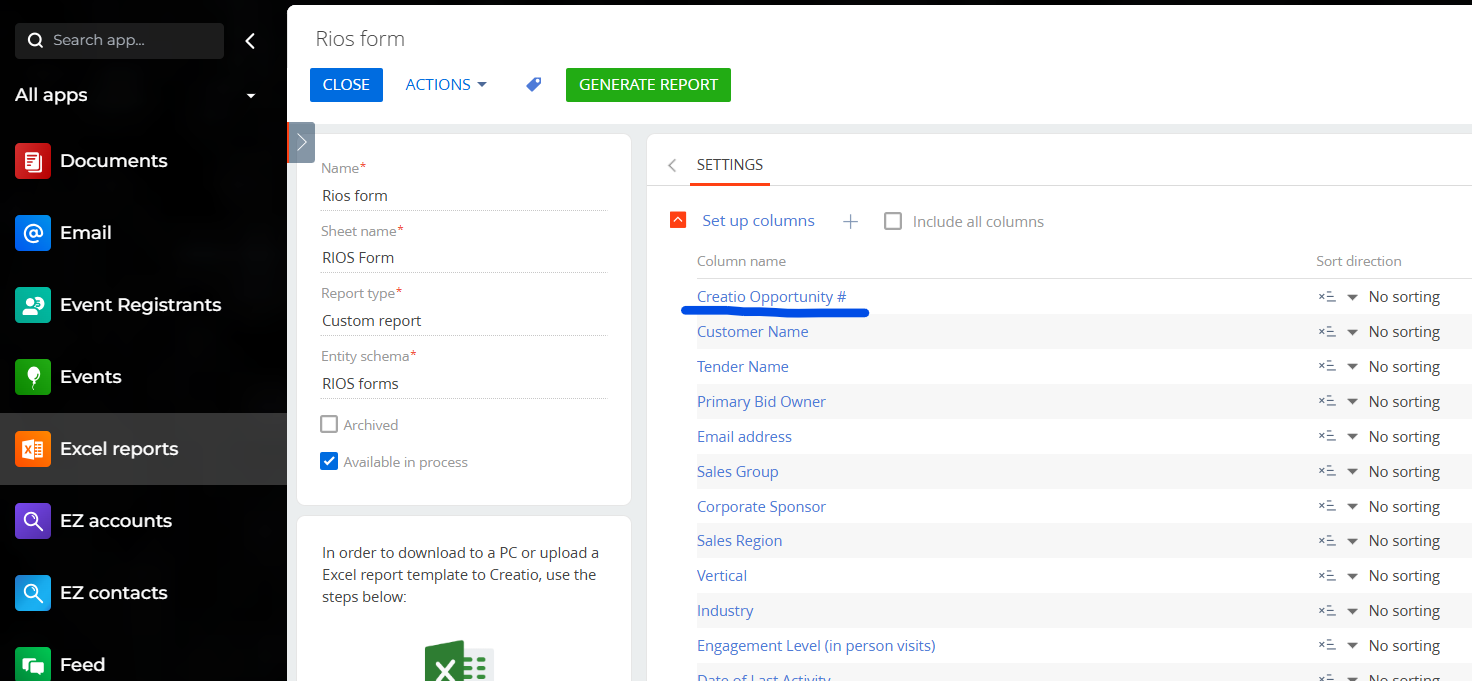
Is there any way to create a link in a cell?  We have the Opportunity # listed in the spreadhseet, and it would be handy if the user could just click the cell and open that Opportunity in Creatio directly.

I know I can open Excel and create a hyperlink like Oppy-123456 but can this be created in the Excel add-in somehow?

Thanks
Rob


Like 1

Like

2 comments

You could likely add a formula using the Excel HYPERLINK function in the template for the Excel report. 

Essentially, create a template for the Excel report. In the Excel report you'd have a column for the record Id. Then use that Id in the formula to create the hyperlink. You could hide the column for the Id as well. If you've not created a template for an Excel report before I have some info here.

Ryan

Thanks -- that's a helpful video!  I will give all this a try and post my results here.
~~~ rob

Show all comments
excel
Sales_Creatio
8.0

Hi. 

Is it possible to write a row (to the bottom) of an Excel spreadsheet from Creatio?

We need to copy select data from a Creatio screen to a row on a spreadsheet.  In our case, the spreadsheet lives on a Sharepoint drive.   The goal is for the user to push a button on a Creatio screen, and have it insert data to the last row of an existing spreadsheet.

Any direction or suggestions you have are appreciated.
Thanks!
Rob

Like 0

Like

4 comments

I have something like that working (except I am using a hosted Google Spreadsheet) that is using make.com. I just execute a Make.com webhook from a process in Creatio, make.com receives that and then writes the line to the existing spreadsheet. All no code, so just thought I would mention. 

Ryan

Hi,

Yes, it is possible to write a row to the bottom of an existing spreadsheet from Creatio.

There's an official Google Sheets connector for Creatio available on the Creatio Marketplace: https://marketplace.creatio.com/app/google-sheets-connector-creatio

It enables two-way sync with Google Sheets and lets you:

-Automatically send data from Creatio to Google Sheets;

-Map sheet columns to Creatio fields;

-Use Google Sheets as a staging point between systems.

This connector is fully no-code and works with current versions of Google Sheets - all you need is a Google Cloud account.

Have a nice day!

Thanks.  However, we are not using Google Sheets, our corporate standard is Excel / MS Office.  Creatio would need to integrate with an existing spreadsheet used by our Operations department -- Is there a connector for that too?

I have something that allow using a excel template to push data with some custom framework primitive for openxml. But it's not trivial to use, and it just download a file localy.

Show all comments
excel
portal
Service_Creatio_enterprise_edition
8.0

Hello Community,

Im trying to import an excel file, in the Cases section as a Portal user.

When i click 'Data Import' from the Case section the Wizard is blank

Am I missing some additional config here?

Sasor

Like 0

Like

2 comments

We have managed to fix the previous issue

However the File Import template is still missing

Sasori Oshigaki,

Hello!

The templates for data import are stored in the object FileImportTemplate. By default, the operation permissions for this object are turned off, meaning that only users with the group "All employees" can access it. 
To allow external users to see the templates, please enable Operation permissions for the object FileImportTemplate and configure the access rule for the needed users.
 

After, allow external users to use feature UseFileImportTemplate. features can be found by the following link: your_site/0/Shell/#Section/AppFeature_ListPage :


I hope this helps. Have a great day!

Show all comments

Hi all mentors, 
     
     I notice there is an app on the marketplace named "Excel reports builder for Creatio" that can generate the excel report in section page directly. Is it also okay to send the excel file in BP directly to certain users? I've tried it but failed during the setup in BP. If there is any reference information or link, please kindly share. 


Like 0

Like

3 comments
Best reply

Jeffrey,

That option is only available for Custom Report types, not Section Reports as shown in your screenshot. If you create a new Excel report with type=Custom Report, it will show for that one.

Ryan

Hello,

Please note that OOTB business process element "Process file" can only generate Word reports, you can find more details about its functionality in this article:

https://academy.creatio.com/docs/8.x/no-code-customization/bpm-tools/process-elements-reference/system-actions/process-file-element

Instead, you can use the "Generate Excel report" element that is a part of the "Excel reports builder for Creatio" app. 

Please note, that only the reports with "Custom report" type and a checked "Available in process" boolean can be used in the process.

Mira Dmitruk,


Hi, Mira, 

    Thank you for your help, however, I can't find "Available in process" setting in the Excel report setting, that may be the reason that I can't find it inside Excel in BP. What's the reason? I'm using 8.2.1.5446 Creatio cloud version, install the excel builder app few days ago. 


Jeffrey.


Jeffrey,

That option is only available for Custom Report types, not Section Reports as shown in your screenshot. If you create a new Excel report with type=Custom Report, it will show for that one.

Ryan

Show all comments
ExcelReportBuilder
Issue_in_Excel_reports_Setup
excel
Studio_Creatio
8.0

Does anyone knows how to work with excel reports with the new business process element? Even though an Excel report is created, he doesn't appear on the business process element "Generate Excel Report".


Like 1

Like

2 comments
Best reply

It only allows "Custom Reports", not Section Report or Edit Page Reports. Also, for Custom Reports, there is a new checkbox on the report page that allows it to be used in processes. You need to check that, then it will show up in the process element to select.

Ryan

It only allows "Custom Reports", not Section Report or Edit Page Reports. Also, for Custom Reports, there is a new checkbox on the report page that allows it to be used in processes. You need to check that, then it will show up in the process element to select.

Ryan

Ryan Farley,

Thks. Ryan. 

Show all comments
excel
report designer
IntExcelExport
Studio_Creatio
8.0

Hi everyone,

I hope you're all doing well. I'm currently working on exporting an Excel report of section data and its details in Creatio. I found a package named IntExcelExport in the Creatio marketplace, which seemed perfect for my needs.

However, I ran into an issue while trying to configure the report. Whenever I try to set it up, I get the following error:

"Cannot read properties of null (reading 'isTiled')"

I've tried several times, but I keep encountering the same problem. Has anyone else experienced this issue or have any insights on how to resolve it?


Any guidance or suggestions would be greatly appreciated!

Thank you in advance for your help.

Like 0

Like

1 comments

Hello Abderrahman Tigami,

I have successfully configured and generated Excel reports using the current version of the app. I kindly ask you to provide more details how to reproduce your issue (version of Creatio instance, report type, any section or specific one).

Show all comments
Excel_reports
Excel_reports_builder
excel
datatime
time
8.0

Does anyone have a solution on how to create Excel reports with Time type columns? I tried to use "Excel reports builder" but it gave me an error "Unable to cast object of type 'System.TimeSpan' to type 'System.IConvertible'.Couldn't store <00:39:00> in ___ Column. Expected type is DateTime." I want to make a pivot table and graph, so the usual unloading of the registry is not enough for me. 


Like 0

Like

5 comments
Best reply

Hello,
The current version of the Excel reports builder for Creatio app doesn't support Date / Time formats. The responsible team plans to add this feature in the next app release. A new version will become available in July.

Hello,

For this, you can use the solution from marketplace: https://marketplace.creatio.com/app/excel-reports-builder-creatio


Best regards,
Malika

Malika,

Unfortunately, it doesn't work with Duration. A report with Time-format columns (00:00:00) is not creating. So I thought maybe there was another solution

Hello,
The current version of the Excel reports builder for Creatio app doesn't support Date / Time formats. The responsible team plans to add this feature in the next app release. A new version will become available in July.

Irina Lazorenko,

Hello, do you know when this App update will be available?

Поліна Стоцька,


Hello,

The new version of the app is under review and will be available on the marketplace this week.

Show all comments
excel
reports
sectionreport
Studio_Creatio
8.0

Hi. 

I download the Excel report app from the Marketplace but when I try to create a Section Report for the sections that I created or for the sections of  Contacts and Accounts it doesn't show the button that allows me to generate the report for the section. If I try with other sections like Activities I don't have this problem. 

Can someone help me please? 

Thanks you. 

Like 2

Like

0 comments
Show all comments
excel
sectionreport
section
marketplace
generatebuilder
apps
Studio_Creatio
8.0

Hi!

I have install the Excel reports builder from the Marketplace (https://marketplace.creatio.com/app/excel-reports-builder-creatio) and I have the following problem, when I want to generate a new section report for one of the new sections that I created it doesn't show the button that allows me to download the report. I have this problem with the sections that I created using the Application Hub and with the Accounts and Contacts section because I try with other sections like Activity and it shows the button to generate the report. 

Any help greatly appreciated here. 

Thanks you. 

Like 0

Like

1 comments

Hi Laura!

The app does not support report download in Freedom UI sections. I have sent your feedback to the responsible team.

As a workaround, you can set up reports that have "Custom report" report type. That way you can generate a report in the Excel reports section.

Show all comments

I need to generate an excel file every 5 min automatically and save it to an ftp space .

Is business process capable of doing it ?


Like 0

Like

2 comments

Hello, 


You can work with a file in a business process with a help of "Process file element", for example if you need to generate a printable. More detailed information can be found in a corresponding article

Using oob version of a system you can send the file with a business process to a specific mailbox or add it to the File and Attachments detail, for uploading the file to the FTP server additional development will be needed.  As of now we do not have any ready to use example to achieve your business task with a help of additional development. 

We've registered a query for our responsible R&D team to consider implementing this functionality in the upcoming releases. 

Best regards,

Anastasiia


Hi there, 


Maybe this add-on will be of help, however subscription is required 

https://marketplace.creatio.com/app/data-import-export-creatio


BR,

Jacek

Show all comments