Email
Business Process
Service_Creatio_enterprise_edition
8.0

Hello community

I'm looking for the cleanest way to send emails to a recurring group of ~120 contacts. The group of recipients stays the same, but the email content is freshly composed every time. I want to write each message manually, not reuse a fixed template. The goal is to avoid adding 120 recipients manually on every send.

Constraints in my environment:

  • I do not have the Marketing module, so Bulk Email is not available.

Sasor

Like 1

Like

2 comments

Sasori Oshigaki,

Step 1: Group all the contacts into a Folder (using Dynamic Filter).
Step 2: You can use a button trigger to load all contacts email and pass that into the TO of email element in Business process or if you use Message compose (Angular component), append the email to the "To Attribute" of the email composer element (Can be investigated in DEV-Console to find the To attribute name).

BR,
Bala.

Create a dynamic contact folder, select the test contacts, and convert your folder to static.
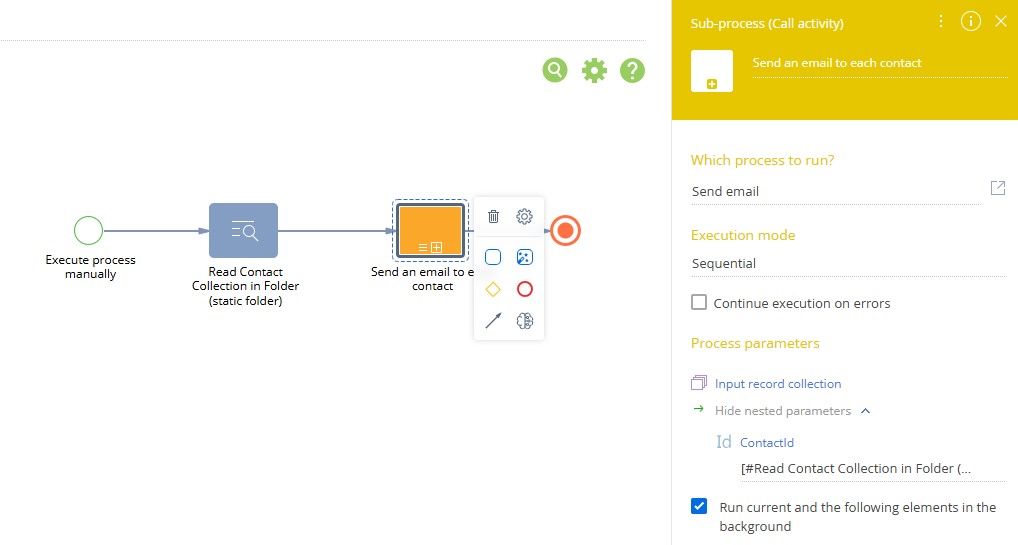
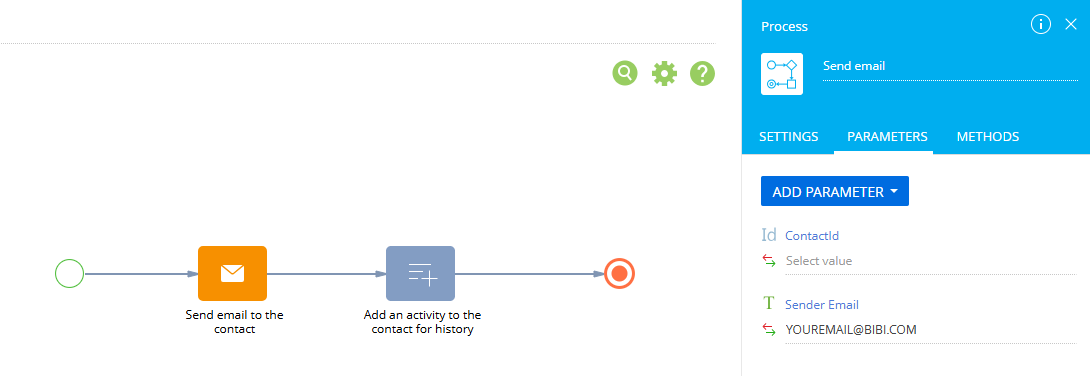
Create a process that reads your contact folder and sends an email to the contact collection via a subprocess.

Main process


Sub Process

Show all comments
attachments
FreedomUI
handlers
file upload
Service_Creatio_enterprise_edition
8.0

Hi Community,

Since the last update, some files are not being uploaded correctly. It appears that the upload process terminates before the entire file is uploaded, which results in corrupted files.

To determine whether this sudden termination is not user-related, we want to add a popup that appears right after the upload process finishes. This way, the user can only navigate through the app once the upload is 100% complete.
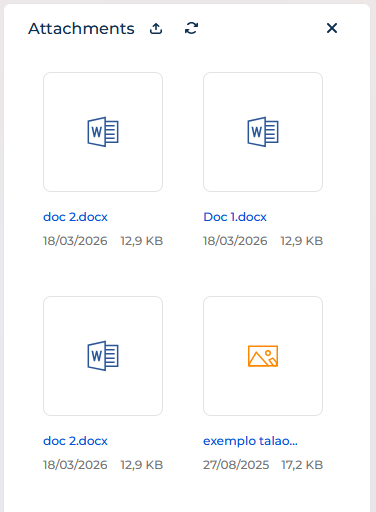
To achieve this, we tried using the UploadFileRequest handler, but it only executes at the start of the upload and does not wait for the process to finish:

{
	request: "crt.UploadFileRequest",
	handler: async (request, next) => {
		const result = await next?.handle(request);
		
		const dialogService = new sdk.DialogService();
		await dialogService.open({
			message: "O upload do documento foi iniciado. Para ficheiros grandes, poderá demorar mais tempo. Por favor, confirme se foi concluído com sucesso.",
			actions: [
				{
					key: "OK",
					config: {
						color: "primary",
						caption: "OK"
					}
				}
			]
		});
	
		return result;
	}
},

Could you please help us solve this issue?

Thank you.

Best regards,
Pedro Pinheiro

Like 0

Like

1 comments

Hello,
The probable reason you have this duplicate is that "LiveEditing" is enabled for the main record. Our R&D team knows about the issue and is working on a fix. As for now, please try disabling the live editing for the main object.

Show all comments
MessageComposer
emailcomposer
font
FreedomUI
Service_Creatio_enterprise_edition
8.0

Hello,

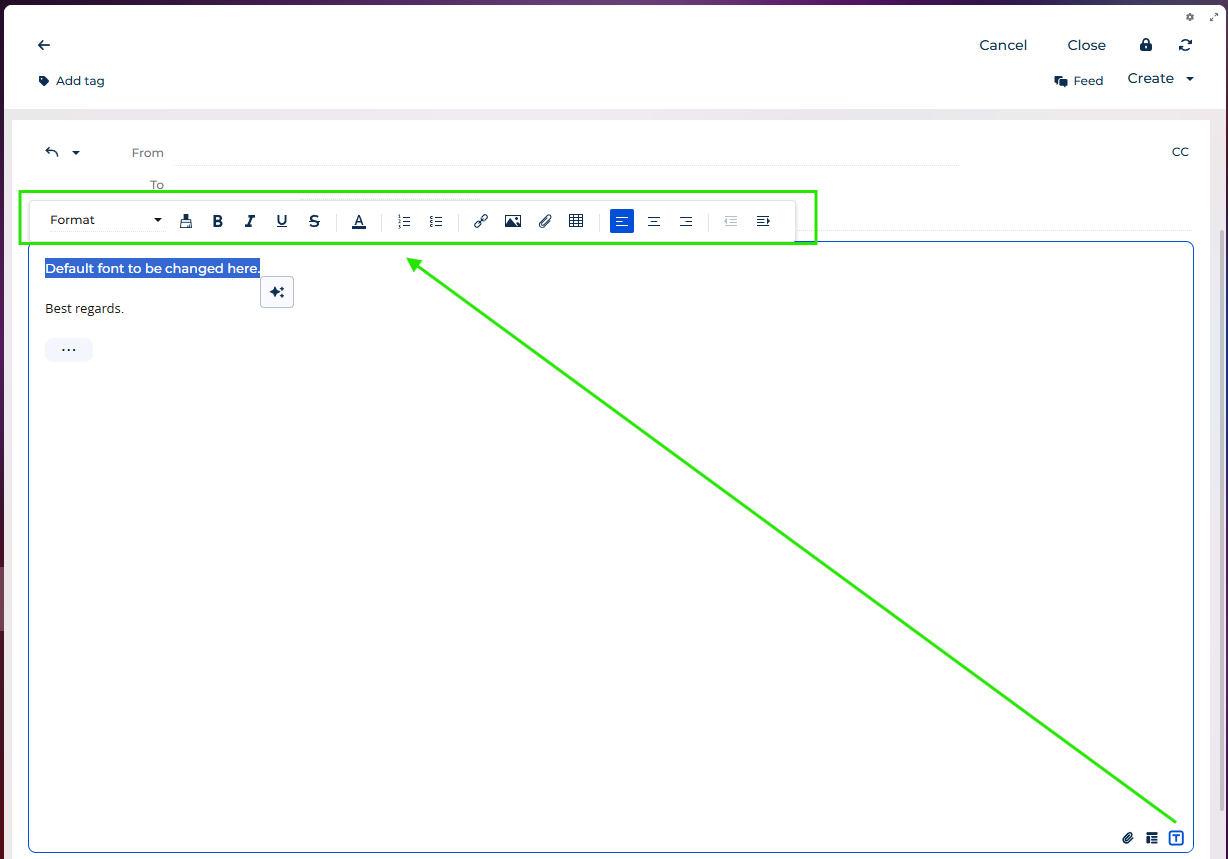
is there a way to change and set default Font in email body of MessageComposer component in Freedom UI to some other font like Arial or Times New Roman for example? 

There is no possibility to change Font at all in MessageCompose component in Freedom UI.

MessageComposer

Like 0

Like

1 comments
Best reply

Hello, 


Currently, there is no possibility to apply the font by default for regular emails (but it is possible to do for bulk emails (in the bulk email designer) using the "CKEditor default font" system setting). Our R&D team has a functionality request in an "Accepted" status regarding the possibility of applying default font for regular emails so we can expect this logic in one of the nearest releases. I will also inform them about your request so to speed up the solution of this issue of missing default font for regular emails.

Thank you for reaching out! 

Hello, 


Currently, there is no possibility to apply the font by default for regular emails (but it is possible to do for bulk emails (in the bulk email designer) using the "CKEditor default font" system setting). Our R&D team has a functionality request in an "Accepted" status regarding the possibility of applying default font for regular emails so we can expect this logic in one of the nearest releases. I will also inform them about your request so to speed up the solution of this issue of missing default font for regular emails.

Thank you for reaching out! 

Show all comments
approval
section cases approval
FreedomUI
Service_Creatio_enterprise_edition
8.0

Hello,

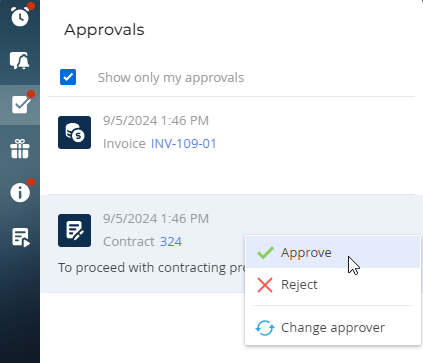
I was wondering if there is a native Freedom UI functionality to change approver directly on Approval component?

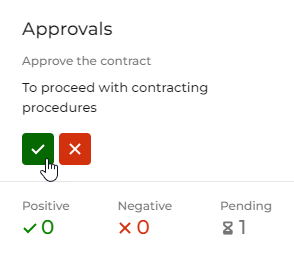
In Freedom UI I have seen only "Approve" and "Deny", but no "Change approver" option.

Fig. 1 Approvals in the Approvals component

"Change approver" can currently be done only in "Classic UI" on right side panel:

Fig. 2 Approvals in the notification panel

Has anybody solution to this?

Thank you.

Like 6

Like

2 comments
Best reply

Hello!

Currently, the Approval component in Freedom UI offers only the "Approve" and "Deny" actions. The "Change approver" feature is available natively only in the Classic UI notification panel. 
There is no standard, out-of-the-box functionality in Freedom UI to change the approver directly within the Approval component at this time.

We also have a request for the development team to implement this logic in the future.

As a possible workaround, you could try implementing this by creating a process on the page that triggers the approver changes. This approach might help achieve the desired behavior until a more permanent solution is implemented.

That would be great, a client of ours asked this very question last week !

Hello!

Currently, the Approval component in Freedom UI offers only the "Approve" and "Deny" actions. The "Change approver" feature is available natively only in the Classic UI notification panel. 
There is no standard, out-of-the-box functionality in Freedom UI to change the approver directly within the Approval component at this time.

We also have a request for the development team to implement this logic in the future.

As a possible workaround, you could try implementing this by creating a process on the page that triggers the approver changes. This approach might help achieve the desired behavior until a more permanent solution is implemented.

Show all comments
MessageComposer
Service_Creatio_enterprise_edition
8.0

I want that based of the role of the user, some users should need approval from a supervisor.
So if the role is probation instead of the send button they should see a "request approval" button

and that button should set the email to draft so when the supervisor sees it can send it if correct.

the question is about modifying the MessageComposer to shows this different buttons.
the functionality i can do with a handler.

Thank you

Like 0

Like

1 comments

Hello,
At the moment, the Message Composer element is not customizable in the system. The task to implement such a possibility is already present for our R&D team, but it is still unknown when it will be added.

Show all comments
Email
Business Process
reply
Service_Creatio_enterprise_edition
8.0

Hello Community,

We’re working on a business process where we capture an incoming email to a specific mailbox.

We’ve set up an automated reply to this email, and the reply itself is working ( we implemented the functionality based on the out-of-the-box “Send email to case contact” process). However, the issue is that the reply doesn’t appear in the same thread as the original email. It’s being sent as a new, separate email instead.

Sasor

Like 0

Like

2 comments

++++

Greetings,

Currently, the business process configuration does not support keeping the original email thread when sending an email.

As a workaround, you can read the body of the received email (if it is available in the process) and pass it through parameters into a new outgoing email.

Please also note that our R&D team already has a suggestion registered to enable sending emails within a single thread directly from a business process in future releases. Your request helps increase the priority of this enhancement, making it more likely to be implemented sooner.

Have a nice day!

Show all comments
excel
portal
Service_Creatio_enterprise_edition
8.0

Hello Community,

Im trying to import an excel file, in the Cases section as a Portal user.

When i click 'Data Import' from the Case section the Wizard is blank

Am I missing some additional config here?

Sasor

Like 0

Like

2 comments

We have managed to fix the previous issue

However the File Import template is still missing

Sasori Oshigaki,

Hello!

The templates for data import are stored in the object FileImportTemplate. By default, the operation permissions for this object are turned off, meaning that only users with the group "All employees" can access it. 
To allow external users to see the templates, please enable Operation permissions for the object FileImportTemplate and configure the access rule for the needed users.
 

After, allow external users to use feature UseFileImportTemplate. features can be found by the following link: your_site/0/Shell/#Section/AppFeature_ListPage :


I hope this helps. Have a great day!

Show all comments
OAuth2.0
Service_Creatio_enterprise_edition
8.0

Hello! 


I am having trouble testing token retrieval via OAuth 2.0.


In the documentation for retrieving an access token, an Identity Service URL is required. Earlier, it states that you do not need to deploy an identity service if you are using Creatio in the cloud, but I see no reference to what the URL should be in this case and have had no luck finding it.


What is the Identity Service URL for Creatio in the cloud?

Like 0

Like

2 comments
Best reply

it is in the system settings. Generally it is https://[instanceName]-is.creatio.com/connect/token


For example, if my instance is autos.creatio.com, the url would be https://autos-is.creatio.com/connect/token

it is in the system settings. Generally it is https://[instanceName]-is.creatio.com/connect/token


For example, if my instance is autos.creatio.com, the url would be https://autos-is.creatio.com/connect/token

Thank you! That's exactly what we needed.

Show all comments
CommunicationPanel
CTI
Service_Creatio_enterprise_edition
8.0

Hello,

I would like to know if anyone has an idea how it could be overridden method answerCall on CTI Panel, so that when somebody clicks on Answer call button, edit Page of that specific Call is opened to fill in Notes and other necessary data?

Thank you.

Like 0

Like

2 comments

Hello Jelenko,
To implement your logic you can do the following:
1) Create replacing view model for CtiPanel object.
2)  Implement CtiPanel  
define("CtiPanel", [],
    function() {
        return {
            attributes: {},
            methods: {
                answerCallCustom: function() {

                    // your logic here

                    // get call id from your cti provider to pass to business process
                    var args = {
                        sysProcessName: "customProcess",
                        parameters: {
                            callId: callId
                        }
                    };
                    ProcessModuleUtilities.executeProcess(args);
                }
            },
            diff: [
                {
                    "operation": "merge",
                    "name": "AnswerButton",
                    "parentName": "ButtonsPanel",
                    "propertyName": "items",
                    "values": {
                        "click": {"bindTo": "answerCallCustom"}
                    }
                },
            ]
        };
    }
);

3) Create business process with callId parameter that opens the page you need1
Hope this helps

Yevhenii Grytsiuk,

Thank you Yevhenii,


after your suggestion to use business process and start it from client side, I changed my implementation approach and managed to do it with following trigger, which starts business process when call is picked up:


CTI BP

Maybe someone finds it useful for future reference.

Thanks.

Show all comments
FreedomUI
nextsteps
Activity
tasks
Service_Creatio_enterprise_edition
8.0

Hi Community,


We have this business requirement, where we need to add a "Quick Complete" button to the NextStep line. Similar to what this marketplace app have, but for FreedomUI.


https://marketplace.creatio.com/app/quick-complete-order-activities-creatio


We want to add the button next to the "Complete" one.


How can we achieve such business requirement? What do we need to change?


Thank you in advance.


Best Regards,

Pedro Pinheiro

Like 1

Like

1 comments

Hello,
 

Unfortunately, at the moment, the Message-composer element is not customizable from the inside using no-code/low-code tools.
 

Currently, we do not have a ready-made instruction for adding such a button. However, we have created a task for the responsible team to either create such an instruction or add no-code tools for adding custom buttons to the element.
 

Thank you for helping make our product better!

Show all comments