knowledge base
SDK
Q&A
support

Question

Can I add two member accounts for one contact in SysAdminUnit?

Answer

You cannot implement this case, for bpm'online it is important to support the principle 1 contact = 1 member account in SysAdminUnit.

Like 0

Like

Share

0 comments
Show all comments
knowledge base
SDK
Q&A
support

Question

Version 7.7.

We modify a page, e.g., of an Account. We add our columns and delete the standard ones.

Afterwards, we want to get back to the default page. For example, we delete the file of the replacing page via configurator. It worked OK in previous versions, all we had to do was to clear the cashe and cookies and recompile everything.

In this version, it does not work. How can we fix it?

Answer

This is connected with using bpm'online bundles starting from version 7.7. The bundles contain all schemas of pages and sections. Simple deleting of a replacing page schema of a section does not change the bundle. To revert to the default page, create an empty replacing client module for the needed page.For example, for the "Leads" section page, it wll look as follows:

define("LeadPageV2", ["BusinessRuleModule", "ConfigurationConstants"],
    function(BusinessRuleModule, ConfigurationConstants) {
        return {};
});

Afterwards, save the created module and clear the browser cache.

Like 0

Like

Share

0 comments
Show all comments

Sypmtom

The folder setup area for mail synchronization is not wide enough to display the folder tree. As a result, the folder names are displayed as a column with one letter only.

Cause

The setup page contains an invisible side panel that was hidden back in version 7.2.0, as a result, only 40% of space is provided for the folder tree. Besides, PageDesignerUtilities styles are applied to the page, which leads to displaying the setup area on half of the page.

Solution

This functionallity was changed completely starting from version 7.7.0, which ensures correct displaying of the folder tree. For versions 7.6.0  and earlier, replace the MailboxFolderSyncSettingsModule module with complete copying of the code, delete styles for the left-container class, add a new style:

#mainContainerEx {
 
     width:  100%;
 
     padding-top:  7px;
 
     margin-right:  40px;
 
}

In the source code, replace Id and the mainContainer selector for the mainContainerEx selector.

Like 0

Like

Share

0 comments
Show all comments
knowledge base
SDK
Q&A
support

Symptoms

Mail block is not displayed in the communication panel. The console displays the following error message: Uncaught Terrasoft.ItemNotFoundException: Column with the '4684d4ba-4b6b-4d1a-93fb-70ec2afed57f' Id not found in the 'Activity' object

Cause

The EntityConnection table contains connection of an activity with nonexisting or outdated object.

Solution

Execute the following in the configuration or DBMS script, that deletes link to nonexisting column:

DELETE FROM [dbo].[EntityConnection]

WHERE [ColumnUId] = '4684d4ba-4b6b-4d1a-93fb-70ec2afed57f'

Necessary conditions and possible restrictions

Before executing, make sure that no column with such UId exists in the Activity object. It might be contained in one of the packages, but bpm'online may not see it due to the incorrect package dependancy.

Like 0

Like

Share

0 comments
Show all comments
knowledge base
SDK
Q&A
support

Symptoms

Information is not displayed on the page - all fields are empty.

Cause

User incorrectly deleted a lookup field in the object.

Solution

Correctly create a lookup field with the same name, publish the object, afterwards delete the created object and republish.

Like 0

Like

Share

0 comments
Show all comments

Question

What database tables should I take to find connection between a Case and permission to its reading?

Answer

Every object has a permission table with the following name structure: Sys + object + Right, (for a case, it is the SySCaseRight name). The permissions are added to such tables with specifying the SySAdminUnitId (a record identifier) of SySAdminUnit (user and group table). The table contains: a RecorId  - the Id of the record that the permission is applied to, Operation - the operation of the permission, and RightLevel - the level of the permission.

SourceId contains the Id from the SysEntitySchemaRecRightSource table, which is the source of permission distribution (Owner, Assignee, Default).

RightLevel values:

      0 - Deny

      1 - CanRead

      2 - CanEdit

Operation values:

      0 - Read

      1 - Edit

      2 - Delete

Like 0

Like

Share

1 comments

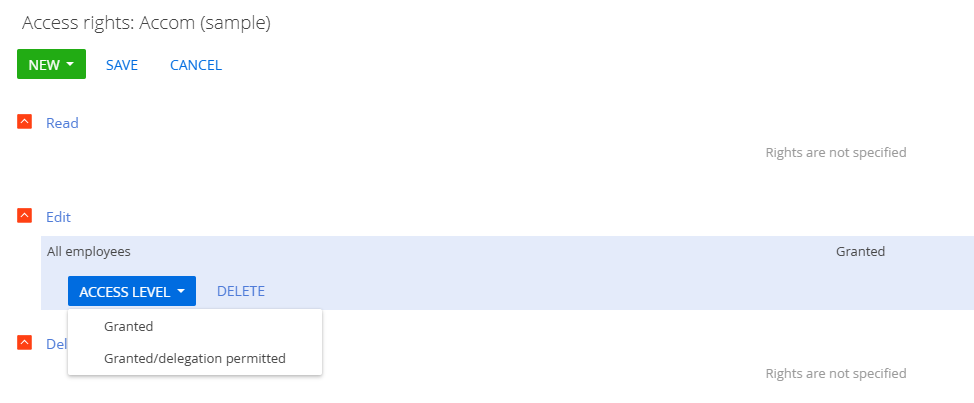
Worth noting that RightLevel 1 corresponds to the Operation being "Granted" (e.g. user is granted permissions to edit the record for Operation 1) while RightLevel 2 corresponds to the Operation being "Granted/delegation permitted" (e.g. user is granted permissions to edit the record for Operation 1 and can also grant this permission to others.


Record permissions UI demonstrating the above:

Show all comments
knowledge base
SDK
support
Q&A

Question

How can I display a virtual column lookup field on a page so that the modal selection window works correctly?

Answer

define("ContactAddressPageV2", [],
    function() {
        return {
            attributes: {
                "UsrKladrStreet": {
                    dataValueType: Terrasoft.DataValueType.LOOKUP
                },
                "UsrVirtualKladrStreet": {
                    "dataValueType": Terrasoft.DataValueType.LOOKUP,
                    "type": Terrasoft.ViewModelColumnType.VIRTUAL_COLUMN,
                    isLookup: true,
                    caption: "virtual street",
                    referenceSchemaName: "UsrKladrStreet"
                }
            },
            diff: /**SCHEMA_DIFF*/[
                {
                    "operation": "insert",
                    "parentName": "Header",
                    "propertyName": "items",
                    "name": "UsrKladrStreet",
                    "values": {
                        bindTo: "UsrKladrStreet",
                        "caption": {"bindTo": "Resources.Strings.UsrKladrStreetCaption"},
                        layout: {column: 0, row: 8, colSpan: 12}
                    }
                },
                {
                    "operation": "insert",
                    "parentName": "Header",
                    "propertyName": "items",
                    "name": "UsrVirtualKladrStreet",
                    "values": {
                        bindTo: "UsrVirtualKladrStreet",
                        "caption": "virtual street",
                        layout: {column: 0, row: 9, colSpan: 12}
                    }
                }
            ]/**SCHEMA_DIFF*/
        };
    }
);


Like 0

Like

Share

0 comments
Show all comments

Question

Web service without authorization for calling a business process with parameters

Answer

Web service instruction on calling a business process is available at: https://community.bpmonline.com/articles/web-service-available-without-…. The web service is available via HTTP\GET and passes parameters to the business process.

Service:

namespace Terrasoft.Configuration
{
    using System;
    using System.Collections.Generic;
    using System.Runtime.Serialization;
    using System.Linq;
    using System.ServiceModel;
    using System.ServiceModel.Web;
    using System.ServiceModel.Activation;
    using System.Web;
    using System.Collections.ObjectModel;
    using System.ComponentModel;
    using System.Drawing;
    using System.Globalization;
    using System.Net;
    using System.Text;
    using System.IO;
 
    using Terrasoft.Core;
    using Terrasoft.Core.Configuration;
    using Terrasoft.Core.DB;
    using Terrasoft.Core.Entities;
    using Terrasoft.Core.Process;
    using Terrasoft.Web.Common;
    using Terrasoft.Common;
    using Terrasoft.Common.Json;
    [ServiceContract]
    [AspNetCompatibilityRequirements(RequirementsMode = AspNetCompatibilityRequirementsMode.Required)]
    public class UsrLaunchProccService : BaseService
    {
        private UserConnection SystemUserConnection {
            get {
                return AppConnection.SystemUserConnection;
            }
        }
 
        public ProcessSchemaManager ProcessSchemaManager {
            get {
                return (ProcessSchemaManager)SystemUserConnection.GetSchemaManager("ProcessSchemaManager");
            }
        }
 
        [OperationContract]
        [WebInvoke(Method = "GET", RequestFormat = WebMessageFormat.Json, BodyStyle = WebMessageBodyStyle.Wrapped,
        ResponseFormat = WebMessageFormat.Json, UriTemplate = "runUsrTestProcc/{ustTestPhone}/")]
        public string runUsrTestProcc(string ustTestPhone)
        {
            ///////
            var currentWebOperationContext = WebOperationContext.Current;
            var outgoingResponseHeaders = currentWebOperationContext.OutgoingResponse.Headers;
            var incomingRequestOrigin = currentWebOperationContext.IncomingRequest.Headers["Origin"];
            outgoingResponseHeaders.Add("Access-Control-Allow-Origin", incomingRequestOrigin);
            ///////
            var result = "";
            try {
                var UserConnection = this.SystemUserConnection;
 
                var manager = UserConnection.ProcessSchemaManager;
                var processSchema = manager.GetInstanceByName("UsrTestProcc");
                var process = processSchema.CreateProcess(UserConnection);
                if (processSchema.Parameters.ExistsByName("UstTestPhone"))
                {
                process.SetPropertyValue("UstTestPhone", ustTestPhone);
                }
                process.Execute(UserConnection);
                result = "OK for ustTestPhone = " + ustTestPhone;
            } catch (Exception ex) {
                result = ex.Message;
            };
            return result;
        }
 
 
        [OperationContract]
        [WebInvoke(Method = "OPTIONS", UriTemplate = "*")]
        public void GetWebFormLeadDataRequestOptions() {
            var outgoingResponseHeaders = WebOperationContext.Current.OutgoingResponse.Headers;
            outgoingResponseHeaders.Add("Access-Control-Allow-Origin", "*");
            outgoingResponseHeaders.Add("Access-Control-Allow-Methods", "GET, POST, OPTIONS");
            outgoingResponseHeaders.Add("Access-Control-Allow-Headers", "Origin, Content-Type, Accept, X-Requested-With, X-Requested-With, x-request-source");
            outgoingResponseHeaders.Add("Access-Control-Request-Headers", "X-Requested-With, x-request-source, accept, content-type");
        }
    }
}


Like 0

Like

Share

0 comments
Show all comments
knowledge base
SDK
Q&A
support

Question

How can I call a web service created in one bpm'online from another bpm'online? I get the "Cross-origin resource sharing" error.

Answer

The below info has been tested on our test platforms. The lead column used for the search was named with a prefix: UsrTest. The classes utils and the service were named with prefixes: UsrMyTestService, UsrLeadSearchUtils.

As a result, we have:

The service schema code

amespace Terrasoft.Configuration.CustomConfigurationService
{
	using System;
	using System.Collections.Generic;
	using System.Runtime.Serialization;
	using System.Linq;
	using System.ServiceModel;
	using System.ServiceModel.Web;
	using System.ServiceModel.Activation;
	using System.Web;
	using System.IO;
	using Terrasoft.Core;
	using Terrasoft.Core.Configuration;
	using Terrasoft.Core.DB;
	using Terrasoft.Core.Entities;
 
	[ServiceContract]
	[AspNetCompatibilityRequirements(RequirementsMode = AspNetCompatibilityRequirementsMode.Required)]
	public class UsrMyTestService
	{
		private UserConnection _userConnection;
 
		private UserConnection UserConnection {
			get {
				return _userConnection ?? (_userConnection = HttpContext.Current.Session["UserConnection"] as UserConnection);
			}
		}
 
		[OperationContract]
		[WebInvoke(Method = "POST", RequestFormat = WebMessageFormat.Json, BodyStyle = WebMessageBodyStyle.Wrapped,
			ResponseFormat = WebMessageFormat.Json)]
		public testclass myTestServiceFunction(string test)
		{
			//////
			var currentWebOperationContext = WebOperationContext.Current;
			var outgoingResponseHeaders = currentWebOperationContext.OutgoingResponse.Headers;
			var incomingRequestOrigin = currentWebOperationContext.IncomingRequest.Headers["Origin"];
			outgoingResponseHeaders.Add("Access-Control-Allow-Origin", incomingRequestOrigin);
			///////
			testclass result = new testclass();
			UsrLeadSearchUtils leadSearchUtil = new UsrLeadSearchUtils(this.UserConnection);
			try {
				var leadCollection = leadSearchUtil.SearchLeadByCustomerID(test);
				foreach (var item in leadCollection) {
					result.Response.Add(new SearchItem() {
						Id = item.GetTypedColumnValue("LeadId"),
						Name = item.GetTypedColumnValue("LeadName"),
					});
				}
			} catch (Exception ex) {
				result.Success = false;
				result.ErrorMessage = ex.Message;
			};
			return result;
		}
 
		////////
		[OperationContract]
		[WebInvoke(Method = "OPTIONS", UriTemplate = "SaveWebFormLeadData")]
		public void GetWebFormLeadDataRequestOptions() {
			var outgoingResponseHeaders = WebOperationContext.Current.OutgoingResponse.Headers;
			outgoingResponseHeaders.Add("Access-Control-Allow-Origin", "*");
			outgoingResponseHeaders.Add("Access-Control-Allow-Methods", "POST");
			outgoingResponseHeaders.Add("Access-Control-Allow-Headers", "Origin, Content-Type, Accept");
		}
		//////////
 
		[DataContract]
		public class testclass {
			public testclass() {
				this.Success = true;
				this.Response = new List();
			}
			[DataMember]
			public List Response {
				get;
				set;
			}
			[DataMember]
			public bool Success {
				get;
				set;
			}
			[DataMember]
			public string ErrorMessage {
				get;
				set;
			}
		}
 
		[DataContract]
		public class SearchItem {
			[DataMember]
			public Guid Id {
				get;
				set;
			}
			[DataMember]
			public string Name {
				get;
				set;
			}
		}
	}
}

The utility schem code

namespace Terrasoft.Configuration
{
	using System;
	using System.Collections.Generic;
	using System.IO;
	using Terrasoft.Core;
	using Terrasoft.Core.Configuration;
	using Terrasoft.Core.DB;
	using Terrasoft.Core.Entities;
 
	public class UsrLeadSearchUtils {
		public UsrLeadSearchUtils (UserConnection userConnection) {
			this.UserConnection = userConnection;
		}
 
		private UserConnection UserConnection {
			get;
			set;
		}
 
		public EntityCollection SearchLeadByCustomerID(string email) {
			if (string.IsNullOrEmpty(email)) {
				throw new ArgumentException("email is undefined.");
			}
 
			var entitySchemaManager = this.UserConnection.GetSchemaManager("EntitySchemaManager") as EntitySchemaManager;
			var esq = new EntitySchemaQuery(entitySchemaManager, "Lead");
			esq.RowCount = 20;
			esq.AddColumn("Id").Name = "LeadId";
			esq.AddColumn("LeadName").Name = "LeadName";
			esq.AddColumn("UsrTest").Name = "UsrTest";
			esq.Filters.Add(esq.CreateFilterWithParameters(FilterComparisonType.Equal, "UsrTest", 
				email));
 
			return esq.GetEntityCollection(this.UserConnection);
		}
	}
}

To call the web service from bpm'online where the service was created, try the following:

onGetServiceInfoClick: function() {
    var usrTest = "test1";
    var serviceData = {
        test: usrTest
    };
    ServiceHelper.callService("UsrMyTestService", "myTestServiceFunction",
        function(response) {
            var result = response.myTestServiceFunctionResult;
            alert(result.Response[0].Name);
        }, serviceData, this
    );
}

We receive the search results. The name of the first lead found via the search line is displayed by the alert.

Now let us try to request the web service from another bpm'online. For this, our service must be registered as the one available without authorization, which involves changing the service code and the website config where the service is located.

Working with the config in more detail:

1) Modify UsrMyTestService, locate it into the "Terrasoft.Configuration" namespace, add "UriTemplate" to the method and options. Establish inheritance from "BaseService". Use "SystemUserConnection" instead of usual connection, since we do not have authorization. The result is displayed below:

namespace Terrasoft.Configuration
{
	using System;
	using System.Collections.Generic;
	using System.Runtime.Serialization;
	using System.Linq;
	using System.ServiceModel;
	using System.ServiceModel.Web;
	using System.ServiceModel.Activation;
	using System.Web;
	using System.IO;
	using Terrasoft.Core;
	using Terrasoft.Core.Configuration;
	using Terrasoft.Core.DB;
	using Terrasoft.Core.Entities;
	using Terrasoft.Web.Common;
 
	[ServiceContract]
	[AspNetCompatibilityRequirements(RequirementsMode = AspNetCompatibilityRequirementsMode.Required)]
	public class UsrMyTestService : BaseService
	{
		private SystemUserConnection _systemUserConnection;
		private SystemUserConnection SystemUserConnection {
			get {
				return _systemUserConnection ?? (_systemUserConnection = (SystemUserConnection)AppConnection.SystemUserConnection);
			}
		}
 
		[OperationContract]
		[WebInvoke(Method = "GET", RequestFormat = WebMessageFormat.Json, BodyStyle = WebMessageBodyStyle.Wrapped,
		ResponseFormat = WebMessageFormat.Json, UriTemplate = "myTestServiceFunction/{test}/")]
		public testclass myTestServiceFunction(string test)
		{
			///////
			var currentWebOperationContext = WebOperationContext.Current;
			var outgoingResponseHeaders = currentWebOperationContext.OutgoingResponse.Headers;
			var incomingRequestOrigin = currentWebOperationContext.IncomingRequest.Headers["Origin"];
			outgoingResponseHeaders.Add("Access-Control-Allow-Origin", incomingRequestOrigin);
			///////
			testclass result = new testclass();
			try {
				UsrLeadSearchUtils leadSearchUtil = new UsrLeadSearchUtils(this.SystemUserConnection);
				var leadCollection = leadSearchUtil.SearchLeadByCustomerID(test);
				foreach (var item in leadCollection) {
					result.Response.Add(new SearchItem() {
						Id = item.GetTypedColumnValue("LeadId"),
						Name = item.GetTypedColumnValue("LeadName"),
					});
				}
			} catch (Exception ex) {
				result.Success = false;
				result.ErrorMessage = ex.Message;
			};
			return result;
		}
 
		[OperationContract]
		[WebInvoke(Method = "OPTIONS", UriTemplate = "*")]
		public void GetWebFormLeadDataRequestOptions() {
			var outgoingResponseHeaders = WebOperationContext.Current.OutgoingResponse.Headers;
			outgoingResponseHeaders.Add("Access-Control-Allow-Origin", "*");
			outgoingResponseHeaders.Add("Access-Control-Allow-Methods", "GET, POST, OPTIONS");
			outgoingResponseHeaders.Add("Access-Control-Allow-Headers", "Origin, Content-Type, Accept, X-Requested-With, X-Requested-With, x-request-source");
			outgoingResponseHeaders.Add("Access-Control-Request-Headers", "X-Requested-With, x-request-source, accept, content-type");
		}
 
		[DataContract]
		public class testclass {
			public testclass() {
				this.Success = true;
				this.Response = new List();
			}
			[DataMember]
			public List Response {
				get;
				set;
			}
			[DataMember]
			public bool Success {
				get;
				set;
			}
			[DataMember]
			public string ErrorMessage {
				get;
				set;
			}
		}
 
		[DataContract]
		public class SearchItem {
			[DataMember]
			public Guid Id {
				get;
				set;
			}
			[DataMember]
			public string Name {
				get;
				set;
			}
		}
	}
}

The utility class remains unchanged.

2) In the folder of the website where our service is registered *website*\Terrasoft.WebApp\ServiceModel, create the "UsrMyTestService.svc" file.

The file should contain:

<%@ ServiceHost Language="C#" Debug="true" Service="Terrasoft.Configuration.UsrMyTestService" CodeBehind="UsrMyTestService.svc.cs" %>

3) In the *website* \Terrasoft.WebApp folder, in the Web.config file, along with other locations, add:


4) In the *website*\Terrasoft.WebApp\ folder, in the Web.config file, change the AllowedLocations key value. Add the following to the value:

ServiceModel/UsrMyTestService.svc;

5) In the *website*\Terrasoft.WebApp\ServiceModel\http folder, in the services.config file, add the following to the service block:


      address=""

      binding="webHttpBinding"

      behaviorConfiguration="RestServiceBehavior"

      bindingNamespace="http://Terrasoft.WebApp.ServiceModel"

      contract="Terrasoft.Configuration.UsrMyTestService" />

6) in the *website*\Terrasoft.WebApp\ServiceModel\https folder, in the services.configfile, repeat actions fro mp.5 in the service block.

The service will be available at:

http(или https)://адрес-сайта/0/ServiceModel/UsrMyTestService.svc

As part of the test, all the above actions were performed at our local website:

http://localhost:8012/

To address this service from another website located on our local platforms at http://localhost:8006/, let us develop the contact schema as follows:

define("ContactPageV2", ["ContactPageV2Resources", "GeneralDetails", "JQuery"],
function(resources, GeneralDetails) {
	return {
		entitySchemaName: "Contact",
		details: /**SCHEMA_DETAILS*/{}/**SCHEMA_DETAILS*/,
		diff: /**SCHEMA_DIFF*/[
		]/**SCHEMA_DIFF*/,
		attributes: {},
		methods: {
 
			onEntityInitialized: function() {
				this.callParent(arguments);
				document.scp = this;
			},
 
			test: function() {
				var params = {
					test: "test1"
				};
				require(["jQuery"], function() {
					$.ajax({
						url: "http://localhost:8012/0/ServiceModel/UsrMyTestService.svc/myTestServiceFunction/" +
							params.test + "/",
						success: function(data) {
							alert(JSON.stringify(data));
						},
						error: function() {
							alert("Error occured!");
						}
					});
				});
			}
		},
		rules: {},
		userCode: {}
	};
});

As a result, we have a call method of a third-party web service from a third-party domain (different ports are considered different domains) and a scope cahed directly in the document (it is done only for testing purposes, you will not have to do it in your work). You can now try to call this method directly from the browser console and see the result:




Like 1

Like

Share

2 comments

After update CORS on Feb2020 there is next problem: "A cookie associated with a cross-site resource at (..,site on bpm...) was set without the `SameSite` attribute. It has been blocked, as Chrome now only delivers cookies with cross-site requests if they are set with `SameSite=None` and `Secure`.".


Where I can change cookies? How to fix it?

Hello Nataliia, 


This issue happens only with HTTP on Chrome version 81 or older. Because SameSite function there is disabled by default. 

You can use either Chrome of the latest version or use the HTTPS protocol where this issue doesn't occurs at all. 


Kind regards,

Roman

Show all comments

Question

I have no "Email accounts" button 

Answer

These settings are not displayed in demo websites. To display them, deselect the corresponding checkbox in the "Display demo links" ("ShowDemoLinks") system setting:

As a result, the setting data will be displayed:

As another option, you can add an email account via the communication panel:


Like 0

Like

Share

0 comments
Show all comments