


Hi Community,
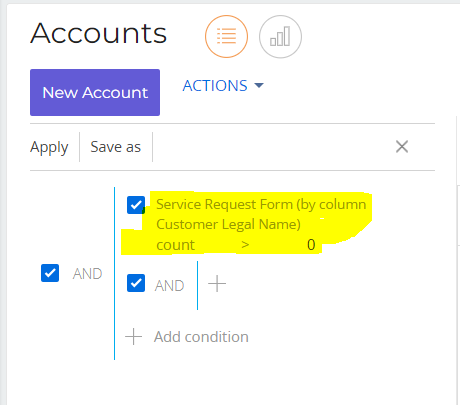
I need to apply the same filter for my Account Lookup. How can I interpret below in esq? Thank you.
Like
1 comments

14:25 Jul 19, 2023
Hello Fulgen,
Please use an example below:
leftExpression = Ext.create("Terrasoft.AggregationQueryExpression", {
    columnPath: '[Case:Account].Id',
    aggregationType: Terrasoft.AggregationType.COUNT,
});
rightExpression = Ext.create("Terrasoft.ParameterExpression", {
    parameterDataType: Terrasoft.DataValueType.INTEGER,
    parameterValue: 1
});
filter = Terrasoft.createCompareFilter(Terrasoft.ComparisonType.GREATER, leftExpression, rightExpression);

esq = this.Ext.create("Terrasoft.EntitySchemaQuery", {
    rootSchemaName: "Account"
});
esq.addColumn("Name");
esq.filters.add("customFilter", filter);
esq.getEntityCollection(function(result) {
    debugger;
    console.log(result);
});
But replace [Case:Account].Id with the column path from the filter and parameterValue in rightExpression from 1 to the needed value (the value that is used for comparison (>0)). And also add needed columns to the ESQ. Tested locally, returns the same result as the filter.
Show all comments